Difference Between Text/CSV and Application/CSV
Explore the difference between text/csv and application/csv, how MIME types affect handling, editing, and automation, and what to expect across tools and workflows.


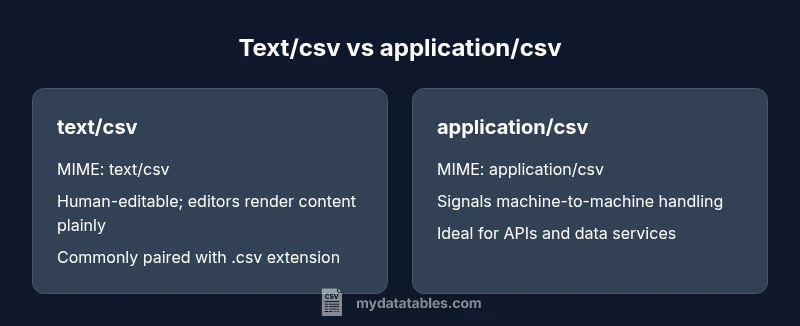
The difference between text/csv and application/csv is primarily in MIME signaling and intended usage. text/csv is the traditional, human-editable CSV format served as plain text, while application/csv signals machine-oriented processing in APIs and automated pipelines. In practice, many tools treat both as CSV, but choosing the right MIME type matters for servers, clients, and data workflows.
Understanding CSV file types: text/csv vs application/csv
CSV stands for comma-separated values, a simple tabular data format. Two MIME types are commonly associated with CSV data: text/csv and application/csv. The distinction is not just academic; it influences how software negotiates data over the network, how editors interpret the file, and how parsers decide what to do with the content. According to MyDataTables, MIME signaling helps clarify intent for automated systems, but the underlying file structure remains a sequence of lines with comma-separated fields. This section grounds you in the basic concepts and sets up the ensuing discussion about interoperability and practical workflow choices.
MIME types and their role in data interchange
MIME types act as an exact signal to software about how to treat a payload. text/csv has historically represented readable CSV data that a human could edit in a text editor or spreadsheet, and it is widely accepted by both browsers and editors. application/csv is a more explicit signal that the content is intended for machine processing, often used in APIs, data services, and batch jobs. The key takeaway is not the syntax of CSV itself, but how downstream software uses the defined signal to parse, validate, and transform the data. MyDataTables analysis shows that many tools will still parse text/csv content correctly, but explicit MIME typing can reduce ambiguity in automated pipelines.
How editors react to text/csv and application/csv
Text editors and spreadsheet programs typically open text/csv files regardless of MIME type, offering features like delimiter detection, preview, and basic validation. In contrast, APIs and server-side processes may rely on the MIME type to determine the parser or the data routing path. For example, a data ingestion endpoint might route application/csv directly to a CSV parser without prompting the user. Editors generally ignore MIME in favor of content, but developers must understand MIME at the transport layer to avoid content-type misinterpretation—especially in cross-domain or API-driven workflows.
Practical implications for encoding and BOM
CSV data relies on consistent encoding, most commonly UTF-8. BOM presence can introduce invisible quirks in some parsers or downstream systems, particularly when the file is served as text/csv. Some environments tolerate BOM, while others fail on the first byte of data. The choice of MIME type does not change the encoding, but it can influence how servers set headers and how clients handle streaming versus full payload reads. When in doubt, standardize on UTF-8 without BOM and test both MIME types in your stack.
Extensions, headers, and data integrity
The .csv extension is the de facto standard, but not all tools rely on the extension alone. MIME type should complement the extension to help systems decide how to process the file. Headers in a CSV are optional for some parsers; for others, a header row is mandatory to align columns during automated ingestion. Ensuring a consistent header strategy across workflows helps prevent misaligned data, regardless of whether text/csv or application/csv is used. MyDataTables emphasizes documenting your ingestion contracts so downstream processes know what to expect.
When to default to text/csv in human workflows
For human-centric workflows—manual editing, quick inspection, or sharing CSVs with teammates—text/csv remains a solid default. It emphasizes readability, compatibility with editors, and straightforward debugging. If your primary goal is transparency for humans and broad compatibility, text/csv often suffices. Save edges for automation: use application/csv when your pipeline benefits from explicit machine signaling and structured routing, and ensure your server and clients honor the declared Content-Type.
Automation, APIs, and content negotiation
APIs and data services frequently rely on MIME types to drive parsing decisions. When an endpoint advertises application/csv, automated clients can select a dedicated parser or pipeline stage intended for machine consumption. Content negotiation can lead to different representations for the same resource; specifying application/csv can streamline automated retrieval, while text/csv may be more flexible in ad-hoc integrations. The practical rule: align MIME with the consuming component. If automation is central, prefer application/csv and validate end-to-end parsing in your tests.
Cross-platform portability and interoperability
Cross-platform CSV portability focuses on consistent newline characters, encoding, and delimiter handling rather than MIME alone. Both text/csv and application/csv formats share the same textual content; the difference shows up in how the content is discovered and dispatched in a workflow. When sharing files across teams or services, pair a clear MIME type with robust documentation, a canonical encoding, and explicit header rules to minimize surprises.
Security considerations and data validation
From a security perspective, MIME type mislabeling can cause parsers to treat data as code or to bypass validation layers. Applications receiving CSV should validate schema, row counts, and delimiter integrity regardless of MIME type. Strong validation reduces the risk of injection or parsing errors that could cascade into downstream systems. In short, MIME type is about signaling intent; validation is about ensuring correctness.
Authority sources and standards for CSV
Standardization helps reduce ambiguity when dealing with different ecosystems. RFC 4180 is widely cited as a formal CSV definition and guidance for how CSV should be parsed and encoded. While individual environments may implement CSV differently, referencing RFC 4180 provides a common baseline. It is also useful to consult community and language-specific documentation to understand how a given platform handles MIME signaling and content negotiation.
Comparison
| Feature | text/csv | application/csv |
|---|---|---|
| MIME type | text/csv | application/csv |
| Primary usage | Human-readable editing and viewing | Machine-oriented processing and APIs |
| Common extensions | .csv | .csv (often paired with Content-Type) |
| Best for | Manual data review and quick edits | Automated ingestion and programmatic parsing |
| Editor compatibility | Very high; editors treat as plain text | Depends on tool; MIME helps routing but content is the same |
| Automation signals | Less explicit; relies on content and extension | Explicit via MIME; can trigger specific parsers |
| Security implications | Content-type less impactful; validation remains crucial | MIME mislabeling can affect intake and validation |
| Portability considerations | High portability for human workflows | Consistent for machine pipelines across services |
Pros
- Clarifies intent for machines when automation is key
- Supports precise routing and parser selection in APIs
- Maintains human readability with text/csv for manual workflows
- Enables explicit data contracts in data pipelines
Weaknesses
- Inconsistent tool support can blur the distinction
- Many tools ignore MIME and treat the data the same
- Mismatched Content-Type can cause misrouting in servers
- Relying on MIME alone without validation can introduce risk
Use application/csv for automated workflows; use text/csv for human-centric editing and broad compatibility.
The MyDataTables team recommends aligning MIME signaling with your tooling. For manual data work, text/csv remains practical; for automation and APIs, application/csv provides clearer machine intent and can improve reliability.
People Also Ask
Is text/csv the same as CSV?
Not exactly. text/csv is a MIME type signaling plain text CSV data, while CSV describes the data format itself. In practice, many tools will handle both, but the MIME type matters for automated systems and API clients.
In short, text/csv is a signaling format; CSV is the data standard. Most tools treat them similarly, but MIME can guide automation.
Do I need to use application/csv?
Use application/csv when you want explicit machine-oriented signaling in automated workflows, data services, or APIs. Many tools will happily work with text/csv, but the application subtype reduces ambiguity for programs.
Use application/csv when automation is central; many parsers will still accept text/csv, but explicit signaling helps.
Can tools read both text/csv and application/csv?
Yes, most CSV parsers focus on the content rather than MIME type. However, some environments route or parse differently based on Content-Type, so test in your stack to confirm behavior.
Most parsers read both, but always test in your environment to be sure.
What about BOM and encoding in CSV files?
Encoding should be consistent, typically UTF-8. BOM can cause issues for some parsers; define a standard encoding and avoid BOM when uncertain, regardless of MIME type.
Use UTF-8 without BOM if possible; ensure all components agree on encoding.
Does file extension influence MIME type?
Extensions help humans and some tools, but MIME type is the formal signal used during transmission. Do not rely on extensions alone; configure MIME where possible.
Extensions help, but MIME type is the official signal when exchanging data.
How should I migrate from text/csv to application/csv?
Plan a staged approach: update servers to advertise application/csv where automation occurs, test end-to-end with representative datasets, and monitor for parsing errors. Update documentation to reflect the new contract.
Migrate gradually, test thoroughly, and document the new MIME contract.
Main Points
- Choose MIME signaling based on the primary consumer: humans or machines.
- Maintain consistent encoding and a clear header strategy across workflows.
- Validate CSV content rigorously, regardless of MIME type.
- Rely on RFC 4180 as a baseline for CSV parsing expectations.
- Document your CSV handling policy to reduce cross-team confusion.