MAT to CSV: Convert MATLAB Data to CSV
Learn how to convert MATLAB MAT files to CSV using MATLAB exports or Python workflows. This practical guide covers methods, data mapping, and reproducible outputs.


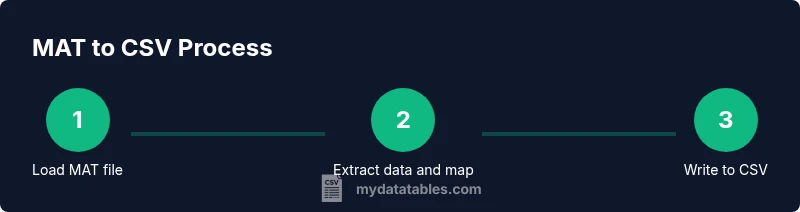
This guide shows you how to convert MATLAB MAT files to CSV data, using MATLAB's export options or a Python-based workflow to extract arrays and write to CSV. You’ll learn practical steps, common data-type issues, and best practices for clean, reproducible outputs. The mat to csv process is approachable for beginners and scalable for large datasets, with guidance on preserving headers and data structure throughout.
MAT to CSV: What it means and why it matters
MAT to CSV conversion is the act of taking MATLAB workspace data stored in MAT files and exporting it to a plain text, comma-delimited format. CSV is universally readable by spreadsheets, databases, and programming environments, making it easier to share results with non-MATLAB users. For data analysts, developers, and business users, converting MAT to CSV enables reproducible data pipelines, audit trails, and cross-tool validation. According to MyDataTables, establishing a clear data-mapping strategy before exporting reduces downstream errors and accelerates collaboration. Start with a small MAT sample to define which variables to export, how to flatten nested structures, and how to represent missing values in the CSV. Remember that CSV cannot store all MATLAB constructs; plan for a faithful, well-documented subset that preserves essential information while remaining human-readable and easy to parse in downstream steps.
MAT to CSV: What it means and why it matters
MAT to CSV conversion is the act of taking MATLAB workspace data stored in MAT files and exporting it to a plain text, comma-delimited format. CSV is universally readable by spreadsheets, databases, and programming environments, making it easier to share results with non-MATLAB users. For data analysts, developers, and business users, converting MAT to CSV enables reproducible data pipelines, audit trails, and cross-tool validation. According to MyDataTables, establishing a clear data-mapping strategy before exporting reduces downstream errors and accelerates collaboration. Start with a small MAT sample to define which variables to export, how to flatten nested structures, and how to represent missing values in the CSV. Remember that CSV cannot store all MATLAB constructs; plan for a faithful, well-documented subset that preserves essential information while remaining human-readable and easy to parse in downstream steps.
Tools & Materials
- MAT-file (.mat)(Source data container to convert)
- Python 3.x(For Python-based MAT to CSV workflows)
- SciPy (loadmat)(Module to read MATLAB files in Python)
- pandas(Optional for tabular mapping and to_csv)
- MATLAB(Optional if using built-in export options)
- CSV viewer/editor(For quick validation of the output)
Steps
Estimated time: 2-3 hours
- 1
Identify target MAT variables
Open the MAT file and inspect the variables to export. Use MATLAB whos or Python's key inspection to determine shapes, types, and whether variables are scalar, vector, or matrix. This step sets expectations for the resulting CSV structure and helps decide if you need multiple CSVs or a single consolidated file.
Tip: List only the variables you need to keep the CSV file focused and readable. - 2
Choose an export approach
Decide between a MATLAB native export path or a Python-based workflow. MATLAB is convenient for simple, numeric-only data; Python offers more flexibility for complex mappings and post-processing in notebooks or pipelines.
Tip: If you expect to automate, plan a Python-based or notebook-driven approach from the start. - 3
Prepare MATLAB export (numeric 2D data)
For simple numeric datasets, you can export directly using MATLAB functions designed for 2D arrays. Ensure your data is shaped as a 2D matrix with consistent row lengths to avoid misalignment in the CSV.
Tip: Confirm that each row represents a record and each column a feature. - 4
Prepare Python workflow (complex data)
Load the MAT file with scipy.io.loadmat, extract relevant variables, optionally flatten nested structures, convert to a pandas DataFrame, and then write to CSV with DataFrame.to_csv.
Tip: Handle missing values explicitly and define clear data types for consistent CSV output. - 5
Flatten and map complex structures
If you encounter structs, cell arrays, or mixed types, flatten to a tabular representation or export multiple CSVs with a consistent schema. Document the mapping so users know where each column originates.
Tip: Create a mapping sheet or README file describing the variable-to-column correspondence. - 6
Validate the produced CSV
Read the CSV back in a tool of your choice to verify shapes, headers, and data types. Check a few sample rows against the MAT source to ensure fidelity.
Tip: Run a small sanity check on the first 10 rows to quickly catch obvious misalignments. - 7
Automate and document
Package the logic into a script or notebook, parameterize input and output paths, and add logging. This improves reproducibility and makes future MAT file conversions straightforward.
Tip: Version-control your scripts and include a changelog for schema changes.
People Also Ask
What is a MAT file?
A MAT file stores MATLAB workspace variables in a binary or v7.3 format. It preserves arrays, structs, and cells that you may need to export. Understanding its structure helps you plan an effective CSV mapping.
A MAT file stores MATLAB variables in a binary format; knowing its structure helps plan the export to CSV.
Can MATLAB export directly to CSV without scripting?
Yes, MATLAB offers export options such as writematrix for numeric data or custom routines for tables. The method depends on the MATLAB version and how your data is arranged.
MATLAB can export to CSV with built-in functions, depending on the version and data layout.
What if MAT includes structs or cell arrays?
You should flatten or selectively export fields to a tabular form. Nested or heterogeneous types require a defined schema and possibly multiple CSVs.
Flatten complex data before exporting to CSV.
Is Python recommended for MAT to CSV?
Python with SciPy and pandas is a flexible approach, especially for large or complex MAT files or when integrating into data pipelines.
Python with SciPy and pandas is a common approach for MAT to CSV.
How can I automate the MAT to CSV workflow?
Wrap the steps into a script or notebook, parameterize inputs, and maintain a log for traceability and reproducibility.
Automate with scripts and logs to keep reproducibility high.
Watch Video
Main Points
- Map MAT data to CSV columns clearly
- Use reproducible scripts for MAT to CSV
- Handle data types consistently in CSV
- Validate CSV output before use