How to Put a CSV File into Python: A Practical Guide
Learn how to load CSV data into Python using the csv module or pandas, handle common formats, validate data, and perform basic transformations. A practical, step-by-step approach designed for data analysts, developers, and business users.


In this guide you will learn how to put a CSV file into Python, using either the built-in csv module or pandas. You’ll verify file access, choose an approach, and load, inspect, and begin manipulating data. Basic prerequisites include Python installed and a CSV file ready to read.
Prerequisites and quick setup
Before you start loading a CSV into Python, make sure your environment is ready. You’ll need Python installed, a CSV file to load, and a basic text editor or IDE for editing scripts. According to MyDataTables, a smooth CSV workflow begins with verifying your setup and planning how you will access data later in your pipeline. In this article, we’ll use a simple file named data.csv located in your project folder to illustrate concepts. If your file is somewhere else, you’ll just provide the correct path. This section covers the essential prerequisites and a quick checklist to ensure you don’t encounter common roadblocks during the import step.
Key steps: verify Python installation, locate your CSV, and plan whether you’ll use csv or pandas for loading.
Understanding the two main approaches: csv module vs pandas
Python offers two robust pathways to put a CSV into your workflow. The built-in csv module is lightweight and transparent, ideal for simple parsing or learning concepts. Pandas provides a higher-level, feature-rich interface for data analysis, with powerful handling of missing values, type inference, and integration with dataframes. According to MyDataTables, the best choice depends on your goal: quick parsing vs. rich data analysis. This section outlines when to pick csv, when to pick pandas, and how both can coexist in a data pipeline.
Advantages and trade-offs:
- csv module: minimal dependencies, fine-grained control, good for small files.
- pandas: excellent for data exploration, cleaning, reshaping, and exporting to other formats.
Consider your project size, performance needs, and downstream tasks when deciding which path to start with for how to put a CSV file into Python.
Basic CSV loading with the built-in csv module
The csv module offers straightforward reading of rows as lists or dictionaries. Example below shows reading with a header row and accessing values by position. This approach is perfect for quick imports or when you want full control over parsing logic.
import csv
from pathlib import Path

path = Path('data.csv')
with path.open(mode='r', encoding='utf-8', newline='') as f:
    reader = csv.DictReader(f)
    for row in reader:
        # Access by column name
        customer = row['customer_id']
        amount = float(row['amount'])
        print(customer, amount)
Tips:
- Use DictReader to access columns by name for readability.
- Always specify encoding to avoid decoding errors.
Loading CSV with pandas for robust data handling
Pandas simplifies CSV loading with a single function and returns a DataFrame, which is ideal for data analysis. This section demonstrates common loading patterns, including handling headers, missing values, and type inference. The pandas approach scales well for larger datasets and integrates with a rich ecosystem of data transforms.
import pandas as pd

# Basic load with header inferred
df = pd.read_csv('data.csv')

# Inspect the first few rows and data types
print(df.head())
print(df.dtypes)

# Optional: specify column types and encoding
# df = pd.read_csv('data.csv', dtype={'customer_id': str}, encoding='utf-8-sig')
Benefits of pandas include fast explorations, flexible filtering, and convenient exports. It’s often the preferred path for data analysts who will perform analyses beyond simple row iteration.
Handling different CSV formats and encodings
CSV files come in many flavors. Delimiters may be commas, semicolons, or tabs; encodings vary beyond UTF-8; quoting styles differ. This section covers how to adapt your reader to these formats so you can reliably load any CSV into Python. If you encounter a UnicodeDecodeError, try a different encoding (such as utf-8-sig) and confirm the file’s actual encoding.
Key options:
- delimiter/sep: specify the character separating fields (default is ',').
- encoding: set the file encoding (e.g., 'utf-8', 'utf-16', 'latin1').
- quotechar and quoting: adjust how quotes around values are treated.
Examples:
- csv module: reader = csv.reader(f, delimiter=';')
- pandas: read_csv('data.csv', sep=';', encoding='latin1')
Validating and cleaning data after load
Loading data is only the first step. Validating the structure and cleaning anomalies improves downstream results. After loading, check the shape, identify missing values, and ensure data types align with downstream tasks. This practice reduces errors when you begin analysis or transformations.
Common checks:
- df.shape to know rows and columns.
- df.isna().sum() to spot missing data.
- df.dtypes to confirm numeric vs. string types.
Basic cleaning examples:
- Fill or drop missing values: df.fillna(0) or df.dropna()
- Convert columns: df['date'] = pd.to_datetime(df['date'], errors='coerce')
Performance tips for large CSV files
Large CSVs can strain memory. Use streaming or chunked reads when possible, and prefer vectorized operations over Python loops. For pandas, consider chunksize or iterator modes to process data in manageable chunks. This keeps memory usage predictable and speeds up long-running tasks.
Strategies:
- Read in chunks with pandas: for chunk in pd.read_csv('data.csv', chunksize=10_000): process(chunk)
- Use categorical dtypes for repeatable text fields to save memory
- Filter columns early to minimize memory footprint
These practices help you handle big data efficiently without compromising the ability to put a CSV into Python for later steps.
Common pitfalls and best practices
Several recurring mistakes can derail CSV loading. Avoid assuming a header row is always present; always verify the first row as column names. Don’t neglect encoding, and remember that different systems may write line endings differently. Finally, prefer explicit paths (avoid relative paths that depend on the current working directory) to ensure reproducibility.
Best practices summary:
- Always specify encoding and delimiter when unsure.
- Validate data in chunks for large files.
- Use pandas for robust data workflows, but fall back to the csv module for lightweight tasks.
By following these guidelines, you’ll reduce debugging time and improve reliability when putting a CSV into Python for practical use.
Next steps: transforms and exporting
After loading, you can transform data, compute aggregates, and export results to new CSVs or other formats. Typical next steps include filtering rows, calculating derived metrics, and joining with other datasets. If you plan to continue your workflow, pandas is a strong choice for consolidation and export via to_csv.
Example export:
# Save transformed data back to CSV
df.to_csv('data_processed.csv', index=False, encoding='utf-8')
As you evolve your workflow, remember to document the data-loading steps and maintain a clear data dictionary. This ensures teammates can reproduce your results and that you stay aligned with best practices shared by the MyDataTables guidance for CSV workflows in Python.
Putting it all together: a practical workflow
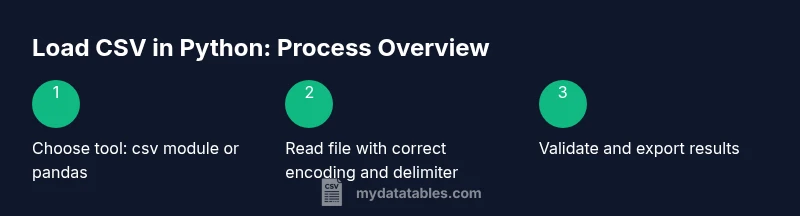
A practical workflow for putting a CSV file into Python typically starts with a quick environment check, followed by selecting the loading method based on your goals, and then validating and transforming data. The two main routes—csv module for lightweight parsing and pandas for analysis—complement each other. Start with a small test file, validate outputs, and gradually scale to larger datasets. This approach keeps your project predictable, testable, and maintainable. By applying these steps consistently, you’ll build a solid foundation for data processing workflows in Python and unlock reliable data-driven insights using libraries and tools recommended by the MyDataTables team.
Tools & Materials
- Python 3.x installed(Check by running python --version; prefer 3.8+ for compatibility.)
- CSV file to load (data.csv)(Place in your project directory or provide an absolute path.)
- Text editor or IDE(Optional but helpful for editing scripts (VS Code, PyCharm, etc.).)
- Pandas library(Install with pip install pandas if you plan to use DataFrames.)
- CLI access (terminal/command prompt)(Needed for script execution and package installation.)
- UTF-8 encoded sample CSV(Testing encoding issues helps prevent decoding errors.)
Steps
Estimated time: 60-90 minutes
- 1
Prepare your environment
Confirm Python is installed and available from the command line. Create or place a test CSV file in your project directory. This ensures you can run scripts without path issues and start exploring how to put a CSV file into Python right away.
Tip: Run python --version and which python (or where python) to verify accessibility. - 2
Choose your loading approach
Decide whether to use the built-in csv module for simple needs or pandas for robust data analysis. The choice affects how you access data (lists vs DataFrames) and what downstream transformations you can perform.
Tip: If you’re new to Python data handling, start with pandas for faster results and easier debugging. - 3
Read CSV with the csv module
Open the file, create a DictReader for header-based access, and loop through rows to extract values. This gives you precise control over parsing logic and can handle small files efficiently.
Tip: Open the file with encoding='utf-8' and newline='' to avoid newline issues on Windows. - 4
Read CSV with pandas
Use pandas.read_csv to load the file into a DataFrame. This yields powerful data structures for analysis, filtering, and aggregation, with minimal boilerplate.
Tip: Use df.head() and df.info() to quickly inspect the dataset. - 5
Handle formats and encoding
If the file uses a different delimiter or encoding, specify sep and encoding parameters. Handling these early prevents runtime errors during reading.
Tip: When unsure of encoding, try utf-8-sig or latin1 as a first test. - 6
Validate and clean the data
Check shape, missing values, and data types. Cleanse or convert types as needed to ensure reliable downstream processing.
Tip: Use df.dropna() or df.fillna() to handle missing values before analysis. - 7
Consider large files and performance
For big datasets, consider chunksize or streaming approaches to avoid loading everything into memory at once.
Tip: In pandas, process data in chunks to stay within memory limits.
People Also Ask
What is the easiest way to load a CSV in Python?
For most users, pandas.read_csv offers a straightforward path to load a CSV into a DataFrame, followed by quick inspection with head() and info(). The built-in csv module is great for small, custom parsing tasks.
Pandas read_csv is the easiest option for Python CSV loading, especially for data analysis.
Do I need pandas to read a CSV?
No. You can read CSVs with Python's built-in csv module. Pandas is optional but widely preferred for data analysis because it provides powerful data structures and functions.
No, you don’t strictly need pandas, but it makes data analysis easier.
How do I handle different delimiters in CSV?
Specify the delimiter with sep in pandas or delimiter in the csv module. Common alternatives include semicolons or tabs. This ensures fields are parsed correctly regardless of how the CSV was written.
Always specify the delimiter when reading, like sep=',' or ' ' for tabs.
What about encoding issues when loading CSVs?
If you encounter decoding errors, try encoding='utf-8-sig' or 'latin1' depending on the source. Always match the file’s encoding to avoid garbled text.
If you see decoding errors, adjust the encoding parameter to match your file.
How can I handle very large CSV files?
Process in chunks with pandas (chunksize) or use the csv module in a streaming fashion. This avoids loading the entire file into memory at once.
For large files, read in chunks to keep memory usage in check.
How do I write the results back to CSV after processing?
Use DataFrame.to_csv in pandas or csv.writer in the standard library to export results back to CSV, ensuring the encoding matches your environment.
You can export your results with to_csv or csv.writer for easy sharing.
Watch Video
Main Points
- Choose the csv module for simple tasks and pandas for data analysis.
- Always verify encoding, delimiter, and header presence before loading.
- Use pandas df.head() and df.info() to quickly explore data after load.
- Process large CSV files in chunks to manage memory efficiently.