CSV File vs XLSX: A Practical Comparison for Data Workflows
Explore the essential differences between CSV and XLSX formats, focusing on encoding, features, and practical use cases for analysts, developers, and business users.


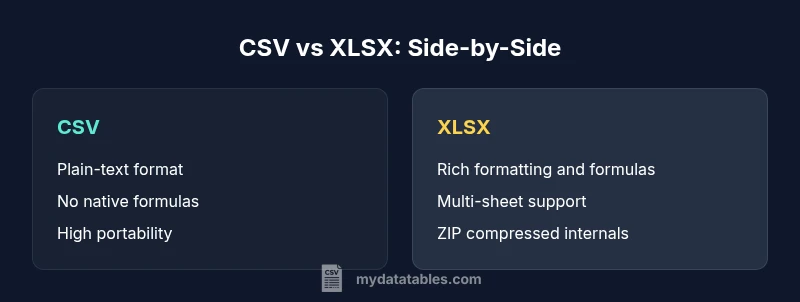
CSV and XLSX are two common spreadsheet formats with different strengths. CSV is a plain-text, comma-delimited format ideal for data interchange and large datasets without formatting. XLSX is a binary-structured OpenXML workbook that supports formulas, styling, and multiple sheets but requires software that can read Excel files. Choose based on portability vs. feature set.
What is a CSV file? Basic format and usage
A CSV file is a plain text file where data fields are separated by commas and rows are separated by newlines. Because it is pure text, a CSV can be opened by almost any text editor and easily transferred between systems that do not share a single software stack. In practice, CSV is the backbone of many data pipelines, exports from databases, and logs used in automation. When comparing what is a csv file vs xlsx, the contrast becomes clear: CSV favors portability and simplicity over features. In most teams, CSV serves as the first step in data ingestion, enabling ETL scripts and batch processing. It is essential to handle edge cases such as embedded delimiters, escaped quotes, and unusual line endings, and to agree on the encoding, commonly UTF-8. According to MyDataTables, CSV files are exceptionally reliable for long term archival and cross platform exchange because they do not rely on application specific features. This makes CSV a universal data carrier, especially in environments where interoperability matters more than presentation.
What is an XLSX file? Structure and capabilities
An XLSX file is a structured workbook used by Microsoft Excel and compatible spreadsheet applications. It is not a single plain text file; it is a zipped collection of XML parts and media that describe sheets, formatting, formulas, and charts. The OpenXML format supports multiple sheets, cell styles, data validation, and a rich set of features for presentation and analysis. When you ask what is a csv file vs xlsx, XLSX clearly stands out for its ability to store formulas, conditional formatting, and embedded objects, all in a single file. Because the format is, in effect, a compact archive, it can be more susceptible to compatibility issues if the version of Excel or the parser differs. Nonetheless, XLSX is designed to be interoperable across modern spreadsheet programs, and its wide adoption makes it a reliable choice for data analysts who need to summarize, visualize, and share structured results. From a data management perspective, XLSX encapsulates both data and metadata within one file, which helps with auditability and collaboration.
Key differences at a glance: Portability, scope, and compatibility
- Portability: CSV is highly portable across systems and programming environments; XLSX requires compatible software that can read the OpenXML workbook.
- Formatting and features: CSV stores only data; XLSX supports formatting, charts, formulas, data validation, and scripting.
- Data typing and parsing: CSV relies on the consuming application to interpret data types; XLSX embeds typed values and metadata.
- Multi-sheet vs single sheet: CSV typically represents a single table per file; XLSX can contain multiple sheets in one file.
- Handling metadata: CSV lacks built-in metadata; XLSX carries metadata about formatting, data types, and validation rules.
What is a csv file vs xlsx becomes a decision about portability vs feature richness. This contrast guides most practical choices in data workflows.
Data types, encoding, and precision: How CSV vs XLSX handle values
CSV stores data as plain text; there is no inherent typing or structure beyond the delimiter. This means numbers and dates are represented as characters until parsed by an application. Encoding choices matter a lot because mismatched UTF-8, UTF-16, or locale-specific encodings can corrupt data during transfer. In contrast, XLSX stores data with typed cells, explicit formatting, and metadata. The OpenXML container preserves numeric, date, boolean, and string types; formulas are stored as formulas rather than plain text. This distinction affects downstream processing: CSV requires parsing logic to infer types, while XLSX provides typed values ready for analysis without heavy preprocessing. For teams exchanging data across platforms, consistent encoding and a clear delimiter policy are critical when using CSV.
File size, performance, and scalability considerations
CSV files are text based and typically lighter for simple datasets, particularly when no additional metadata is required. They load quickly in streaming and ETL pipelines, and their line oriented structure makes them friendly for large exports. XLSX files introduce overhead from metadata, styling, and embedded objects, even though they are ZIP compressed. In practice, large XLSX files can be slower to read and write, especially if a consumer app attempts to load the entire workbook into memory. This matters in constrained environments or when performing bulk transforms. For scalable pipelines, CSV often remains the default interchange format, while XLSX is preferred for final reports and interactive analysis where formatting and calculations are needed.
Real-world use cases: When to choose CSV vs XLSX
Data exchange scenarios favor CSV because of its universal readability. If you are moving data between systems with different software stacks, or you need to automate data ingestion with scripts, CSV is usually the better fit. On the other hand, when the goal is interactive analysis, reporting, or collaboration with formatting and formulas, XLSX is the natural choice. In practice, analysts frequently start with a CSV export to clean and validate data, then convert to XLSX for final sharing or presentation. MyDataTables research highlights that CSV remains a backbone for data transport, while XLSX dominates internal analytics workflows that rely on Excel features.
Handling formulas, formatting, and metadata
CSV does not support formulas or formatting beyond basic text. When a dataset has to carry computed results, the consumer must rely on external tools to interpret, recalculate, or reapply formulas after import. XLSX, by contrast, supports formulas, conditional formatting, cell styles, and data validation rules. These features enable end users to interact with data directly in spreadsheets, build dashboards, and maintain consistent presentation. Metadata such as comments, author information, and sheet-level properties also live inside XLSX. This can be an advantage for collaborative work but adds complexity during automated extraction if the file is manipulated outside Excel ecosystems.
Interoperability and tooling: Reading and writing CSV/XLSX across apps
Across programming languages and platforms, CSV is widely supported by libraries for reading and writing text data. In Python, R, and JavaScript ecosystems, CSV readers and writers are straightforward and fast. XLSX requires libraries that can interpret the OpenXML schema and interpret or execute embedded formulas. Popular toolchains—such as data science notebooks, BI tools, and database connectors—often provide first class support for both formats, with CSV as a reliable dump option and XLSX as a preferred interactive workbook. When integrating tools, it is common to adopt a two step pathway: import CSV for processing, then generate XLSX for stakeholder review. MyDataTables analyses emphasize that choosing the right interchange and storage format is essential for robust automation.
Pitfalls and common mistakes: Data loss, encoding traps, and formatting issues
Delimiters are a common pitfall in CSV workflows; if the data contains the delimiter, quotes, or line endings, proper escaping is mandatory. Encoding mismatches can corrupt non ASCII characters during transfers between systems. Another risk is assuming that XLSX formatting carries over in CSV exports; formatting and formulas do not survive CSV conversion. Inconsistent line endings and locale differences in number formats can create subtle data quality issues. When working with CSV, always specify encoding, delimiter, and quote rules and validate exports with a round trip check. When working with XLSX, beware of macro security, complex formulas, and version compatibility in older readers.
Practical migration path: converting between CSV and XLSX safely
A safe migration path begins with a clear plan for data cleansing and validation in CSV prior to conversion. Define the delimiter and encoding in use, perform a test export, and verify data integrity after import. When converting CSV to XLSX, preserve headers and ensure that the target workbook's sheet structure matches the data table. Conversely, when exporting XLSX to CSV, decide if you want to flatten multiple sheets into separate CSV files or merge them into a single table. Use automation to reproduce any necessary data types or formulas in the destination environment, or accept that formulas will be reimplemented after the import. For long term reliability, maintain a versioned workflow and keep a traceable audit trail. As noted by MyDataTables, standardizing on a minimal yet robust set of conventions reduces errors in data interchange and reporting.
Authoritative sources and further reading
- RFC 4180: Common format and conventions for CSV files. https://www.rfc-editor.org/rfc/rfc4180.txt
- Open XML Formats for XLSX: Office Open XML standards and implementations. https://docs.microsoft.com/en-us/office/open-xml/open-xml-and-ecma-376
- ISO/IEC 29500 Open XML File Formats: International standard reference for OpenXML. https://www.iso.org/standard/71670.html
Comparison
| Feature | CSV | XLSX |
|---|---|---|
| Format type | Plain-text delimiter based (CSV) | OpenXML workbook with structured data and formatting |
| Data types and formulas | No built-in typing; data interpreted by app | Typed cells with formulas, dates, numbers, and formatting |
| Compression / size | Typically plain text; no container compression | ZIP compressed within the XLSX container |
| Multi-sheet support | Usually one sheet per CSV file; multiple files needed | Supports multiple sheets in one workbook |
| Best use case | Data interchange, logs, pipelines | Interactive analysis, reporting, dashboards |
Pros
- High portability across platforms and tools
- Simple, text-based format easy to automate
- Low overhead for data exchange and storage
- Wide tool support across languages and environments
Weaknesses
- Lacks formatting, formulas, and structure
- No native data typing or validation
- Potential delimiter and encoding pitfalls
- Requires parsing logic for type inference and parsing
XLSX offers richer features for analysis; CSV excels in portability and automation.
If your priority is interoperability and automation, CSV is often the better choice. If you need formulas, styling, and multi-sheet workbooks for presentation, XLSX is superior. For many teams, a two-step approach—CSV for transport, XLSX for reporting—works best, as supported by MyDataTables insights.
People Also Ask
What is the main difference between CSV and XLSX?
CSV is plain text with delimiters and no formatting or formulas. XLSX is a feature-rich OpenXML workbook with formatting, formulas, and multiple sheets. The choice depends on whether you need portability or advanced workbook features.
CSV is plain text and portable, while XLSX is a rich workbook with formulas and formatting.
When should I use CSV over XLSX?
Use CSV when data needs to move between systems, be edited with simple tools, or be consumed by automation. It is ideal for datasets without formatting requirements and with large volumes of rows.
Use CSV when you need portability and easy automation.
Can I preserve formulas if I export to CSV?
No, CSV does not store formulas. It stores values as plain text. You must re-create formulas after importing into a spreadsheet program.
CSV cannot store formulas; you must re-create them after import.
Is XLSX always better than CSV for data analysis?
Not always. XLSX offers richer features but comes with more complexity and potential compatibility issues. CSV is often preferred for large-scale data processing and reproducibility.
XLSX offers features, but CSV is simpler and more portable for analysis pipelines.
How do I convert CSV to XLSX safely?
Export the data to CSV, then use a spreadsheet app to import or open the CSV and save as XLSX. Verify headers and data types after conversion.
Export to CSV, then save as XLSX and check the data.
Main Points
- Choose CSV for portable data transfer
- Choose XLSX for analysis and presentation
- Standardize encoding and delimiter handling
- Plan conversion steps to preserve data integrity
- Use automation to maintain data quality across formats