xls vs csv: A Practical Comparison for Data Workflows
Explore the differences between XLS/XLSX and CSV formats, including fidelity, portability, and tool compatibility for analysts, developers, and business users.


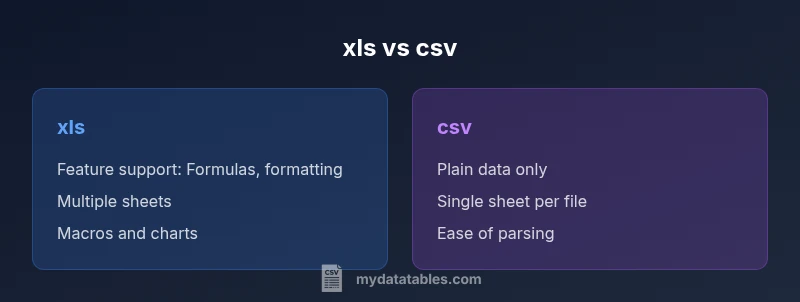
xls vs csv: For data portability and interoperability, CSV files are generally easier to share and import across tools, while XLS/XLSX preserve formatting, formulas, and multiple sheets. If you need simple columnar data without metadata, choose CSV; if you require advanced features or Excel-centric workflows, choose XLS/XLSX. The optimal choice depends on the tools you use, data fidelity needs, and file size constraints.
Understanding xls vs csv: formats, encoding, and structure
When you look at the two most common spreadsheet data formats—XLS/XLSX and CSV—their underlying structures couldn't be more different. XLS and its successor XLSX are binary or zipped-XML workbook formats developed for Microsoft Excel. They store data, formatting, formulas, charts, macros, and even multiple sheets within a single file. CSV, by contrast, is a plain-text representation of tabular data, where each row is a line and each column is separated by a delimiter such as a comma, semicolon, or tab. That simplicity brings portability and universal readability, but at the cost of not storing structure beyond raw values. For data professionals evaluating xls vs csv, it’s crucial to recognize that this dichotomy affects parsing, encoding, and downstream processing. In practice, CSV files are ideal for automated pipelines and cross-tool transfers, while XLS/xlsx files excel in environments where end-user editing, rich formatting, and embedded calculations are essential. The MyDataTables team notes that the choice often hinges on your workflow’s stage—collection, transfer, analysis, and reporting—and the software your team relies on. Understanding these core differences helps prevent surprises when you scale data projects or migrate between systems.
When to use CSV: portability, automation, and interoperability
CSV shines when interoperability and automation are paramount. Because CSV is plain text, it imports cleanly into virtually any data tool—databases, scripting languages, BI platforms, and cloud services all support CSV without requiring special libraries or plugins. This makes CSV the default choice for data ingestion pipelines, API exports, and lightweight data dumps from systems that don’t rely on spreadsheet features. For teams building automated workflows, CSV offers predictable parsing: a delimiter defines columns, newlines separate rows, and text qualifiers (like quotes) help handle embedded delimiters. Importantly, CSV is language-agnostic; Python, R, Java, and SQL ecosystems all have robust, battle-tested CSV support. The trade-off is that CSV cannot store formatting, metadata, formulas, or multiple sheets—so any such features must be re-created in downstream steps if needed. Encoding matters too; UTF-8 is widely used, but regional encodings can introduce subtle data corruption if not handled consistently. If your objective is repeatable, scriptable data exchange across diverse tools, CSV is typically the better starting point.
When to use XLS/XLSX: rich features and Excel-centric workflows
XLS/XLSX files are designed for human-heavy interaction and complex data modeling. They preserve formatting, cell styles, validation rules, charts, pivot tables, and embedded formulas. This makes them ideal for scenarios where analysts need to perform exploratory analysis within Excel or where reports rely on visual design, conditional formatting, or macro-driven automation. Many business processes still depend on workbook features like external data connections, named ranges, and sheet-level protections, which CSV simply cannot capture. In organizations with mature Excel-based workflows, XLS/XLSX can speed decision-making by keeping data and presentation tied together. However, these advantages come with trade-offs: larger file sizes, slower open/save cycles, and tighter coupling to specific software versions. If your priority is maintaining advanced analytics capabilities, model complexity, and end-user editing within a familiar UI, XLS/XLSX is the natural fit in the xls vs csv comparison.
Data fidelity and transformation challenges
A core part of the xls vs csv decision is how each format handles data fidelity during import, export, and transformation. CSV preserves data values as text or numbers but discards formulas, data validation rules, and formatting. When you convert an XLS/XLSX workbook to CSV, you typically lose formulas and multi-sheet context; the resulting CSV only captures the active sheet as plain rows and columns. Conversely, converting CSV to XLS/XLSX can reconstruct a workbook, but formulas must be re-created manually or through automation; numeric precision and locale encoding can also shift during conversion, leading to subtle data inconsistencies if the delimiter or encoding isn’t consistently applied. Encoding matters for non-ASCII content; ensure UTF-8 or an agreed local encoding is used across systems to minimize corruption. In short, CSV is excellent for data exchange and pipelines, but XLS/XLSX provides fidelity within the Excel ecosystem; when moving between formats, plan for data mapping, validation steps, and tests to detect any drift.
How tools handle converting between formats
Conversion between xls/xlsx and csv is a routine operation in many data stacks, but tool behavior varies. Excel and Google Sheets can export both XLSX and CSV, preserving much of the presentational context when exporting to CSV, though calculations will be static values rather than live formulas. Pandas in Python offers explicit read_csv and read_excel methods, enabling controlled parsing with dtype specifications, encoding options, and missing-value handling; writing back to CSV or Excel supports many customization knobs like quoting and line terminators. R’s read.csv and read.xlsx functions, database import/export utilities, and ETL platforms also provide similar capabilities, but the quality of the conversion heavily depends on how you manage delimiters, quoting, and locale. Practically, you should test your conversion path end-to-end: export, re-import, compare row-by-row checks, and validate critical fields like IDs and dates. This diligence helps prevent subtle mishaps when you move from Excel-centric drafts to automated data pipelines or vice versa.
Performance, size, and scalability considerations
Performance considerations often come into play when dealing with large datasets in xls vs csv. CSV files generally load faster in many analytics environments because they’re plain text and require minimal metadata parsing. They are also easier to stream, which helps in ETL pipelines that process data chunk by chunk. XLS/XLSX files, while offering rich features, can be heavier to parse due to the need to interpret formatting metadata, formulas, and possible embedded content. In distributed processing scenarios—like big data frameworks—the simplicity of CSV typically translates into lower overhead, better parallelization, and simpler partitioning. On the other hand, for teams using desktop-based reporting or offline analysis, XLS/XLSX can reduce the friction of reformatting and recalculations, especially when the data model is complex and multi-sheet. Ultimately, the choice should reflect not only the data volume but also the intended processing path, whether in-cloud analytics, desktop BI tools, or programmatic pipelines where streaming and parsing efficiency matter.
Practical migration guidelines and checklists
If you’re migrating from XLS/XLSX to CSV for automation, start with a clear data dictionary and a test plan. List the critical fields, confirm data types, and decide on a delimiter. Favor UTF-8 encoding to maximize compatibility, and standardize on a quoting policy to avoid stray delimiters within values. When moving in the opposite direction—CSV to XLS/XLSX—plan for re-creating formulas and formatting; keep track of data types to avoid misinterpretation of numeric values (for example, dates and decimals). Maintain a sample workbook that contains edge cases: missing values, unusual characters, and very large numbers. Create automated validation checks that compare summary statistics, row counts, and key fields before and after the migration. Finally, document any caveats: which features were lost or preserved, how missing data is represented, and where manual review is required. Following these practices will reduce friction and improve reliability across transitions from xls to csv or back.
Common pitfalls and how to avoid them
To reduce friction in xls vs csv decisions, watch for these common issues. First, assuming formatting or formulas survive a CSV export—often they do not. Second, mismatched delimiters or locale settings can corrupt data during import; enforce a single encoding and delimiter policy. Third, when importing CSV into Excel, ensure leading zeros are preserved and that date formats are interpreted consistently. Fourth, macros in XLS/XLSX can pose security risks if opened from untrusted sources; disable macros or use trusted environments. Finally, always validate the end-to-end data after conversion with automated checks and spot verification by analysts. By anticipating these pitfalls, you’ll minimize surprises and maintain data integrity across formats.
Decision framework: matching your use case to a format
Choosing between XLS/XLSX and CSV should start with a decision framework anchored in real-world use cases. If your priority is cross-tool compatibility and automation, prefer CSV and plan for occasional reformatting if you need formulas or charts. If your priority is end-user collaboration, advanced analytics, and rich presentation, invest in XLS/XLSX and maintain clean export paths for sharing or printing. For mixed environments, a hybrid approach often works best: store the canonical data in CSV for pipelines, and maintain a light-weight XLSX workbook for analysts to explore interactive insights. Finally, always design your data model with portability in mind: think about delimiters, encoding, and the minimum metadata required to reproduce the dataset across teams. This pragmatic framework helps teams reduce technical debt and preserve data integrity across formats.
Comparison
| Feature | xls | csv |
|---|---|---|
| File structure | Binary workbook with multiple sheets, formatting, and formulas | Plain-text, single sheet per file with delimiters |
| Data fidelity | High fidelity for formulas, charts, and styling within Excel ecosystem | Fidelity limited to values; no formulas or formatting preserved |
| Feature support | Supports formulas, macros, charts, and advanced formatting | No native support for formulas or macros; relies on raw data |
| Portability | Tightly tied to spreadsheet software; best in Excel-centric environments | High portability across tools, languages, and platforms |
| Performance with large datasets | Typically heavier to load due to formatting and metadata | Generally fast to parse and load in pipelines |
| Best for | Complex analytics, reporting, and macros within Excel | Data exchange, scripting, and automation across systems |
Pros
- Preserves data fidelity for Excel-centric workflows
- Supports multiple sheets and rich formatting in XLS/XLSX
- Better for collaboration within Excel and similar tools
- Offers powerful built-in features like formulas and charts within the workbook
Weaknesses
- Larger file sizes and slower loading times
- Less portable across non-Excel environments
- Conversion to CSV can strip formulas and formatting
- Macro-enabled workbooks pose potential security risks
XLS/XLSX is best for Excel-centric workflows; CSV is best for portability and automation
Choose XLS/XLSX when you need formulas, macros, and rich formatting within a workbook. Opt for CSV when you require broad compatibility, easy automation, and minimal friction across tools. The right choice depends on your data fidelity needs and tooling ecosystem.
People Also Ask
What is the main difference between XLS/XLSX and CSV?
XLS/XLSX are feature-rich workbook formats that store formulas, formatting, and multiple sheets, while CSV is a simple, delimiter-delimited text format that stores only raw data. The choice hinges on whether you need advanced workbook features or broad cross-tool portability.
The main difference is that XLS/XLSX keep formulas and formatting, while CSV is just plain data for easy sharing.
Data loss on converting XLS to CSV—how common is it?
It is common for formulas, macros, charts, and formatting to be lost when exporting from XLS/XLSX to CSV. Only the visible data values remain. Plan for recreating formulas or charts after conversion if needed.
Converting from XLS to CSV usually loses formulas and formatting; you’ll typically keep only the raw values.
Is CSV suitable for large datasets?
CSV is generally suitable for large datasets because it’s lightweight and easy to stream. However, extremely large CSVs can still be memory-intensive to parse depending on the tool, so consider chunked processing or a database-backed workflow.
Yes, CSV is good for large data because it’s lightweight, but you may need chunked processing for very big files.
Can I preserve formulas when converting to CSV?
Preserving formulas in a CSV file is not possible because CSV stores only values. If you need formulas later, they must be re-created in the target environment after conversion.
No—the CSV format cannot store formulas; you’d have to recreate them after converting.
What format is best for exchanging data between systems?
CSV is typically the best choice for data exchange due to universal parsing support. XLS/XLSX can also be used in exchanges but may require additional handling for formatting and features.
For data exchange, CSV is usually the safest default, with XLS/XLSX used when workbook features matter.
Are there security concerns with macro-enabled workbooks?
Yes. Macros in XLS/XLSX can pose security risks if sourced from untrusted files. Disable macros or enable protections and strictly control the sources of workbook files.
Macros can be risky; only enable them from trusted sources.
Main Points
- Define your primary workflow before choosing a format
- CSV offers broad interoperability and easy automation
- XLS/XLSX preserves formulas, formatting, and multi-sheet structure
- Anticipate data fidelity issues during format conversion
- Use a hybrid approach when both portability and advanced features are needed