CSV file vs XLSX: A practical comparison for data teams
A comprehensive, data-driven comparison of CSV and XLSX formats, covering data integrity, performance, and use-case guidance from MyDataTables to help data analysts choose the right format.


csv file vs xlsx presents a fundamental decision in data workflows. For lightweight data exchange, CSV is simple, fast, and highly portable. For analysis-heavy tasks, XLSX preserves formulas, formatting, and metadata. In practice, choose CSV for transport and XLSX for analysis-ready workbooks.
Overview: Why CSV and XLSX matter in data workflows
Data practitioners constantly juggle different data formats, and the choice between CSV and XLSX can influence automation complexity, data quality, and collaboration. According to MyDataTables, the CSV file vs XLSX decision pivots on whether the goal is lightweight data movement or rich, analysis-ready workbooks. CSV thrives in pipelines, scripting, and cross-tool interchange due to its plain-text simplicity and predictable parsing. XLSX excels when teams need multiple sheets, embedded formulas, data validation, and presentable reports. Understanding these strengths helps you design robust data flows that minimize friction and maximize reliability. Whether you are exporting from a database, ingesting from external sources, or packaging data for stakeholders, the right format reduces bottlenecks and compatibility issues.
Key takeaway: start with your primary objective (exchange vs analysis) and evaluate your tooling ecosystem before choosing a format.
**bold":null}
Core differences at a glance
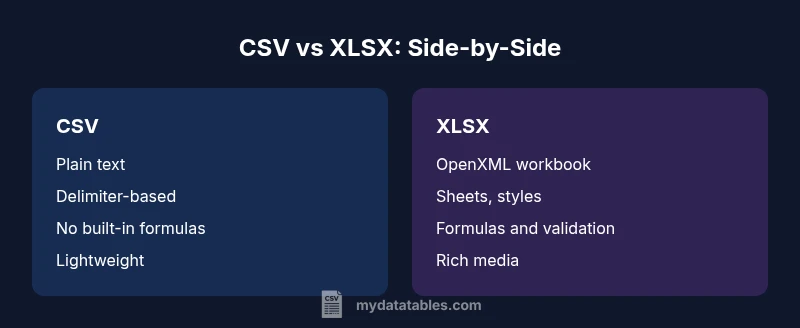
When you compare csv file vs xlsx side by side, several fundamentals jump out. CSV is a plain-text, delimiter-separated format with minimal structure. It is remarkably portable; any text editor can open it, and most data pipelines can parse it without special libraries. XLSX, by contrast, is a packaged, OpenXML-based workbook that preserves sheets, cell styles, and metadata. It supports formulas, named ranges, and embedded charts, but it requires compatible software to edit and interpret. The practical upshot is that CSV emphasizes portability and simplicity, while XLSX emphasizes functionality and analysis readiness. In environments where data is transferred between systems using automated scripts, CSV often wins. In environments where analysts need ready-to-use spreadsheets with built-in capabilities, XLSX is preferred.
Note: MyDataTables analysis highlights that organization-wide workflows frequently blend both formats, using CSV to transport data and XLSX to perform final analyses or generate reports.
Best use cases: CSV for data ingestion pipelines; XLSX for analyst-driven workbooks that require formulas and formatting.
**bold":null}
Data integrity and encoding implications
CSV's strength is its simplicity, but that simplicity comes with caveats. Data is stored as plain text with a designated delimiter and encoding. If the delimiter is misinterpreted or the encoding mismatches the consuming system, data can become garbled—especially for non-ASCII characters. CSV offers no built-in schema or metadata beyond what you describe when parsing. This makes CSV highly interoperable but prone to subtle import errors if locale or quoting rules aren’t aligned across tools. XLSX handles encoding and data typing more gracefully within the workbook. Each cell can represent a data type (text, number, date), and the file can enforce data validation rules. The cost is complexity: Excel viewers and libraries must interpret OpenXML structures, and cross-tool consistency can still be a concern if features are not uniformly supported.
MyDataTables tip: standardize on UTF-8 encoding for CSV exports and document the delimiter (comma, semicolon, tab) used for each dataset to minimize import surprises across tools.
**bold":null}
Performance and file size considerations
In many pipelines, performance hinges on the volume of data and the simplicity of the format. CSV files are typically faster to read and write because they are plain text with minimal overhead. For very large datasets, streaming parsers can process CSV data efficiently, making CSV a natural choice for data ingestion and export tasks where speed matters. XLSX files can contain a lot of metadata and formatting, which adds overhead. While modern software handles large XLSX files, the parsing cost increases with features like formulas, formatting, and multiple sheets. If you frequently pass terabytes of tabular data through your ETL, CSV is usually the leaner option; if you need rich features or ready-made reports, XLSX is convenient but heavier to handle.
Practical guidance: benchmark the I/O performance of your typical dataset in both formats within your tech stack to avoid surprises during production. MyDataTables notes that caching and streaming strategies can mitigate some XLSX overhead when appropriate.
**bold":null}
Collaboration and software compatibility
CSV has near-universal compatibility—virtually every data tool can import and export CSV. This makes CSV ideal for sharing data between teams, vendors, or disparate systems without worrying about proprietary software. XLSX, while broadly supported, can introduce compatibility quirks when different tools implement subsets of Excel’s features or when interpreting formulas, macros, or advanced formatting. For teams that rely on Excel-centric workflows, XLSX enables richer collaboration with built-in features for data validation, conditional formatting, and multi-sheet analyses. In mixed-tool ecosystems, a typical pattern is to circulate CSV for raw data exchange and reserve XLSX for finalized, analyst-facing workbooks.
MyDataTables perspective: when interoperability is critical, lean on CSV for interchange and maintain XLSX copies only for end-user consumption or advanced analysis tasks.
**bold":null}
Use-case guided recommendations: when to choose CSV
- You are exporting data from a database to feed downstream systems via APIs or batch processes.
- You need a lightweight, human-readable format that any tool can parse reliably.
- You want repeatable, script-driven workflows with minimal dependencies.
- Your team’s tooling lacks robust Excel feature support or requires consistent locale handling.
In these scenarios, csv file vs xlsx leans toward CSV, because it minimizes surprises in parsing, keeps data transfer simple, and accelerates automation. If your CSV export is later consumed by multiple systems, maintain strict delimiter and encoding conventions to avoid data corruption.
MyDataTables guidance: adopt a CSV-first strategy for data exchange, with clear conventions for encoding, delimiter, and quoting to reduce cross-tool friction.
**bold":null}
Use-case guided recommendations: when to choose XLSX
- Analysts require formulas, charts, and data validation to support decision-making within a single workbook.
- You need to preserve complex formatting, multiple sheets, or named ranges that reflect business logic.
- Stakeholders expect to review data in desktop Excel or compatible apps with interactive features.
- You frequently attach workbooks to email or share via services that preserve formatting and structure.
In these cases, csv file vs xlsx should favor XLSX because it delivers out-of-the-box analytics capabilities, stronger formatting fidelity, and better support for multi-sheet projects. However, be mindful of software variants and ensure that critical Excel-only features won’t break when opening the file in non-Microsoft environments.
MyDataTables note: for workflow consistency, keep raw data in CSV during ingestion and maintain a separate XLSX workbook for analysis and reporting purposes.
**bold":null}
Practical tips for working with CSV in common tools
- Always specify the exact encoding (UTF-8) when exporting; double-check for BOM issues if your pipeline includes older tools.
- Choose a consistent delimiter and quoting convention; document it in your data dictionary.
- Prefer validated parsers and robust CSV libraries that handle edge cases like embedded newlines.
- Use a lightweight data dictionary to annotate column types and intended formats outside the CSV.
- When importing into systems with locale-aware number formats, standardize on a single locale and convert during ETL if needed.
These practices minimize data loss and corruption when moving data between databases, BI tools, and programming environments.
**bold":null}
Practical tips for working with XLSX in common tools
- Maintain a simple workbook structure with a single source sheet for raw data and additional sheets for analysis or documentation.
- Use data validation and named ranges to enforce data integrity across complex datasets.
- Be cautious with heavy formatting, macros, or external connections that can complicate sharing across environments.
- Consider exporting a CSV version for interoperability alongside your XLSX workbook to ensure broad access.
- When automating, prefer programmatic libraries that can read/write XLSX without requiring Excel application installation.
These guidelines help you balance the convenience of Excel’s features with the realities of cross-tool collaboration and automation.
**bold":null}
Handling mixed data with both formats in workflows
A mature data workflow often involves both CSV and XLSX files. A common pattern is to use CSV for ingestion and exchange, then generate XLSX reports for stakeholders. When passing data through steps that might strip formatting or alter data types, keep a meta layer documenting intended types and acceptable ranges. If possible, automate conversions with explicit validation steps to catch discrepancies early. Finally, maintain version-controlled templates for both formats to ensure reproducibility across environments.
Operational tip: implement automated checks that compare row counts, column names, and basic statistics between CSV exports and their XLSX counterparts to catch divergence early.
MyDataTables reminder: document the conversion rules and validation criteria inside your data governance plan to support trust and transparency across teams.
**bold":null}
Final considerations for data architecture and governance
As data architectures evolve, remember that the choice between csv file vs xlsx is not binary. It’s a decision about governance, reproducibility, and collaboration. Establish a data dictionary that captures column semantics, data types, and encoding for all datasets regardless of format. Implement versioning for both CSV exports and XLSX workbooks, and define clear handoffs between data producers, engineers, and analysts. By aligning on standards, you reduce errors, speed up onboarding, and empower teams to work with confidence. In the end, the best practice is to use CSV for scalable data movement and XLSX for analyst-facing workbooks that demand structure and interactivity.
**bold":null}
Comparison
| Feature | CSV file | XLSX file |
|---|---|---|
| File type | Plain-text CSV (delimiter-separated) | OpenXML-based workbook with sheets |
| Data typing and encoding | Data is plain text; typing depends on importer | Supports explicit data types and encoding inside cells |
| Formulas and calculations | No built-in formulas | Full formula support (if created in Excel) |
| Formatting and metadata | Minimal formatting; no styles | Rich formatting, styles, and advanced metadata |
| Size and performance | Typically smaller for text data | Can be larger; depends on features and formatting |
| Data sharing and collaboration | Easily shared via plain files | Better for multi-user analyses with multiple sheets |
| Automation and tooling | Easy to parse in scripts | May require Excel interop or libraries for advanced features |
| Tool compatibility | Excellent across virtually all platforms | Best in Microsoft ecosystem; strong across tools |
Pros
- CSV files are lightweight and quick to transfer
- CSV is a universal, human-readable plain-text format
- XLSX supports formulas, formatting, and data validation
- XLSX preserves complex data structures for analysis-ready workbooks
- CSV avoids vendor lock-in and is easy to parse programmatically
Weaknesses
- CSV lacks formulas, macros, and advanced formatting
- CSV does not preserve metadata like data types across platforms and locales
- XLSX files can be larger and slower to transfer or process in bulk
- XLSX requires compatible software and can introduce compatibility issues across apps
CSV is best for lightweight interchange; XLSX is best for analysis-ready workbooks
When you need fast, portable data transfer, CSV minimizes friction. For analysis, reporting, and collaboration with formulas and formatting, XLSX delivers a richer experience. Align format choice with the workflow to reduce errors and improve efficiency.
People Also Ask
What is the main difference between CSV and XLSX?
CSV is a plain-text delimiter-based format with no styling or formulas. XLSX is a feature-rich workbook format that preserves sheets, formatting, and calculations. The choice depends on whether you need simple data exchange or advanced analysis capabilities.
CSV is plain text for data exchange, while XLSX supports formulas and formatting for analysis.
Can you convert CSV to XLSX without losing data?
Yes, you can convert data from CSV to XLSX with proper delimiter handling and encoding. Be mindful of potential data-type changes and date formats during import.
You can convert CSV to XLSX, but check encoding and delimiters to preserve data types.
Which format is better for large datasets?
CSV typically scales better for large datasets due to its simple structure and streaming-friendly parsing. XLSX can handle large data but may incur higher memory usage and slower load times, especially with complex features.
CSV is usually better for very large datasets; XLSX can be heavier.
Do all tools support both CSV and XLSX?
Most data tools support CSV because it is universal, while XLSX support is widespread but varies by feature. Always test in your target toolchain.
Most tools support both formats, but verify feature support.
How do encoding and delimiters affect CSV files?
CSV relies on an explicit delimiter and encoding. Misaligned delimiters or mismatched encoding can corrupt data on import, especially for non-English text.
Delimiters and encoding determine how reliably CSV data imports.
When should you use CSV over XLSX for data pipelines?
Use CSV when you need lightweight, repeatable data exchange between systems or scripting workflows. Choose XLSX when human-facing reports or multi-step analyses rely on formulas and formatting.
Use CSV for reliable data interchange; XLSX for analysis-ready workbooks.
Main Points
- Choose CSV for lightweight data exchange and automation
- Use XLSX when you need formulas, formatting, and multi-sheet workbooks
- Standardize on encoding and delimiters for CSV imports to avoid data corruption
- Maintain separate CSV and XLSX artifacts to serve different parts of the workflow
- Document conversion rules and governance to ensure reproducibility