CSV Split: Break Large CSVs into Manageable Chunks
Learn how to split large CSV files into smaller, usable chunks with preserved headers, choosing the right tools, and best practices for reliable data handling. A practical guide by MyDataTables.


You will learn how to split a large CSV into smaller, balanced chunks while preserving the header row, choose appropriate tools (shell commands, Python scripts, or spreadsheet-safe utilities), and handle edge cases such as quoted fields, varying delimiters, and encoding to ensure data integrity. This quick guide also outlines best practices for reproducibility and automation.
What csv split means and when to use it
csv split is the practice of dividing a large CSV file into smaller, logically grouped pieces. This approach is useful when you need to feed data into systems with size limits, distribute work across teams, or speed up processing in data pipelines. According to MyDataTables, csv split is a practical technique for handling big CSV datasets without loading the entire file into memory. It helps ensure reproducibility, easier error tracing, and smoother collaboration. You’ll typically choose a chunk size based on downstream constraints, such as a target file size or a maximum number of rows. When done correctly, each chunk remains a faithful subset of the original data, with headers preserved. In this guide, you’ll learn how to decide when to split, what tools to use, and how to verify results.
Core concepts: headers, chunks, and encoding
Before you split, understand the core concepts: headers, chunks, and encoding. The header row contains column names and must appear at the top of every resulting chunk to keep data meaningful. If you drop or duplicate headers, downstream tools may misinterpret fields. Chunks can be defined by a target number of rows or by approximate file size; the choice affects performance and downstream consumption. Encoding (UTF-8 is standard) and line endings (LF vs CRLF) also matter because mismatches can break scripts or corrupt data. If your CSV uses quoted fields or embedded newlines, you’ll need a parsing approach that respects CSV rules rather than simple line-based slicing. Finally, consider the delimiter and common variants (comma, semicolon, tab). The more consistent your source data, the easier it is to split reliably. This block lays the groundwork for practical splitting scenarios and tool selection.
Tooling landscape: shell, Python, and spreadsheet constraints
There isn’t a single best tool for every scenario. For quick ad-hoc splits on a local machine, shell utilities like awk or dedicated split commands can be fast and scriptable. For large datasets or repeated workflows, Python’s csv module or pandas with chunksize offers robust, portable options. Desktop spreadsheets (Excel, Google Sheets) are convenient for small files but usually struggle with very large CSVs and may force you to export in less reliable ways. Consider your environment, performance needs, and your team’s skills when choosing a toolchain.
Splitting while preserving the header row
One of the most important requirements is to keep the header row at the top of every chunk. Practical approaches include using a lightweight shell script or a small Python utility that reads the header once and writes it to every output file before appending data rows. The general idea is to compute a chunk index based on the current row position and then direct each row into the appropriate chunk file. This ensures downstream tools continue to recognize the column structure without manual intervention. By planning the header handling first, you prevent a cascade of downstream issues and make the workflow reusable.
Practical shell examples (one-liners) with explanations
In practice, shell-based solutions trade off simplicity for control. A typical pattern is to compute a chunk number based on the current row count and write rows to chunk_N.csv files, ensuring the header is written to each new file. This approach avoids loading the entire dataset into memory and works well for moderately large files. For exact behavior, you may need a small wrapper that first captures the header and then iterates through data rows, routing each row to the correct chunk file. Always verify that every produced file begins with the header and contains only valid rows.
Python examples: streaming and chunked reading
Python offers a robust path for csv split through streaming, which minimizes memory usage while writing out separate chunk files. A typical implementation creates a reader for the input file, stores the header, and then writes each row into a chunk while tracking the current chunk index. This method supports varied chunk sizes, complex field quoting, and different encodings, making it well-suited for pipelines that require precise control and error handling. It also integrates comfortably with logging, checksums, and automation scripts.
Handling large files, memory, and performance tips
When dealing with multi-GB CSVs, avoid loading the entire file into memory. Streaming readers and writers keep memory usage low and allow processing to begin before the final chunk is written. If you’re using Python, prefer csv module or pandas with read_csv(..., chunksize=...) rather than loading the whole dataset. In a production workflow, consider logging chunk counts, sizes, and a checksum for each piece to detect corruption early. Remember to pick an encoding (UTF-8) and a consistent delimiter to minimize surprises during downstream processing.
Common pitfalls and how to avoid them
- Forgetting to rewrite the header in each chunk leads to unusable files.
- Mismatched encodings cause characters to spill into fields.
- Multiline fields or embedded newlines can break naive line-based splitting.
- Inconsistent delimiters across files cause misaligned columns.
- Very small chunks may overwhelm downstream systems with excessive file counts.
A quick-start plan for your csv split workflow
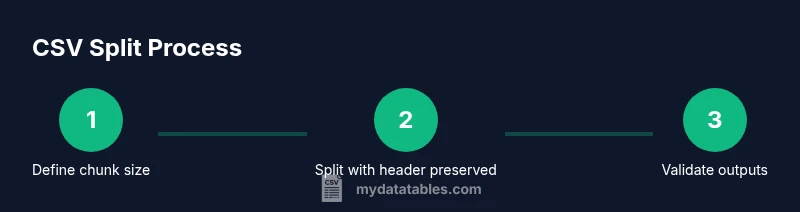
- Define your chunking criterion: number of rows vs target file size. 2) Pick your toolset (shell for quick tasks, Python for complexity). 3) Prepare a workspace and sample data to validate. 4) Run the split, preserving headers, and verify chunk integrity with a sample check. 5) Add automated logging and a simple checksum for each chunk. 6) Schedule your job if this is a recurring task and document the workflow for teammates.
Tools & Materials
- CSV file to split(Your input dataset in CSV format)
- Command-line shell (bash or sh)(For quick shell-based splitting workflows)
- Python 3.x(Optional for robust, repeatable pipelines)
- Text editor or IDE(Useful for editing scripts or notes)
Steps
Estimated time: 1-2 hours
- 1
Define chunking criteria
Decide whether you will split by a fixed number of rows or by target file size. This choice affects how many chunks you’ll produce and how downstream systems will handle them. Document the rationale for reproducibility.
Tip: Choose a chunk size that aligns with downstream limits and your processing cadence. - 2
Prepare header handling
Plan to carry the header row into every chunk. This ensures each split file remains self-describing and usable by tools that expect column names.
Tip: Test with a small sample to confirm headers appear exactly once per chunk edge. - 3
Pick a toolset
Select between shell-based approaches for speed, Python for reliability, or a GUI for small datasets. Consider team skill, environment, and future reuse.
Tip: If automation is a goal, favor scripting with logs and error handling. - 4
Implement the split
Create a script or command sequence that routes rows to chunk files and writes the header to each file. Validate that the number of chunks matches expectations.
Tip: Include a final verification step to detect incomplete chunks. - 5
Validate integrity
Check that each chunk starts with the header and that the row count adds up to the original minus the header. Use checksums if available.
Tip: Automate a lightweight test to run after every split. - 6
Automate and document
Wrap the process in a reusable script or workflow, add logging, and document usage so teammates can reproduce it.
Tip: Store versioned scripts in a changelog or repository for traceability.
People Also Ask
What is csv split and why should I use it?
Csv split is the process of dividing a large CSV into multiple smaller files. It helps with performance, sharing, and compatibility with systems that have file-size or row-count limits. Using a header-preserving approach ensures downstream tools continue to interpret data correctly.
Csv split breaks large CSVs into smaller files, helping performance and compatibility while keeping headers so tools know what each column means.
How do I preserve headers when splitting?
Use a strategy that captures the header once and reuses it at the top of each resulting chunk. This avoids orphaned data and keeps columns identifiable across all files.
Capture the header first, then prepend it to each chunk so every file stays self-describing.
Can I split by file size instead of rows?
Yes, you can estimate chunk boundaries by file size, but it’s trickier because line lengths vary. Most practical approaches default to a row-based chunk size for predictability.
Splitting by size is possible but less predictable; most use a fixed number of rows for consistency.
What about different delimiters or encodings?
Ensure you consistently use UTF-8 and a stable delimiter. If your data uses nonstandard quotes or embedded newlines, prefer a proper CSV parser over line-based tricks.
Stick to UTF-8 and a consistent delimiter, and use a proper CSV parser when possible.
Is it safe to automate csv split in production?
Automation is safe when you include robust logging, error handling, and integrity checks. Start with a small test run before full deployment.
Automation is safe with proper tests, logs, and checks; start small and scale up.
Which tool is best for beginners?
For beginners, a Python-based script with clear documentation offers a gentle learning curve and good maintainability.
Beginners often find Python scripts easiest to learn and maintain for split tasks.
Watch Video
Main Points
- Know your split goal: rows vs. size.
- Preserve header rows in every chunk for reliability.
- Choose the right tool for scale and repeatability.
- Validate outputs with lightweight checks.
- The MyDataTables team recommends integrating logging and documentation for repeatable CSV split workflows.