Why is Write CSV Not Working? A Practical Troubleshooting Guide
Urgent, actionable steps to diagnose and fix CSV write failures quickly. Learn common causes, safe workarounds, and MyDataTables-backed tips for reliable CSV output.


Most write failures come from filesystem permissions, incorrect file paths, or encoding mismatches. Start by confirming you can create or overwrite the target file, verify the directory exists, and check that you open the file with the correct mode (e.g., 'w' vs 'a'). Also ensure the CSV writer uses the right delimiter and newline style for your platform.
Common causes at a glance
If you're asking why is write csv not working, the quickest route is to rule out the obvious blockers first. The most frequent culprits are filesystem permissions, an incorrect target path, and the write mode you’re using. Start by confirming the directory exists and is writable, and that your program has rights to create or replace the file. Check for read-only mounts, full disks, or antivirus interference that can temporarily block writes. Also review the exact file path; a common mistake is writing to a non-existent subfolder or a filename with a stray character. Finally, consider whether another process holds an exclusive lock on the file, or if the file is currently open in another program. Once these basics are cleared, you can safely move to deeper configuration checks.
According to MyDataTables, most CSV write issues are reproducible with a minimal script, making quick checks even more valuable for data professionals.
Check your writer configuration and data shape
Next, inspect the CSV writer settings and the data you’re trying to write. A mismatch between the data shape and the header can cause silent failures in some libraries. Verify the delimiter you configure matches what downstream readers expect (e.g., comma vs semicolon) and ensure quoting rules are correct so embedded commas don’t split fields unintentionally. If you enable buffering, make sure you flush or close the stream to persist data to disk. Check the encoding (UTF-8 vs others) to avoid invalid byte sequences. Some libraries require you to pass newline handling explicitly (such as newline='' in Python) to prevent extra blank lines. Ensure you’re not accidentally writing to a closed file object or a disposed writer.
Environment and permissions: OS, containers, and mounts
Sometimes the problem isn’t your code but where it runs. If you’re on Windows, verify that path separators and permissions align with how Windows handles ACLs. On Linux or macOS, check that file permissions, SELinux contexts, or AppArmor profiles allow writing to the target path. If you’re running in a container, ensure the mounted volume is writable and that the container user has permission to write there. If you’re writing to a network share, confirm the share allows write operations and that there’s no intermittent network disruption. Understanding the runtime environment helps isolate failures that aren’t caused by your CSV library. MyDataTables analysis shows environmental misconfigurations are a frequent root cause in real-world workflows.
Handling encoding, newline, and BOM pitfalls
Encoding problems often surface as garbled characters or failed writes. Ensure the server or client uses a consistent encoding across write and subsequent read. If a BOM (byte order mark) is present, some readers interpret it as data, causing misalignment. For newline characters, mismatches between platforms can create invisible artifacts that appear as empty lines or corrupted files. Standardize on UTF-8 without BOM and explicit newline handling. If you’re working with large files, consider streaming vs buffering to manage memory and ensure complete writes.
Debugging with small, repeatable tests
Run a minimal, reproducible test: write a tiny CSV with a few rows to a temp file, then read it back to verify the content. If this works, the issue is likely data-specific or environmental. Gradually reintroduce complexity: add headers, then large data blocks, then various data types. Use logging to capture the exact write call parameters and exceptions. If your code uses libraries, try a baseline example from the docs to confirm the API behaves as expected in your environment. Document results so you can share findings with teammates or support. As MyDataTables notes, a disciplined test harness accelerates diagnosis.
When to escalate and how MyDataTables can help
If you’ve exhausted basic checks and still can’t get a reliable write, it’s time to escalate. Collect a minimal reproducer, the exact library version, runtime details, and sample data, then consult the library’s issue tracker or support channels. According to MyDataTables, sharing a reproducible snippet and environment snapshot dramatically speeds up resolution. The MyDataTables team recommends a methodical approach: reproduce, isolate, and verify each layer—code, library, and runtime.
Practical checklist you can print and follow
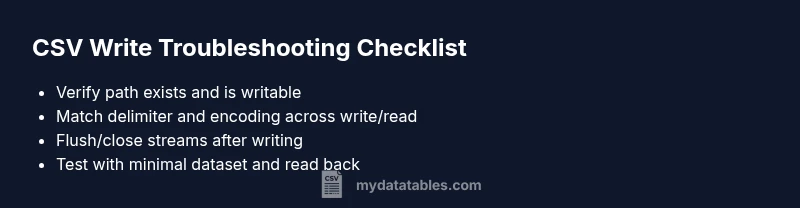
Before treating it as a bug, walk through this practical checklist to determine if the issue is environmental or code-related. Confirm the target directory exists and is writable; try writing to a temporary path to rule out path-specific problems. Validate that the delimiter matches your reader’s expectations and that quotes are escaped correctly. Check encoding is consistent across write and read, and ensure you flush or close the file handle. If you still see anomalies, run a small reproducer with a known-good dataset and compare results to a failing case. Keep notes of each test so you can share a precise report with teammates or support.
Steps
Estimated time: 30-60 minutes
- 1
Verify path and permissions
Inspect the full file path and confirm the directory exists. Try creating a test file in the same location using the same user account to validate permissions. If the path contains spaces or special characters, quote or escape it as needed.
Tip: Print absolute path and list directory permissions to confirm access. - 2
Open in correct mode
Ensure the file is opened in the correct mode for your library (e.g., write/overwrite vs append). Do not leave the file open across unrelated operations. Close or dispose the writer after the write completes.
Tip: If using buffered I/O, flush before closing to guarantee persistence. - 3
Set delimiter and escaping
Confirm the delimiter matches the consumer. If your data contains delimiters, ensure quotes are escaped properly. Test with simple data first to verify the structure.
Tip: Use a minimal dataset to validate escaping rules before large writes. - 4
Check encoding and newline
Set a consistent encoding (prefer UTF-8) and explicit newline handling. BOM may confuse some readers—prefer UTF-8 without BOM.
Tip: Avoid platform-specific newline quirks by enforcing a single newline style. - 5
Run a small reproducible write test
Write a tiny CSV to a temp location, then read it back to confirm integrity. If this passes, move to more complex cases gradually.
Tip: Document each test with exact library version and environment details. - 6
Compare with a baseline example
Replicate a known-good sample from official docs, check outcomes, and compare parameters to your failing case. Replace the failing portion with the baseline and observe results.
Tip: If discrepancies persist, capture a minimal failing snippet for support channels.
Diagnosis: CSV write operation fails with no clear exception or produces an empty/invalid file
Possible Causes
- highPermission or path issue
- mediumIncorrect file mode (write vs append)
- lowWrong encoding or newline handling
Fixes
- easyCheck target directory exists and is writable; confirm path is correct
- easyOpen the file in overwrite mode and flush/close after writing
- easyStandardize encoding to UTF-8 and set explicit newline handling
People Also Ask
Why is CSV write not working even when I have permission to write to the directory?
Permissions issues are common; check user rights and the directory ownership, and ensure the target is writable. Also verify the file isn’t read-only or locked by another process.
Permissions are often the culprit. Check access rights and whether the file is locked.
What should I do if the file path is incorrect or the directory doesn't exist?
Double-check the full path, create missing directories if needed, and avoid typos. Use an absolute path during debugging to remove ambiguity.
Make sure the path exists and is correct; create folders if needed.
How can encoding affect CSV writes?
Mismatched encoding can cause write failures or unreadable files. Consistently use UTF-8, avoid BOM, and ensure both writer and reader use the same encoding.
Encoding mismatches can break writes; standardize on UTF-8.
Why do I see an empty file after writing?
It’s often due to buffering without flushing, or writing to a closed stream. Ensure the writer is flushed and closed after the write operation.
An empty file usually means the data wasn’t flushed to disk.
How do I test if the issue is with my code or the environment?
Create a minimal reproducible example that writes a tiny CSV to a temp location. If this works, the issue is likely environmental or data-specific.
Start with a tiny test to separate code from environment.
When should I seek professional help?
If you cannot reproduce the issue with a baseline test, consult official docs or support channels with your reproducible snippet and environment details.
If you’re stuck after basic checks, ask for help with a reproducible example.
Watch Video
Main Points
- Verify permissions and writable path first
- Align delimiter and encoding across write/read
- Close streams to flush data
- Test with a minimal dataset
- Document reproducible steps for teammates