Can You Protect CSV Files? A Practical CSV Security Guide
Learn how to protect CSV files with encryption, access controls, and secure sharing. This step-by-step guide covers practical techniques, masking, encoding, and audit ideas for data teams.


Yes. You can protect a CSV file by applying layered security: encrypting the file at rest, restricting access with permissions, and using safe sharing practices. You should also validate encoding, redact sensitive columns, and audit how CSV data moves between systems. This quick guide outlines essential steps to shield CSV data from common threats.
What It Means to Protect a CSV File
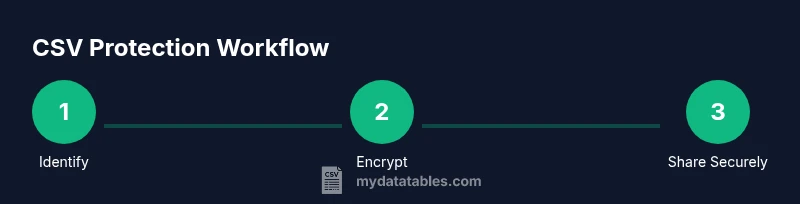
When someone asks can you protect csv file, the short answer is yes, and the best protection comes from layered measures that address data at rest, in transit, and during processing. A CSV file is a plain text table that travels through many environments, from local desktops to cloud storage and shared folders. Protection means controlling who can access the file, how the data is transmitted, and how the contents are presented to users and systems. In practice, CSV protection combines encryption, access governance, data minimization, and careful sharing practices. At MyDataTables, we emphasize that risks are not limited to encryption alone; you must plan for storage, movement, and usage across the data lifecycle. This section introduces core concepts and sets the stage for concrete techniques you can apply today. A well-protected CSV is not a single setting but a repeatable workflow: identify sensitive columns, apply encryption or masking where needed, ensure encoding consistency to prevent corruption, and verify that collaborators use secure methods. By implementing these practices, you reduce the risk of exposure when CSV files are copied, emailed, or opened in third-party editors.
Common Threats to CSV Data
CSV files are convenient, but their simplicity creates security gaps. Unencrypted sharing via email or cloud links can expose data to unintended recipients. Copy-paste and clipboard leakage are common in busy workflows, and backups or archived versions may sit in insecure storage. CSVs often move between systems with different encoding expectations, which can trigger data corruption and misinterpretation. Even routine data analysis steps can introduce risk if sensitive columns are exposed to unauthorized users or if scripts mishandle files. Understanding these threats helps you design defenses that cover both technical controls and everyday practices.
High-Level Protective Strategies (People, Process, Technology)
Protecting CSV data requires a holistic strategy. People: train teammates on data sensitivity, consent, and secure sharing habits. Process: document data lifecycle policies, from creation to disposal, and enforce least privilege access. Technology: implement encryption for stored files, secure transmission channels, and tooling that supports masking or tokenization. Use layered controls so if one line of defense fails, others still protect the data. At a minimum, combine encryption, strict access management, and audited sharing workflows to reduce risk across environments.
Encryption: At Rest and In Transit
Encryption is foundational for CSV protection. Encrypting at rest prevents reading data if disks or storage are compromised, while encryption in transit protects data as it moves between devices, servers, and services. Choose industry-standard algorithms (for example, AES-256) and manage keys securely with a dedicated key management process. When applicable, favor formats or workflows that let you encrypt the file as a compact, self-contained blob, so a single copy cannot be opened without the key. Remember: encryption is powerful, but it only protects what it covers—keep keys well guarded and rotation policies in place.
Access Controls and Permissions
Access control is the second pillar of CSV protection. Apply role-based access control (RBAC) or attribute-based access control (ABAC) to determine who can read, write, or share CSV data. Use the principle of least privilege—grant only the minimum permissions needed for a user to do their job. Store access policies in a centralized identity and access management (IAM) system when possible, and regularly review granted rights. By tying permissions to user identities rather than devices, you reduce the chance of forgotten access persisting after a team change.
Safe Sharing and Collaboration Practices
Sharing CSV data securely starts with selecting appropriate channels. Prefer encrypted transfers (HTTPS, SFTP) and avoid plain email attachments for sensitive data. Consider time-bound access, one-time links, or password-protected archives for shared files. When sharing, share only the minimum necessary data and prefer masked or tokenized forms for analysis tasks. Audit who accessed the file and when, and revoke access promptly after a project ends.
Data Masking and Redaction for Sensitive Columns
Masking protects sensitive fields without blocking analysis. Tokenization, redaction, or partial masking keeps the structure usable while hiding critical values. Define a clear masking policy that aligns with your compliance requirements and apply it consistently across all CSVs that traverse your systems. In some cases, you may replace sensitive values with placeholders or references to tokens stored in secure data stores. Regularly review masking rules as data use cases evolve.
Encoding, Delimiters, and Data Integrity
Consistent encoding prevents garbled data and misinterpretation when CSVs cross platforms. Use UTF-8 as a baseline and validate that commas, quotes, or other delimiters are escaped correctly. Quoting rules should be explicit to avoid data leakage or structural errors during imports. If a CSV originates in one locale but is consumed in another, consider a normalization step to maintain data integrity. Small mistakes in encoding or delimiter handling can expose sensitive content or corrupt datasets.
Practical Tools and Workflows for MyDataTables Users
MyDataTables users benefit from a practical toolkit that supports CSV protection without forcing a heavyweight overhaul. Favor tools that offer built-in encryption options, easy masking capabilities, and secure sharing features. Integrate these tools into existing pipelines and ensure they align with your organization’s governance policies. Build repeatable workflows that apply protection steps automatically when CSVs are created or shared, so security becomes a natural part of your data processes.
Automation and Compliance: Auditing CSV Protection
Automation makes CSV protection scalable. Script routine protections, log access events, and alert on unusual sharing patterns. Maintain an auditable trail that details who accessed which files, when, and under what permissions. Regularly review protection rules for changing data needs or regulatory requirements. A proactive approach to auditing helps you demonstrate compliance and improve defenses over time.
Tools & Materials
- Encryption software or library (AES-256 or stronger)(Used to encrypt CSV files at rest)
- Secure password manager(Store keys and passwords securely)
- Access control plan or IAM documentation(Define who can read, write, or share CSV data)
- Secure transport method (SFTP/HTTPS)(Protect data in transit)
- Masking/tokenization tooling(Optional for protecting sensitive columns in workflows)
- Encrypted backup/storage(Protects CSV copies over time)
Steps
Estimated time: 30-60 minutes
- 1
Identify sensitive content
Catalog all columns and rows to determine which data requires protection, focusing on personal identifiers, financials, and other critical fields.
Tip: Create a data inventory and map sensitivity levels to avoid guessing later. - 2
Choose the protection approach
Decide whether encryption, masking, or tokenization best fits each data scenario, and align with governance policies.
Tip: Use a policy matrix to keep decisions consistent across projects. - 3
Encrypt the CSV at rest
Apply strong encryption to stored CSV files so that a stolen file cannot be read without the key.
Tip: Store encryption keys separately from the data and rotate them periodically. - 4
Set access controls
Implement RBAC/ABAC to restrict who can open or modify the CSV, and keep an up-to-date access list.
Tip: Review access quarterly and after role changes. - 5
Encrypt data in transit
Use secure channels (HTTPS/SFTP) when uploading, downloading, or transferring CSV files.
Tip: Prefer signed or authenticated transfers to prevent tampering. - 6
Mask sensitive columns
If full data access is unnecessary, apply masking or tokenization to protect sensitive values.
Tip: Maintain data utility by masking only what is required for the task. - 7
Validate encoding and integrity
Check that CSV encoding is consistent (e.g., UTF-8) and that delimiters/quoting won’t corrupt data.
Tip: Run sample parses on multiple platforms to catch edge cases. - 8
Automate protection
Embed protection steps into your data pipelines and sharing workflows so security happens automatically.
Tip: Document automation rules for audits and training. - 9
Audit and review
Maintain an audit log of access, sharing events, and policy changes; update protections as data use evolves.
Tip: Set reminders for annual or event-driven policy updates.
People Also Ask
Do I need to encrypt all CSV files, or only those with sensitive data?
Encrypt files that contain sensitive data or are stored in insecure locations. For non-sensitive data, you can rely on access controls and secure sharing, but encryption remains a strong baseline for any CSV in transit or at rest.
Encrypt when sensitive data is present or when the file will travel beyond secure networks.
What about CSV files used in Excel or other editors?
CSV protection applies regardless of the editor. Use encryption and access controls on the file itself, and consider masking when sharing to editors that can read sensitive values.
Protection travels with the file, not with the editor.
Is encryption alone enough to protect CSV data?
Encryption is essential but not sufficient alone. Combine it with access governance, secure sharing, data masking, and ongoing auditing to address all lifecycle risks.
Encryption is a foundation, but layered controls are necessary.
How should I share encrypted CSV files securely?
Use secure channels, time-bound access, and if possible, password-protected archives or tokenized data. Avoid email attachments for sensitive files whenever feasible.
Share through secure links or encrypted channels with clear expiry.
Can masking replace encryption in some cases?
Masking can complement encryption by protecting data inside files while preserving usability for analysis. It does not replace encryption but can reduce data exposure when sharing non-essential values.
Masking helps protect data during collaboration, while encryption protects the file itself.
Which tools help protect CSV files effectively?
Look for tools that support strong encryption, masking/tokenization, and secure sharing workflows. Ensure they integrate with your existing data governance and auditing processes.
Choose tools with encryption, masking, and auditable sharing features.
Watch Video
Main Points
- Identify sensitive data before applying protections
- Combine encryption, access controls, and safe sharing
- Mask or tokenize when full data access isn't required
- Automate protection and maintain auditable logs