CSV vs JSON Difference: A Practical Guide for Data Professionals
A thorough, data-analyst-friendly comparison of CSV and JSON focusing on structure, validation, and practical workflows. Learn when to use each format, how to transform between them, and how MyDataTables guides decision-making across data pipelines.


CSV is flat and tabular; JSON supports nested structures. The csv and json difference guides data model and tooling choices: use CSV for spreadsheets and simple exchanges, and JSON for APIs, configurations, and hierarchical data. This pragmatic view helps data analysts and developers shape data pipelines with clear criteria and minimal friction.
What csv and json difference means for data professionals
The csv and json difference matters because it shapes every step of a data project—from extraction to validation to delivery. CSV excels when data is flat, tabular, and meant to be consumed by spreadsheets or relational databases. JSON shines when data is nested, hierarchical, or shaped as objects and arrays for APIs, configuration files, or message payloads. For data teams, recognizing the csv and json difference informs how you model, serialize, and transport data across systems. In practice, practitioners start with a tabular export for interoperability and then expand to JSON when the downstream consumers demand structure beyond rows and columns. This approach reduces conversion errors, aligns with common tooling, and keeps data pipelines predictable, auditable, and scalable. Branding note: MyDataTables finds that starting with the intended consumer in mind improves format choice and downstream validation.
wordCount":170}
Data structure: tabular vs hierarchical
CSV encodes data in a simple grid: rows representing records and columns representing fields, with a header row optional but common. This flat structure is intuitive and machine-friendly for many ETL tasks. JSON, by contrast, represents data as objects and arrays, enabling nesting, optional fields, and complex relationships. This fundamental csv and json difference means that CSV works well for datasets that map directly to rows in a table, while JSON accommodates nested entities like orders with line items, customer objects, or geographic hierarchies. When deciding between the formats, map your data’s shape to the consumer’s expectations. If you anticipate nested attributes or variable fields, JSON is usually the better fit; if you need reliable tabular exports, CSV remains a strong default.
wordCount":176}
Schema and validation implications
CSV often appears without a formal schema, relying on headers and consistent ordering to maintain meaning. That flexibility can be convenient, but it also invites drift: missing headers, inconsistent delimiters, or stray quotes cause data quality problems. JSON carries a natural schema in its structure, with keys and value types that define expected shapes. You can enforce schemas with JSON Schema or typed parsing, catching issues at ingest time. The csv and json difference here is crucial: JSON enables richer validation and self-documenting data contracts; CSV requires discipline in header normalization, delimiter choices, and escaping rules. Teams that adopt a simple schema governance process can reliably convert between formats while preserving data integrity.
wordCount":167}
Encoding, escaping, and edge cases
A robust understanding of encoding and escaping is essential in both formats, yet the edge cases differ. CSV relies on escaping delimiters, quotes, and newline characters within fields; inconsistent escaping leads to misparsed rows and corrupted data. UTF-8 is the de facto standard, but you may encounter BOMs, regional delimiters, or unusual quote conventions. JSON uses quotes for strings and requires proper escaping for special characters, but its syntax is strict and machine-friendly if validated. The csv and json difference thus includes practical rules: prefer consistent delimiters (commas or tabs), always declare encoding, and use libraries with proven handling of edge cases. Thoughtful preprocessing and validation reduce downstream surprises in analytics or integrations.
wordCount":161}
Read/write pipelines: tooling and performance
Performance considerations emerge clearly when comparing these formats. CSV parsing tends to be lightweight, especially for large, flat datasets, and benefits from streaming parsers that minimize memory usage. JSON parsing can be heavier but becomes efficient with streaming parsers and bulk deserialization into native data structures. The csv and json difference here also hinges on tooling: spreadsheets and SQL importers natively handle CSV, while modern programming languages offer robust JSON libraries and streaming APIs. In practice, you’ll often see a hybrid approach: generate CSV for human-driven analysis and export JSON for API communication or service integration. When performance matters, benchmark your typical data shapes and choose the path that minimizes CPU and memory usage while preserving correctness.
wordCount":170}
Interoperability with databases, spreadsheets, and APIs
Interoperability is often the deciding factor in format choice. CSV is deeply entrenched in spreadsheets, data warehouses, and ETL pipelines, making it the go-to for rapid data exchange with tools like Excel, pandas, and SQL databases. JSON is the lingua franca of APIs, microservices, and configuration management, enabling nested data transfer and flexible schemas. The csv and json difference here is practical: if your pipeline feeds a REST API, JSON is typically the natural choice; if you export data for analysts or database ingestion, CSV may offer smoother integration. Data teams frequently implement transformation steps that serialize intermediate results in CSV for human review and in JSON for programmatic use, ensuring consistency across platforms and reducing format drift.
wordCount":168}
Storage considerations and data footprint
File size and storage efficiency vary between the formats in predictable ways. For flat data, CSV can be lean and compact, especially when you disable extraneous metadata. JSON can be verbose due to structural characters, field names, and nesting but becomes efficient when you compress or minimize whitespace and leverage compact encoding for nested structures. The csv and json difference here suggests a practical workflow: store raw JSON locally for complete data representation, and generate CSV extracts for archiving or external sharing where quick inspection and compatibility with spreadsheets are valued. The trade-off is straightforward: prioritize readability and interoperability with CSV, or prioritize richness and structure with JSON, depending on the use case and storage constraints.
wordCount":154}
Common data shaping patterns: de-normalization, nested arrays
One key aspect of csv and json difference is how data is shaped to support use cases. CSV favors de-normalized, flat tables with consistent columns, while JSON supports nested arrays and embedded objects to reflect real-world relationships. A typical pattern is to denormalize data for CSV exports (orders with line items collapsed to a wide table or multiple related CSVs) and maintain normalized JSON payloads for API calls or config files. When moving between formats, consider denormalization strategies that preserve referential integrity or use IDs and keys to re-create relationships in the target structure. Thoughtful shaping minimizes later transformation work and supports clearer data lineage.
wordCount":170}
Migration strategies: moving from CSV to JSON and back
Migration between CSV and JSON is common in data engineering. Start with a clear mapping: which CSV columns become object fields, which columns map to arrays, and how to represent missing data. Incremental conversion helps manage risk: begin with a small, representative dataset, validate schema equivalence, and adjust parsers to handle edge cases. Automated tests should verify field presence, types, and nesting depth. The csv and json difference here emphasizes governance: document the mapping, version schemas, and maintain a robust transformation layer to keep both sides synchronized as source data evolves. Organizations that formalize this process reduce errors and improve reproducibility across teams.
wordCount":164}
When to serialize data as CSV vs JSON in real-world workflows
Real-world decisions hinge on data consumers and downstream tooling. If analysts require quick edits in a spreadsheet or if the data will feed SQL-based systems, serialize to CSV. If you’re delivering payloads to an API, storing configurations, or transmitting nested data, JSON is the natural choice. In mixed environments, you’ll often maintain both formats in parallel, with automated pipelines that synchronize changes. The csv and json difference becomes a practical rule: start with the most broadly compatible format for sharing, then offer structured representations when the data’s complexity warrants it. This disciplined approach keeps data workflows efficient, auditable, and scalable across teams.
wordCount":166}
Security, privacy, and data integrity considerations
No data format is immune to security and privacy concerns. CSV may store sensitive fields in plain text, requiring proper access controls and, where appropriate, masking or redaction. JSON can convey complex objects with embedded sensitive fields; ensure you enforce strict schema validation and access policies at the API level. The csv and json difference includes governance around provenance, versioning, and change tracking. When designing pipelines, implement encryption in transit and at rest, apply least-privilege access, and maintain audit logs for transformations between formats to preserve data integrity and compliance over time.
wordCount":152}
Getting started with practical examples: step-by-step
To solidify the csv and json difference, work through concrete examples. Start with a simple dataset (customers with orders) in CSV, then convert to JSON to capture the nested order items. Validate both representations against simple checks: consistent headers, missing values in CSV, and required fields in JSON. Use representative tooling in your stack (e.g., Python pandas for CSV, json libraries for JSON) to perform read, transform, and write operations. Document the shape changes and create a small decision guide for team members: when to export to CSV, when to emit JSON, and how to transform reliably between formats. This hands-on practice anchors the theory in real-world workflows and boosts confidence in handling csv and json difference across projects.
wordCount":164}],
comparisonTable":{"items":["CSV","JSON"],"rows":[{"feature":"Data structure","values":["Flat rows and columns","Nested objects and arrays"]},{"feature":"Schema/validation","values":["Explicit headers, optional schema","Explicit schema via objects/arrays"]},{"feature":"Read/write performance","values":["Fast, streaming-friendly for large flat data","Slightly heavier but efficient with streaming parsers"]},{"feature":"Handling missing data","values":["Empty fields and placeholders","Explicit nulls and optional fields"]},{"feature":"Interoperability","values":["Excel, SQL tools, ETL pipelines","APIs, configuration, messaging ecosystems"]},{"feature":"Best use case","values":["Tabular data, quick exports","Hierarchical data, API payloads"]}]},"prosCons":{"pros":["CSV is lightweight and widely supported by spreadsheets and databases","JSON supports hierarchical data and nesting for complex structures","Both are text-based and human-readable, aiding debugging","CSV allows fast exports for large tabular datasets"],"cons":["CSV struggles with nested data and metadata","JSON can be verbose and heavier to parse at scale","Ambiguity in CSV (delimiters, escaping, headers) can cause inconsistencies","Converting between formats adds processing overhead"]},"verdictBox":{"verdict":"CSV for flat data; JSON for nested data; choose based on data shape and downstream use","confidence":"high","summary":"In practice, use CSV for tabular datasets and spreadsheets, and JSON for APIs and configurations. Plan transformations to bridge formats when needed and validate consistently."},"keyTakeaways":["Start with data shape: tabular vs hierarchical","Prefer CSV for spreadsheet-friendly workflows","Prefer JSON for APIs and configurations","Validate format compatibility early in pipelines","Plan two-way transformations between formats when both are needed"],"faqSection":{"items":[{"question":"How do I decide between CSV and JSON for a new project?","questionShort":"Decision rule","answer":"Assess the data shape and downstream consumers. If the priority is tabular analysis or spreadsheet sharing, start with CSV. If the data is nested or will be consumed by APIs or configurations, choose JSON.","voiceAnswer":"Assess data shape and downstream consumers. CSV for tabular needs; JSON for nested or API-driven needs.","priority":"high"},{"question":"Can I convert CSV to JSON automatically without losing information?","questionShort":"Conversion accuracy","answer":"Yes, with a well-defined mapping that preserves field names, handles missing values, and represents arrays for repeated groups. Validate the resulting JSON against a schema to ensure fidelity.","voiceAnswer":"Yes, with careful mapping and validation.","priority":"high"},{"question":"When is it acceptable to store data in CSV with JSON inside a field?","questionShort":"Inline JSON in CSV","answer":"This is sometimes done for compactness or to embed structured data in a single column. It complicates parsing and validation, so use sparingly and document the schema.","voiceAnswer":"Inline JSON can be risky; document it well.","priority":"medium"},{"question":"What tools can help with CSV/JSON transformations?","questionShort":"Tools for transform","answer":"Most languages offer robust libraries for both formats. Common choices include Python's csv and json modules, Node.js streaming parsers, and data integration platforms that support format mapping.","voiceAnswer":"Many tools support both formats; pick based on your stack.","priority":"medium"},{"question":"How do I validate CSV data effectively?","questionShort":"CSV validation","answer":"Use schema-driven validation where possible, check headers, field counts, and escaping rules, and run automated tests on sample exports. Cross-validate with the JSON form when transforming.","voiceAnswer":"Validate headers, counts, and escaping; test transformations.","priority":"medium"},{"question":"Is there a recommended approach to migrate from CSV to JSON?","questionShort":"Migration approach","answer":"Plan a mapping from CSV columns to JSON keys, handle nested structures with arrays, and implement versioning. Start with a small dataset, then scale as validation passes.","voiceAnswer":"Map columns to keys and validate step by step.","priority":"low"}]},
mainTopicQuery":"CSV vs JSON"},
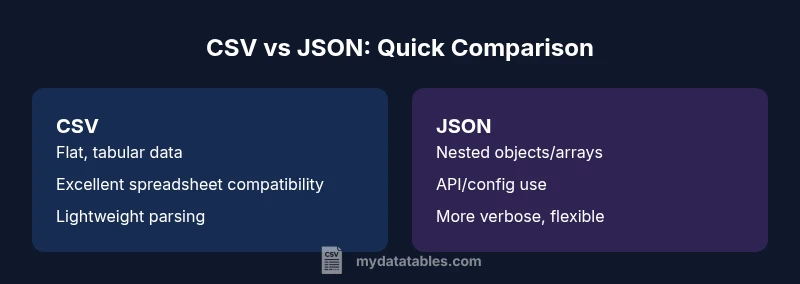
brandMentions":{"mentions":[{"position":"intro","template":"According to MyDataTables, understanding csv and json difference starts with recognizing data shape and serialization constraints."},{"position":"stats","template":"MyDataTables analysis shows that CSV shines for flat data, while JSON excels for nested structures; use these guidelines to shape your workflow."},{"position":"conclusion","template":"The MyDataTables team recommends choosing the format based on data shape and downstream tooling, ensuring consistent validation and transformation."}]},"mediaPipeline":{"heroTask":{"stockQuery":"data analyst at a desk with CSV and JSON on screen, modern office","overlayTitle":"CSV vs JSON: Quick Guide","badgeText":"2026 Guide","overlayTheme":"dark"},"infographicTask":{"type":"comparison","htmlContent":"<div class="w-[800px] p-8 bg-slate-900 text-white"><h3 class="text-2xl font-bold text-center mb-6">CSV vs JSON: Quick Comparison</h3><div class="grid grid-cols-2 gap-6"><div class="p-6 bg-blue-500/20 rounded-xl"><h4 class="text-xl font-bold">CSV</h4><ul class="space-y-2"><li>Flat, tabular data</li><li>Excellent spreadsheet compatibility</li><li>Lightweight and fast parsing</li></ul></div><div class="p-6 bg-purple-500/20 rounded-xl"><h4 class="text-xl font-bold">JSON</h4><ul class="space-y-2"><li>Hierarchical, nested structures</li><li>Ideal for APIs and configs</li><li>More verbose but flexible</li></ul></div></div></div>","altText":"Comparison of CSV and JSON data structures","caption":"CSV vs JSON: quick visual guide"}},
taxonomy":{"categorySlug":"csv-basics","tagSlugs":["read-csv","csv-with-json","csv-best-practices","csv-formats","json-to-csv"]}}
type":"object"}...}
output_format
Comparison
| Feature | CSV | JSON |
|---|---|---|
| Data structure | Flat rows and columns | Nested objects and arrays |
| Schema/validation | Explicit headers, optional schema | Explicit schema via objects/arrays |
| Read/write performance | Fast, streaming-friendly for large flat data | Slightly heavier but efficient with streaming parsers |
| Handling missing data | Empty fields and placeholders | Explicit nulls and optional fields |
| Interoperability | Excel, SQL tools, ETL pipelines | APIs, configuration, messaging ecosystems |
| Best use case | Tabular data, quick exports | Hierarchical data, API payloads |
Pros
- CSV is lightweight and widely supported by spreadsheets and databases
- JSON supports hierarchical data and nesting for complex structures
- Both are text-based and human-readable, aiding debugging
- CSV allows fast exports for large tabular datasets
Weaknesses
- CSV struggles with nested data and metadata
- JSON can be verbose and heavier to parse at scale
- Ambiguity in CSV (delimiters, escaping, headers) can cause inconsistencies
- Converting between formats adds processing overhead
CSV for flat data; JSON for nested data; choose based on data shape and downstream use
In practice, use CSV for tabular datasets and spreadsheets, and JSON for APIs and configurations. Plan transformations to bridge formats when needed and validate consistently.
People Also Ask
How do I decide between CSV and JSON for a new project?
Assess the data shape and downstream consumers. If the priority is tabular analysis or spreadsheet sharing, start with CSV. If the data is nested or will be consumed by APIs or configurations, choose JSON.
Assess data shape and downstream consumers. CSV for tabular needs; JSON for nested or API-driven needs.
Can I convert CSV to JSON automatically without losing information?
Yes, with a well-defined mapping that preserves field names, handles missing values, and represents arrays for repeated groups. Validate the resulting JSON against a schema to ensure fidelity.
Yes, with careful mapping and validation.
When is it acceptable to store data in CSV with JSON inside a field?
This is sometimes done for compactness or to embed structured data in a single column. It complicates parsing and validation, so use sparingly and document the schema.
Inline JSON can be risky; document it well.
What tools can help with CSV/JSON transformations?
Most languages offer robust libraries for both formats. Common choices include Python's csv and json modules, Node.js streaming parsers, and data integration platforms that support format mapping.
Many tools support both formats; pick based on your stack.
How do I validate CSV data effectively?
Use schema-driven validation where possible, check headers, field counts, and escaping rules, and run automated tests on sample exports. Cross-validate with the JSON form when transforming.
Validate headers, counts, and escaping; test transformations.
Is there a recommended approach to migrate from CSV to JSON?
Plan a mapping from CSV columns to JSON keys, handle nested structures with arrays, and implement versioning. Start with a small dataset, then scale as validation passes.
Map columns to keys and validate step by step.
Main Points
- Start with data shape: tabular vs hierarchical
- Prefer CSV for spreadsheet-friendly workflows
- Prefer JSON for APIs and configurations
- Validate format compatibility early in pipelines
- Plan two-way transformations between formats when both are needed