CSV vs JSON: A Practical Comparison for Data Professionals
Explore is csv the same as json? A thorough, practical comparison of CSV and JSON formats, covering structure, data types, tooling, use cases, and conversion tips for data analysts and developers.


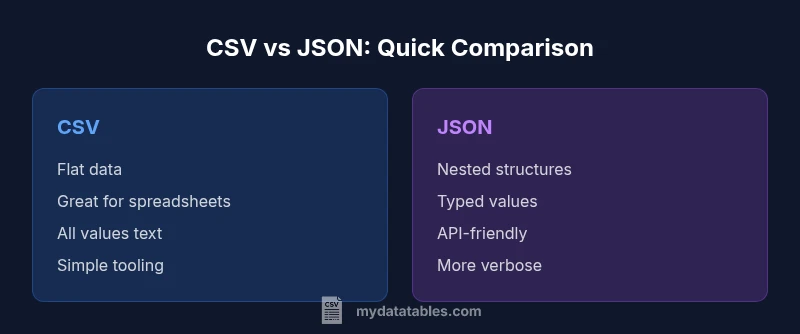
CSV and JSON differ in structure, usage, and data types. CSV is flat, human-friendly, and excels for spreadsheets; JSON supports nesting, arrays, and typed values, making it ideal for APIs and complex data. For data interchange and software development, JSON is typically more flexible, while CSV remains best for simple tabular exports.
Is CSV the same as JSON? Clarifying the basics
Is csv the same as json? Not in practice. CSV and JSON encode data in fundamentally different ways, and their strengths align with different tasks. CSV is typically flat, human-friendly, and excels when you need to view or edit tabular data in spreadsheets. JSON, by contrast, is hierarchical and designed for interconnected data structures common in APIs and modern software. When deciding between the two, consider how your data will be consumed: if you need rows and columns for analysis, CSV is often the simplest choice; if you need nested objects, arrays, or strong typing, JSON is usually a better fit. Throughout this guide, we unpack the core differences, common use cases, and practical conversion tips so you can answer the question is csv the same as json with confidence.
Data structure: CSV vs JSON
CSV stores information in a plain table: rows represent records, and columns represent fields. Each line is a record, and fields are separated by a delimiter, most often a comma. There is no inherent nesting or hierarchy in standard CSV. JSON, on the other hand, represents data as objects and arrays, allowing nested structures and multiple levels of detail. This distinction matters because software that consumes CSV expects a predictable tabular shape, while JSON can describe complex relationships, such as a customer record with a list of orders.
When you ask is csv the same as json, the answer hinges on structure. If your data fits a single table, CSV is straightforward and widely supported. If your data includes sub-objects or collections, JSON accommodates that complexity directly.
Data types and schemas: How values differ
In CSV, all data essentially arrives as text; numbers and dates are interpreted by the consuming application, not by the format itself. There is no formal schema in a standard CSV file, which can make validation harder. JSON defines a richer type system: strings, numbers, booleans, null, arrays, and objects, with optional schemas like JSON Schema to enforce structure. This difference affects parsing, validation, and downstream logic: JSON can carry explicit types, while CSV relies on conventions and downstream parsing rules. When converting from CSV to JSON, developers often convert numeric-looking fields to numbers and date-like strings to date objects to preserve semantics. Conversely, converting from JSON to CSV may require flattening nested structures into multiple rows or a single row with serialized arrays.
Interoperability and tooling: Reading and writing CSV/JSON
There are mature tools for both formats. CSV is integrated into spreadsheets (Excel, Google Sheets) and many ETL pipelines; it is easy to generate and edit without specialized software. JSON has broad API support, with libraries in every major language, making it the de facto choice for web services. Debugging JSON is often simpler because the structure is explicit, though ensuring valid JSON (proper quotes, commas, and brackets) requires careful formatting. For teams, the choice can be influenced by the existing tech stack and data flows: data scientists who pivot between notebooks and dashboards may prefer CSV for quick exploration, while backend engineers may lean toward JSON for API payloads and microservices.
Performance and size considerations
CSV files tend to be smaller for straight tabular data, since there is less syntax overhead than JSON. However, CSV has limitations when data fields include newlines, commas, or quotes; escaping rules add complexity. JSON incurs more characters for structural syntax (braces, brackets, quotes), which can lead to larger payloads but pays off in clarity for nested data. In terms of parsing speed, CSV parsers are lightweight and fast for simple tables, while JSON parsers can be optimized for streaming and incremental parsing, especially with large, nested objects. When evaluating performance, consider not just file size but also the complexity of your consumers and the required data fidelity.
Real-world use case: tabular data for spreadsheets
Many business workflows revolve around tabular data: inventories, sales, time-series, or survey results. For these scenarios, CSV offers a familiar editing experience and easy import into spreadsheets or BI tools. If your primary task is manual editing, quick sharing with non-technical stakeholders, or exporting data for ad-hoc analysis, CSV often wins on practicality. Keep in mind that CSV lacks explicit typing and may require additional metadata to prevent misinterpretation when numbers or dates are involved. Adding a separate data dictionary or using quoted fields to escape special characters can mitigate common CSV pitfalls.
Real-world use case: nested data for APIs
When data needs to describe customers, orders, and related entities in one payload, JSON shines. APIs commonly accept and emit JSON, so nested structures, arrays, and optional fields map naturally to real-world models. The trade-off is verbosity and the need for parsing logic that understands the schema. If you store configuration or telemetry events with hierarchical attributes, JSON provides a flexible representation that scales with evolving requirements. In practice, teams often keep a CSV export for analysts but expose a JSON API for applications; conversion layers can bridge both worlds when needed.
Converting between CSV and JSON: Practical approaches
Conversion is rarely one-size-fits-all. A common workflow is to flatten a CSV into a row-based JSON array where each row becomes an object, with header names as keys. For nested JSON, you might embed arrays of objects and flatten by creating a separate key per column or by grouping related fields into sub-objects. Many languages offer built-in or library-based converters: Python's csv and json modules, JavaScript's JSON.parse/stringify, and dedicated tools like jq for streaming transformations. When designing conversions, consider data quality: handle missing values, consistent delimiters, and proper escaping. Finally, test round-trips: converting to JSON and back should preserve the essential data and structure for practical tasks.
Hybrid approaches and alternatives
In some scenarios, hybrid formats like YAML or XML offer middle-ground capabilities. For simple tabular data, a de-normalized JSON array might be sufficient, while for dashboards and data lakes, columnar formats such as Parquet or Apache Arrow can provide performance and compression benefits. Another pragmatic approach is to store metadata in a separate sidecar file or to include a lightweight schema description alongside the data, enabling clearer interpretation without sacrificing the simplicity of the primary format. The key is to align format choice with downstream tooling, data governance, and performance goals.
The decision framework: when to choose which format
Start with data shape: is the information naturally tabular or hierarchical? If your use case requires deep nesting, arrays, and explicit data types, JSON is the natural fit. If your data fits a flat table, CSV is often the most pragmatic choice. Consider audience: spreadsheets and analysts are comfortable with CSV, while developers and API clients expect JSON. Evaluate tooling and ecosystem: ensure your libraries can parse, validate, and transform the format reliably. Finally, look at future evolution: will your data model grow in complexity, requiring more structure? A disciplined decision framework helps teams avoid format-related bottlenecks later on.
Common pitfalls and best practices
Beware of embedded delimiters and quoting in CSV, which can corrupt parsing if not handled correctly. Always define whether to treat the first row as headers and whether to allow comments. In JSON, adhere to valid syntax and avoid including executable code or comments in strict JSON. For conversions, document assumptions and maintain a mapping between fields and data types. Finally, embrace a documented data dictionary and a clear data governance policy to ensure consistent interpretation across teams and tools.
Comparison
| Feature | CSV | JSON |
|---|---|---|
| Data structure | Flat, tabular rows (one record per line) | Hierarchical, nested objects and arrays |
| Data types and schema | All values are text; no built-in schema | Supports strings, numbers, booleans, null, arrays, objects; optional schemas available |
| Flexibility | Rigid to tabular data; simple and predictable | Flexible for complex models and evolving structures |
| Best use case | Flat tabular data for spreadsheets and basic analytics | APIs, configurations, and nested data payloads |
| Readability | Very readable in plain text for simple tables | Readable but more verbose due to structural characters |
| Size and performance | Typically smaller for pure tables; escaping adds complexity | Larger due to braces/brackets but efficient for nested data with streaming parsers |
| Tooling support | Excellent spreadsheet and ETL tool support | Strong API/tooling in most programming languages |
| Data types fidelity | No explicit typing by default | Explicit types and nested structures supported |
Pros
- CSV is simple and human-friendly for quick editing
- CSV integrates seamlessly with spreadsheets and BI tools
- JSON supports nesting and explicit data types for APIs
- JSON is widely used in web services and modern software
Weaknesses
- CSV has no native support for hierarchy or typing
- CSV can be error-prone with delimiters and escaping
- JSON can be verbose and less friendly to manual editing
- JSON requires parsing libraries and careful syntax validation
JSON is generally the better default for nested data and API integration; CSV remains superior for flat tabular exports.
Choose JSON when data has structure, nesting, or needs explicit types. Choose CSV for simple tables, quick sharing, and spreadsheet workflows.
People Also Ask
Is CSV the same as JSON?
No. CSV is flat and text-based, ideal for tabular data in spreadsheets, while JSON supports nested structures and typed values for API payloads. The right choice depends on data shape and consumption.
No—CSV is flat and spreadsheet-friendly, JSON supports nesting for APIs. Choose based on data shape.
What are the main differences between CSV and JSON?
The main differences lie in structure, data types, and use cases. CSV offers a simple, tabular format with no inherent schema, whereas JSON accommodates objects, arrays, and various data types for complex data flows.
CSV is flat and schema-less; JSON supports objects and arrays with typed values.
When should I use CSV?
Use CSV when data is truly tabular, needs easy editing in spreadsheets, or must be ingested by BI tools. It’s ideal for light-weight data exports and quick data sharing with non-technical stakeholders.
Use CSV for flat tables and spreadsheet workflows.
When should I use JSON?
Choose JSON for nested data, API payloads, and configurations that benefit from a structured, typed representation. It scales better for complex data models and modern software architectures.
Use JSON for nested structures and API-friendly data.
Can CSV be converted to JSON automatically?
Yes. You can map each CSV row to a JSON object, optionally casting fields to numbers or booleans. Nested JSON requires additional transformation logic to flatten or group fields.
Automated conversion is common, with careful handling of types and structure.
Main Points
- Choose CSV for flat tabular data and spreadsheets
- Choose JSON for nested data and APIs
- Plan conversions with data quality checks
- Document data dictionaries and schemas when needed
- Test round-trips to preserve data integrity