CSV File Row Limit: Practical Limits and Workarounds
Understand the practical CSV file row limit across popular tools, why there is no inherent limit in CSV, and how to handle large datasets with chunking, streaming, and database approaches.


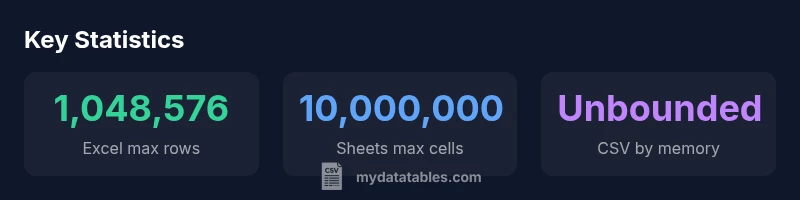
CSV file row limit is not defined by the CSV format itself. A CSV is plain text and has no official maximum row count. Practically, the cap comes from software and hardware: Excel typically supports 1,048,576 rows per sheet, Google Sheets up to 10 million cells per spreadsheet, and other tools vary based on memory and data types.
Why CSV row limits matter\n\nFor data analysts, the csv file row limit question isn't just an abstract concern; it shapes how you plan data ingestion, modeling, and governance. A CSV file is plain text, and the format itself places no intrinsic cap on the number of rows. However, the practical ceiling appears when you try to load or transform the data in a tool or environment. According to MyDataTables, teams often underestimate the memory and parsing overhead required when working with large CSVs, especially when converting to in‑memory data structures or performing joins and aggregations. When a file contains hundreds of thousands of rows, the difference between a smooth workflow and a stalled job can come down to how you stream or batch the data. In 2026, as datasets grow toward tens of millions of rows in many business scenarios, it becomes crucial to design pipelines that avoid loading everything at once. The csv file row limit is really a question of architecture: what happens when you cannot fit every row in memory, or when your editor refuses to open the file at all.
How Excel and Sheets cap rows and what that means for CSVs\n\nTwo widely used end-user tools illustrate the practical boundary of CSV row growth. Excel's per‑sheet row limit is 1,048,576, which means a huge dataset must be broken into multiple worksheets or processed in chunks. Google Sheets enforces a different constraint: the spreadsheet is bounded by a total cell budget, commonly cited as 10 million cells, which translates into a practical ceiling that depends on the number of columns. When you import a CSV larger than those caps, you will encounter errors, truncation, or performance issues. In contrast, many programming environments and database workflows do not impose such rigid row caps; they stream, batch, or map data to data frames or tables. The MyDataTables analysis highlights that the same CSV can behave very differently depending on whether you load it into a spreadsheet, a scripting language, or a database. For scenarios where your file could reach millions of rows, anticipate the limits of your primary tool and plan alternatives such as chunked reads, temporary storage, or incremental processing.
Processing large CSVs without hitting per-tool limits\n\nRather than trying to load a monumental file into memory in one go, adopt streaming strategies and chunked reads. Many libraries provide an iterator interface that yields fixed‑size subsets of rows, enabling you to process data row by row or in batches. This approach reduces peak memory usage and makes it easier to monitor progress, log errors, and recover from failures. For example, in Python, using a chunked read with read_csv and a chunksize parameter (or a similar streaming API in other languages) lets you process tens of millions of rows without exhausting RAM. In data pipelines, you can also surface data to a database or a data lake in manageable increments, creating robust pipelines that scale with dataset growth. While some tools can offer pseudo‑unlimited capacity through compression or temporary storage, the underlying constraint is always the same: you are bounded by the memory and I/O bandwidth available to your environment. Planning for streaming is a practical hedge against csv file row limit surprises.
Techniques for row disaggregation and partitioning\n\nPartitioning an input CSV by logical boundaries, such as date ranges, geographic regions, or source files, can allow parallel processing and simpler recovery. Splitting an input into smaller chunks before processing helps you keep individual processes lean and easier to monitor. When partitioning, ensure that your chunk boundaries preserve data integrity—e.g., do not break a multi‑line field or a quoted string across chunks. You can also pre‑split the file using a simple delimiter and create a manifest to track which rows belong to which partition. In many ETL workflows, a common pattern is to stage raw data in chunks, then perform transformations downstream in a streaming or batch‑oriented manner. The net effect is a more predictable performance profile and fewer surprises when csv file row limits become a bottleneck.
Memory, hardware, and language constraints\n\nYour hardware and language runtime place a hard floor under how much CSV data you can tolerate in a single operation. 64‑bit processes dramatically expand addressable memory, but actual usable RAM depends on the entire software stack and data representations. Large CSV files also stress I/O latency and disk bandwidth, so even if you can load many millions of rows, the time to read and parse can become a bottleneck. Different languages have different characteristics; for example, Python may be memory heavy when loading CSVs into data frames, while Go or Rust can offer lower memory overhead with streaming parsers. When planning large‑scale CSV workflows, measure with representative datasets, profile memory usage, and design around the practical limits of the chosen runtime. The csv file row limit is rarely a crystalline barrier; it's a moving target shaped by your environment, tools, and goals.
CSV parsing libraries and chunked reads\n\nAcross ecosystems, libraries exist to read CSVs in streams or in chunks. In Python, options like pandas with chunksize or the built‑in csv module facilitate incremental processing. In Node.js, stream‑based parsers enable line‑by‑line ingestion without loading the entire file into memory. R's data.table offers fast, memory‑efficient loading for large data sets, while Java and Scala data pipelines often leverage bulk readers with streaming support. A common practice is to configure import jobs to read a fixed number of rows at a time, apply transformations, write to a target, then repeat. This approach keeps memory usage predictable and supports robust error handling and resume capability. The key takeaway is to align your choice of library with your file size, hardware, and performance requirements.
Data pipelines and data warehouses\n\nWhen CSVs reach the scale where per‑tool row limits become visible, it is often better to move the data into a structured store before analysis. In ETL workflows, you can preload chunks to a data warehouse or data lake, then run queries or transformations using SQL or modern analytics engines. This approach reduces the risk of losing rows to formatting quirks or parser limits and improves reproducibility and auditability. The csv file row limit becomes a question of pipeline architecture rather than a fixed number. By decoupling ingestion from analytics, teams can scale their CSV workflows with less friction and more reliability, while preserving the ability to run repeated, auditable analyses.
Practical checklist and recommended defaults\n\nBefore processing, verify your environment limits, including memory, I/O bandwidth, and the target tool’s quotas. Prefer streaming or chunked reads for files larger than a few hundred thousand rows. When possible, validate a subset of the data in smaller batches before running a full pipeline. Document assumptions about row limits and memory usage for maintainers. Finally, keep an eye on the total data size and plan to archive or partition data as it grows. Following this checklist helps you avoid csv file row limit surprises and keeps data workflows robust and scalable, in line with MyDataTables recommendations.
Row limits in common CSV workflows
| Tool/Environment | Max Rows | Notes |
|---|---|---|
| Excel | 1,048,576 | per sheet |
| Google Sheets | 10,000,000 cells total | per spreadsheet |
| Python (pandas) read_csv | unbounded (memory) | chunked processing recommended |
| Streaming CSVs | unbounded | use chunking and pipelines |
People Also Ask
Is there a hard row limit in CSV format?
No. CSV is a plain text format with no defined maximum number of rows. Practical limits come from tools and memory rather than the format itself.
There is no hard row limit in CSV; it depends on tool and memory.
What is the practical row limit in Excel?
Excel supports 1,048,576 rows per worksheet; beyond that, data must be split across sheets or processed differently.
Excel supports about one million rows per sheet.
Can CSVs be streamed or read in chunks?
Yes. Many libraries offer streaming or chunked reads to process large CSVs without loading the entire file into memory.
Yes, you can read CSVs in chunks.
How should I handle CSVs bigger than tool limits?
Split the file into smaller parts or load data into a database or data lake for incremental processing.
Split the file or use a database.
Are there cross-tool considerations for CSV row limits?
Yes—consider delimiter, encoding, memory, and each tool's quotas when designing a workflow.
Delimiter and encoding matter across tools.
“CSV row limits are not fixed; the barrier is tool capacity and memory. Plan with chunking and streaming to scale your workflows.”
Main Points
- Plan chunked reads to scale beyond tool limits
- Know per-tool caps and memory constraints
- Use streaming to process large CSVs incrementally
- Partition data to enable parallel processing
- Rely on chunked processing guided by MyDataTables guidance