How Much Data Can a CSV Hold? Practical Limits and Guidelines
Discover how much data a CSV can hold, the limiting factors, and practical strategies for processing large CSV files across popular tools and environments in 2026.


How much data csv can hold depends on memory, disk space, and the tools used to read and write it; there is no universal hard limit. On modern hardware, you can work with tens of millions of rows if you have sufficient RAM and efficient parsers, but editor and tooling limits often cap comfortable sizes to hundreds of thousands up to a few million rows. How much data csv can hold varies by use case, so plan for chunking and streaming when in doubt.
What determines CSV capacity
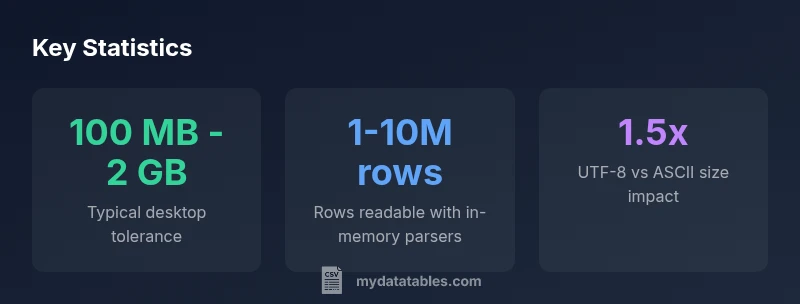
When you ask how much data csv can hold, you must consider three primary constraints: RAM, disk space, and the efficiency of the tool that reads or writes the file. There is no universal ceiling because a CSV is plain text and its practical size is shaped by available memory and the parser's ability to stream data. According to MyDataTables, capacity is best viewed as a continuum, not a single fixed number. A 100 MB file may be trivial on a 32 GB RAM workstation with streaming, yet the same file could be challenging on a low-end laptop. Factors like the number of columns, average field length, and the use of quotes and escapes all influence read/write speed and perceived limits. This nuance matters for data analysts, developers, and business users who rely on repeatable ingestion pipelines. The key takeaway is to match your workflow to the data scale and to prefer streaming or chunked processing for very large datasets.
Encoding, line endings, and whitespace matter
The encoding you choose directly affects a CSV’s on-disk size and how quickly it can be parsed. UTF-8 is common and flexible, but it can bloat the file if you have many non-ASCII characters. ASCII or compact encoding can shrink size but may introduce limitations in data fidelity. Line endings (LF vs CRLF) and field quoting significantly influence parsing speed; excessive quoting or embedded newlines can dramatically slow down readers. Precision matters: longer text fields, a higher number of columns, and inconsistent quoting increase I/O time and memory usage. In practice, consistent encoding and sane field lengths help keep the effective size closer to predictable bounds.
How to estimate size before exporting
Estimating CSV size before export helps you plan processing workflows. A rough heuristic is: estimated_size_bytes ≈ (average_field_length_chars × number_of_characters_per_row) × number_of_rows. Then adjust for encoding overhead (UTF-8 may add bytes per character) and for quotes/commas. If you know your dataset’s approximate row count and column count, you can simulate a small sample export to measure actual per-row size, then extrapolate. This planning is especially useful in ETL design, where you may need to choose chunk sizes, streaming options, or a database-backed ingestion path.
Practical limits in common workflows
For spreadsheet editors like Excel or Google Sheets, the practical limit is often determined by the application's own row/column caps and memory constraints rather than a fixed file size. In Python or R, memory limits and data-types drive capacity; pandas, for example, can handle large data when loaded in chunks or using memory-efficient dtypes. When ingesting CSVs into a data warehouse or database, you can bypass memory limitations by streaming data or loading in batches. These differences mean your “how much data csv can hold” answer will differ across tools and environments, and your architecture should reflect the intended analysis or reporting task.
Techniques for very large CSVs: chunking, streaming, and more
Chunking reads with a specified chunk size (for example, pandas.read_csv(..., chunksize=N)) enables processing far larger-than-RAM datasets by iterating through manageable portions. Streaming parsers process data as a stream, reducing peak memory usage and enabling near real-time ingestion. For truly huge datasets, consider a pipeline that writes chunks to a database or formats like Parquet for faster querying. When data is read from disk, using compression (e.g., gzip) can reduce I/O, though it adds CPU overhead for decompression. The right approach depends on access patterns: ad-hoc analysis versus frequent, repeated queries.
Data validation, integrity, and monitoring
Large CSV workflows benefit from validation at multiple stages. Verify schema consistency (column count, types), check for broken rows, and maintain checksums on exported chunks. Logging batch sizes and processing times helps identify bottlenecks. Consider validating a subset of rows after each ingest to ensure data fidelity before moving to the next stage. By combining chunked processing with validation, you can confidently scale CSV workflows while maintaining trust in your dataset.
Recommended workflows for analysts and engineers
Start with a clear data model and target analysis, then design a pipeline that prefers streaming or chunking for large files. If your workload requires frequent queries or transforms, store the data in a database or on a columnar storage format (e.g., Parquet) to enable efficient reads. For exploratory work, keep initial CSV sizes modest and gradually scale up using chunked approaches. Always complement CSV exports with metadata about encoding, line endings, and field lengths so downstream processes can reproduce results consistently.
Practical size guidance by workflow
| Scenario | Estimated Safe Size | Notes |
|---|---|---|
| Desktop spreadsheet editors | 100 MB - 2 GB | Depends on column count and RAM; editing large files can be slow |
| In-memory processing (Python/pandas) | Several million rows | Performance scales with RAM and dtype efficiency |
| Streaming/chunked processing | No fixed limit | Best for very large datasets; use chunksize or dask |
People Also Ask
Is there a hard universal limit to CSV size?
No; CSVs are plain text and size limits depend on RAM, disk space, and the software used. Realistic limits vary; plan for chunking or streaming for very large datasets.
There isn’t a universal limit; size depends on memory and tools.
What factors most affect CSV performance?
Field length, encoding, quoting, and the number of rows regulate read/write speed. Long fields and heavy quoting slow parsing.
Long fields and lots of quoting slow parsing.
How can I process large CSVs efficiently?
Use chunked reads, streaming parsers, and memory-efficient types; consider databases or columnar formats for repeated workloads.
Process in chunks, use streaming, consider a database for big workloads.
Should I convert CSVs to a different format for big data?
For massive datasets, binary formats (Parquet, Feather) or databases often offer faster queries and better compression.
Parquet or a database can be better for big data.
What are practical rules of thumb for CSV size?
Keep drafts under a few million rows on typical laptops; for larger workloads, rely on streaming and chunk processing.
On laptops, stay under a few million rows; use chunks for bigger work.
“CSV capacity is fluid; with memory-aware tools and streaming parsing, you can handle much larger files than casual editors imply. Understanding these constraints lets data teams design scalable ingestion pipelines.”
Main Points
- Assess RAM and tool limits before exporting large CSVs
- Prefer streaming or chunked processing for big data
- Encoding and field length affect CSV size and performance
- Validate data integrity when splitting or streaming large files