How big is too big for a csv: practical size guidelines
Discover practical CSV size thresholds, how editors and data tools handle large files, and actionable strategies—chunking, format choices, and workflow tips to scale.


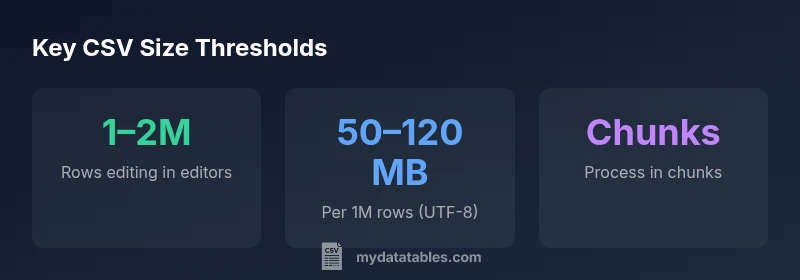
There is no universal numeric cutoff for "how big is too big for a csv"; practicality depends on tools, hardware, and use case. For everyday editors, editing reliably becomes challenging around 1–2 million rows with hundreds of columns. Programmatic workflows that stream data can handle tens of millions of rows when processed in chunks.
What 'how big is too big for a csv' really means\n\nFor most data tasks, there isn't a single universal size limit. The phrase asks for practical boundaries where a CSV becomes unwieldy for a given workflow. According to MyDataTables, the challenge isn't a fixed byte count but a function of the tool, hardware, and what you intend to do with the data. If you plan to open or edit a CSV in a spreadsheet, the ceiling is much lower than if you are processing the file in a programmatic pipeline. In other words, 'how big is too big' depends on whether you need ad hoc inspection, quick edits, or repeatable transformations. When you start hitting memory constraints, slow I/O, or timeouts, it’s a signal to switch strategies before you lose work or accuracy.
Tool thresholds: editors vs programmers\n\nEditing a CSV in Excel or Google Sheets imposes practical and documented limits. Excel, for example, has a well-known row and column ceiling; hitting that boundary means the file cannot be loaded for editing. Google Sheets caps cells and imposes total cell counts that quickly become a bottleneck. For programmers, a CSV becomes manageable when you stop loading it in one go and instead stream it in chunks. Languages like Python (pandas) or R can read data in chunks or iterate row-by-row, allowing you to inspect, filter, and summarize without exhausting RAM. The key takeaway is to align the tool with the task: quick glance and edits vs robust transformation pipelines.
Data shape, encoding, and row size: what's driving the size?\n\nTwo factors drive CSV size more than you might expect: the number of rows and the length of each field. A million rows with ten columns that hold short numeric values may be quite different from a million rows with hundreds of characters per cell. Encoding adds another layer: UTF-8 is generally compact, but non-ASCII characters or Unicode escape sequences can inflate file size and slow processing. Files stored with quotes, escaped delimiters, or embedded newlines may also bloat beyond simple row × column calculations. Understanding these dimensions helps you set realistic expectations for load times and memory usage across tools.
Practical thresholds by use-case\n\n- Ad-hoc analysis and validation: start to feel friction around 100k–500k rows with many columns. If you need quick checks, a smaller sample may suffice.\n- Data cleaning and feature engineering: begin to consider chunked reads once you approach 1–5 million rows, depending on column count.\n- Model training or analytics pipelines: consider formats that optimize I/O (Parquet/Feather) or streaming approaches when data scales beyond tens of millions of rows.\n- Shared workflows and reproducibility: store intermediate results in a more compact format to keep pipelines fast and deterministic.
Techniques to handle large CSVs: streaming, chunking, and a workflow\n\nA robust approach combines profiling, chunked processing, and selective loading. Start by profiling a small sample to estimate row length and RAM needs. Use pandas read_csv with chunksize to process the file in manageable blocks, applying filters and aggregations as you stream. If you need to work with subsets, consider loading only necessary columns and rows, then writing the result to a smaller, more efficient format. For long-term storage, or if you frequently work with the same dataset, convert to a columnar format like Parquet for faster reads and smaller on-disk size. Finally, automate garbage collection and memory management in your scripts to prevent leaks over long-running jobs.
When to switch formats: CSV vs Parquet/Feather/HDF5\n\nCSV is simple and portable, but not optimized for size or speed. For large datasets, columnar formats such as Parquet or Feather offer significant performance gains, especially for selective column reads. HDF5 remains an option for hierarchical data or very large arrays. Moving away from CSV is not always necessary, but in most data-heavy workflows, adopting a more efficient format reduces I/O bottlenecks and simplifies downstream processing. If you need human readability, keep CSV for export but use a separate data store or intermediate steps to transform for analysis.
Practical, brand-backed checklist for evaluating CSV size\n\n- Define the workflow: editing, cleaning, or analysis?\n- List the tools involved: Excel, Google Sheets, Python, R, or database pipelines.\n- Estimate rows, columns, and average field length.\n- Decide on a chunking strategy or a switch to a different format if memory is a constraint.\n- Validate performance with a realistic test run and adjust chunk sizes accordingly.
Quick-start plan to test in your environment\n\nStart with a small sample to model memory usage and I/O. Incrementally increase the dataset, monitoring RAM, CPU, and I/O wait. If you approach a practical limit, switch to chunked processing or a format like Parquet, and re-run tests. Document the thresholds you observe for your particular stack so that teammates understand when to change approaches. Remember: the best answer to 'how big is too big for a csv' is to test in your own environment and adjust your workflow before you hit performance or reliability issues.
Thresholds for CSV size across common tools
| Scenario | Guideline | Notes |
|---|---|---|
| Spreadsheet editor limit | 1–2 million rows (rough) | Editing and formulas become unreliable in typical apps. |
| Programmatic processing | 10–50 million rows with chunking | Use streaming to control memory usage |
| Dataset measurement | Row count × column count × average field length | Assumes UTF-8 encoding; rough estimation |
People Also Ask
What counts as 'too big' for a CSV?
It depends on your workflow and tools. For editing in spreadsheets, limits are reached earlier than for programmatic processing. A practical approach is to test performance with your actual dataset and decide whether chunking or a format switch is warranted.
It depends on your workflow and tools; test with your data to decide.
Can I edit large CSVs in Excel?
Excel has finite rows and columns; once the limits are reached, the file won’t load or will be unreliable. For very large data, prefer programmatic processing or split the file into smaller chunks before editing.
Excel has limits; large files should be chunked or processed programmatically.
How can I process large CSVs efficiently in Python?
Use chunked reads with pandas (read_csv with chunksize), filter during loading, and process in chunks. Consider writing intermediate results in Parquet or Feather to reduce future I/O. This keeps memory usage predictable.
Use read_csv with chunksize and process in chunks.
Are there benefits to switching to Parquet or Feather?
Yes. Parquet and Feather are columnar formats designed for fast reads with selective column loading and smaller on-disk size, which can dramatically improve performance for large datasets.
Parquet/Feather can be much faster for big data.
How can I estimate the size of a CSV before loading?
Estimate size by multiplying the row count, column count, and average field length, then adjust for encoding and metadata. Use a small sample to calibrate your estimates.
Estimate by sizing a small sample and extrapolating.
“There is no universal size limit for CSVs; the practical ceiling is defined by your toolchain and hardware. Plan for chunking, streaming, and format choices to keep workflows reliable.”
Main Points
- Define a clear row cap before editing
- Prefer chunked processing for large CSVs
- Know tool limits (Excel, Sheets, pandas)
- Consider format changes for scale
- Test with real data and document thresholds