Do CSV Have a Row Limit? A Practical Analyst's Guide
Do CSV have a row limit? Learn how software constraints shape CSV size, with practical tips on streaming, chunking, and handling large datasets in 2026. MyDataTables shares data-driven guidance.


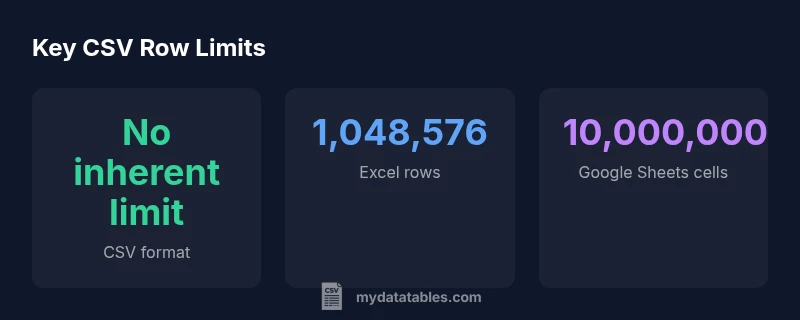
Do CSV have a row limit? Not inherently—the CSV format is plain text with no built-in row cap. The practical limit comes from the software you use to read or process it. Excel tops out at 1,048,576 rows per sheet; Google Sheets maxes out on 10 million cells, and programming tools depend on memory and streaming options.
Do CSV have a row limit?
To the question do CSV have a row limit, the short answer is no—the CSV format itself places no fixed cap on the number of rows. CSV is plain text, and its size is limited primarily by how much memory and disk space your system can handle. In practice, the limiting factor is the software that reads the file: spreadsheets may impose per-file or per-sheet caps, while programming languages can stream data in chunks. According to MyDataTables, the absence of an inherent limit makes CSV highly scalable, but only if you choose tools that support large inputs. For analysts, this means designing pipelines that either stream rows or load data in slices rather than trying to read a whole huge file into memory at once.
Where do row limits come from?
Row limits are not baked into CSV; they come from apps and libraries. Desktop spreadsheets might cap the number of rows per sheet, while cloud tools cap total cells or impose quotas. Databases and data-processing libraries, by contrast, can process files far larger than a single sheet, provided you load data in parts. Memory, CPU, and I/O bandwidth determine how much you can safely process in one go. This is why practitioners speak of streaming, chunking, and incremental loading rather than a fixed line count. MyDataTables analysis shows the practical effect: when you hit tool-imposed caps, the solution is often to partition the work into manageable segments.
Implications for data workflows
Understanding that CSV has no universal row cap informs how you architect data pipelines. If you assume a hard limit like a spreadsheet, you’ll design workflows that unnecessarily fragment data or force premature aggregation. In real-world workstreams, teams leverage a mix of streaming (reading one row at a time), chunking (processing blocks of rows), and staged loading into databases or data warehouses. This approach reduces peak memory use and improves fault tolerance. MyDataTables analysis highlights the importance of aligning data ingestion methods with the capabilities of the downstream tools (ETL, analysis notebooks, dashboards) to prevent mid-flight failures.
Practical guidance for very large CSVs
When you anticipate very large CSVs, plan around three levers: memory, I/O, and processing approach. Start by estimating file size and row count, then decide whether to stream or chunk. If you must process in-memory, sample a manageable subset first and scale up gradually. For ongoing pipelines, implement a staging area (e.g., a database or data lake) to offload heavy reads from single-file CSV sources. Finally, automate validation at each stage to catch truncation or corruption early.
Tool-by-tool comparison: Excel, Sheets, and pandas
Excel and Google Sheets impose fixed caps per sheet or per spreadsheet, which can become a bottleneck for large analytics tasks. In contrast, pandas in Python supports reading large files in chunks and streaming, enabling scalable workflows when memory is limited. For truly massive datasets, consider alternating between import to a database and batch analysis in a notebook or BI tool. The key is to design a data flow that never relies on a single, monolithic file if your target workload exceeds tool-imposed limits.
Estimating your CSV size in practice
Start with a rough estimate: count lines, multiply by the average columns, and adjust for approximately how much memory each field consumes. If you’re unsure, run a dry-run with a smaller subset and extrapolate. Tools like shell utilities (wc -l for lines, du -h for size) or streaming libraries in Python or R can provide quick benchmarks. As you scale, validate performance at each milestone to avoid surprises during production runs. The MyDataTables approach emphasizes iterative testing over guessing capacity.
Techniques: streaming, chunking and database imports
Streaming reads process one row at a time, consuming little memory and enabling near real-time analysis for large files. Chunking loads data in fixed-size blocks, making it easy to coordinate transforms, validations, and aggregations. For the largest datasets, load into a database or data warehouse, then run SQL-based queries or BI tools. This hybrid approach minimizes memory pressure while preserving analytic flexibility. In practice, you’ll often combine streaming with chunking and a staging area for best results.
Myths and edge cases
A common myth is that CSV is inherently fragile or unsuitable for large-scale analytics. In reality, CSV is robust when paired with proper tooling and data governance. Edge cases include inconsistent row lengths, embedded newlines, or multi-quote fields; all require careful parsing and validation. Another caveat is that not all consumer-grade tools can handle near-maximum-size CSVs gracefully—design your workflow to tolerate partial failures and implement proper retries.
Common row limits and strategies across popular CSV workflows
| Tool/Platform | Inherent Row Limit | Notes |
|---|---|---|
| CSV Files (generic) | None | CSV is plain text; no built-in row limit; size limited by memory/disk and tooling |
| Excel (Windows/macOS) | 1,048,576 rows per sheet | Limit applies per sheet; use multiple sheets or import strategies for larger data |
| Google Sheets | 10,000,000 cells per spreadsheet | Rows depend on column count; practical sheet sizes vary; streaming preferable for large datasets |
| Python/pandas with streaming | Memory-dependent | Process large files by reading in chunks or streaming rows |
| Relational databases | Unbounded (with storage) | Ingest CSVs into a DB and query with SQL for scale |
People Also Ask
Do CSV files have a built-in limit?
No—the CSV format defines plain text data and does not specify a row limit. Limits come from the software reading or importing CSVs. Plan for memory, streaming, and chunking to scale.
No built-in limit; tools determine how big a CSV you can work with.
Which tools impose the biggest row limits?
Desktop spreadsheets like Excel and cloud apps like Google Sheets impose fixed caps per sheet or per spreadsheet. Databases and programming libraries can handle much larger inputs if you stream or chunk data.
Excel and Sheets have fixed caps; databases and programming tools can handle bigger files with streaming.
How can I work with CSVs larger than a sheet can handle?
Read the file in chunks or stream rows, and consider loading into a database or data warehouse. This avoids loading the entire file into memory at once.
Use chunking and streaming; consider a database for scale.
Are there best practices for importing large CSVs?
Profile memory usage, read in chunks, and validate data in stages. Avoid loading the entire file into memory; test with representative slices first.
Read in chunks and monitor memory usage.
Should I split huge CSVs into smaller files?
Splitting can help manage resource constraints and parallelize processing. Combine results later or load into a database for unified queries.
Yes—splitting can help, then aggregate later.
“CSV files have no built-in row limit; the cap is defined by your tools and environment. Plan around memory, streaming, and partitioned processing to scale safely.”
Main Points
- CSV has no inherent row limit.
- Check tool-specific limits before loading large files.
- Use streaming or chunking for big datasets.
- Validate large CSVs with samples to avoid memory errors.