CSV Reading: A Practical Guide
Learn to read CSV files reliably with proper delimiters, encoding, and headers. This practical guide covers Python, JavaScript, and spreadsheet workflows with clear, step-by-step instructions and best practices.


To master csv how to read, you will learn reliable techniques for parsing CSV files across languages, handle common pitfalls like delimiters, quotes, and encoding, and apply best practices for headers and missing values. This guide covers Python, JavaScript, and spreadsheet workflows, with practical examples and clear steps to verify results.
Understanding CSV structure
According to MyDataTables, CSV reading is foundational for data workflows. A CSV file is a plain text document that stores tabular data in rows and columns. Each line represents a row, and fields within a row are separated by a delimiter, most commonly a comma, though regional variants often use semicolons or tabs. The first row is frequently treated as the header, naming each column, but a CSV file does not have to include headers. Understanding this structure helps you choose the right tooling and parsing strategy. When you see a file with trailing delimiters or irregular line endings, it’s a signal to inspect the file more closely before writing code.
Beyond the delimiter, be aware of encoding (UTF-8 is the modern default, but many datasets use UTF-16 or other encodings). If you misread encoding, you’ll encounter garbled characters and misread values. In practice, a robust CSV reader should expose a simple configuration for delimiter, quote character, and encoding, and should gracefully handle edge cases like embedded newlines inside quoted fields. The MyDataTables team emphasizes validating the basic properties of a CSV before attempting to load it into memory or into a data frame.
Understanding these basics helps you avoid common misinterpretations—such as thinking a comma with thousands separators is a delimiter, or assuming missing values are always empty strings. The content that follows builds on these foundations with concrete steps, language-specific examples, and practical tips for real-world CSV usage.
Key decisions: delimiter, encoding, and headers
Choosing the right delimiter, encoding, and header strategy is crucial for reliable CSV reading. The delimiter should be chosen based on the source’s convention; if a file uses semicolons (common in some European locales) or tabs, your parser must be configured accordingly. Encoding dictates how bytes map to characters; UTF-8 supports a wide range of characters and is generally preferred, though Byte Order Marks (BOM) can complicate initial reads. Headers influence how data maps to fields; if a header row is absent, you’ll need to generate synthetic field names or enforce positional access.
Practical guidelines:
- Inspect the first few lines to confirm the delimiter and whether a header exists.
- Attempt to read with UTF-8 first; if you encounter invalid characters, try a different encoding like ISO-8859-1.
- If the file contains embedded newlines in quoted fields, ensure your reader supports proper quoting rules.
MyDataTables Analysis, 2026 suggests starting with a consistent delimiter and UTF-8 encoding to maximize compatibility across tools and platforms. This upfront alignment reduces downstream errors when you move data between Python, JavaScript, and spreadsheet environments.
In short, treating delimiter, encoding, and header strategy as explicit configuration options saves debugging time and improves data portability across systems.
Practical Python: read CSV with pandas vs the csv module
Python offers two mainstream ways to read CSV data: the built-in csv module for low-level control and pandas for high-level data manipulation. The csv module is lightweight and explicit, making it ideal for streaming or when you need fine-grained control over parsing rules. Pandas provides a single read_csv function that infers datatypes, handles missing values intelligently, and returns a ready-to-use DataFrame.
Key differences:
- csv module: you manage row iteration, handle types manually, and control error handling granularly.
- pandas read_csv: quick loading, powerful type inference, missing value handling, and convenient downstream operations (grouping, filtering, aggregations).
Example patterns:
- Using csv: open the file, create a reader, loop rows, and cast types as needed.
- Using pandas: df = pandas.read_csv('file.csv', delimiter=',', encoding='utf-8') and then use df.head(), df.describe(), or df.dtypes.
Both approaches are valid; choose based on the size of data, the need for streaming, and how you intend to transform results. MyDataTables team recommends starting with pandas for analytics tasks and reserving the csv module for streaming or memory-constrained workloads.
Reading CSV with JavaScript (Node.js): libraries and built-ins
In the Node.js ecosystem, you can read CSV files with built-in fs promises for small files or with specialized libraries like csv-parser or papaparse for larger datasets. csv-parser offers a streaming, event-based approach that minimizes memory usage, while Papaparse is particularly friendly in browser contexts and supports streaming in Node as well.
Strategies:
- For large files, prefer a streaming parser to avoid loading the entire file into memory.
- When working in the browser, Papaparse provides strong support for uploads and progressive parsing.
- Always verify that the delimiter, quote character, and encoding are aligned with your source.
Example workflow:
- Create a read stream for the file.
- Pipe the stream into a CSV parser configured with the correct delimiter and encoding.
- Accumulate rows or stream them into a target data structure.
If you’re starting with Node.js, a practical approach is to use a streaming parser in a pipeline and perform lightweight validation on each row to catch malformed data early.
Handling large CSV files and performance considerations
Large CSV files pose a challenge for memory and speed. The biggest performance wins come from streaming rather than loading the entire file into memory. Techniques include chunked reads, buffered processing, and lazy evaluation where possible. For Python, use chunks via pandas read_csv with the chunksize parameter to process data in manageable slices. In Node.js, a streaming parser with a transform stream can process rows one by one.
Other performance tips:
- Avoid repeated datatype casts inside tight loops; batch type coercion after reading a chunk.
- Use a robust delimiter and quoting configuration to reduce re-reads caused by malformed rows.
- When possible, filter out unnecessary columns early to reduce memory usage.
MyDataTables Analysis, 2026 finds that streaming approaches dramatically reduce peak memory usage and improve responsiveness when users load files larger than a few megabytes. If you need to work with multi-hundred-megabyte CSVs or larger, plan for streaming first and only load summaries or samples into memory for analysis.
Finally, consider enabling parallel processing where supported, but ensure deterministic behavior when rows depend on order or when rows contain complex nested fields.
Validation, cleaning, and ensuring data quality after read
Reading a CSV is the first step; the next is validating and cleaning. After loading data, perform schema checks (column names, data types, expected ranges) and handle anomalies such as missing values, extra columns, or inconsistent formats. Automated validation reduces downstream errors in reporting or modeling.
Best practices:
- Define a schema upfront and validate each row against it, reporting the first failure encountered.
- Normalize datatypes (e.g., parse dates, convert numeric strings to numbers) to enable reliable analytics.
- Use libraries that provide robust error handling and clear exceptions to quickly locate problems.
- Log validation results and provide a summary of rows rejected for transparency.
This validation mindset aligns with best practices advocated by the MyDataTables team and helps you build repeatable, auditable CSV ingestion pipelines. With proper validation, your CSV consumption becomes a stable foundation for dashboards, reports, and data science workflows.
Tools & Materials
- CSV file to read(Your dataset in plain text, with accessible path or URL)
- Text editor or IDE(For quick inspection and edits (VS Code, PyCharm, Sublime, etc.))
- Python 3.8+ with pandas or csv module(For Python examples and data manipulation)
- Node.js 18+ or modern JS runtime(For JavaScript/Node.js examples and streaming parsers)
- Spreadsheet app (Excel/Google Sheets)(Useful for quick verification and manual checks)
- Command line tools (optional)(grep, awk, head, tail for quick previews)
Steps
Estimated time: Estimated total time: 45-90 minutes
- 1
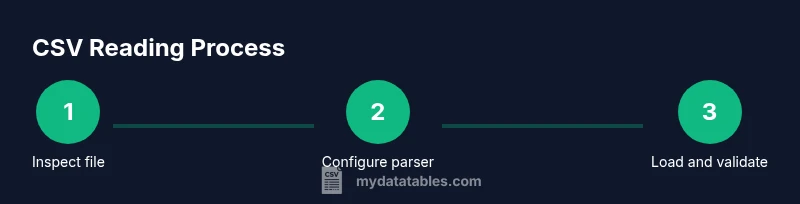
Inspect the CSV file
Open the file in a text editor or preview tool to confirm the delimiter, encoding, and header presence. Check for irregular line endings, embedded newlines, or inconsistent column counts. This upfront inspection prevents downstream parsing errors.
Tip: Look for the header row and count columns in the first 5 lines to establish a baseline. - 2
Choose delimiter and encoding
Decide on the delimiter based on the source (commas, semicolons, or tabs) and set the encoding (UTF-8 is preferred). If the header exists, decide whether to use it as field names or to generate your own. These choices impact every subsequent read.
Tip: If unsure, start with UTF-8 and a comma delimiter, then adapt if you see anomalies. - 3
Load using your language of choice
Use a reliable reader (Python: pandas.read_csv or csv; JavaScript: csv-parser or Papaparse; spreadsheet tools: import wizard). Pass the delimiter and encoding and handle headers as configured.
Tip: Prefer a library that supports streaming for large files. - 4
Normalize headers and data types
Ensure header names are consistent and transform values to proper types (numbers, dates, booleans) as soon as possible after loading. This reduces surprises downstream.
Tip: Define a small conversion function and apply it in a vectorized way where possible. - 5
Validate and handle missing values
Implement a validation pass to identify missing or malformed data. Decide on policies for missing data (ignore, fill, or drop) based on the context and downstream needs.
Tip: Record the count of missing values per column to guide remediation. - 6
Test with a sample and verify output
Read a small subset or a controlled sample to confirm the results. Compare against expected values or a validated schema before processing the entire file.
Tip: Use a quick assertion or unit-test style check to catch issues early. - 7
Process and export clean data
After validation, write your cleaned data to a new file or a data store. Preserve a record of changes and document the read pipeline for reproducibility.
Tip: Keep metadata about the read configuration (delimiter, encoding, schema) with the output. - 8
Document and automate the workflow
Create a repeatable script or notebook that reads, validates, and exports CSV data. Automate monitoring or scheduling if this is a production task.
Tip: Include error handling and clear logs to simplify debugging.
People Also Ask
What is a CSV file?
A CSV file is a plain text format that stores tabular data as rows and columns, with fields separated by a delimiter such as a comma. It may or may not include a header row. The simplicity of CSV makes it widely supported, but you must know the delimiter and encoding to read it correctly.
CSV is a simple text format with rows and columns and a delimiter; check for a header row and the encoding before you read it.
How do I read a CSV in Python?
In Python, you can use the csv module for low-level control or pandas for high-level data manipulation. csv lets you iterate rows and cast types manually, while pandas.read_csv loads a DataFrame with automatic type inference and easy data ops.
Use pandas read_csv for most tasks, or the csv module if you need tight, low-level control.
Which delimiter should I use?
The delimiter should match the source file. Common choices are comma, semicolon, and tab. If the file comes from a regional source, check documentation or inspect the first lines to confirm.
Match the delimiter to the file’s format and test with a small read first.
How should headers be handled?
If a header row exists, treat it as field names and rely on the parser to map columns. If not, generate or supply your own column names. Consistently handling headers simplifies downstream data processing.
Treat the first row as headers if present, otherwise assign your own labels.
What encoding is best for CSV?
UTF-8 is the recommended encoding for CSV files because it supports most characters and is widely compatible. If you encounter errors, try a fallback like ISO-8859-1 and remove any BOM before reading.
UTF-8 is preferred, switch if needed to handle special characters.
How can I validate data after reading?
After loading, verify column types, check for missing values, and compare against a known schema. Implement a validation step to catch malformed rows early and keep a log of issues for remediation.
Validate types and missing values right after reading to catch issues fast.
Watch Video
Main Points
- Read CSVs with explicit delimiter, encoding, and header handling.
- Choose a language/library that supports streaming for large files.
- Validate data types and missing values after read.
- Use a repeatable, documented process for reproducible results.