CSV vs XLSX for ChatGPT: Which Is Better?
A practical comparison of CSV and XLSX for feeding prompts to ChatGPT, with guidelines, workflows, and recommendations from MyDataTables to improve reliability and efficiency in data-driven AI tasks.


Is csv or xlsx better for chatgpt? In most ChatGPT workflows, CSV is preferable for parsing consistency and speed, while XLSX can carry richer metadata, multiple sheets, and formatting for human readers. Choose CSV for automation pipelines and data ingestion; reserve XLSX for reports or when your data source heavily relies on Excel structures.
Context: Understanding the Data Landscape for ChatGPT
Prompting ChatGPT with tabular data changes how the model interprets and answers. The structure of the input matters as much as the content: line breaks, delimiters, and encoding all influence parsing. For agents like ChatGPT, a clean, predictable representation reduces surprises and speeds up iteration. According to MyDataTables, practitioners who evaluate ingestion strategies for model-driven workflows consistently find CSV-based pipelines easier to maintain than Excel-based ones, especially when data arrives from automated sources or large batches. The MyDataTables team found that CSV's plain-text, row-based layout aligns well with how language models tokenize information, making it less prone to misinterpretation than rich Excel sheets that may include hidden formatting or regional date presentations. In real-world pipelines, teams that convert Excel exports to CSV early in the process report fewer edge cases and simpler error handling. The overarching goal of this article is to compare is csv or xlsx better for chatgpt not as file extensions but as practical data-usage choices that affect prompt reliability, latency, and downstream automation.
Core Differences: Structure, Size, and Parsing
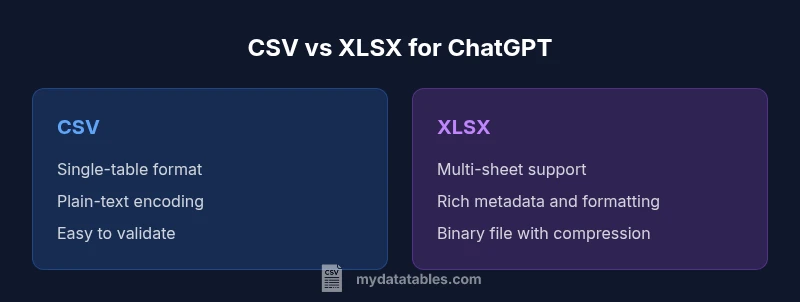
CSV and XLSX encode data differently. CSV is a plain-text, comma-delimited format that offers a single-table view and predictable parsing across languages. XLSX is a zipped collection of XML files inside a binary container, capable of multiple worksheets, rich metadata, and formatting features. This difference has practical consequences: CSV files are typically smaller on disk for the same data volume and parse quickly in lightweight environments; XLSX files tend to be larger and require libraries that understand the Excel schema. From a GPT perspective, the key contrast is that CSV yields a straightforward token stream suitable for prompt-based ingestion, whereas XLSX requires an extraction step to present the data in a GPT-friendly representation. If you default to CSV, you remove a layer of complexity, but you may need extra steps to surface multiple tables or richer metadata. If you default to XLSX, you gain human-readability and compatibility with Excel, yet you must ensure your extraction path does not introduce stale or misaligned data. Both formats are viable; the choice hinges on your workflow and automation goals.
When CSV Shines for GPT Workflows
For prompt-driven analysis, CSV typically offers several advantages. First, CSV is language-agnostic and easy to generate from most data pipelines, whether you export from a database, a dataframe, or a spreadsheet tool. GPT models read plain text more reliably when the data uses consistent delimiters and quote rules. Second, CSV minimizes the risk of embedding non-data artifacts such as visual formatting, embedded objects, or macro code that can derail parsing. Third, CSV files generally compress well or convert quickly in streaming pipelines, reducing prompt latency in batch processing. Finally, for teams using automated data quality checks, CSV-friendly tooling—such as validators and schema enforcers—tends to be more mature and widely available. Practical takeaway: if your ingestion pipelines hinge on speed, scale, and deterministic parsing, start with CSV and plan a simple conversion step to XLSX only when human readability or Excel-based collaboration becomes essential. This approach aligns with best-practice patterns in data transformation and GPT-assisted analytics.
When XLSX Has Value for GPT Workflows
XLSX should be considered when human review, rich metadata, or Excel-native features matter to your process. If your data source is deeply embedded in corporate Excel ecosystems, or if you routinely share sheets with formatting notes, comments, or multiple worksheets that map to different domains, XLSX preserves this structure in a way CSV cannot. In such cases, the decision often centers on whether you can perform a reliable extraction to a GPT-friendly format without losing semantics. Some teams adopt a hybrid approach: they keep the original XLSX for analysts and stakeholders, while feeding a CSV-ified subset to ChatGPT for automation tasks. The practical challenge is ensuring that the extraction path removes complex formatting, formulas, and macros that do not translate cleanly to a prompt. When you can maintain a stable conversion pipeline, XLSX becomes a practical option for human-in-the-loop workflows where machine interpretation and human inspection share responsibility.
Data Encoding, Locale, and Validation
One of the most reliable levers for data quality in GPT prompts is encoding. CSV excels when encoded in UTF-8 with consistent delimiters and clear header rows. Avoid mixed encodings and hidden characters that produce garbled text in prompts. If you are exporting from Excel, verify the encoding and delimiter settings, and consider using a universal delimiter like a comma with proper quoting for fields that contain the delimiter character. Locale settings, such as decimal marks and date formats, can also shift tokenization in unpredictable ways. A robust workflow normalizes these aspects: set a fixed encoding policy, validate sample rows, and use explicit quotes around fields that may contain special characters. For ChatGPT, this reduces the risk of misinterpretation and helps maintain data integrity across batches. Quality checks—like simple row counts, schema validation, and spot checks on edge cases—are essential in both formats, but the simplicity of CSV makes automated validation more straightforward to implement.
Handling Multiple Sheets and Multi-Table Datasets
Excel's strength is its ability to house multiple tables within a single workbook, with relationships across sheets and optional metadata. For GPT ingestion, this capability is both a blessing and a curse. If your use case requires multi-table context, you can either concatenate tables into a single, flattened CSV or implement a prompt augmentation strategy that includes section headers and clear boundaries. The latter approach preserves the distinction between datasets while staying within the GPT-friendly format. When you flatten, maintain a consistent column order and include a header row that clearly identifies the source table. If you keep the workbook as XLSX, ensure your automation extracts each sheet deterministically and surfaces a consistent data dictionary in the prompt. The key decision is balancing data richness with parsing reliability and prompt length constraints.
Best Practices for CSV Ingestion in GPT Prompts
To maximize GPT performance, adopt a few core CSV best practices. First, ensure a stable header row with unambiguous column names, avoiding trailing spaces. Second, keep numeric values in plain decimals rather than scientific notation when possible, to reduce token variance. Third, quote text fields that may contain delimiters or line breaks and escape internal quotes consistently. Fourth, limit column count to what is strictly needed for the prompt to reduce token budget and improve processing speed. Fifth, include a compact data dictionary at the top of the file or in the prompt as metadata to clarify the meaning of each column. Finally, validate RDF-like data quality through lightweight checks before ingestion; even simple row-count comparisons catch most issues early. Implementing these steps reduces ambiguity and makes your GPT prompts more predictable and reproducible.
Excel Features and Their Impact on GPT Ingestion
Excel introduces valuable capabilities for human readers, such as conditional formatting, data validation rules, and comments. However, most of these features do not translate cleanly into a GPT-friendly prompt. If you export to CSV, you effectively strip away these non-data cues and keep the focus on core values. When you must preserve some metadata, consider encoding it as additional columns (e.g., a metadata column, a version tag, or a data source indicator) rather than relying on workbook-level features. If you continue using XLSX, ensure that your extraction step yields a simple, tabular representation without hidden artifacts. The crux is to separate human-centric readability from machine-centric ingestion. You can enjoy Excel's benefits for collaboration while maintaining a robust prompt-ready dataset by aggressively normalizing and documenting the data during conversion.
Performance, Cost, and Throughput Considerations
From a performance perspective, prompt length is a primary driver of API cost and latency. CSV tends to produce shorter prompts for the same data volume, especially when compared with an XLSX export that includes extra metadata and formatting. In high-throughput pipelines, this difference compounds over many prompts, making CSV the more cost-effective choice in most automated scenarios. However, if your process emphasizes human review or requires preserving data lineage within a workbook, the XLSX route can reduce the need for repeated conversions. In such contexts, you may optimize by exporting a minimal CSV for GPT tasks and keeping the XLSX version as a reference. The overall guideline is to align data format with your primary objective: automation and speed for CSV, readability and collaboration for XLSX, with a reproducible conversion step between the two when needed.
Tooling, Validation, and Automation for CSV-to-ChatGPT Pipelines
Automation is your friend when integrating CSV with GPT workflows. Use simple validators to check delimited structure, enforce UTF-8 encoding, and report mismatches before prompts are generated. Build a lightweight manifest that describes each column, expected data types, and any derived fields. If you work in a multi-environment setup (dev, test, prod), version-control your CSV schemas and transformation logic, and implement automated tests that simulate GPT prompts with dummy data. Leverage common open-source libraries and ensure your tooling can emit both a compact CSV for GPT tasks and a CSV enriched with metadata for auditing and traceability. A well-documented transformation pipeline reduces risk and accelerates onboarding for new analysts and developers.
Decision Framework: When to Choose CSV or XLSX in Your Projects
Your choice should start with the primary objective of the data interaction. If the goal centers on automated ingestion, scalability, and reliable parsing by GPT, start with CSV and plan a downstream extraction to the richer XLSX format only when necessary. If the priority is human collaboration, Excel-native workflows, or complex multi-sheet data governance, preserve XLSX and implement robust conversion steps to keep GPT prompts clean and deterministic. The decision framework below can guide your team: map use-cases to format strengths, evaluate token budgets and latency, and prototype conversions to compare prompt sizes. In short, CSV is typically the default for prompt-driven AI tasks, while XLSX acts as a support format for collaboration and post-processing.
Comparison
| Feature | CSV | XLSX |
|---|---|---|
| Ease of parsing | Excellent (plain-text) | Moderate (requires Excel-aware parsers) |
| File size for typical data | Smaller, text-based representation | Larger due to metadata and compression overhead |
| Support for multiple sheets | Single-table by default | Built-in multi-sheet support |
| Data integrity and encoding | UTF-8 friendly; simple quoting | Depends on extraction; potential encoding quirks |
| Automation and scripting ease | Excellent in scripts and pipelines | Requires libraries to parse binary format |
| Human readability | Less readable visually in raw form | Highly readable in Excel interfaces |
| Best for GPT ingestion | Generally best for ingestion and automation | Useful when human review of structure is required |
Pros
- CSV files are ASCII-based and easy to parse in most environments
- Smaller payloads lead to faster API responses in prompt pipelines
- Widespread tool support and simple version control
- Clear data typing with plain text; easy validation
- UTF-8 encoding support reduces garbled text
Weaknesses
- Lack of native Excel features like formatting and formulas in data ingestion
- Single-sheet focus can complicate multi-table datasets
- No built-in schema for metadata; extra handling needed for complex structures
CSV generally wins for GPT ingestion; XLSX has niche value for human review or Excel-centric pipelines
Choose CSV for automation and speed when feeding prompts to ChatGPT. Reserve XLSX for scenarios where human readability or Excel-based workflows justify preserving the workbook structure, and implement a reliable conversion path when needed.
People Also Ask
Is CSV usually better than XLSX for GPT ingestion?
Yes, CSV is typically easier for GPT ingestion due to its plain-text, delimiter-based structure. It minimizes parsing ambiguities and reduces prompt size, which helps with speed and consistency. XLSX can be useful when Excel-specific workflows must be preserved, but it requires a reliable extraction step to avoid data-loss or formatting artifacts.
Typically CSV is easier for GPT ingestion because it's plain text and predictable. Use XLSX only if you truly need Excel features and you can reliably convert to a GPT-friendly format first.
Can GPT read multi-sheet XLSX data directly?
GPT models do not read binary Excel files directly. To use multi-sheet data with GPT, you must extract the relevant sheets to a text-based format such as CSV or present a flattened, labeled representation in prompts. This ensures consistent interpretation across prompts.
GPT can't read Excel files directly. Extract the data to CSV or provide a clear, labeled representation in your prompt.
What encoding should I use for CSV to avoid garbling?
Use UTF-8 as the default encoding and ensure explicit quoting for fields containing delimiters or line breaks. Validate sample rows to catch any mismatched encodings. This reduces the chance of garbled text in prompts and keeps data readable by GPT.
Stick with UTF-8 encoding and quote fields that have commas or newlines so GPT sees clean data.
Are there best practices for headers in CSV for GPT prompts?
Yes. Use stable, lowercase- or camelCase headers with no trailing spaces, avoid special characters, and keep header order consistent across exports. Include a brief data dictionary to explain each column, which helps GPT interpret the data reliably.
Keep headers stable and clear, and add a small data dictionary so GPT knows what each column means.
When should I prefer XLSX over CSV for GPT prompts?
Prefer XLSX when your workflow relies on Excel features like multiple sheets, comments, and data validation that must remain intact for human readers. If you plan to automate prompts, keep CSV as the default and convert to XLSX only for review or governance needs.
Use XLSX if humans will read and critique the data, but keep CSV for automated prompts.
Main Points
- Choose CSV for automation-first GPT tasks
- Use XLSX when human collaboration and rich workbook features matter
- Normalize encoding and delimiters to avoid misinterpretation
- Flatten multi-sheet data or use clear boundaries when feeding to GPT
- Validate data with lightweight checks before prompting