CSV vs JSON: Choosing the Right Data Format for Workflows
A rigorous, data-driven comparison of CSV and JSON, focusing on structure, readability, size, tooling, and real-world use cases to help data analysts and developers select the best format for their workflows.


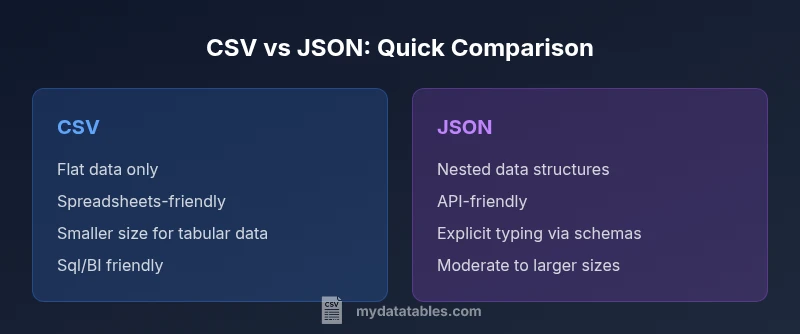
CSV and JSON serve distinct purposes in data workflows. CSV shines for flat, tabular data that you want to edit in spreadsheets or load into relational databases, while JSON excels for nested, structured data used in APIs and modern applications. For simple dumps and quick analysis, CSV is often preferred; for APIs, configuration, and complex data, JSON is typically the better choice. The decision hinges on data shape, downstream tooling, and validation needs.
CSV vs JSON in Practice: Defining the Choice
When you hear the terms csv and json in a data project, you are really confronting two different philosophies of data representation. CSV, short for comma-separated values, encodes information as a flat table: rows and columns where each field is a simple string. JSON, short for JavaScript Object Notation, encodes data as nested objects and arrays, which supports hierarchical structures and rich data types. For data analysts, developers, and business users at MyDataTables, the practical takeaway is simple: if your data is a table and the workflows rely on spreadsheets or SQL, CSV is often the natural starting point. If your data has structure that goes beyond a single row, or you are exchanging data with web services and APIs, JSON becomes indispensable. In short, csv or json isn’t a single universal best choice—it depends on the data shape and the ecosystem around your project.
Context: What Your Downstream Systems Expect
Most ETL pipelines, BI tools, and data warehouses can ingest CSV with straightforward schemas and consistent quoting. CSV’s simplicity makes it fast to parse and easy to inspect manually. JSON, by contrast, shines when you need to model complex relationships—arrays of records, optional fields, and nested objects. The MyDataTables team has observed that projects that start with a clear understanding of downstream systems tend to pick the right format early, avoiding costly conversions later on. If your consumers expect an API payload or a configuration object, JSON is often the natural format; if your consumers are analysts using Excel or SQL-based dashboards, CSV gets you there faster.
Understanding Data Shape: Flat vs Nested Structures
A key differentiator is data shape. CSV handles flat, tabular data well—each row is a record, each column a scalar value. JSON handles nested data with ease—an item can include arrays, dictionaries, and other objects. When data can be fully described with a table, CSV typically wins on simplicity and speed. When you must convey hierarchical information such as user profiles with addresses, preferences, and multiple orders, JSON’s nested structure reduces the need for flattening data and preserves semantics. This difference affects validation, parsing libraries, and how easily data can be transformed downstream.
Readability and Editing Experience
CSV offers excellent readability for anyone familiar with spreadsheets. Open a CSV in Excel or Google Sheets and you can scan, filter, and edit values directly. However, large CSV files can become unwieldy, and escaping, quoting, and delimiter changes introduce edge cases. JSON is less approachable for casual editors but becomes highly readable once you grow accustomed to the syntax. Humans can inspect key-value pairs and the structure of nested objects, which is valuable for configuration files and API payload examples. When readability matters for humans who aren’t developers, CSV often provides a quicker grasp; for developers who need to reason about structure, JSON is clearer.
Validation, Typing, and Schema Considerations
CSV remains schema-light by default; there is no built-in enforcement of data types or field existence. This can lead to inconsistent data, especially when multiple teams contribute to the same dataset. JSON benefits from explicit structure and can be complemented with schemas (e.g., JSON Schema) to enforce types, required fields, and nested constraints. If your project demands strict validation and automatic type mapping, JSON paired with a schema language offers stronger guarantees. Conversely, CSV relies on external validation layers, such as predefined column orders or schema files, which can be fragile if the source changes.
Performance and Storage Implications
File size and parsing performance commonly favor CSV for flat data. CSV lacks verbose syntax, so a pure tabular dump may be smaller than a JSON representation of the same records. Parsing CSV is typically faster for large, uniform datasets because there is less overhead per record. JSON, with its braces, quotes, and nested structures, consumes more space and requires more CPU to parse, especially if you rebuild nested objects or convert types. When streaming large datasets, CSV can be advantageous due to lower overhead, but you should balance this against the need for structure and readability.
Use-Case Scenarios: When Each Shines
- CSV shines for: ad-hoc data dumps, spreadsheet-based workflows, data lake ingestions with tabular schemas, and simple dashboards that rely on relational joins.
- JSON shines for: API payloads, configuration files, event streams, and data modeling with nested relationships. If your data includes arrays (tags, items) or dictionaries (metadata, attributes), JSON reduces the need for flattening and preserves semantics.
- Hybrid workflows: Many teams adopt both formats in different parts of the pipeline. A common pattern is to store tabular data in CSV for analytics, then convert to JSON when interacting with web services or API-driven components.
Practical Transformation Patterns: Converting Between csv and json
Transformation between csv and json is a frequent operation in data workflows. A typical approach is to map each CSV row to a JSON object, with a header row providing field names. When nested data is required, you can use encoding conventions (e.g., dot-delimited headers or JSON strings within a single CSV field) or perform a structural enrichment during ETL to create true nested objects in JSON. Tools like scripting languages, data integration platforms, and database ETL features all support such transformations. Always validate after transformation to ensure that the resulting structure matches the target schema and that data types are preserved where needed.
Interoperability with Popular Tools and Platforms
Both formats enjoy broad ecosystem support, but their strength varies by tool. CSV integrates smoothly with spreadsheets, SQL databases, and many BI platforms; it is often the default transfer format in data export/import workflows. JSON integrates naturally with modern programming languages, RESTful APIs, and microservices, where nested data, lists, and attributes are common. When you need to serialize complex domain objects or exchange data with cloud services, JSON is typically the preferred format. MyDataTables emphasizes choosing a format that aligns with your toolchain and the end-user workflows you expect to support.
Best Practices for Choosing Between csv and json
- Start with data shape: flat vs nested. If your data can be represented without nesting, CSV is usually simplest and fastest.
- Consider downstream systems: do they prefer spreadsheets, databases, or APIs? This often determines the default format.
- Plan for validation and typing: JSON with a schema provides stronger guarantees than CSV without one.
- Be mindful of readability and maintainability: casual editors favor CSV; API-driven development favors JSON.
- Design for future growth: if you anticipate schema evolution or nested data, lean toward JSON to minimize restructuring later.
Practical Guidelines for Teams and Projects
For teams deciding csv or json, document the decision in a data governance wiki, include a short rationale, and publish a conversion policy. Use a consistent naming convention for columns or keys, and keep sample files that illustrate edge cases (nulls, missing fields, nested objects). Invest in simple validation scripts that check for anomalies after data ingest. By establishing clear guidelines at the start, you reduce friction when teams collaborate and when you scale data processing across environments.
Final Notes and Next Steps
Ultimately, the choice between csv or json should be guided by data shape, tooling, and the intended audience. Start with an inventory of how data will be consumed and validated in downstream systems. If you anticipate evolving schemas or nested structures, JSON provides greater flexibility; if you need fast, spreadsheet-friendly data dumps, CSV remains unbeatable in its simplicity. The MyDataTables approach is to document use cases, create lightweight validators, and maintain sample templates to help teams get started quickly.
Comparison
| Feature | CSV | JSON |
|---|---|---|
| Data structure | Flat rows and columns | Nested objects and arrays |
| Schema/typing | Schema optional by convention | Explicit typing via JSON Schema (optional but common) |
| Readability for humans | High in spreadsheets; easy editing | Moderate; becomes clear with JSON viewers or code editors |
| Size and overhead | Typically smaller for tabular data | Usually larger due to braces and quotes |
| Best use cases | Tabular analytics, quick dumps, BI imports | APIs, configurations, nested domain data |
| Tooling and ecosystem | Excel, SQL, BI tools | |
| Schema evolution | Less flexible for changing structures | More flexible with nested fields and versions |
| Parsing and processing speed | Very fast for flat data; streaming friendly with separators | Parsing complexity increases with nesting; JSON streaming exists but heavier |
Pros
- CSV is compact and edit-friendly for tabular data
- JSON supports nested structures and complex data models
- CSV integrates smoothly with spreadsheets and SQL workflows
- JSON aligns with modern programming languages and APIs
- Both formats are widely supported and interchangeable with proper tooling
Weaknesses
- CSV cannot natively represent nested structures without encoding tricks
- CSV has no inherent data typing or schema enforcement
- JSON can be verbose and harder to eyeball in large flat datasets
- JSON parsing requires processing power and memory for complex structures
CSV for flat, tabular data; JSON for nested, API-oriented data
Choose CSV when data is tabular and you need spreadsheet compatibility. Choose JSON when data has structure, nesting, or API integration, and you require explicit schemas for validation.
People Also Ask
When should I use CSV over JSON?
Use CSV when your data is flat, you need spreadsheet compatibility, or you require fast, simple exports for analytics pipelines. It’s ideal for tabular data with consistent columns and minimal nesting. For API payloads or nested data models, JSON is usually the better fit.
Use CSV for flat data you edit in spreadsheets. For nested data and APIs, JSON is the way to go.
Can CSV represent nested structures?
CSV cannot natively encode nested structures. You can flatten data or encode nested data as JSON strings inside a single field, but that reduces readability and defeats some benefits of a true tabular model. Prefer JSON for nested data.
CSV is flat by design. Nested data works better in JSON.
Which format is better for APIs?
JSON is generally preferred for APIs due to its support for nested data and programmability. CSV can be used for simple payloads, but you’ll usually need additional formatting for complex structures. If you control the API, JSON with a schema is typically the best practice.
APIs favor JSON because it handles complex data easily.
Is CSV compatible with Excel and databases?
Yes. CSV is highly compatible with Excel, Google Sheets, and most SQL databases. It’s a standard choice for data import/export, especially when you need a human-friendly, tabular format. Just watch out for delimiter and quoting rules to avoid parsing errors.
CSV plays nicely with Excel and databases, as long as you handle delimiters properly.
What about performance with large datasets?
CSV often parses faster for large, uniform datasets due to its simple structure. JSON parsing can be heavier, especially with nested objects, though streaming and streaming parsers mitigate some costs. Consider the end-use and memory constraints when choosing.
CSV tends to be faster for large flat datasets; JSON can be heavier but streaming helps.
Should I use both formats in a project?
Many projects benefit from using both formats: CSV for analytics and data dumps, JSON for APIs and config data. Build a clear conversion policy and automate transformations to minimize manual steps and data loss. This approach leverages the strengths of each format where appropriate.
Yes—use both where each format shines, with automated conversions.
Main Points
- Choose CSV for flat tabular data and rapid spreadsheet workflows
- Choose JSON for nested data and API-driven integration
- Evaluate downstream tooling and validation needs early
- Prefer schemas when data integrity and evolution matter
- Maintain a clear data-conversion policy across teams