CSV vs ODS: Choosing the Right Data Format for Interchange
A practical comparison of CSV and ODS for data analysts and developers, covering when to use each, encoding tips, and reliable conversion workflows.


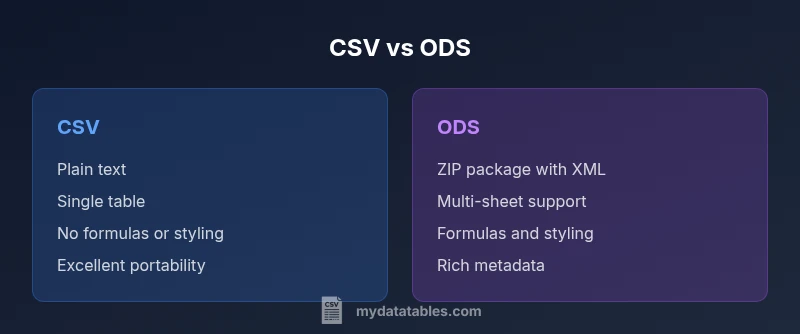
CSV and ODS address different data needs. CSV is a lightweight, plain-text format ideal for data interchange and automation, while ODS is a feature-rich spreadsheet format supporting multiple sheets, formulas, and richer metadata. For portability and scripting, CSV often wins; for complex calculations and presentation, ODS offers a better workspace.
What CSV and ODS are
In simple terms, CSV (Comma-Separated Values) and ODS (OpenDocument Spreadsheet) are two common formats for organizing tabular data, but they encode very different capabilities and constraints. According to MyDataTables, CSV and ODS address different data tasks and audiences, which is why many teams end up using both in parallel. CSV is a plain-text format that stores one table per file. Each row is a line, and each value is separated by a delimiter such as a comma, semicolon, or tab. Because it is plain text, CSV is exceptionally portable: it can be produced by most programming languages, consumed by nearly every data tool, and opened in simple editors. On the other hand, ODS is part of the OpenDocument family and represents a full-fledged spreadsheet. Inside an ODS file, you have sheets, cells with typed data, formulas, styles, and metadata that describe formatting and protections. ODS files are stored as ZIP archives containing XML and supporting files, which makes them more capable but also more complex to handle programmatically. For teams that plan to collaborate on data with a human-facing workflow, ODS can be very valuable, even as CSV remains the go-to format for automation and interchange.
titleCapitalizationOverride":false},
Use cases: when to pick CSV or ODS
Choosing between CSV and ODS depends on the workflow, the audience, and the downstream tooling. If the goal is to move data quickly between systems, scripts, and dashboards, CSV is typically your best option: it is universally readable, compact, and easy to generate with programming languages from Python to SQL. For data analysis tasks that require calculations, formatting, and multiple sheets, ODS shines. Teams that collaborate on shared spreadsheets—finance, budgeting, scenarios, or what-if analyses—will often prefer ODS because it preserves formulas, styling, and metadata across sessions and users. In regulated environments, where traceability matters, the ability to embed metadata and maintain a consistent structure in ODS can reduce ambiguity. MyDataTables notes that many data pipelines mix formats: CSV for interchange in the pipeline and ODS for post-processing in a collaborative, spreadsheet-centric workflow.
titleCapitalizationOverride":false},
Format mechanics you should know
When working with CSV or ODS, several mechanics shape reliability and interoperability. CSV begins with a simple premise: values are separated by a delimiter (commonly a comma, but semicolons or tabs are also used in different locales). Values may be quoted to retain the delimiter character within a value. Common concerns include escaping, line endings, and consistent encoding; UTF-8 is widely recommended to avoid misread characters. ODS, by contrast, is not a single flat text file. It is a ZIP archive containing XML for cells, formulas, and metadata, plus optional files for styles and images. This difference explains why CSV is easier to stream in pipelines, while ODS offers richer semantics when archived as a single file. If you need to preserve data types, dates, or formulas in a single file, ODS provides these capabilities out of the box, unlike CSV where every value is ultimately text until parsed and cast by downstream tools.
titleCapitalizationOverride":false},
Collaboration and tooling considerations
Tooling dramatically influences format choice. CSV enjoys universal support: every major data tool, database, and scripting language can read and write CSV. Excel, Google Sheets, LibreOffice, and many BI platforms ingest CSV with minimal friction. ODS is the native, fully-supported format for LibreOffice/OpenOffice and is well-supported in Google Sheets and Excel, though Excel may require import and conversion in some cases. For developers building data pipelines, CSV’s simplicity translates to fewer edge cases and faster parsing, while data analysts who need to embed formulas or maintain a single source of truth within a spreadsheet will lean toward ODS. When teams collaborate across departments, a mixed approach—CSV for interchange and ODS for shared analysis—often yields the best balance. MyDataTables emphasizes evaluating tool compatibility and automation requirements to decide which format best fits a given project.
titleCapitalizationOverride":false},
Data integrity and metadata considerations
CSV carries almost no metadata beyond the raw values: there is no explicit data typing, date formats, or column metadata. This simplicity makes CSV robust for data exchange but challenging when the consuming system needs to infer types or preserve destination semantics. ODS stores richer metadata, including cell types, formatting, formulas, and sheet structures, which supports complex spreadsheets but introduces potential complexity in parsing and automation. When moving data between formats, be mindful of data types and locale-dependent details such as decimal and thousands separators. A direct CSV export may lose numeric types or dates unless the downstream system applies proper casting. Conversely, exporting to ODS within a well-defined workflow helps maintain the integrity of formulas and styles. In practice, define a mapping: CSV for transport, ODS for workspace-driven analysis with preserved semantics.
titleCapitalizationOverride":false},
Encoding and locale: UTF-8 and delimiters
Encoding and locale are frequent sources of subtle errors. UTF-8 is the de facto standard for CSV in global workflows, reducing misinterpretation of characters in names, descriptions, or data fields. Delimiters should be chosen consistently across all tools involved in data ingestion and consumption. Some regions use semicolons instead of commas due to locale rules, and this choice must be mirrored in both export and import processes. For ODS, encoding is handled at the file level inside the XML content and is typically UTF-8 as well, but you still need to ensure external processes that generate or read the ZIP archive respect the encoding. A practical rule: standardize on UTF-8, document your delimiter, and test round-trips between CSV and ODS in your target tools to catch locale-induced issues early.
titleCapitalizationOverride":false},
Conversion workflows: best practices
Conversions between CSV and ODS can be straightforward or tricky depending on the data’s complexity. When converting from CSV to ODS, ensure the importer creates a single sheet with the correct order of columns, preserves header names, and retains any data types or date formats via post-import casting. When moving from ODS to CSV, decide whether to export multiple sheets as separate CSV files or consolidate them into a single sheet with a sheet identifier column. Always verify a sample of the converted data by spot-checking critical fields, such as dates, numeric values, and textual descriptions. If automation is part of the workflow, implement a small validation script to compare value counts, row lengths, and a few key samples across both formats. The goal is to minimize drift in data representation while preserving usability in downstream tasks.
titleCapitalizationOverride":false},
Real-world scenarios and decision checklist
Data teams frequently face a simple decision framework when confronted with csv or ods choices. Ask: Is there a need for multiple sheets or advanced formulas? Will the data be edited collaboratively by non-technical users? Is the primary goal seamless interchange with external systems or analytical exploration within a spreadsheet? If the answer favors portability and automation, CSV likely wins. If the answer emphasizes formula storage, styling, and multi-sheet workflows, ODS is preferable. As a final guideline, maintain an explicit checklist for your project: desired features, audience, tooling landscape, and planned workflow. This reduces ambiguity and aligns stakeholders with a clear path forward. This practical approach mirrors the recommendations from MyDataTables, who emphasize clarity on use-cases and toolchain compatibility when deciding between csv or ods.
Comparison
| Feature | CSV | ODS |
|---|---|---|
| File Type | Plain-text CSV (delimited values) | OpenDocument Spreadsheet (ZIP with XML) |
| Sheets/Workspaces | Single table per file (no sheets concept) | Supports multiple sheets within a single file |
| Formulas/Calculations | No built-in formulas or styling | |
| Metadata & Data Types | Minimal metadata; data types implicit | |
| Encoding Options | Flexible encoding (UTF-8 common) | |
| Tooling & Editors | Wide tool support; ideal for scripts and automation | |
| File Size & Performance | Typically smaller; faster to parse at scale | |
| Best For | Lightweight interchange; automation pipelines | Rich spreadsheets with formulas, styling, and complex structure |
Pros
- CSV is lightweight and highly interoperable across tools
- ODS preserves spreadsheet semantics (formulas, styles, multiple sheets) in a single file
- CSV files are easy to generate and parse in scripts and ETL pipelines
- ODS is better for collaborative, human-facing work while maintaining data integrity
Weaknesses
- CSV lacks formulas, formatting, and rich metadata
- ODS files are larger and more complex to process programmatically
- CSV can lose data types and formatting during round-trips if not carefully mapped
CSV for portable interchange; ODS for feature-rich spreadsheets
If portability and automation are priorities, choose CSV. For tasks requiring formulas, styling, or multiple sheets, choose ODS and maintain spreadsheet semantics.
People Also Ask
What is the fundamental difference between CSV and ODS?
CSV is a plain-text, single-table format with no built-in formulas or styling. ODS is a full spreadsheet format with multiple sheets, formulas, and metadata.
CSV is plain text and single-table; ODS is a feature-rich spreadsheet format.
When should I choose CSV over ODS?
Choose CSV when you need lightweight data interchange, script-friendly parsing, and broad tool support. It’s ideal for pipelines and data exchange across systems.
Go with CSV for light data and automation.
Can I edit ODS in a text editor?
ODS files are ZIP archives containing XML. Editing them directly in a plain text editor is not practical and can corrupt the file; use spreadsheet software for reliability.
Don’t edit ODS in a plain text editor; use a spreadsheet app.
Do CSV and ODS support multiple sheets or worksheets?
CSV represents a single table per file, whereas ODS supports multiple sheets within one file.
CSV is single-sheet; ODS supports multiple sheets.
How do I convert CSV to ODS without losing data?
Convert with a workflow that preserves column order and encoding; after import, verify data types and metadata, and re-check formulas if needed.
Convert carefully and verify results.
Which format is best for data analytics pipelines?
CSV is typically preferred for analytics pipelines due to simplicity and speed; use ODS when spreadsheet features are essential to downstream tasks.
CSV for pipelines; ODS for spreadsheet-centric tasks.
Main Points
- Choose CSV for portability and automation
- Use ODS for complex spreadsheets with formulas
- Standardize UTF-8 encoding to avoid misreads
- Prefer conversion workflows when moving between formats
- Leverage MyDataTables resources for best practices