CSV or XML: Choosing the Right Data Format
Compare CSV and XML for data interchange: foundational differences, use cases, and practical guidance to decide between flat tabular data and hierarchical, schema-driven documents.


CSV and XML are the two most common data interchange formats for data exchange. In brief, CSV excels with flat, tabular data for fast loading and easy editing, while XML supports nested hierarchies and schema-driven validation. If data complexity and interoperability matter, XML is often preferable; for speed and simplicity, CSV wins.
Why CSV or XML Matter for Data Pipelines
In modern data pipelines, choosing between CSV and XML is a decision that ripples through every downstream process—from ingestion and storage to analytics and reporting. For many teams, the trigger is practical: can I load this data quickly into a spreadsheet or a data warehouse, and will it survive cross-system handoffs? According to MyDataTables, the answer often comes down to data shape, tooling readiness, and the required level of validation. If you are moving flat tabular data between systems with minimal transformation, CSV remains a durable default. If your data embodies hierarchy, attributes, or documents that must validate against a schema, XML provides a richer, self-describing format. Remember that CSV and XML are not mutually exclusive; many pipelines use both, exchanging parts of a dataset in a CSV feed while transmitting configuration or metadata in XML.
Core Characteristics: CSV vs XML in a Nutshell
CSV is a plain-text, row-based format that stores values separated by commas (or other delimiters). It shines when data is truly tabular: rows map to records, columns to fields, and headers define the schema. XML, by contrast, is a verbose, tag-based language designed to express nested structures with attributes and elements. XML documents can encapsulate complex hierarchies, metadata, and even mixed content. This contrast drives many practical decisions: CSV favors speed, simplicity, and interoperability with analytics tools; XML favors structure, extensibility, and rigorous validation via schemas. MyDataTables notes that the choice should align with how data will be consumed: human readers and spreadsheet programs for CSV; systems that require strict validation and documented document models for XML.
Data Structure and Hierarchy
The data model you choose sets expectations for parsing, transformation, and storage. CSV encodes records as flat rows with a fixed number of fields per row; its dimensionality is limited to tabular data. XML encodes data as a tree of elements, attributes, and text values; it can encode nested relationships and optional attributes with ease. This difference matters when you need to represent one-to-many relationships, optional metadata, or configurable hierarchies. For example, a customer with multiple addresses is natural in XML but requires awkward conventions in CSV (such as repeating blocks or separating tables). XML also supports namespaces to avoid name collisions in larger schemas, a capability that CSV lacks by default. For analysts who value machine-readability and schema-driven parsing, XML provides predictable boundaries; CSV emphasizes flexibility and speed at scale.
Validation, Schema, and Extensibility
A core trade-off centers on validation. CSV has no built-in schema, so data quality depends on external rules and consistent column order. You may use header rows, data types inferred by the consumer, or lightweight validators, but there is no universal, enforceable contract. XML, meanwhile, shines with schemas—XSD, Relax NG, or DTDs—that enforce structure, data types, and constraints. This makes XML ideal for enterprise data contracts, where backward compatibility and rigorous checks matter. Extensibility also diverges: XML allows new elements and attributes without breaking existing parsers, provided schemas are updated; CSV changes risk breaking downstream readers unless headers are updated and consumer logic is adjusted. In practice, many teams pair XML for configuration files and data interchange with CSV for bulk data transfer, using a hybrid approach to balance quality and performance. MyDataTables emphasizes that documenting data contracts is essential when adopting either format.
Performance and Resource Consumption
Parsing efficiency often drives format selection, especially in streaming pipelines or high-volume ETL jobs. CSV parsers tend to be lightweight and fast because they parse simple, delimited records with minimal parsing state. XML parsers, in contrast, must tokenize tags, manage namespaces, and sometimes validate against a schema, which consumes more CPU and memory. The result is that raw CSV can deliver lower latency and higher throughput for tabular data, while XML can incur higher CPU overhead and larger I/O. However, the narrative changes when considering network transmission and storage: XML documents can be verbose, but they also carry metadata within the same file, reducing the need for separate sidecar files. In practice, the total cost depends on data size, schema complexity, and the maturity of the processing stack. For light, recurring CSV feeds, the speed advantage is clear; for documents or configurations that must survive long-term validity checks, XML pays dividends over time.
Tooling, Parsing, and Ecosystem
CSV enjoys broad tooling, from spreadsheets to SQL loaders, Python pandas, and cloud-based data lakes. Its simplicity means fewer surprises when moving data across systems. XML, while more complex, has a deep ecosystem for validation, transformation (XSLT), and document-centric workflows. Many enterprise data pipelines leverage XML schemas to enforce contracts, while CSV is frequently used for lightweight data exchange and ad-hoc analysis. The MyDataTables team notes that tooling maturity improves with the use of standard libraries and well-formed inputs: pay attention to encoding (UTF-8 most common), newline handling, and delimiter choices to avoid escaping conflicts. For developers, XML offers robust tooling around streaming, streaming-transform, and partial parsing techniques. For analysts, CSV remains the friendliest starting point, especially when example data is copied into spreadsheets to perform quick validations.
Data Size and Transmission Considerations
In many pipelines, file size matters as much as data accuracy. CSV files are typically smaller per record due to the absence of markup; serialization is lean, and compression often yields dramatic savings. XML documents, replete with opening and closing tags, can be substantially larger, especially for complex datasets. Network bandwidth, storage costs, and archival policies frequently push teams toward CSV for bulk transfers and XML for long-term archival of rich documents. It's also worth considering encoding and escaping rules. CSV is forgiving when fields are plain and consistent but can become problematic when data contains commas, quotes, or newlines unless correctly escaped. XML encodes such edge cases more predictably, albeit with larger code overhead. When deciding, estimate a realistic end-to-end scenario: ingestion, transformation, validation, and downstream consumption.
Use-Case Scenarios and Industry Practices
Different industries favor different formats based on data maturity and interoperability requirements. Finance and healthcare often rely on XML with strict schemas for document-level exchanges and record-keeping, while e-commerce catalogs and analytics exports frequently use CSV for velocity and ease of integration with BI tools. Government data portals sometimes publish datasets in CSV for accessibility, while XML variants are used for more formal data contracts. MyDataTables suggests mapping your data assets to a standard model first: identify the core entities, relationships, and constraints, then decide whether a flat representation suffices or a hierarchical one is required. In practice, many modern pipelines adopt a hybrid approach: feed bulk data as CSV to analytics platforms, while exposing structured XML or XML-based formats for configuration, metadata, and document-like content. When evaluating marketplaces, ensure your data governance and tooling strategy supports both formats where appropriate.
Migration and Interoperability Between Formats
Interformat migrations are common in data modernization projects. The process involves mapping data types, handling missing fields, and reconciling divergent schemas. A CSV-to-XML migration typically starts with a well-defined schema that captures each CSV column as an XML element with an appropriate structure. The reverse path requires robust parsing and careful handling of attribute vs element representations. Interoperability best practices include preserving data semantics, maintaining encoding integrity (prefer UTF-8), and validating the target format against a test suite. Automation is critical: use pipelines that codify mapping rules, test data, and error handling, and avoid ad-hoc scripts that drift over time. The goal is not only to convert data but to ensure that the resulting documents or tables remain consistent across systems, audits, and archiving policies. MyDataTables advocates a disciplined approach: document your mappings, maintain reversible transformations, and validate results with representative samples.
Best Practices for Choosing Between CSV and XML
A practical decision framework starts with questions: What is the data shape? How will it be consumed? What level of validation is required? Start with CSV for high-velocity, tabular data, especially when spreadsheets and SQL-based tools are the primary consumers. Move to XML when data hierarchy, metadata, or document-style content demands a schema. Document data contracts early, including encoding, delimiters, and schema constraints. Favor UTF-8 encoding to maximize compatibility, and choose a delimiter carefully to avoid escaping conflicts. Implement consistent header conventions, data typing rules, and robust handling of missing values. Finally, consider tooling alignment: if your stack includes XML-based middleware or enterprise services, XML can reduce negotiation friction. MyDataTables emphasizes that the best choice is the one that minimizes transformation and maximizes data quality across the full lifecycle.
Authoritative sources and further reading
For formal definitions and best practices, consult XML and CSV standards from reputable sources. XML reference material is provided by the W3C: https://www.w3.org/TR/xml/ . CSV format guidance is codified in RFC 4180: https://www.rfc-editor.org/rfc/rfc4180. These resources offer authoritative context on data modeling, validation, and interoperability across systems.
Practical Guidelines and Next Steps
- Map your data: list core entities, attributes, and relationships.
- Decide on a primary format based on consumers, not just data volume.
- Prepare a compatibility plan for conversions and edge cases.
- Put validation in place early, with schemas where appropriate.
- Run pilot migrations to uncover hidden issues.
This approach ensures you choose the most appropriate format and reduces rework later. Also, return to the MyDataTables guidelines for CSV and XML considerations as you scale data pipelines.
Comparison
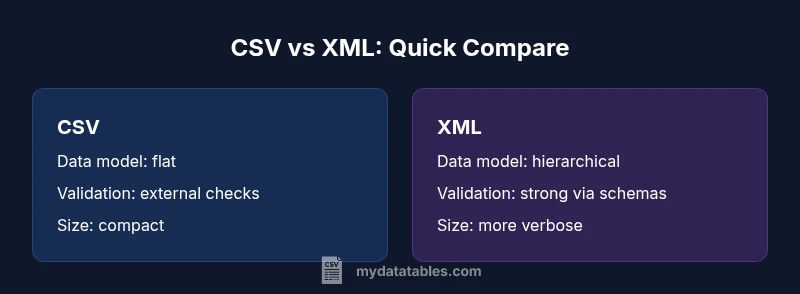
| Feature | CSV | XML |
|---|---|---|
| Data structure | Flat rows of values | Hierarchical with nesting and attributes |
| Validation / schema | Limited built-in schema; external checks | Strong schema support (XSD/Relax NG) |
| File size / overhead | Typically smaller per row; minimal overhead | Verbose with tags; larger overhead |
| Readability for humans | High in small datasets, spreadsheets-friendly | Readable but verbose for large trees |
| Tooling maturity | Very broad support; tabular analytics ready | Mature in enterprise data integration; XML tooling |
| Use cases | Tabular data, logs, exports | Documents, configurations, hierarchical data |
| Streaming / processing | Line-delimited streaming common | XML streaming (XML StAX) possible but heavier |
Pros
- Simple and lightweight for flat, tabular data
- Fast parsing and loading in data pipelines
- Broad tool support and easy editing
- Well-supported in spreadsheets and databases
- Low cognitive overhead for small datasets
Weaknesses
- No inherent schema or nested data without external formats
- CSV can suffer from delimiter ambiguity and quoting issues
- XML can be verbose and heavier to parse
- CSV lacks native namespaces and formal contracts
XML is preferable for hierarchical data and strict schemas; CSV wins for simple, fast tabular exchanges
For data with hierarchy and validation needs, XML offers robust structure. If you need speed, simplicity, and wide spreadsheet compatibility, CSV remains the practical default. The MyDataTables team recommends starting with CSV for flat data and reserving XML for complex documents or configurations.
People Also Ask
What is the primary difference between CSV and XML?
CSV is flat and tabular, designed for speed and ease of use with spreadsheets, while XML represents nested structures and supports schemas for validation. Each serves different data modeling needs.
CSV is flat and fast; XML is hierarchical and schema-driven.
Which format is easier to audit and validate?
XML can be validated against schemas (XSD/Relax NG), providing formal contracts. CSV relies on external checks and conventions, so validation is less centralized.
XML with a schema makes validation clearer.
Can CSV handle nested data?
CSV is inherently flat. Nested data can be simulated with complex conventions, but true hierarchy is better expressed in XML or other formats.
CSV doesn't natively support nesting.
How do I convert CSV to XML?
Conversion involves mapping each CSV row to an XML element and deciding on the resulting schema. Tools and scripts can automate the transformation with attention to encoding and data types.
Use mapping scripts or a transformation tool.
What about performance differences?
CSV parsing is typically faster due to its simple structure. XML parsing incurs extra overhead from tags and optional validation, especially on large files.
CSV generally parses faster; XML is heavier.
Which format is more interoperable in enterprise workflows?
CSV offers broad interoperability for tabular data, while XML supports complex data contracts and document-like exchanges through schemas and namespaces.
CSV is everywhere for simple data; XML supports contracts.
Main Points
- Start with CSV for simple tabular data to maximize speed
- Use XML when data hierarchy and schemas are essential
- Document contracts and encoding choices up front
- Evaluate tooling alignment before committing
- Test round-trip conversions to prevent data loss