What is CSV vs XML? A Practical Guide for Data Analysts
Compare CSV and XML to decide when to use flat tabular data versus nested documents, and how format choices affect performance, parsing, schemas, and interoperability in data workflows.


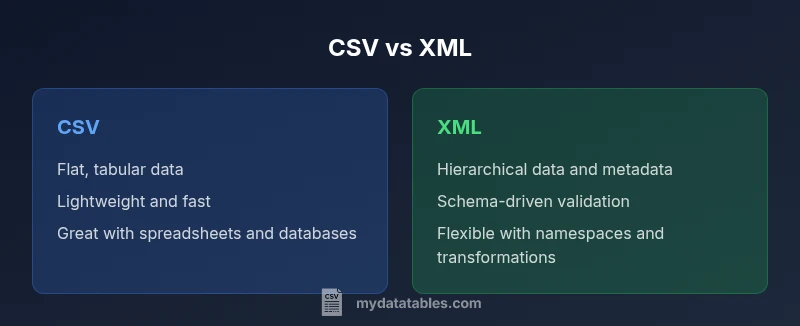
CSV and XML address different data tasks. What is csv vs xml? CSV is a flat, tabular format that excels at simple lists and spreadsheets, with minimal overhead and fast parsing. XML is a hierarchical markup language that supports nested data, metadata, and schemas. For data interchange, CSV is compact and easy to ingest; XML offers structure, extensibility, and validation. Choose CSV for tabular datasets; choose XML for complex, nested data.
What CSV and XML Are: Core Concepts
In data engineering, a clear mental model of formats helps prevent over-optimization. What is csv vs xml? Understanding what is csv vs xml isn’t about picking a universal winner; it’s about matching data shape to the right tool. According to MyDataTables, CSV and XML address different data tasks, not a single best format. CSV is a flat file: each line is a row, and each field is separated by a delimiter, most commonly a comma. It carries minimal metadata and has no built-in mechanism for expressing hierarchy. XML, on the other hand, encodes data as nested elements with opening and closing tags, attributes, and namespaces. This structure supports arbitrarily deep hierarchies and rich metadata, which is essential when data describes complex objects or configurations. Because of these differences, CSV tends to shine for simple tabular data such as spreadsheets, database exports, or lightweight data feeds. XML shines in configuration files, document-centric exchanges, and systems that require explicit schemas for validation or transformation. In real-world workflows, teams often start with CSV for speed and familiarity and then move to XML when nesting or metadata becomes important. In the following sections, we’ll compare the two on practical criteria like size, parsing, and ecosystem support.
--
Comparison
| Feature | CSV | XML |
|---|---|---|
| Data model | Flat table: rows and columns | Hierarchical/nested elements with attributes |
| Schema/validation | RFC 4180 (informational; no universal CSV schema) | XML Schema, DTD, or RELAX NG for strict validation |
| Size/verbosity | Lightweight, minimal overhead | Verbose due to tags and structure |
| Readability/editability | Easily edited in spreadsheets and simple editors | More cumbersome to edit by hand; better with editors supporting XML |
| Best use case | Tabular data, exports, quick ingestion | Nested data, configurations, document-style exchanges |
| Tooling support | Broad support in databases, spreadsheets, ETL | Strong XML tooling: parsers, validators, XSLT, namespaces |
| Transformations | CSV to relational schemas, data marts | XML to other XML formats via XSLT, XPath |
| Validation & metadata | Limited without custom rules | Rich metadata via attributes, namespaces, schemas |
Pros
- CSV is simple and fast to parse, with minimal overhead
- XML provides structured data with metadata and schemas
- CSV files are widely compatible with spreadsheets and databases
- XML enables validation and complex transformations through schema definitions
- CSV is easy to version-control and human-read"able when simple
Weaknesses
- CSV offers little intrinsic structure or metadata, leading to ambiguity without headers or conventions
- XML verbosity can increase transmission and parsing time
- XML requires more effort to extract tabular data into flat forms
- CSV can be fragile if special characters are not properly escaped or quoted
CSV for flat tabular data; XML for nested data and metadata; in modern pipelines, many teams use both based on the data shape.
When your data is primarily rows and columns, CSV keeps things lightweight and fast. When data needs hierarchy, attributes, and schemas, XML is the more expressive choice. The best practice is to select the format that aligns with the data model first and transform to the other format only when necessary.
People Also Ask
When should I use CSV instead of XML in a data integration project?
Assess the data shape first: if the data is tabular and you need rapid ingestion or export to spreadsheets, CSV is typically the better choice. If the data is nested, contains metadata, or must validate against a schema, XML offers clearer semantics and extensibility. In practice, many projects start with CSV for speed and switch to XML for integration with complex systems.
Use CSV for simple tables and Excel-friendly data; switch to XML when you need nesting and metadata for configuration or document-style exchanges.
Can CSV store metadata and complex structures?
CSV does not natively store metadata or complex hierarchical structures. You can include a header row for column names and rely on conventions, but formal schemas and namespaces are outside CSV’s core design. If metadata is essential, consider XML or embed metadata in external sidecar files or a separate schema.
CSV is for simple tables; metadata and nesting are better handled with XML or separate metadata files.
Is XML always better for nested data?
XML is well-suited for nested data and documents that require structure, namespaces, and validation. However, XML introduces verbosity and can be heavier to parse. For simple nested data, consider JSON or YAML as lighter alternatives, but XML remains a trusted standard for enterprise document exchanges and configurable systems.
XML helps with nesting and structure, but it’s heavier. Use it when you need formal schemas and metadata.
How do I convert XML to CSV?
XML-to-CSV conversion typically involves parsing XML into a tabular representation and then writing out rows and headers. Tools and libraries can extract repeated elements into table columns. The transformation should preserve data integrity and handle missing values gracefully.
You can extract the repetitive elements into a table and export as CSV, making sure headers line up with your data.
Are there performance differences between CSV and XML?
CSV generally offers better parsing speed and lower memory usage due to its simple structure. XML, with its tags and hierarchical data, requires more processing and can be slower to parse, especially for large datasets. Practical impact depends on dataset size and the CPU and I/O bandwidth of your environment.
CSV tends to be faster to parse; XML can be slower but offers richer structure.
What tools help work with CSV and XML in MyDataTables?
Most data ecosystems provide robust support for both formats. Spreadsheets, databases, and ETL tools handle CSV well, while XML benefits from validators, XSLT processors, and schema-aware editors. MyDataTables recommends leveraging format-appropriate tooling to ensure data quality and interoperability.
Use your usual data tools for each format—CSV with spreadsheet/db tools, XML with validators and XSLT.
Main Points
- Choose CSV for flat data and fast ingestion
- Choose XML for nested data and explicit schemas
- Be mindful of encoding and escaping in CSV
- Use transformation pipelines to bridge formats when needed
- Document data models to avoid ambiguity and preserve intent