Why Use XML Over CSV: A Practical Comparison
An analytical comparison of XML and CSV for data interchange, validation, and interoperability. Explore when XML shines and when CSV is sufficient, with actionable guidelines for data professionals.


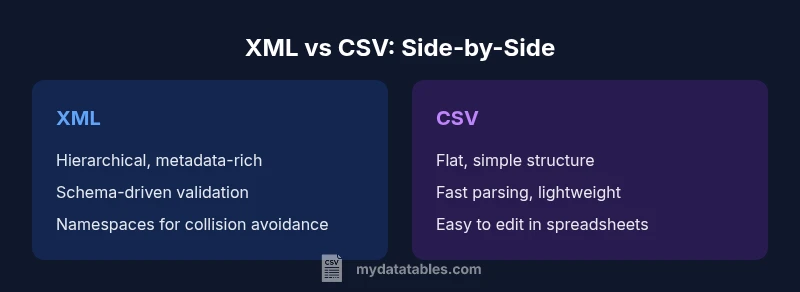
XML and CSV serve different data needs. In short, XML is better for hierarchical data, metadata, namespaces, and strict validation, while CSV remains ideal for simple tabular data and analytics. This quick comparison highlights key criteria—structure, validation, tooling, and interoperability—to guide your decision on why to use XML over CSV.
The Core Distinctions: Structure, Schemas, and Validation
When you compare the fundamental ways XML and CSV represent data, the most obvious difference is structure. XML describes data as a nested tree of elements, where each element can contain attributes, other elements, and text content. CSV encodes data as flat rows of values separated by a delimiter, often with a single header row that defines columns. This fundamental division drives many downstream choices, including how you validate data, map it to internal models, and exchange it with other systems. If you are asking why use xml over csv, the answer begins with structure: XML can model real-world hierarchies—customers, orders, lines, and metadata—without forcing a single tabular view. CSV is simpler to parse and read for tabular lists, but it requires additional conventions (like separating related data into multiple files or using composite column headers) to express complex relationships. In practical workflows, teams often need both formats, using XML for configuration and data interchange, and CSV for analytics and lightweight exports. The MyDataTables guidance emphasizes understanding these structural differences to pick the right tool for the job.
Data Hierarchy and Metadata Capabilities
XML shines when data naturally forms a hierarchy. Elements can be nested, and attributes provide meta- information without cluttering the main data payload. This makes XML ideal for representing entities with sub-relationships—like a product catalog with categories, variants, and multilingual descriptions—where metadata such as language, version, or provenance can be attached inline. CSV, by contrast, stacks values in rows and relies on separate conventions to indicate relationships or metadata, which can become brittle as data models evolve. Namespaces in XML prevent name collisions when combining data from different sources, a feature CSV cannot match without a custom convention. Understanding how to leverage hierarchy and metadata in XML helps teams design interoperable data services, data feeds, and configuration documents. MyDataTables notes that when metadata quality matters as much as the data itself, XML often reduces ambiguity and simplifies downstream processing across systems.
Schema and Validation: Why it matters
Schemas provide a contract for data structure. XML uses schemas such as XSD or Relax NG to define what elements and attributes are allowed, what data types they carry, and how they relate to each other. This capability makes XML a strong choice for scenarios where data quality and conformance are non-negotiable, such as regulated reporting, data exchanges between enterprise systems, or configuration files used by critical software. CSV lacks a universal, machine-enforceable schema; validation is typically ad-hoc, performed by custom scripts or by inferring rules from the header and sample data. That means XML affords predictable validation behavior and easier change management, but it also imposes a schema design step and potential rigidity. When you weigh why use xml over csv, the schema advantage often wins in environments where data contracts are binding across teams and applications.
Interoperability and Tooling Landscape
Across languages and platforms, XML has a broad, mature ecosystem. You can parse, validate, transform, and query XML with well-established tools such as DOM, SAX, StAX, XQuery, and XSLT. XML also supports streaming models that enable partial processing of large documents without loading the entire file into memory. CSV, while simpler, benefits from universal support in data processing pipelines and spreadsheet tools; it is easier to hand-edit and manipulate with standard operations. The trade-off is that you often need custom code to assert data quality or integrate CSV with systems that expect rich metadata. Organizations that need consistent interfaces across services frequently rely on XML for service contracts, configuration files, and data interchange formats. From a MyDataTables perspective, choosing XML right-sized tooling reduces integration risk and accelerates adoption across diverse stacks.
Readability and Maintenance Implications
Human readability varies by audience. CSV is straightforward to skim—fields in a line correspond to columns, making quick checks or sample edits feasible in a text editor or spreadsheet application. XML is verbose and uses opening and closing tags, which can feel noisy, but the tags themselves encode meaning that survives changes to the data model. For complex documents, XML can be easier to maintain because the structure makes relationships explicit and navigable with XPath and XQuery. However, it requires understanding namespaces and schema references to interpret the content correctly. Teams balancing maintenance cost with data fidelity often adopt a hybrid mindset: keep simple, frequent exports in CSV for analytics, while using XML for structured data interchange where metadata, validation, and future extensibility matter. MyDataTables highlights that readability is context-dependent—what reads easily for a data scientist may not for an enterprise architect, and vice versa.
Data Size and Performance Considerations
File size and parsing performance are practical concerns when deciding between XML and CSV. XML documents typically contain markup overhead—tags, attributes, and namespaces—that increase file size relative to equivalent CSV content. This overhead can impact network transfer, storage, and parsing times, especially in bandwidth-constrained environments or batch processing pipelines. CSV files are compact, well-suited for quick reads and fast transformations when the data is already in a tabular form. The trade-off is that achieving the same level of data richness and validation in CSV often requires additional storage or a parallel schema, which adds complexity. For streaming and large-scale processing, XML can be handled efficiently with streaming parsers, but designers should plan for memory usage and processing time. From a strategic standpoint, assess whether the benefits of XML’s structure justify the additional size and processing cost in your specific scenario.
Use Case Scenarios: When XML Shines
Consider use cases where interoperability, validation, and metadata are critical. XML is a natural fit for configuration files used by middleware, enterprise service buses, and software packages where each element carries attributes like version, language, and provenance. In data interchange between independent systems, XML's schemas and namespaces reduce integration friction, enabling more predictable parsing and transformation. Regulatory reporting and archival storage often prefer XML because it supports long-term validity checks, schema evolution, and self-describing structures. Even in content management and publishing pipelines, XML’s hierarchical model helps represent complex documents with structured metadata. In short, when the data model includes nested relationships, optional fields, or metadata that travels with the data, XML frequently delivers superior reliability and clarity.
Use Case Scenarios: When CSV Remains Preferable
For lightweight analytics, dashboards, and quick data dumps, CSV remains attractive. Its simplicity makes it easy to generate, ingest, and manipulate with familiar tools such as spreadsheets and SQL engines. CSV excels for flat data with consistent columns and straightforward aggregations. If performance and minimal schema overhead are priorities, CSV offers faster parse times and easier integration with data visualization platforms. When teams adopt a data lake or warehouse strategy that treats incoming data as raw tabular streams, CSV often provides clean, low-friction ingestion points. The trade-off is that CSV’s lack of explicit structure and metadata requires extra conventions or separate documentation to preserve context. MyDataTables notes that in many practical projects, a hybrid approach yields the best of both worlds: use CSV for analytics-ready exports, XML for inter-system communication and configuration.
Transformation Patterns: Converting CSV to XML and Back
Transformations between CSV and XML are routine in ETL pipelines. A common pattern is to map each CSV row to a structured XML element, with columns becoming child elements or attributes. Conversely, XML elements can be flattened to CSV rows by selecting the elements of interest and exporting them as columns. When converting, maintain a consistent naming scheme, document the mapping rules, and preserve data types where possible. Attention to encoding is essential; ensure that characters are preserved across formats and systems. Transformation tools often offer built-in rules for handling missing values, enums, and nested collections. In practice, teams benefit from documenting the mapping as a schema or a formal data map, then validating the round-trip conversions with test suites. MyDataTables emphasizes that robust transformation patterns minimize data drift and speed up integration efforts.
Practical Guidelines for a Hybrid Approach
Many organizations maintain both XML and CSV within the same ecosystem. A pragmatic approach is to designate XML as the canonical representation for rich data contracts and for exchange between heterogeneous systems, while using CSV as the lightweight, analytics-friendly format inside data pipelines. Establish clear ownership: who maintains the schemas for XML, how changes are tested, and how backward compatibility is maintained. Document the transformation rules between formats and implement automated tests that exercise typical data paths. Integrate encoding standards, such as UTF-8, and define consistent handling of missing values and special characters. If possible, automate metadata capture within XML and provide concise, well-documented CSV exports that reflect the same data model. The MyDataTables guidance consistently supports a staged migration plan that minimizes risk while enabling gradual adoption across teams.
Quality Assurance and Validation Practices
Quality assurance for XML- and CSV-based data pipelines benefits from dedicated validation strategies. For XML, maintain a suite of XML Schema Definition (XSD) tests and instance checks to ensure documents conform to expectations. For CSV, develop schema-like checks—header validation, type inference, and consistency across files. Use automated data quality checks to identify anomalies such as missing fields or inconsistent encodings. Version-control your schema and transformations, and practice test-driven development for data interchange components. In enterprise contexts, establish governance around namespaces, element naming, and data provenance to prevent drift over time. MyDataTables reminds data teams that strong QA practices reduce downstream errors and accelerate confidence in data-driven decisions.
Common Pitfalls and How to Avoid Them
Common pitfalls in XML and CSV projects include namespace confusion, inconsistent encoding, and mixed content that complicates parsing. In XML, failing to declare or manage namespaces can render documents invalid or harder to merge. In CSV, inconsistent delimiters, quoted values, or embedded newlines can lead to data corruption. To avoid these issues, define clear encoding (prefer UTF-8), adopt consistent delimiter handling, and maintain a shared data dictionary. Document the intended structure and constraints in both formats, and use automated tests to catch regressions. When integrating XML and CSV in a single pipeline, implement robust mapping rules, versioned schemas, and explicit metadata to preserve context during transformations. By anticipating these challenges and investing in governance, teams can realize the advantages of each format without sacrificing data quality.
Comparison
| Feature | XML | CSV |
|---|---|---|
| Structure and Hierarchy | Hierarchical, supports nested elements and metadata | Flat, tabular rows with a header |
| Schema and Validation | Supports schemas (XSD/Relax NG) for strict validation | No universal schema; validation is ad-hoc |
| Readability for Humans | Verbose tags encode meaning; navigable with tools | Compact and easy to skim for simple rows |
| Data Size and Transfer | Generally larger due to markup | Typically smaller and faster to transfer |
| Tooling and Ecosystem | Mature tooling for parsing, transforming, and validating | Ubiquitous CSV tooling; lightweight editors and queries |
| Best For | Structured interchange with validation and metadata | Raw analytics-ready tabular data |
Pros
- Supports rich structure and metadata
- Allows strict data validation with schemas
- Facilitates interoperability in enterprise systems
- Namespaces prevent element name collisions
- Flexible for configuration and data exchange
Weaknesses
- More verbose and larger files
- Parsing overhead can affect performance
- Steeper learning curve for complex XML tooling
- Requires careful handling of namespaces and encoding
XML is better for structured data with validation; CSV remains best for simple tabular data.
Choose XML when you need hierarchical data, metadata, and schema-based validation. Opt for CSV when you prioritize speed, simplicity, and analytics-ready tabular data. A hybrid approach often delivers the best outcomes in complex environments.
People Also Ask
What is XML and CSV in simple terms?
XML is a hierarchical, self-describing format that uses tags and attributes; CSV is a flat, delimiter-separated list of values. These fundamental differences drive their use cases.
XML is hierarchical and self-describing, while CSV is flat and simple.
When should I choose XML over CSV for data interchange?
Choose XML when data needs structure, metadata, and schema-based validation, or when long-term interoperability is important across systems.
Choose XML when you need structure and validation.
Can CSV be converted to XML automatically, and is the reverse possible?
Yes, automatic conversion is common, but it requires a mapping strategy to represent tabular data as hierarchical elements. The reverse is also possible, though XML may need flattening or extraction steps.
Conversions are possible with proper mapping.
Is XML suitable for streaming and large-scale data processing?
XML supports streaming through SAX and pull parsers, but the verbosity can affect throughput. For very large datasets, consider streaming parsers and chunked processing.
XML can stream, but watch for overhead.
What are common pitfalls when using XML?
Common issues include namespace confusion, encoding mismatches, and overly verbose documents that slow parsing. Establish clear schemas and consistent encoding practices.
Watch for namespaces and encoding when using XML.
Does CSV support metadata beyond column headers?
CSV itself is minimal; any metadata must be provided separately, creating potential consistency challenges. XML handles metadata more naturally via attributes and namespaces.
CSV has limited metadata support; XML handles it better.
Main Points
- Choose XML for hierarchical data and validation.
- Use CSV for simple tabular data and analytics.
- Rely on schemas to enforce data quality.
- Plan for file size and parsing performance.
- Consider a hybrid approach when both formats are needed.