Is CSV or .xlsx smaller? A practical size comparison
Explore how CSV and XLSX compare in file size for identical datasets, with actionable rules, tests, and guidelines to choose the right format when size matters.


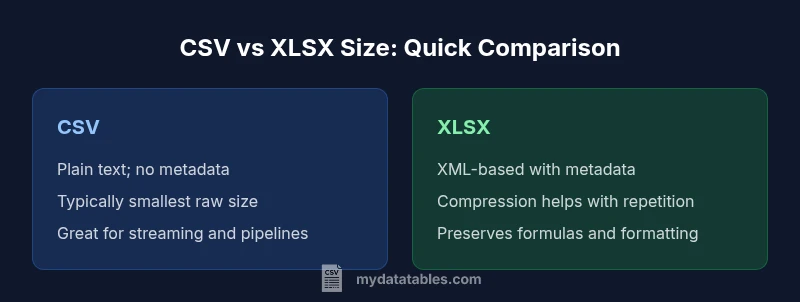
For data interchange, CSV is usually smaller than Excel's .xlsx when storing the same dataset in raw form. The key: CSV stores only raw values with no formatting or metadata, while XLSX bundles XML parts and metadata that add to the size. However, compression and data characteristics can narrow or reverse this gap in practice.
Is csv or.xlsx smaller? Size realities for data teams
Data teams often face the same question when planning a data interchange or storage strategy: is csv or.xlsx smaller? The short answer is usually yes for CSV, but the exact outcome depends on data characteristics and downstream usage. In practice, a plain CSV file stores only the raw values: no fonts, no formatting, no formulas, and no workbook metadata. An Excel workbook (.xlsx) packages the same values inside a ZIP archive but adds multiple XML parts—workbook properties, sheet definitions, styles, and optionally embedded objects. That combination generally leads to larger uncompressed representations, even though ZIP compression can shrink both formats. Consequently, when you compare sizes for the exact same data, CSV often wins on raw size, but the degree of advantage depends on encoding, line endings, and whether you compress the files later. For data teams, this means you should consider not just the number of records, but how the file will be stored, transmitted, and processed.
How file size is determined in CSV and XLSX
File size is not just about the number of rows and columns. In CSV, size is driven by the length of values, the presence of long text, the use of delimiters, line endings, and the encoding (UTF-8 vs UTF-16, for example). Quoted fields, escaping, and BOM markers can add bytes. In XLSX, size is affected by the packaging overhead: the workbook structure, shared strings table, styles, and relationships, plus the actual data stored as XML. While Excel compresses its internal XML with ZIP, the overhead from metadata and repeated XML tags often makes XLSX larger than a plain CSV when the dataset is simple and unformatted. If the same data is stored in both formats, you should expect CSV to be smaller in most typical cases, especially before any compression is applied.
CSV basics and size implications
CSV is the simplest plain-text representation of tabular data. Its footprint grows with:
- The average length of values, particularly text fields
- The presence of quotes and delimiters needed to escape data
- Line ending conventions across platforms (LF vs CRLF)
- The chosen encoding (UTF-8 without BOM is often leaner than UTF-16) Because there is no metadata, formatting, or type information in a CSV, the file is inherently compact for many datasets. However, if you apply compression, the resulting compressed size depends on the redundancy of data. Repeating patterns compress well in both CSV and XLSX, but the raw CSV remains leaner in most straightforward datasets.
XLSX anatomy and how it affects size
An XLSX file is a ZIP container that stores many XML parts. The core contributors to size include:
- workbook.xml and worksheets.xml that describe structure and content
- sharedStrings.xml that stores repeated strings for compactness
- styles.xml and theme data that add formatting information
- relationships and content types that define how parts connect Because of this modular approach, even datasets with the same values can incur more bytes in XLSX before compression than in CSV. Yet, XLSX can leverage strong compression when the data includes many repeated strings or when the spreadsheet embeds formatting, formulas, or data validation rules. In practice, if your data is purely numeric or short, CSV will usually be smaller; if your data contains lots of repeated text or rich formatting, XLSX may catch up after compression.
The role of compression and encodings
Compression changes the size equation. CSV files compress effectively when they contain long or repetitive text patterns, which can dramatically reduce the final footprint on disk or in transit. XLSX, being ZIP-based, benefits from the same principle, but its XML structure often reduces to a larger pre-compression size due to metadata and tags. Encoding choices also matter: UTF-8 without BOM tends to yield smaller files than UTF-16, especially for CSVs; XLSX uses UTF-8 for strings in modern implementations, but the internal XML format can still introduce overhead. In short, enable compression for both formats when size matters, then compare the resulting compressed sizes to determine the better option for a given dataset.
Practical rules of thumb: when is CSV smaller?
- Your data consists mainly of numeric values or short text fields with minimal formatting.
- You will store or transmit the file in a compressed form (gzip/zip) and want to minimize bandwidth or storage costs.
- You require minimal metadata and no formulas, charts, or formatting to accompany the data.
- The pipeline expects a simple, plain-text input with deterministic parsing rules. In these scenarios, CSV typically yields a smaller footprint than XLSX, especially before compression. If your workflow benefits from a universal delimiter and a consistent text encoding, CSV is often the pragmatic choice when is csv or.xlsx smaller is a primary concern.
Edge cases: when XLSX can be smaller or equal
There are rare situations where XLSX may approach or even undercut CSV for the same data:
- The data includes many repeated strings and you rely on the sharedStrings.xml mechanism to compress repeated values effectively.
- You have significant formatting, data validation, or embedded metadata that XLSX stores efficiently in compressed form, reducing overhead relative to a large CSV with quoted fields.
- The CSV would otherwise require heavy escaping and quoting due to embedded commas, newlines, or quote characters, increasing its raw size beyond XLSX’s structured XML approach. In these edge cases, measuring actual file sizes with representative data is the safest approach before deciding based on size alone.
Measuring size differences: a quick experiment
A practical test helps quantify the difference in your environment. Steps:
- Create a representative dataset in your source system with the typical mix of values.
- Export once as CSV and once as XLSX using the same data and encoding.
- Compare uncompressed sizes on disk (and then compressed sizes if your workflow uses compression).
- Repeat with variations (long text fields, many duplicates, numeric-heavy content) to observe how the gap shifts.
- Record the results and apply a simple rule of thumb: is csv or.xlsx smaller for your dataset under typical processing conditions? This empirical approach will guide your ongoing format choice.
Implications for data pipelines and transfers
The choice between CSV and XLSX, from a size perspective, affects data ingress to stores, backups, and network transfer. If your pipeline is cloud-based and bandwidth-limited, CSV is often the safer bet for raw size efficiency, especially when you plan to compress files or stream data. Conversely, if you depend on Excel-specific features or require tight integration with spreadsheet workflows, XLSX might be the practical choice, with size mitigated through selective formatting or selective exporting of raw values. When evaluating is csv or.xlsx smaller, consider not just the raw size but also the total cost of ownership—including parsing libraries, error handling, and downstream storage policy.
Comparison
| Feature | CSV (.csv) | Excel (.xlsx) |
|---|---|---|
| Default file size for identical data (uncompressed) | Typically smaller | Typically larger due to XML overhead and metadata |
| Compression impact | Compresses well; plain text yields high compression | Already ZIP-compressed internally; benefits depend on data redundancy |
| Metadata and formatting | No metadata or formatting | Includes workbook properties, styles, and sheets |
| Parsing complexity | Simple parsing; robust in pipelines | Requires Excel-compatible tooling; more complex to parse programmatically |
| Best for | Data interchange, logs, streaming raw values | Rich spreadsheets with formulas, charts, or styling |
Pros
- CSV files are widely supported across tools and pipelines
- CSV generally has the smallest raw size for plain datasets
- CSV is simple to parse and stream in many ETL processes
- XLSX benefits from compression when data includes many repeated strings
- XLSX preserves formatting and formulas for end-user workflows
Weaknesses
- CSV lacks metadata, schema, and formatting, increasing parsing risk
- XLSX adds metadata and XML overhead, increasing uncompressed size
- CSV requires careful handling of escaping and encoding to avoid data corruption
CSV generally yields the smallest raw size for identical data; XLSX can match or exceed CSV only in edge cases with heavy repetition and metadata.
Choose CSV if raw size is your primary concern and you want broad tool compatibility. Consider XLSX when you need formatting, formulas, and metadata, but verify size with a quick test on your actual data to confirm which format truly minimizes storage and transfer costs.
People Also Ask
Is CSV always smaller than XLSX for identical data?
In most cases, CSV will have a smaller uncompressed size because it stores only raw values with no metadata. However, if the dataset contains many repeated strings and you rely on Excel’s internal compression or you require rich formatting, XLSX can approach or slightly beat CSV in compressed form. The safest approach is to test with your actual data.
Usually CSV is smaller raw size, but test your data to confirm, especially if you plan to compress.
Does compression change which format is smaller?
Yes. Compression can reduce both formats, but the impact varies. CSV’s plain text often yields high compression for repetitive data, while XLSX’s ZIP-based compression benefits from repeated strings in the sharedStrings.xml and other XML parts. The result depends on data patterns and whether you compress before storage or transmission.
Compression can flip which format is smaller, depending on data patterns.
When should I prefer CSV by size alone?
Choose CSV when you need the smallest possible raw size for large datasets and you don’t need formatting or formulas. This is common in data pipelines, backups, and transport of raw data. Always verify with a small-scale test on your actual dataset.
Pick CSV if size is the top constraint and you don’t need Excel features.
How can I measure size differences quickly?
Export the same dataset as CSV and XLSX, then compare both uncompressed and compressed sizes on disk. Repeat with different data patterns to understand how the gap changes. Document the results for future decisions.
Do a quick export-and-compare test on representative data.
Do data types affect size differences between CSV and XLSX?
Yes. CSV stores values as text with minimal typing information, while XLSX stores structured XML with data types and formatting. If you have many large numeric fields, XLSX may inflate less than expected if formatting is used heavily, but generally CSV remains smaller for raw data.
Data type handling can influence size, but raw CSV is usually lighter.
Main Points
- Assess data characteristics before format choice
- CSV is usually smaller for plain data-bytes
- Compress both formats to see real-world size benefits
- Edge cases exist where XLSX can be comparable in size
- Run a quick empirical test on representative data to decide
- Consider downstream tooling and pipeline requirements for size considerations