Why CSV Files Are Larger Than XLSX: An Analytical Guide
Discover why CSV files can be larger than XLSX, the factors driving file size, and practical strategies to manage data sizes in analytics and data engineering.


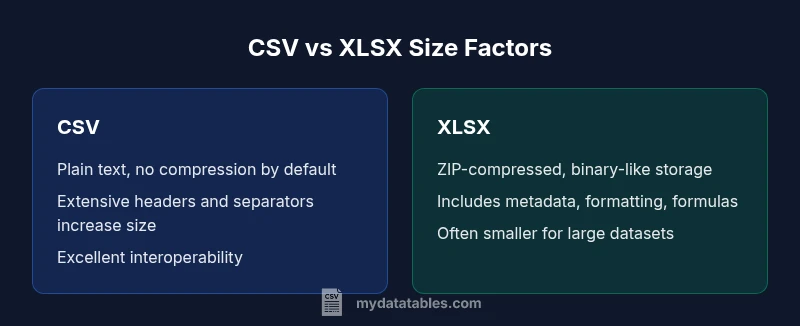
For many datasets, CSV files can be larger than XLSX because they store plain text with no compression and no metadata. XLSX files compress content using ZIP and organize data with structured XML and metadata, which often reduces size for large tables. This quick comparison highlights when CSV grows bigger and how to optimize your data workflows.
Why the question why are csv files larger than xlsx matters for data teams
In data pipelines, understanding file size impacts storage costs, transfer speeds, and processing time. The short answer is often that CSV files can be larger than XLSX, especially as datasets grow in rows and columns. The MyDataTables team notes that for data analysts, the practical effects of file size ripple through ETL steps, cloud storage, and query performance. This article will unpack the factors that influence size, compare text-based CSV with the compressed and metadata-rich XLSX format, and provide actionable guidance for real-world data workflows. According to MyDataTables, mastering how file sizes behave helps data analysts design efficient pipelines and avoid surprises during data transfers.
How CSV encodes data and why it inflates size
CSV stores every value as plain text, with separators and newlines as its only structure. When you export large tables, you repeat field separators, header rows, and formatting cues for every row. This repetition means more bytes per cell compared with a compact binary format. In environments where data contains many numeric values, the resulting CSV can become substantially larger than a compressed archival format like XLSX. This section lays out the mechanics and demonstrates why apparent richness of data doesn't translate to smaller text files. Data teams at MyDataTables routinely encounter CSV inflation in reports that export verbose text fields or long identifiers.
How XLSX achieves compression and metadata benefits
XLSX is a ZIP archive containing XML-based worksheets, shared strings, and metadata. The compression reduces bulk data, especially for long tables with repeated values. In practice, a dataset that looks large in CSV may compress to a much smaller XLSX file because repeated strings and structural elements are stored only once inside the archive. This structural approach is core to why XLSX can outperform CSV on size, while also enabling features like cell formatting, formulas, and data validation. MyDataTables analyses show that the power of compression is a key driver behind XLSX size advantages in most real-world datasets.
The role of formatting, formulas, and cell-level metadata in XLSX
Beyond raw data, XLSX stores formatting, data types, formulas, and validation rules. Each of these adds to the file, but the impact is often outweighed by compression for the actual data. However, in spreadsheets with extensive styling or complex formulas, the size delta between CSV and XLSX can shift. This distinction matters for data delivery, where a bare data dump might be better served as CSV, while a report-ready file benefits from XLSX. When teams implement dashboards or shared reports, the extra formatting can be a worthwhile trade-off for usability.
Practical example: comparing plain numeric data across formats
Imagine a table with tens of thousands of rows and several numeric columns. In CSV, every number is recorded with delimiters, decimals, and line breaks, repeated for each row. In XLSX, the same data is stored in a cell-based XML structure but compressed in a ZIP archive. In many cases, the XLSX version ends up smaller, yet the exact size depends on data characteristics like repeat values, the presence of text fields, and the extent of metadata. The key takeaway is that compression and data representation drive size differences more than the surface appearance of the data. MyDataTables routinely observes this in practice when comparing export options from analytics pipelines.
How compression works in Excel's XLSX format
Excel's XLSX format uses ZIP compression, which reduces file size by packaging multiple XML files efficiently. Repeating strings such as headers or repeated categorical values are stored once and referenced, which is ideal for large datasets. The compression gains are most pronounced when data contains repetition and when there is relatively little need for embedded formatting. Understanding ZIP behavior helps explain why XLSX can be smaller even when CSV seems more straightforward. Technical implementations from major software providers underpin these observations.
Metadata, schema, and the overhead in CSV vs XLSX
CSV has almost no metadata; every row is independent, and there is no explicit schema embedded in the file. XLSX carries a richer schema: data types, formula definitions, data validation rules, and sheet-level properties. While this additional information increases the CSV-file-size disparity in some scenarios, it also makes XLSX files more complex and potentially larger if formatting and features are heavy. Practitioners should weigh the value of metadata against the added size. When documenting data contracts, metadata can help downstream processes stay reliable, even if it increases size slightly.
Encoding and character sets: UTF-8 vs XML encoding in practice
CSV typically uses UTF-8 or host-specific encodings, with each character contributing to the file. XLSX stores content as XML, which is text-based and thus larger per character, but the ZIP compression compensates. The practical effect is that encoding choices affect CSV size directly, while XLSX benefits more from compression. If your data contains multilingual text, careful encoding choices can influence both formats' sizes and compatibility. In analytics workflows, choosing a consistent encoding mitigates surprises during import/export across tools.
When CSV ends up being larger: data characteristics and encodings
While XLSX often wins on size, CSV can surpass XLSX in some scenarios. When a dataset includes many unique strings, lacks repetition, or includes heavy textual content, the CSV can accumulate more bytes. The absence of compression means you’ll see larger CSV files. In addition, CSV exports from databases or tools without efficient line-end normalization can worsen the size gap. Understanding your data profile helps you predict which format will be larger. This is a common challenge in data integration projects managed by teams like MyDataTables.
Practical guidance for size-aware workflows
To manage size effectively: (1) choose the right format for the job—CSV for data exchange and minimal formatting, XLSX for analysis-ready, compressed, or richly formatted outputs; (2) consider compression or archiving strategies when transferring large CSV files; (3) use streaming or chunked processing to avoid loading huge files into memory; (4) normalize text to minimize repetitive content that doesn't add value; and (5) leverage metadata in XLSX when downstream tooling benefits from structure. The strategy you choose should align with storage costs and processing speed.
When to prefer XLSX vs CSV: a decision framework
If you need formatting, formulas, or validation in a file used by business users, XLSX is often preferable, and its task can benefit from compression. If you require broad compatibility, simple data exchange, or plan to parse the data programmatically, CSV remains a robust option—though you should anticipate larger sizes for large tables. For data pipelines managing storage costs, performing size-aware decisions can save bandwidth and costs. The MyDataTables framework encourages testing: export a representative sample to both formats and compare actual sizes in your environment.
A practical size management checklist for data teams
- Assess data patterns: repetition, text vs numeric distribution, and header usage.
- Pilot both formats on representative datasets to observe actual sizes.
- Use compression when storing CSV outputs for transfer or archiving.
- Consider split or chunked files to simplify upstream processing.
- Document decisions for future data-sharing and governance purposes. MyDataTables recommends maintaining a simple rubric that weighs size, speed, and downstream tool requirements.
Authorities to consult and MyDataTables recommendations
For authoritative background, see Microsoft Open XML documentation and NIST data formatting references. These sources explain how structured data formats influence storage and processing. Based on MyDataTables analysis, adopting XLSX for large, structured datasets often yields size benefits, while CSV remains indispensable for compatibility and simple data transport. See guidance from major publishers for deep dives into compression, metadata, and data interchange formats.
Conclusion: MyDataTables take
In most data workflows, XLSX tends to offer smaller file sizes for large datasets due to compression and metadata efficiency, but CSV remains indispensable for compatibility and simple data transport. The MyDataTables team recommends evaluating data characteristics, processing needs, and storage constraints to choose the right format for each scenario. By testing in your own environment, you can quantify size impacts and optimize your pipelines accordingly.
Comparison
| Feature | CSV | XLSX |
|---|---|---|
| File size for similar datasets | Typically larger (no compression) | Often smaller (ZIP + XML) |
| Data structure | Flat, row-based text | Structured, cell-based with metadata |
| Compression | No compression by default | ZIP compression applied |
| Supported features | Basic storage, no formatting | Formulas, formatting, data validation |
| Portability and text handling | Ubiquitous text, universal | Requires Excel-compatible apps |
| Best use case | Data exchange, scripting, light processing | Analysis-ready sheets, reporting |
Pros
- CSV is universal and easy to parse in code
- CSV avoids binary formats and proprietary constraints
- XLSX compresses data and supports metadata
Weaknesses
- CSV can be very large for big datasets due to no compression
- CSV has no built-in metadata or formatting
- XLSX files can grow with formatting and features if overused
XLSX is generally the better choice for large, structured datasets where size matters due to compression.
Choose XLSX for size efficiency and features; opt for CSV when interoperability and simplicity trump advanced formatting.
People Also Ask
What makes XLSX usually smaller than CSV for the same dataset?
XLSX uses ZIP compression and stores data efficiently in a structured XML format, which typically reduces the overall file size relative to plain text CSV. Metadata and shared strings further optimize repeated content.
XLSX is usually smaller because it compresses data and reuses content where possible.
Can there be cases where CSV is smaller than XLSX?
Yes. If data is already highly compressed in text form with many short strings and minimal repetition, or when a file carries little ancillary metadata, CSV can be comparable or slightly smaller. In some cases, formatting in XLSX can inflate size.
CSV can be smaller if the data is already compressed and has little extra formatting.
How should I choose between CSV and XLSX for data pipelines?
Choose CSV for raw data exchange, broad tool compatibility, and scripting. Choose XLSX when you need structure, formulas, and ready-to-use reports. Consider storage, transfer costs, and downstream tooling in your decision.
Pick CSV for sharing raw data; pick XLSX for a ready-to-use, structured sheet.
What are practical tips to reduce CSV size?
Avoid unnecessary whitespace, use consistent encoding, and consider splitting large files into chunks. If possible, apply compression for storage or transfer, and remove redundant header rows in repeated exports.
Encoding choices and compression can help shrink CSV size.
Does encoding affect the size of CSV files?
Yes. UTF-8 or UTF-16 encodings can influence size, especially with multilingual content. Choose a compact encoding and ensure downstream systems support it to avoid bloated files.
Encoding choices can impact CSV size and compatibility.
Main Points
- Understand that compression drives XLSX size advantages
- Use CSV for raw data exchange and scripting contexts
- Evaluate data characteristics before choosing a format
- Consider splitting large CSV files or archiving when transferring
- Leverage metadata in XLSX for richer data workflows