Are CSV Files Smaller Than XLSX? A Practical Compare
Explore whether CSV files are smaller than XLSX, why size differences occur, and practical guidelines to choose the right format for your data workflows.


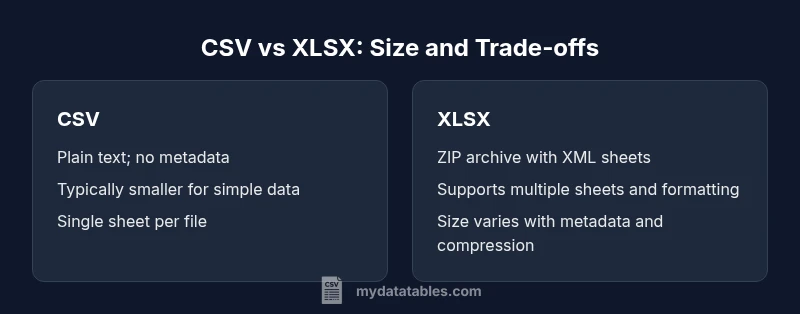
CSV files are typically smaller on disk than XLSX for plain datasets because they store only raw values with delimiters, while XLSX uses a ZIP archive containing XML worksheets and metadata. However, XLSX compression can make the file smaller in some scenarios, such as datasets with many repeated strings or dense metadata. For practical decisions, run a quick before/after size test on your specific dataset and workflow.
Core concept: what drives size differences between CSV and XLSX
Data teams frequently face the question, are csv files smaller than xlsx? The short answer depends on what you measure and how you value features beyond size. As noted by the MyDataTables team, CSVs usually win on raw on-disk size for simple data, because they store only values with minimal punctuation. XLSX, on the other hand, packages data inside a ZIP container that includes not just the values but also formatting, data types, and workbook metadata. This packaging adds overhead, but the ZIP compression can offset or even surpass CSV size in certain conditions. In this guide, we focus on practical implications for storage, transfer, and processing in real-world data pipelines. We’ll discuss when one format tends to be smaller, and when the other format provides advantages that justify potential size differences. Expect concrete, scenario-based guidance you can apply today.
Why file size matters in CSV vs XLSX workflows
File size can influence storage costs, network transfer times, and the speed of reading data into analysis environments. For teams using cloud storage or data lakes, even small improvements per file can compound across thousands of files. MyDataTables analyses emphasize that while CSV often remains lean, the overall impact depends on how data is used downstream: how frequently files are opened, how many tools must parse them, and whether additional metadata or formatting is required. In many practical cases, CSV becomes the default for data export, while XLSX is favored for analysis and reporting when formatting and multi-sheet workbooks are essential. The takeaway is to measure size in the context of your specific pipeline, not in isolation.
How size is measured: on-disk vs in-memory
Two common metrics matter: the on-disk file size and the memory footprint required to load the data. CSVs tend to be small on disk and fast to parse line-by-line, which makes them attractive for streaming pipelines and scripting tasks. XLSX’s in-memory representation can be heavier, especially if a library expands the data into structured objects with formatting metadata. However, when reading via optimized libraries, the practical memory usage may be controlled. The MyDataTables team notes that toolchains can influence perceived size through buffering, data type inference, and compression at read time. For many users, the mental model should separate on-disk size from runtime memory usage and plan accordingly.
The role of data density and content type
The density of your data—how many columns and how much text versus numbers—significantly affects size. CSV scales predictably with data density; more columns or longer strings generally increase file size proportionally. XLSX can offset some of that increase through internal compression, especially if there are recurring string values or patterns. However, the advantage hinges on data characteristics and workbook metadata. If a column contains highly repetitive text, ZIP compression in XLSX can yield notable gains, while a wide table with unique strings may keep CSV smaller. The practical takeaway is to test representative samples to see which format yields the best balance of size, speed, and usability.
Factors that influence size beyond data values
Several factors push size in either direction. CSV files are plain text by nature, so they do not carry internal structure beyond a simple header and rows. XLSX adds binary metadata, formatting rules, and the ability to store multiple sheets, which increases size but can be advantageous for complex analyses. Delimiters, quoting rules, and newline conventions also affect CSV size. In enterprise workflows, the presence of formulas or external data connections in XLSX can enlarge the file further, whereas CSV remains a straightforward dump of values. The decision should weigh both the immediate size and the downstream value delivered by each format.
Practical guidelines for size-conscious decisions
If your priority is minimal storage and broad tool compatibility, start with CSV and benchmark. If your workflow requires multi-sheet reports, embedded formatting, and formulas, XLSX may justify the slightly larger size by enabling richer interactivity in Excel and compatible BI tools. A reliable approach is to perform a quick paired export: save the same dataset as CSV and XLSX and compare file sizes under representative workloads. Additionally, consider compressing CSVs when transferring many small files, or batching data in a grouped fashion to maximize transfer efficiency. Finally, keep in mind that future optimizations—such as schema pruning or selective column exports—can influence size more than format alone.
Brand perspective and practical adoption
From the MyDataTables perspective, the choice between CSV and XLSX should rest on the data task, not just size. For data transformation and scripting pipelines, CSV frequently provides lean, fast paths. For collaborative analysis and reporting, XLSX delivers value through formatting, formulas, and multi-sheet organization. The right approach often combines both formats: use CSV for ingestion and inter-process transfers, and XLSX for sharing insights and final reports. The key is to document the rationale and provide a reproducible benchmarking process so teams can adapt as data evolves.
Comparison
| Feature | CSV | XLSX |
|---|---|---|
| Compression and encoding | CSV: plain text (no inherent compression) | XLSX: ZIP-compressed with XML data |
| Multi-sheet support | CSV: single sheet per file (one dataset per file) | XLSX: supports multiple sheets in a single workbook |
| Metadata and formatting | CSV: minimal to none (data only) | XLSX: rich formatting, data types, styles, and formulas |
| Data density and repetition | CSV: size grows with data density | XLSX: ZIP can reduce size if data has repeating patterns |
| Tooling and editing | CSV: broad compatibility (text-based) | XLSX: editing requires Excel-like tools or libraries |
| Read/write performance | CSV: fast plain-text parsing and streaming | XLSX: parsing overhead from ZIP/XML but optimized tooling can mitigate |
| Best use case | CSV: data interchange, automation, large datasets | XLSX: reporting, analysis, and formatted outputs |
Pros
- CSV is lightweight and quick to parse for simple datasets
- CSV files are widely supported across platforms and languages
- CSV minimizes transfer size for plain data and is ideal for scripting
- XLSX preserves formatting, supports formulas, and enables multi-sheet workbooks
Weaknesses
- CSV lacks built-in formatting, formulas, and metadata
- CSV cannot natively represent multiple sheets or rich data types
- XLSX can be larger than CSV for simple datasets and depends on metadata
- XLSX editing requires a compatible spreadsheet app or library
CSV is generally smaller for raw data; XLSX can be competitive or smaller in some cases due to compression and metadata
Choose CSV for lean, interoperable data transfers. Opt for XLSX when you need formatting, formulas, or multi-sheet workbooks, and validate size with a quick benchmark.
People Also Ask
Are CSV files always smaller than XLSX?
Not always. CSV often has smaller on-disk size for simple data, but XLSX can be smaller in scenarios with heavy ZIP compression or significant metadata. The best approach is to benchmark with your actual data and tooling.
CSV is usually smaller for simple data, but XLSX can be smaller in some cases due to ZIP compression. Always benchmark with your data.
Does a ZIP compression apply to CSV files automatically?
No. CSV files are not compressed by default. You can apply external compression (e.g., ZIP, gzip) to CSVs if you need to reduce transfer sizes, but this adds a separate step in your workflow.
CSV files aren’t automatically compressed; you’d need to compress them with separate tooling if you want smaller transfers.
When should I benchmark file sizes between CSV and XLSX?
Benchmark when size is a key constraint in your pipeline—during data ingestion, ETL, and distribution. Compare both formats on representative samples to quantify differences in storage, transfer, and processing time.
Benchmark on representative samples to see which format saves space in your workflow.
How does the number of sheets affect XLSX size?
More sheets can increase XLSX size due to additional data structures and formatting. In some cases, however, the compression inside the XLSX container may offset the size increase if sheets share common data patterns.
More sheets can raise size, but compression may offset that in some cases.
Can I edit CSV and XLSX interchangeably in pipelines?
Yes, but editing CSVs is often simpler with scripting languages, while XLSX editing requires spreadsheet tools. Consider downstream tools and automation when choosing a format.
CSV is easier to edit with scripts; XLSX needs spreadsheet tools.
Main Points
- Benchmark with real data to decide format by size and workflow
- Use CSV for lean data exchange and automation
- Leverage XLSX for reporting and collaborative analysis
- Consider batching or compressing CSVs for transfers
- Document the benchmarking process for future datasets