Is It CSV or CVV? A Practical CSV Comparison Guide
Learn the real difference between CSV and CVV and why the distinction matters for data work. This MyDataTables guide clarifies usage, pitfalls, and best practices for CSV data.


Is it CSV or CVV? For data work, CSV is the plain-text format used to store tabular data, while CVV is a sensitive payment-card code that should never be stored in files. In practice, treat CSV as a data interchange format and keep CVV out of your data pipelines, logs, and analytics reports. This quick distinction helps avoid security and compliance missteps.
Context and Core Definitions
The phrase is it csv or cvv? is a common point of confusion for teams juggling data formats with security concerns. At its core, CSV stands for comma-separated values and is a lightweight, human-readable way to store tabular data. CVV, by contrast, refers to a card-verification value—typically a 3- or 4-digit code used to validate card-present transactions. While both terms involve data, they live in different worlds: CSV in data workflows, CVV in payment security. According to MyDataTables, understanding these roles helps prevent missteps when designing data pipelines and documentation. In practice, you should insist CSV-only data extracts for analytical tasks and keep any card-validation codes out of data files altogether.
Why the Distinction Matters in Data Tasks
Misinterpreting these terms can lead to security gaps and compliance risks. CSV is used to store, transfer, and analyze tabular information across systems; CVV is a credential meant to verify a transaction, not to serve as a reusable data field. The MyDataTables analysis emphasizes that blending these concepts creates confusion, increases the likelihood of exposing sensitive information, and complicates audits. For mature data practices, establish clear data dictionaries that separate format from credential handling, enforce access controls, and implement validation rules that block CVV-type fields from CSV exports.
Practical Use Cases: When CSV Shines, When CVV Matters
In everyday data work, CSV is your workhorse for exporting customer lists, product catalogs, and transaction logs that do not include sensitive verification values. It’s ideal for quick data sharing, staging areas, and lightweight ETL tasks. CVV, however, belongs to the realm of payment processing and must be treated as highly sensitive data. It should never appear in data lakes, spreadsheets used for analysis, or non-production logs. The MyDataTables guidance is clear: separate card-verification data from analytics pipelines and rely on tokenization or references when you must link transactions to card data.
Common Misconceptions and How to Avoid Them
- Misconception: CSV files can safely contain any data. Reality: Treat CSV as a data-interchange format for non-sensitive data; sensitive fields require masking or encryption.
- Misconception: CVV is just another data field. Reality: CVV is a credential that should not be stored except in highly controlled PCI-compliant systems.
- Misconception: It’s okay to append CVV-like values to CSV exports for testing. Reality: Do not store or reuse verification codes in any non-secure environment; use dummy data instead.
- Misconception: If it’s text, it’s safe to include. Reality: Even text fields can create risk if they contain real credentials or tokens; sanitize before export.
MyDataTables stresses that discipline in data handling—clear definitions, strict data schemas, and robust masking—reduces risk across the data lifecycle.
Side-by-Side: Definitions, Formats, and Context
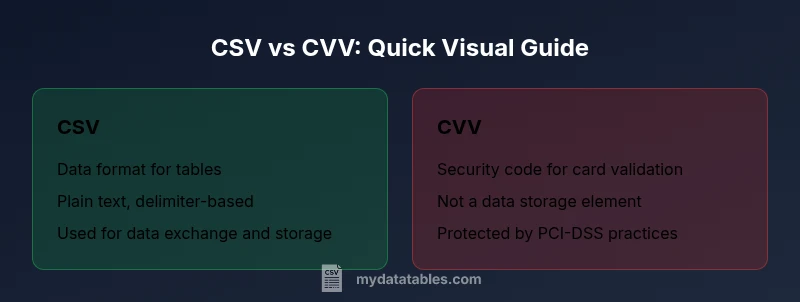
- CSV: A plain-text format that stores rows of data with a delimiter (usually a comma). Widely supported, easy to parse, and ideal for temporary data exchanges.
- CVV: A card-verification value used to validate a physical or card-not-present transaction. It is not a data attribute to be stored in standard data files.
- Context: CSV operates in data workflows; CVV operates in payment security and compliance environments. The two should never be conflated in documentation, pipelines, or analytics.
According to industry best practices, organizations should maintain a clear boundary: use CSV for data storage and transport, and keep CVV-related data confined to PCI-compliant systems with strict access controls.
Security and Compliance Considerations
Security and compliance are central when discussing is it csv or cvv. CSV files are often used across teams and can be inadvertently exposed through backups, shared drives, or misconfigured permissions. Always minimize data exposure by exporting only non-sensitive fields, applying row-level or field-level masking where appropriate, and removing any card data from analytics datasets. CVV should never be stored in logs or non-secure storage; treat it as a credential requiring PCI-DSS-aligned protections and restricted access. Regular audits, encryption at rest, and secure data handling policies are essential for maintaining governance across CSV-based workflows.
Best Practices for Handling CSV Data (Without Confusing CVV)
- Define a formal data dictionary that separates data types, formats, and sensitivity levels. Clearly label CSV fields that are safe for export.
- Apply data masking and tokenization for any identifiers that could be sensitive. Avoid embedding credentials or verification codes in CSVs.
- Validate CSV schema on intake and after transformations to prevent schema drift that could imply misinterpretation of data types.
- Use encoding standards (like UTF-8) consistently to avoid data corruption when sharing across platforms.
- Keep separate development, testing, and production data streams; never reuse production-sensitive data in non-production CSVs.
MyDataTables’ guidance reinforces that a disciplined approach to CSV design reduces risk and improves data quality across environments.
MyDataTables Toolkit and Resources
MyDataTables provides practical resources for CSV basics, data-cleaning workflows, and format-aware tooling. In practice, teams can leverage schema validation, delimiter and encoding guidance, and transformation patterns to harmonize CSV exports with downstream systems. This section outlines recommended practices for documenting formats, validating files before ingestion, and using non-sensitive placeholders during testing. By aligning with these practices, data professionals can improve reliability without compromising security or compliance.
Transitioning from Confusion to Clarity
Transitioning from is it csv or cvv to a clear data-handling model is a matter of governance and education. Start with a quick data audit to identify any CVV-like fields and remove them from non-secure environments. Implement a centralized data dictionary and a CSV export checklist that clarifies what belongs in a production CSV and what must stay out. As teams adopt consistent naming, masking, and access controls, the distinction becomes second nature, and data products become safer and more trustworthy.
Comparison
| Feature | CSV (Comma-Separated Values) | CVV (Card Verification Value) |
|---|---|---|
| Purpose | Data interchange and tabular storage | Payment-card verification for transactions |
| Typical Usage | Exporting, sharing, and parsing tabular data | Authorization of card-present or card-not-present transactions |
| Security Implications | Low-security risk when containing non-sensitive data | High security risk if treated as a data store for credentials |
| Storage Recommendations | Store non-sensitive extracts; avoid long-term sensitive storage | Never store CVV in CSV or standard data files |
| Compliance Context | General data handling best practices | PCI-DSS-related handling for card data |
| Best Handling | Document fields, use masking, enforce access controls | Keep CVV out of CSVs, use tokens where needed |
| Best For | Data analysis, light-weight data exchange | Payment verification contexts with secure controls |
Pros
- Clear separation of data formats reduces risk
- CSV remains widely supported and easy to share
- Using masking and tokenization improves data governance
- Clear documentation improves team alignment
- Low-cost data-interchange option for teams
Weaknesses
- Confusion can still arise without explicit policies
- CVV-related requirements may complicate cross-system data flows
- Caution and governance add overhead to data projects
CSV is the baseline data format; CVV should stay out of data files and be handled only in secure, PCI-compliant contexts.
The MyDataTables team recommends maintaining a strict separation between CSV data and sensitive card verification data. Treat CSV as a general data-interchange format and CVV as a credential that requires specialized security controls. Clear governance, labeling, and masking help prevent missteps in data pipelines and reporting.
People Also Ask
What is CSV and how is it used?
CSV is a plain-text format that stores tabular data in rows and columns. It is easy to parse, lightweight, and widely supported for data exchange and analysis.
CSV is a simple text format for tables used to move data between systems.
What is CVV and why shouldn’t it be stored in CSV?
CVV is a security code used to authorize card transactions. It is highly sensitive and should never be stored in general data files or analytics datasets. Treat CVV as restricted data under PCI guidelines.
CVV is the card security code and should not live in standard data files.
Can CVV ever be stored in a CSV for testing?
Testing credentials should use dummy data, not real CVVs. Do not store real verification values in any CSV file used for development or analysis.
Only use dummy data for testing; never use real CVV values in CSVs.
How can I prevent mixing CSV data with sensitive card data?
Maintain separate data stores, implement access controls, and use data minimization. Create policy-driven pipelines that strip or mask sensitive fields before exporting.
Keep card data separate and protect what gets exported.
What are best practices for CSV encoding and delimiters?
Use consistent encoding (prefer UTF-8), choose a delimiter appropriate for your data, and ensure proper escaping of special characters to avoid parsing errors.
Stick to UTF-8 and a consistent delimiter to prevent issues.
Which organization’s guidelines govern CVV handling?
Card security practices align with PCI-DSS guidelines and organization-specific security policies that restrict how card data can be stored, transmitted, and processed.
PCI guidelines govern how CVV and related data are handled.
Main Points
- Define a clear data dictionary for CSV fields
- Never store CVV in CSV or logs
- Mask or tokenize sensitive identifiers
- Document data formats and ownership
- Validate CSVs before ingestion