CSV vs VCARD: Practical Data Workflow Comparison
Explore a practical comparison between csv or vcard file formats for data workflows, covering structures, tooling, interoperability, and best-use scenarios for analysts, developers, and business users.


CSV and VCARD are two fundamental data formats used for different purposes. For data workflows, CSV is ideal for tabular data, bulk imports, and analytics, while VCARD encodes contact details for exchange between address books. This comparison highlights structure, tooling, and interoperability to help you choose the right format for csv or vcard file scenarios.
Why csv or vcard file choice matters in data workflows
Choosing between csv or vcard file formats is not a casual decision; it shapes how you model data, how you integrate systems, and how easily you can scale your workflows. For data workflows, CSV is the backbone of tabular data, used in data lakes, databases, and analytics pipelines. VCARD, by contrast, encodes contact information as discrete, portable records designed for exchange between address books and contact-management apps. According to MyDataTables, the right choice depends on the downstream consumers, the data shape, and the level of interoperability you need. The MyDataTables Team notes that many organizations rely on CSV for bulk data interchange, while VCARD assists when you need a standardized, shareable representation of individuals or groups. This section lays the groundwork for a practical comparison between csv or vcard file formats, highlighting when each shines and where they fall short.
Data structures at a glance: CSV vs VCARD
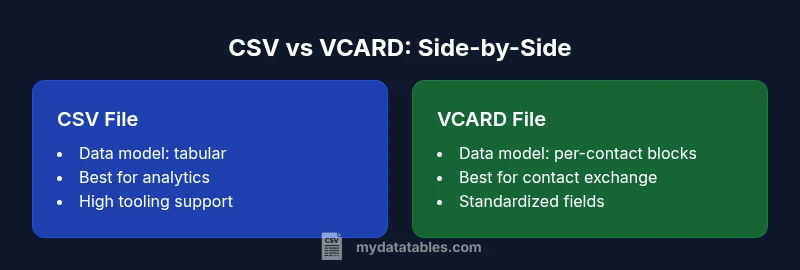
CSV is a plain-text, table-oriented format where each line represents a record and each field is separated by a delimiter (commonly a comma or tab). VCARD is an object-oriented format consisting of a sequence of vCard components, each of which maps to a subset of fields such as FN (full name), TEL (telephone), EMAIL, ADR (address). The first difference readers notice is schema: CSV relies on external headers to define meaning; VCARD encodes meaning through defined field labels. Another contrast is scalability: CSV handles rows efficiently and scales with tooling that can stream or batch process, while VCARD grows with the number of contacts and can become verbose. For csv or vcard file workflows, understand that CSV emphasizes columnar organization, whereas VCARD emphasizes individual contact records with structured metadata.
When to choose CSV: analytics, imports, and bulk data
CSV shines in data analytics, export/import pipelines, and scenarios requiring bulk processing. It is forgiving in editing, friendly to spreadsheets, and excellent for column-level transformations, filtering, and aggregation. If your downstream tools expect a tabular input—like SQL databases, BI platforms, or machine learning pipelines—CSV is typically the safer, faster choice. From an interoperability perspective, the wide ecosystem of libraries and utilities around CSV makes it easy to parse, validate, and transform. For csv or vcard file decisions, consider the end-to-end workflow: how you will capture data, how you will validate it, and how you will share it with teams. According to MyDataTables analysis, CSV remains the default format for many business data exchanges, precisely because of its simplicity and ubiquity.
When to choose VCARD: contact exchange and interoperability
VCARD is purpose-built for contact data, making it the natural choice when you need to move people information between email clients, CRM systems, and phonebooks. The format provides strong semantics for names, organizations, addresses, phone numbers, and emails, with explicit typing that reduces ambiguity during imports. VCARD is especially valuable in environments where interoperability across platforms matters more than bulk analytics. For csv or vcard file considerations, VCARD abstracts away the column mapping problem: instead of aligning hundreds of fields, you map standard vCard fields to the target schema. The trade-off is verbosity and the need for specialized parsers or libraries. The end result is portable, self-describing records that travel well between modern contact-management ecosystems.
Encoding, delimiters, and portability considerations
Delimiters, encoding, and newline handling can make or break data portability. CSV relies on a delimiter and quoting rules; if your data contains the delimiter, you must escape it, which can be error-prone. UTF-8 is the de facto standard, but environments vary, so you should verify BOM usage and character encoding across tools. VCARD uses a line-based encoding with property parameters; it can be easier to preserve Unicode characters for names and addresses, but some older systems struggle with multi-valued files or with different versions (2.1, 3.0, 4.0). When choosing csv or vcard file approaches, ensure you specify an encoding, line endings, and a consistent delimiter policy. Pilot tests and validation checks help you catch misinterpretations before they propagate through downstream systems.
Tooling and ecosystem: editors, libraries, and apps
A healthy tooling ecosystem is a deciding factor in real-world adoption. CSV benefits from universal editors, scripting languages, and database loaders; libraries exist for Python (pandas, csv module), JavaScript (Papa Parse), R, and many ETL platforms. VCARD tooling is more specialized: you’ll encounter contact-export utilities, email clients, and CRM integrations that generate or read vCard files. When csv or vcard file workflows cross-team boundaries, choose a workflow that supports both formats and provides a smooth conversion path. Interoperability becomes a problem only if you pick a toolchain that treats one format as a one-way export. The practical recommendation: document field mappings, define expectations for encoding, and validate a round-trip conversion to catch data loss or misinterpretation early.
Conversion strategies: from CSV to VCARD or VCARD to CSV
Conversion between formats is a common necessity; the direction dictates the approach. To convert CSV to VCARD, you typically map CSV headers to vCard properties (FN, TEL, EMAIL, etc.), then emit a series of VCARD blocks. Conversely, CSV export from VCards requires flattening structured fields into a tabular schema and deciding how to handle multi-value fields. A robust strategy includes preserving key identifiers, validating against a reference schema, and handling multilingual data with careful encoding. For csv or vcard file transformations, tools like scripting languages or ETL platforms can orchestrate these mappings. Implement tests that cover edge cases: missing fields, multiple emails, or multi-line addresses. Document the mapping rules so future contributors understand how data evolves during conversion.
Data quality and validation: ensuring fields align
Data quality in csv or vcard file workflows hinges on consistent field semantics and clean values. Implement validation rules for required fields, data types, and length limits; use schema-aware imports when possible, even for CSV. For VCARD, validate structured properties and avoid unsupported versions or deprecated fields. Data profiling, sampling, and validation dashboards can reveal gaps in real-world data before they cascade into downstream systems. Consider automation to flag anomalies—like invalid phone numbers, malformed emails, or inconsistent address formats—and develop a remediation workflow. The MyDataTables approach to data quality stresses that you should treat both formats as living artifacts: evolve your templates with governance, maintain a versioned mapping, and monitor changes over time.
Privacy, security, and compliance when exporting contacts
Exports containing personal information require careful handling. Ensure you minimize exposure by exporting only the necessary fields, encrypting sensitive data in transit and at rest, and applying access controls to export artifacts. CSV files can be zipped and password-protected, while VCARDs may embed sensitive data within a single file or multiple attachments. Compliance considerations differ by jurisdiction but often center on consent, retention, and the ability to revoke access. When planning csv or vcard file workflows, implement logging for exports and monitor for unusual access patterns. In team environments, define clear policies on sharing and archiving to reduce risk from data leakage or misuse.
Practical import/export workflows in popular tools
Most modern tools offer import/export support for both CSV and VCARD, but the user experience can vary. In spreadsheet ecosystems, you typically export to CSV for bulk data and import VCARD as contact lists into address books. In CRM or marketing platforms, CSV often serves as the primary import format, while VCARD imports may be used for contact lists or contact provisioning. When you design csv or vcard file workflows, ensure that you test end-to-end scenarios: create sample records, perform round-trip conversions, and validate that the target system preserves the essential fields. Establish guidelines for versioning data, re-import checks, and rollback plans in case a mapping changes.
Performance and scalability considerations with large datasets
CSV scales gracefully for large datasets because of simple structure and streaming-friendly parsing. VCARD, while robust for individual contacts, can become resource-intensive when dealing with millions of records or multi-valued fields. To optimize performance, consider chunked processing, streaming parsers, and parallel conversion pipelines. Also assess I/O bandwidth, memory usage, and CPU overhead in your environment. When you need csv or vcard file formats at scale, implement incremental processing, verify data integrity after each chunk, and maintain a consistent encoding across all steps. The takeaway is to design with throughput in mind and plan for growth early.
A practical migration playbook: deciding and executing the move
A disciplined approach helps teams decide and execute a migration between CSV and VCARD with minimal risk. Start with a requirements workshop: define use cases, data domains, and success criteria. Then map fields, choose encoding standards, and identify edge cases. Build a small pilot, measure conversion accuracy, and collect feedback from downstream systems. Finally, roll out with versioned templates, automated validation, and a rollback plan. For csv or vcard file migrations, establish governance around field mappings, dependencies, and change control. The goal is a repeatable, auditable process that your team can reuse for future formats or data shapes.
Comparison
| Feature | CSV file | VCARD file |
|---|---|---|
| Data model | Tabular (rows and columns) | Line-based entries per contact with standardized fields |
| Best for | Bulk analytics and imports | Contact exchange and interoperability |
| Human readability | High in spreadsheets; easy to scan | Moderate; readable but specialized |
| Tooling & libraries | Extensive (pandas, CSV parsers, DB loaders) | Moderate; widely supported in contact apps |
| Encoding & internationalization | UTF-8 widely supported; delimiter handling critical | UTF-8 for names; versioning matters |
| File size impact | Typically compact per row; scales linearly | Per-contact overhead; may be larger for multi-value fields |
| Conversion complexity | Relatively straightforward with clear header mapping | More complex due to field semantics and versioning |
| Common pitfalls | Delimiter escaping; missing headers | Unmapped fields; multi-value fields |
Pros
- CSV is widely supported by spreadsheets, databases, and analytics tools
- CSV files are easy to generate and parse programmatically
- VCARD provides standardized fields for contact data, improving interoperability
- CSV handles large tabular datasets efficiently and with low overhead
- VCARD facilitates portable contact exchange across platforms
Weaknesses
- CSV lacks a built-in schema, risking field ambiguity and data drift
- VCARD can be verbose and harder to process in bulk workflows
- CSV can suffer from delimiter encoding pitfalls if not carefully managed
- VCARD's support for multi-value fields and version variations can complicate parsing
CSV is the preferred default for data processing; VCARD excels for contact exchange.
For most data workflows, choose CSV to maximize compatibility and throughput. For exchanging individual or grouped contacts between apps, VCARD offers better portability and semantic structure; use conversion tooling to bridge gaps when needed.
People Also Ask
Which format should I choose for importing contacts into a CRM?
For CRM imports, VCARD is often preferred because it preserves contact semantics and supports rich, structured fields. If your CRM accepts CSV, you can still import by mapping headers to the target fields, but expect additional validation work. Consider starting with VCARD for interoperability, then complement with CSV for bulk updates if needed.
VCARD is typically better for CRM contact imports because it keeps fields structured and consistent across systems.
Can I store multiple contacts in a single VCARD file?
Yes, a single VCARD file can contain multiple VCARD blocks, each representing a contact. However, some applications may restrict parsing to single entries per file, so it’s important to validate with your target system. When sharing large contact lists, consider batch processing or splitting into manageable chunks.
Yes, VCARD files can hold multiple contacts, but always test with your target app.
Can CSV to VCARD conversion preserve all fields?
Converting CSV to VCARD relies on a clear field mapping from headers to standard vCard properties (like FN, TEL, EMAIL). Some CSV columns may not have direct equivalents, requiring custom properties or data normalization. Expect potential loss if you map loosely or omit optional fields.
Fidelity depends on mapping; some CSV fields may not have direct VCARD equivalents.
What tools support both formats?
Many ETL tools and scripting libraries support both CSV and VCARD formats. For CSV, common libraries exist across Python, JavaScript, and R; for VCARD, look for contact management APIs, email clients, and CRM plugins. Choose a toolchain that offers explicit mappings and validation for both formats.
Look for tools with explicit mapping and validation for both CSV and VCARD.
Are there encoding or delimiter considerations I should know?
Yes. For CSV, choose a stable delimiter and consistently escape quotes; confirm UTF-8 encoding across systems. VCARDs rely on a line-oriented format with explicit encoding considerations. Always standardize on UTF-8 and document line endings to avoid cross-system misinterpretations.
Standardize on UTF-8 and consistent line endings to avoid misinterpretation.
Is VCARD suitable for large datasets?
VCARD can handle large datasets, but performance may degrade as the number of contacts grows, due to verbose blocks and parsing overhead. For very large lists, consider chunked processing and validating each batch to keep operations manageable.
Large VCARD datasets can be slower to parse; batch processing helps.
Main Points
- Choose CSV for analytics-ready data and bulk imports
- Use VCARD when portable, standards-based contact exchange is needed
- Plan encoding, delimiters, and field mappings upfront to avoid data drift
- Prefer a validation-controlled pipeline with round-trips between formats
- Leverage conversion tooling to bridge CSV and VCARD when required