CSV to ICS File: Convert CSV Events to iCalendar
A practical guide to converting CSV events into ICS format, detailing field mapping, date/time handling, and validation to ensure clean calendar imports.


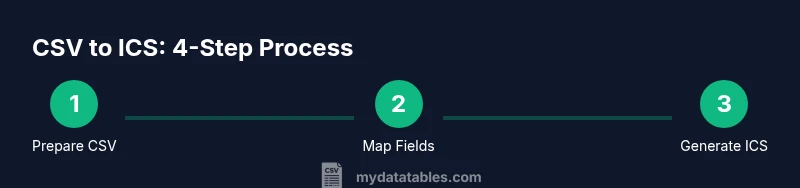
To convert a CSV to ICS, map each row to a VEVENT entry, then assemble those VEVENT blocks into a single VCALENDAR with VERSION:2.0 and PRODID tags. Ensure dates and times use proper formats (YYYYMMDD, HHMMSS), handle time zones, include a UID for each event, and validate the final .ics file with a calendar validator.
CSV to ICS file: What it is and why you’d want to convert
Converting CSV data to ICS format enables you to turn a simple list of events into a portable calendar file that almost any calendar app can import. When you have a CSV with columns like Subject, StartDate, StartTime, EndDate, EndTime, and Location, you can produce a clean ICS file that preserves event boundaries and reminders. According to MyDataTables, this practice is common when teams need to share event data across Google Calendar, Outlook, Apple Calendar, or internal scheduling apps. The benefit is consistency: once the CSV is mapped to ICS, you can reuse the same workflow for dozens or hundreds of events, avoiding manual entry and reducing errors.
Understanding ICS (iCalendar) structure and essential fields
An ICS file follows the iCalendar format, typically beginning with BEGIN:VCALENDAR and ending with END:VCALENDAR. Inside, each event is defined by VEVENT blocks containing fields such as DTSTART, DTEND, SUMMARY, LOCATION, DESCRIPTION, UID, and DTSTAMP. Dates can be in local time with TZID or in UTC, and CRLF endings separate properties. MyDataTables analysis shows that common mistakes—omitted UID, inconsistent date formats, or missing DTEND—lead to import failures. Adhering to the 2.0 spec and keeping fields consistent reduces errors across calendar apps.
Mapping CSV columns to ICS fields: practical examples
A straightforward mapping uses: Subject -> SUMMARY, StartDate/StartTime -> DTSTART, EndDate/EndTime -> DTEND, Location -> LOCATION, Description -> DESCRIPTION, and UID for unique event identification. If AllDay is present, you can set DTSTART with a date only and use a UID per row. For repeating events, RRULE or RDATE lines can be added. This section includes concrete examples, showing how a CSV header like Subject,StartDate,StartTime,EndDate,EndTime,Location,Description translates into a VEVENT block that can be repeated for each row.
Handling dates, times, and time zones in ICS
Dates in ICS can be expressed as local times with a TZID or as UTC times with a trailing Z. For example DTSTART;TZID=America/New_York:20260307T090000 or DTSTART:20260307T130000Z. Consistency is key; mixing formats will confuse calendar apps. If your CSV uses time zones, consider storing both the local time and the TZID in a mapping column to generate accurate ICS entries. You may also add a DTSTAMP for each VEVENT to indicate when the event was created.
Recurring events, alarms, and advanced ICS features
ICS supports recurring events via RRULE, plus RDATE and EXDATE for exceptions. VALARMs allow you to define reminders. When converting, decide if a row represents a one-time event or a recurring pattern. For recurring rows, generate an appropriate RRULE (e.g., FREQ=WEEKLY;COUNT=10) and include a SUMMARY and UID. Advanced features like ATTENDEE, ORGANIZER, or GEO can also be mapped if your data includes those fields.
Validation, testing, and common pitfalls
After generating the ICS file, validate it with an ICS validator and test by importing into multiple calendars (Google, Outlook, Apple). Common pitfalls include malformed VEVENT blocks, missing END:VEVENT, incorrect DTEND values, and non-UTF-8 characters. Ensure line lengths stay within spec limits and that the file uses CRLF endings. Keeping a sample ICS with a few events helps you spot issues early and refine your mapping rules.
Best practices for a robust CSV-to-ICS workflow
- Keep a clean source CSV with enforced headers and consistent date formats. - Use a template VEVENT block to ensure uniform fields across all rows. - Separate data transformation from file writing to simplify debugging. - Include unit tests that compare produced ICS snippets against expected outputs.
Quick sanity checks before sharing your ICS
Scan your ICS for syntax errors, verify TIME ZONE IDs, and confirm that each VEVENT has a UID, DTSTART, DTEND, and SUMMARY. A final check with a calendar import will catch locale-specific quirks before deployment.
Tools & Materials
- CSV file containing events(Headers should include Subject, StartDate, StartTime, EndDate, EndTime, Location, Description (examples).)
- Text editor or IDE(Use a code-friendly editor to manage templates and avoid accidental formatting.)
- Spreadsheet software or CSV processor(Helpful for validating and preprocessing large CSV files.)
- ICS generator template (or scripting environment)(Python, Node.js, or a spreadsheet approach can be used.)
- Calendar for testing (Google/Outlook/Apple)(Import and verify the .ics file behaves as expected across apps.)
- ICS validator tool(Tools like iCalendar validators help catch syntax errors.)
- Time zone data source (IANA TZ database)(Useful for accurate TZID mappings if your data spans multiple zones.)
Steps
Estimated time: 60-90 minutes
- 1
Prepare the CSV
Inspect the CSV to ensure required columns exist and dates are consistently formatted. Remove extraneous columns and normalize headers to simple names like Subject, StartDate, StartTime, EndDate, EndTime, Location, Description.
Tip: Create a sample 5-row subset to test your mapping rules before processing the full file. - 2
Choose a conversion method
Decide whether you will script the transformation (Python/Node.js) or use a spreadsheet-based approach with text export. A scripted approach scales better for large datasets, while spreadsheets can be quicker for small lists.
Tip: If scripting, plan a reusable function that reads CSV and outputs VEVENT blocks. - 3
Create an ICS VOUELEMENT template
Draft a VEVENT block skeleton including DTSTART, DTEND, UID, SUMMARY, and LOCATION. Decide on UTC vs TZID for times and ensure your template can be populated row-by-row.
Tip: Always include a placeholder UID so every event is unique. - 4
Populate VEVENT blocks from CSV
Map each CSV row to a VEVENT with the appropriate fields. Generate DTSTAMP and UID, and construct DTSTART/DTEND using either TZID or Z suffix for UTC.
Tip: Use a deterministic UID (e.g., YYYYMMDD-HHMMSS-Subject) to avoid duplicates. - 5
Assemble into VCALENDAR
Wrap all VEVENT blocks inside a single VCALENDAR with VERSION:2.0 and PRODID identifiers. Ensure proper line endings and newline separation between events.
Tip: Include a BASIC END:VCALENDAR to close the file. - 6
Validate and test the ICS
Run the generated ICS through validators and import into several calendars to verify compatibility and time accuracy. Fix any issues and re-run tests.
Tip: Test with both single-day and multi-day events to catch edge cases.
People Also Ask
What is an ICS file and why use it?
An ICS file is a standard calendar data format (iCalendar) used to store events. It enables easy sharing and synchronization of events across calendar apps like Google Calendar, Outlook, and Apple Calendar.
ICS is the standard calendar format you share across apps. It makes event data portable and easy to import.
Can I convert large CSV files to ICS without breaking things?
Yes, but you should batch the conversion, validate intermediate results, and test with a subset of events before scaling. Large files can reveal performance and formatting issues.
You can convert big CSVs, just test in chunks and validate each chunk.
What date/time formats should I use for the ICS file?
Use ISO-like components in ICS: dates as YYYYMMDD and times as HHMMSS, with an optional TZID or a Z suffix for UTC. Consistency across all events is crucial.
Use the ICS time formats like YYYYMMDD and HHMMSS, with consistent time zones.
How do I handle time zones in ICS events?
Decide whether to store times with TZID or in UTC. If your CSV lacks TZ data, convert to UTC or map to a standard TZID before generating DTSTART/DTEND.
Choose UTC or a named TZID for all times and stay consistent.
Can ICS support recurring events?
Yes. Use RRULE to define recurrence rules, and include RDATE/EXDATE for exceptions. Ensure UID uniqueness across instances.
ICS can handle recurring events with RRULE and related fields.
What if my CSV has missing fields?
Fill missing fields with sensible defaults where possible (e.g., Subject = Untitled Event). If essential fields are missing, flag and correct the data before conversion.
If essentials are missing, fix them before converting.
Watch Video
Main Points
- Map CSV rows to VEVENT blocks accurately
- Handle time zones consistently to avoid shifts
- Validate with calendar apps before sharing
- .ics files enable cross-platform calendar interoperability
- Document your mapping rules for future data syncs