yaml to csv: A practical guide for data teams
Learn step-by-step how to convert yaml to csv, flatten nested data, validate results, and automate the workflow using Python and CLI tools.


You will learn how to convert yaml to csv, including flattening nested structures, preserving data types, and building a repeatable workflow. You’ll need a YAML parser, a CSV writer, and a script or command-line tool to automate the process. Also, consider validation steps to catch missing fields and type mismatches before merging into pipelines or reports.
What yaml to csv means and why it matters
According to MyDataTables, converting yaml to csv is a common task in data workflows, used when migrating configuration data, test fixtures, or extraction results from YAML into tabular form. YAML (Yet Another Markup Language) is human-friendly and supports nesting, lists, and complex structures. CSV (Comma-Separated Values) is widely supported by analytics tools, databases, and spreadsheets. The pairing is powerful: YAML preserves structure during capture or configuration, and CSV makes the data easy to filter, join, and visualize. In this section we’ll set expectations, outline typical data patterns, and introduce the core idea of flattening nested YAML into a flat, header-driven CSV.
Key ideas:
- Flatten hierarchical keys into column headers (e.g., user.address.city → user_address_city)
- Decide on how to represent lists (one row per item vs. multiple columns)
- Preserve or annotate data types to avoid misinterpretation in downstream tooling
YAML structure and common data types you’ll encounter
YAML supports scalars (strings, numbers, booleans), sequences (lists), and mappings (maps). It also allows anchors and references, which can complicate straightforward conversion if not resolved. When you convert YAML to CSV, you typically flatten maps into columns and convert lists into repeated entries or delimited strings. Common patterns:
- Scalars: simple, direct values like name: "Alex"
- Nested maps: address: street: "Main" city: "Springfield"
- Lists: tags: ["data", "etl"] or items: [{id:1, name:"A"}, {id:2, name:"B"}]
Understanding these shapes helps you design a stable schema for the CSV and avoids misalignment between rows and headers.
CSV column design and data integrity concerns
A robust YAML-to-CSV design starts with a stable header plan. Decide how deep flattening goes, how to name columns, and how to handle optional fields. Consider data integrity: numeric fields must stay numeric, booleans should be true/false, and nulls should be represented consistently (e.g., empty string or explicit null). If you’re exporting to a database, ensure you align CSV columns with the target table schema, including data types and default values. You’ll also want to think about encoding (UTF-8) and delimiter choice for reliability across tools.
Best practices:
- Use consistent header naming (prefer underscores over spaces)
- Normalize units and formats (dates, currencies)
- Validate after conversion with a lightweight schema check
Flattening strategies for nested YAML to flat CSV
Two common strategies exist for flattening nested structures:
- Dot notation: convert nested keys to a single header using dot separators (e.g., user.address.city becomes user.address.city).
- Delimiter-based or compound headers: replace dots with underscores or other separators (user_address_city).
Choose a strategy early and document it in your pipeline. Lists require a policy:
- One row per list item is common when each item represents an independent record.
- If each YAML document represents a single record, you can expand lists into multiple columns or normalize with a separate CSV file and a join step.
Consistency is the key. Whichever approach you pick, apply it across the entire dataset.
A practical workflow: from YAML file to CSV with Python
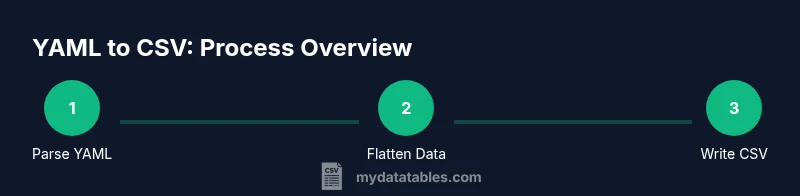
In this section we’ll outline a practical workflow and show a minimal code path. You can adapt this to CLI-based tools if you prefer not to code. The core idea is to read YAML, recursively flatten the data, align with a header structure, and write out a CSV with guaranteed column order.
Typical steps include:
- Load YAML with PyYAML or ruamel.yaml
- Recursively flatten mappings to a single dictionary per record
- Collect all headers across records to build a consistent CSV header
- Write rows in the same header order, handling missing keys gracefully
Step-by-step: a concrete Python example (high level)
Code examples show how to implement a YAML-to-CSV converter with flattening and validation. This example uses PyYAML and the built-in csv module.
import yaml, csv
from itertools import chain

def flatten(d, parent_key="", sep="_"):
    items = {}
    for k, v in d.items():
        new_key = f"{parent_key}{sep}{k}" if parent_key else k
        if isinstance(v, dict):
            items.update(flatten(v, new_key, sep=sep))
        elif isinstance(v, list):
            items[new_key] = ",".join(map(str, v))
        else:
            items[new_key] = v
    return items

with open("data.yaml") as f:
    data = yaml.safe_load(f)
flattened = [flatten(item) for item in data]
headers = sorted(set(chain.from_iterable(d.keys() for d in flattened)))
with open("output.csv", "w", newline="") as f:
    w = csv.DictWriter(f, fieldnames=headers)
    w.writeheader()
    for row in flattened:
        w.writerow({k: row.get(k, "") for k in headers})
This snippet demonstrates a straightforward approach: flatten dictionaries, unify headers, and write in a deterministic order. Adapt to your YAML structure and data types as needed.
Validation and quality checks after conversion
Validation helps catch data quality issues early. Typical checks:
- All rows have the same header set
- Numeric fields parse as numbers where expected
- Dates and timestamps follow a consistent format
- Optional fields are either present or consistently blank
Tools you can use for validation include csvkit (csvstat, csvformat) or simple Python scripts that compare headers and sample rows. Automate these checks as part of CI/CD or data pipelines to prevent regression.
Performance considerations for large YAML files
YAML parsers can be memory-intensive for very large files. If you expect megabytes to gigabytes of YAML, consider streaming parsers (ruamel.yaml with safe_load_all, or PyYAML's SafeLoader) and a streaming writer for CSV. Parallelization is often limited by the flattening step; however, you can chunk the YAML input and write multiple CSV fragments, then concatenate them while ensuring header consistency.
Practical tips:
- Stream input when possible to avoid peak memory usage
- Precompute headers from a representative sample to prevent dynamic header changes
- Use a compiled language for extreme scale or a workflow engine that supports streaming
Common pitfalls and best practices when converting YAML to CSV
Pitfalls include losing hierarchical context, misinterpreting lists, and mixing data types. To mitigate:
- Decide on a flattening policy before coding and document it
- Normalize dates, times, and numbers early
- Prefer explicit nulls over empty strings for missing values when your downstream systems require it
- Test with edge cases: empty mappings, long strings, and nested lists
With a clear policy and tests, YAML-to-CSV conversions become reliable and reproducible.
Tools & Materials
- Python 3.x interpreter(Ensure you have access to pip for installing libraries)
- PyYAML or ruamel.yaml(Choose one YAML parser and use a consistent API)
- CSV writer library (csv module or pandas)(The built-in csv module is sufficient for most cases)
- Sample YAML file(s) to convert(Include representative edge cases like nested maps and lists)
- Text editor or IDE(For editing scripts and YAML samples)
- Optional CLI tools (yq, jq)(Helpful for quick YAML inspection and filtering)
- CSV validation tool (csvkit)(Useful for quick schema checks)
- Environment with UTF-8 encoding(Prevents encoding-related data loss)
Steps
Estimated time: 1-3 hours
- 1
Define target CSV schema
Outline which YAML fields map to which CSV columns. Decide how nested structures will flatten (dot notation vs underscores) and set a consistent header order.
Tip: Document your mapping so future conversions stay aligned. - 2
Choose the flattening approach
Select a consistent policy for transforming nested keys into columns. Implement a helper that applies this policy uniformly across all records.
Tip: Prefer a naming convention early to simplify downstream queries. - 3
Pick tooling (Python vs CLI)
Decide whether to implement in Python (more flexible) or shell-based CLI tools (faster to ship).
Tip: Python is recommended for complex transformations and validation. - 4
Implement flattening function
Write a recursive function to flatten YAML mappings into a flat dictionary keyed by the chosen headers.
Tip: Handle lists by joining items or emitting multiple rows per item depending on your schema. - 5
Build header set and write CSV
Aggregate all keys across records to determine the header order, then write each row with missing fields filled consistently.
Tip: Sort headers to ensure deterministic output across runs. - 6
Validate output
Run a small suite of checks: header consistency, type integrity, and sample value validation.
Tip: Automate this as part of your data pipeline tests. - 7
Automate and monitor
Wrap the process in a script or workflow tool to run on a schedule or in response to data changes; add logging and alerts.
Tip: Log any discrepancies and fix the root cause in the source YAML. - 8
Optimize for large files
If YAML files are huge, consider streaming parsers and chunked CSV writing to manage memory usage.
Tip: Profile memory usage and tune buffering to balance speed and stability.
People Also Ask
What is the difference between YAML and CSV in data work?
YAML is hierarchical and human-friendly, suitable for configuration and nested data. CSV is flat and tabular, ideal for analytics. Converting YAML to CSV lets you leverage standard data tools while preserving as much structure as possible.
YAML is hierarchical and human-friendly, while CSV is flat and great for analytics. Converting lets you use standard data tools.
How should I handle lists when converting YAML to CSV?
Decide whether to expand lists into multiple rows, join items into a single string, or create separate related CSV files. Consistency across the dataset is key.
Lists can be expanded, joined, or split into related files; keep a consistent approach.
Can I preserve the original YAML structure in CSV?
CSV cannot represent arbitrary nesting directly. Flattening is necessary. Preserve meaningful hierarchy by choosing clear header names and documenting the mapping.
CSV is flat; flattening is needed, but you can keep hierarchy with clear headers.
What tools best support YAML-to-CSV workflows?
Python with PyYAML or ruamel.yaml is common. The built-in csv module or pandas can write CSV, and yq or jq can help pre-process YAML in shells.
Python with PyYAML is a solid choice; use csv or pandas to write CSV.
How can I automate YAML-to-CSV in a data pipeline?
Wrap the conversion in a script or job, trigger on YAML updates, and include validation steps. Integrate into CI/CD or orchestration tools like Airflow or Prefect.
Automate with a script and add validation in your pipeline.
What are common errors when converting YAML to CSV?
Mismatched headers, inconsistent data types, and lossy handling of missing values are frequent problems. Always validate after conversion.
Header mismatch and type issues are common; validate output.
Is there a recommended workflow for rapid prototyping?
Start with a small YAML sample, implement a flattening routine, generate CSV, and iterate on header naming and value normalization.
Prototype with a small sample, then iterate on headers and types.
Watch Video
Main Points
- Define a stable YAML-to-CSV mapping
- Flatten with a consistent header strategy
- Validate output before use in analytics
- Consider streaming for large files
- Automate the workflow to reduce manual errors