How to translate CSV: A practical guide for data teams
Learn practical, encoding-safe methods to translate CSV data across languages. This comprehensive guide covers encoding, glossary design, automation, validation, and export, with step-by-step instructions for data analysts, developers, and business users.


Translate CSV content into another language while preserving its structure and encoding. This guide walks you through practical methods—from selecting a translation approach and glossary to validating results and exporting clean CSV files. Key requirements include using UTF-8 encoding, maintaining column headers, and applying automated checks to catch mis-translations, formatting drift, and data integrity errors.
What translating CSV means for data teams
Translating CSV data is about converting the textual content within a CSV file from one language to another while keeping the original structure intact. For data analysts, developers, and business users, translating CSV is a common step in internationalization workflows, data localization, and multilingual reporting. The MyDataTables team emphasizes that a successful translation project begins with understanding which fields are text, which values are identifiers, and how the translation will affect downstream processes.
In practice, translating CSV requires more than word-for-word replacement. It demands careful handling of encoding, delimiters, and locale-specific formats (dates, numbers, and currencies). By planning the translation lifecycle—scope, glossary, encoding, validation, and governance—you can reduce back-and-forth, minimize rework, and deliver CSV outputs that are accurate and usable across teams. This is where the concept of translate csv becomes a repeatable, auditable workflow rather than a one-off manual task.
Encoding, locale, and data integrity
CSV translation hinges on robust encoding practices. UTF-8 with a UTF-8 BOM is preferred to accommodate diverse languages and scripts. Before translating, normalize the file to UTF-8, ensure consistent quoting for fields containing delimiters, and verify that all text fields are properly identified. Locale-aware formatting matters: numbers and dates often need formatting changes in target languages, while identifiers like product codes must remain unchanged. When translating CSV, you should decide whether to translate headers, or keep them in a master language and provide separate mappings. MyDataTables recommends starting with a minimal glossary and a controlled vocabulary so that automated tools translate consistently and do not corrupt reserved tokens, placeholders, or formatting markers.
Translation strategies and glossary design
There are several viable approaches to translate csv data, depending on volume, accuracy needs, and budget:
- Manual translation by bilingual reviewers for high-accuracy fields.
- Glossary-driven machine translation paired with post-editing to retain domain terms.
- Hybrid workflows that translate text in bulk, then apply manual QA on critical rows.
A well-constructed glossary is essential. Include brand names, product codes, and common phrases, and version it so changes are auditable. For automation, store translations in parallel columns or in a translation table, and keep a reference mapping to the original text. This ensures you can re-use translations and maintain consistency across files and projects. The MyDataTables approach emphasizes repeatable, testable translation processes.
Practical workflow: translate a CSV file (step-by-step)
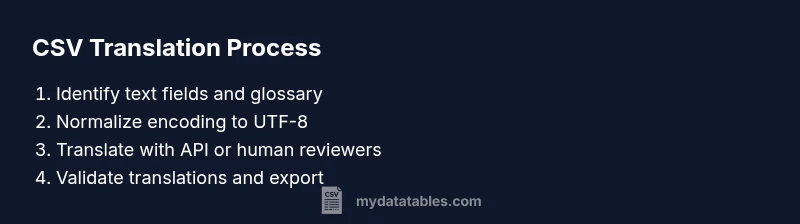
A practical translate csv workflow includes discovery, preparation, execution, validation, and export. Start by loading the CSV, identifying text columns, and creating a translation glossary. Then run translations via an API or editor, apply post-edits, and verify formatting. Finally, export the translated CSV with the same structure and headers preserved. Document any non-translatable fields and record the translation provenance to support audits.
Handling special columns: dates, numbers, and IDs
Text translation must not alter non-text data. Dates and numbers often require locale-aware formatting in the target language. Preserve IDs and codes exactly as-is, using translation for only free-text fields. If a text field contains a mix of values (e.g., 'Yes/No' or status labels), translate only the textual portion and maintain separators, punctuation, and case. For multilingual datasets, consider creating a mapping layer where translated terms are stored alongside the original values for easy reference and rollback.
Validation, quality checks, and governance
Quality checks are critical after translate csv operations. Implement unit tests to verify that headers remain intact, that non-text columns are unchanged, and that translations align with glossary terms. Back-translation can surface mistranslations, while spot-checks with bilingual reviewers catch errors the automated system may miss. Govern translation projects with version control, change logs, and access controls to ensure accountability. Finally, plan for ongoing maintenance as languages and product terms evolve.
Export, sharing, and collaboration
Export translated CSVs using the same delimiter and quoting rules as the source. Share outputs with stakeholders in a controlled manner, and attach glossaries, version numbers, and validation reports. When distributing translated data, consider building a lightweight data catalog entry noting language, provenance, and last updated timestamp. MyDataTables advocates documenting the translation workflow and keeping an auditable trail to support compliance and cross-team collaboration.
Tools & Materials
- CSV file(s) containing text fields(Source data to translate; preserve original as a reference)
- Python 3.x(Version 3.8+ recommended; run translation scripts)
- Pandas (Python library)(For reading/writing CSV and handling data types)
- Translation API access (e.g., Google Cloud Translation, DeepL, or equivalent)(Obtain API key and set usage limits)
- Glossary/dictionary of domain terms(Include placeholders, product names, and branded terms)
- Text editor or IDE(For manual QA and script editing)
Steps
Estimated time: 2-4 hours
- 1
Identify text fields to translate
Open the CSV and scan each column to determine which contain natural language text. List headers and values that should be translated, while clearly marking non-text fields like IDs and codes.
Tip: Use sample rows to validate which columns actually require translation; avoid translating IDs. - 2
Normalize encoding and prepare the file
Convert the file to UTF-8 encoding, ensure consistent quoting, and verify that delimiters are correct. This reduces encoding-related errors during translation.
Tip: Check for mixed encodings in a few sample rows before full conversion. - 3
Design or adopt a glossary
Create a glossary of terms, phrases, and brand names to ensure consistent translations. Version the glossary so changes are auditable and reversible.
Tip: Include placeholders (e.g., {customer}) and codes to prevent unintended translation. - 4
Translate text with your chosen method
Run translations via an API or manual translators, applying the glossary and post-editing where needed. Store translations in a parallel column or translation table.
Tip: Keep a separate column for translations to simplify QA and rollback. - 5
Validate translations and adjust data types
Perform back-translation checks, QA reviews, and verification of date/number formats. Ensure non-text fields are unchanged and headers remain intact.
Tip: Use a small, audit-friendly sample to catch issues early. - 6
Export and document provenance
Export the translated CSV with identical structure and headers. Document language, glossary version, translation source, and last updated timestamp for governance.
Tip: Version-control the translated output and attach a validation report.
People Also Ask
What does translating CSV involve?
Translating CSV means converting the text content within a CSV file from one language to another while preserving the file structure and non-text fields. It requires careful handling of encoding, headers, and data types to ensure the result remains usable.
Translating CSV means turning the text into another language without changing the file layout or non-text data.
Should I translate CSV headers?
Headers can be translated if downstream systems require localized column names; otherwise, you can keep headers in a master language and map translations separately. Always maintain a reference to the original headers.
Translate headers if needed for your downstream systems; otherwise, keep them in the source language.
How do I handle non-text fields like IDs or dates?
Do not translate IDs or codes, and preserve dates and numbers with locale-aware formatting as appropriate. Translate only free-text fields to maintain data integrity.
Don't translate IDs or dates; focus on translating text fields only.
What if the CSV is not UTF-8 encoded?
Convert the file to UTF-8 before translating to avoid garbled characters. Re-validate after conversion and handle any special characters properly.
Convert to UTF-8 before translating.
Can I automate translation for large CSV files?
Yes, automation is feasible with APIs and glossary-driven workflows; however, plan for quality checks and human review for critical terms to ensure accuracy.
Automation helps scale translation, but QA is essential for accuracy.
What are common pitfalls during CSV translation?
Common issues include translating placeholders, altering data formats, or changing the meaning of terms due to poor context. Always validate in-context and preserve formatting rules.
Watch out for placeholders and formatting; validate in context.
Watch Video
Main Points
- Plan translation scope before coding
- Preserve headers and structure
- Use glossary-driven translation
- Validate thoroughly and document