How to Open a CSV File That Is Too Large
Discover practical, proven methods to open and work with CSV files that exceed memory limits, including chunking, streaming, and database-based approaches. A MyDataTables guide to safely process big CSVs.


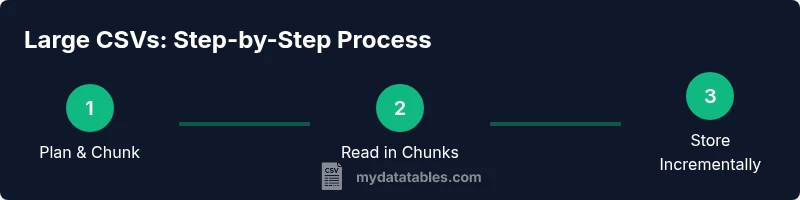
If a CSV file is too large to open in memory, you can still access its data by reading it in chunks, streaming rows, or importing it into a database. Start with a quick plan: choose a chunk size, enable streaming I/O, and verify the file schema. For most users, chunked reads plus a lightweight intermediate store unlock access without crashing your tool.
Understanding the challenge: how to open csv file that is too large
Opening a CSV that exceeds your system memory is a common hurdle for data analysts, developers, and business users. When a single read tries to load billions of characters into RAM, most spreadsheet apps and even some data libraries crash or stall. The keyword how to open csv file that is too large points to a design pattern: process data in streams or chunks, and either summarize on the fly or persist portions to a storage medium. According to MyDataTables, many teams encounter this bottleneck during data ingestion projects, so adopting a scalable reading strategy is essential for reliability and reproducibility. In practice, you’ll want to establish a plan that minimizes memory footprint, keeps data integrity intact, and preserves the ability to audit results. Begin by assessing the file’s structure: does it have a header row, what are the column types, and are there any malformed lines? Knowing these details informs how you parse and chunk without losing alignment or context.
Why large CSVs break traditional tools
Traditional spreadsheets and single-shot parsers attempt to load the entire file into memory. Large files exhaust RAM, trigger OS-level swapping, and slow down or crash processes. Even robust libraries can struggle if they default to reading the whole dataset. This is where streaming reads and chunking shine: they let you process a slice of the file at a time, maintain progress, and gradually build results. MyDataTables analyses emphasize that chunk-based processing is often the most reliable path for huge CSVs, especially when you need to extract summaries, filters, or aggregates without loading everything at once.
Defining your goals before you read
Before you touch the data, define your objective: do you need a full replica for offline analysis, or just a subset of columns and rows? Are you validating data types, computing aggregates, or preparing data for a database import? Clarity here reduces unnecessary work and helps you pick the right tool and chunk size. Start with a minimal viable workflow: read in fixed-size chunks, inspect a sample, and verify that your schema remains consistent across chunks. This upfront planning reduces rework and makes debugging faster when you encounter malformed records.
Core approaches to handle large CSVs
There are several practical strategies you can employ, depending on your environment and target outcome. Streaming via Python, R, or command-line tools allows you to read rows incrementally without loading the full dataset. Importing chunks into a database (SQLite, PostgreSQL, or a data warehouse) enables powerful querying without a giant ingestion spike. Splitting the file into smaller parts is another option, especially when you need to push data through tools that don’t handle huge inputs well. Choosing a path depends on data size, required operations, and your preferred ecosystem. MyDataTables recommends starting with chunked reads and then selecting one or two downstream targets (temporary storage, database, or summarized CSV).
How to validate correctness while chunking
Chunking can complicate validation because you must ensure row boundaries remain intact and that column alignment is preserved across chunks. A practical approach is to record the number of lines read per chunk and compare the sum to the total line count. If the file contains a header, confirm that every chunk preserves the header structure or adjust your parser to skip repeated headers. Consistency checks for data types, missing values, and outliers should be performed incrementally to catch issues early, rather than after the entire file is processed.
Tools & Materials
- A computer with sufficient RAM(Aim for at least 8-16 GB for mid-size CSVs; 32 GB or more for very large files.)
- Disk storage with free space(Keep at least 2x the file size free for temporary outputs and intermediate databases.)
- CSV viewer or data tool with streaming/chunk support(Examples: Python with chunksize, csvkit, or database ingestion tools.)
- Python 3.x environment(Recommended for chunked reads (pandas.read_csv with chunksize) and streaming parsers.)
- Optional database system(SQLite, PostgreSQL, or a lightweight data warehouse can simplify large CSV workflows.)
- Backup of source CSV(Always keep a verified copy before performing chunking or transformation.)
Steps
Estimated time: 60-120 minutes
- 1
Define chunking plan
Decide chunk size (e.g., 1000–10000 rows per chunk) and which columns to load. Confirm whether you need a header per chunk and how to handle missing values. Clear planning prevents rework when you implement the code.
Tip: Start with 5000-row chunks to balance I/O and processing speed; adjust based on memory and time. - 2
Set up the environment
Install or configure your chosen tools (Python, pandas, or CSVKit). Ensure you have a 64-bit interpreter to access more memory space. Create a working directory for temporary outputs.
Tip: Use a virtual environment to isolate dependencies and reproduce the workflow. - 3
Open the file in chunks
Write or run a script that iterates over chunks. Track progress and verify each chunk’s header alignment. Do not load the entire file into memory at once.
Tip: Use the iterator interface provided by your library to ensure memory is released per chunk. - 4
Process and store chunks incrementally
For each chunk, perform the necessary transformations and either append results to a database or write a smaller CSV. Maintain a log of processed chunks for auditing.
Tip: Prefer incremental writes to avoid large temporary files accumulating on disk. - 5
Validate and reconcile results
After each chunk, verify schema consistency, data types, and row counts. Reconcile any discrepancies before moving to the next chunk.
Tip: Automate a quick schema check to catch column shifts or encoding issues early. - 6
Tune memory and I/O usage
Monitor RAM and disk I/O; adjust chunk size if you see swapping or high I/O wait times. Use streaming I/O options or decompress lazily if the file is compressed.
Tip: Disable unnecessary logging during heavy reads to reduce I/O overhead. - 7
Create a final consolidated artifact
If you created intermediate datasets, merge or export them into a final dataset (CSV or database). Verify the final record count matches expectations.
Tip: Keep a checksum of the final artifact to detect corruption. - 8
Document and share the workflow
Record the tools used, chunk sizes, and processing parameters. Share the steps so others can reproduce or audit the workflow.
Tip: Include a sample of the first and last processed chunks to illustrate behavior.
People Also Ask
What is chunking in CSV processing and why is it useful?
Chunking reads the file in smaller blocks rather than loading everything at once. This is essential for large CSVs because it limits memory usage and allows incremental processing.
Chunking lets you read the file in small portions, so your memory stays under control while you process data.
Can I convert a large CSV to smaller files automatically?
Yes. You can split the file into manageable chunks or export chunks on the fly to multiple smaller CSVs or a database. This preserves accessibility without loading the entire file at once.
You can automatically split the file into smaller pieces or stream chunks into a database for easier handling.
Which tools support reading huge CSV files efficiently?
Tools like Python with pandas (using chunksize), csvkit, and lightweight databases provide robust support for large CSVs. Choose based on your downstream needs (analysis vs. persistence).
Pandas with chunksize, csvkit, and databases are common choices for big CSVs.
Is there any risk of data loss when chunking?
If you maintain consistent schema and track progress across chunks, the risk is minimal. Always backup the source and verify final results.
Data loss is unlikely if you validate and preserve chunk boundaries and headers.
What’s a quick way to validate a chunked read?
Compare the number of rows processed per chunk to the total row count, and check that all chunks have consistent columns. Run a simple sample check on early chunks.
Check that each chunk has the right columns and counts; compare with the total later.
Watch Video
Main Points
- Chunk large CSVs to manage memory
- Choose the right tool for streaming or chunking
- Validate data incrementally to avoid surprises
- Persist chunks to a safe intermediate store
- Document the workflow for reproducibility