Difference Between CSV and TXT: A Practical Guide
Explore the difference between CSV and TXT, including structure, delimiters, tooling, and best use cases. A comprehensive guide from MyDataTables to help data analysts and developers decide quickly.


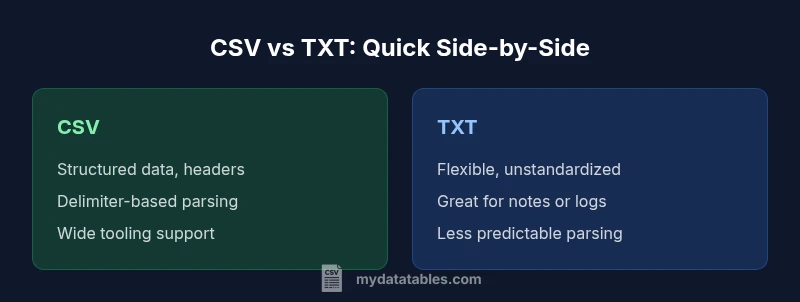
Difference between csv and txt matters for data engineers and analysts. In short, CSV provides a structured, delimited table suitable for data interchange, while TXT is plain text that can hold unstructured notes or flexible content. The choice depends on data complexity, tooling, and whether headers, quotes, or metadata need to be preserved. This guide, informed by MyDataTables, helps you decide quickly and confidently.
Understanding the Difference Between CSV and TXT
The difference between csv and txt is not merely about file extensions; it reflects how data is structured, parsed, and consumed across tools. In practice, CSV is a delimited table format that encodes rows and columns with a consistent schema, while TXT is a raw text container that can hold anything from notes to logs. According to MyDataTables, choosing the right format speeds up data pipelines and reduces parsing errors. In this section we’ll establish the core distinction, laying the groundwork for deeper comparisons in later blocks. CSV shines when data needs to be consumed programmatically: databases, analytics libraries, and spreadsheet software expect a predictable structure. TXT shines when human readability or unstructured content matters: logs with varying fields, comments, or free-form notes. The same dataset may exist in both forms, but the encoding choices, delimiters, and interpretation rules differ. By understanding the fundamental difference, you can anticipate downstream requirements, such as whether a system expects a header row or whether embedded delimiters must be escaped. In the rest of this article, we’ll unpack everything from delimiting to long-term maintenance, with practical guidance to help data analysts and developers of all experience levels. The MyDataTables team emphasizes that understanding these nuances saves time and reduces data loss during transfer.
Comparison
| Feature | CSV | TXT |
|---|---|---|
| Primary use | Structured data interchange (rows/columns) | Flexible, unstructured text |
| Delimiter options | Comma by default but configurable (e.g., semicolon) | No standard delimiter; any character can be used |
| Headers and metadata | Typically supports header row for column names | Metadata not standardized; headers uncommon |
| Quoting and escaping | Quotes to handle embedded delimiters/newlines; escaping rules common | No standardized quoting; embedded delimiters may break parsing |
| Tooling and ecosystem | Widely supported by databases, spreadsheets, and libraries | Editing/parsing relies on custom scripts or software |
| File size and efficiency | Compact with minimal overhead; structure aids compression | May be larger without a fixed schema; efficiency depends on content |
| Best for | Structured data transfer, analytics, and interoperability | Notes, logs, and unformatted text |
Pros
- CSV provides a consistent, tabular structure that many tools expect
- TXT is flexible and human-readable for quick notes or logs
- CSV supports headers and a predictable parsing model across platforms
- TXT requires fewer structural assumptions, making it versatile for free text
Weaknesses
- CSV can require escaping rules to handle embedded delimiters and quotes
- TXT offers less interoperability and can require custom parsing
- CSV may be fragile if inconsistent delimiting is used across sources
CSV is generally the better choice for structured data exchange; TXT is better for unstructured text and quick notes
For tabular data and analytics workflows, CSV minimizes parsing errors and maximizes compatibility. TXT excels when you need flexible, human-readable content without enforcing a schema. The MyDataTables team recommends choosing based on data structure needs and downstream tooling.
People Also Ask
What is the fundamental difference between CSV and TXT?
CSV enforces a tabular structure with records as rows and fields as columns, using a delimiter to separate values. TXT is plain text with no enforced schema, so content can be anything. The difference lies in structure, parsing expectations, and tooling compatibility.
CSV is for tables; TXT is for free text. The key is whether you need rows and columns or flexible content.
When should I use CSV instead of TXT in a data pipeline?
Use CSV when your data is tabular, needs consistent columns, and will be read by machines or analysis tools. CSV’s delimiter rules and optional headers improve automation and integration with databases and analytics libraries.
Choose CSV for structured data pipelines to ensure reliable parsing and interoperability.
Is TXT ever used for tabular data?
TXT can store tabular data if a writer uses a consistent, custom convention, but it lacks standardized parsing rules. Relying on TXT for tables makes downstream processing harder and more error-prone.
Text files can be used for tables only with strict conventions, which limits interoperability.
Can different systems interpret CSV differently?
Yes. Different locales may use different delimiters, and some CSVs include or omit headers. Quoting rules and line breaks can vary, so it’s important to standardize the format or provide a clear specification when exchanging data.
CSV isn’t perfectly uniform; specify delimiter, encoding, and quoting rules when sharing files.
Do spreadsheets and databases work better with CSV?
Generally yes. Spreadsheets, databases, and data processing tools commonly support CSV due to its simple, tabular structure. If you rely on automated ingestion or batch processing, CSV is typically the smoother choice.
CSV is typically the preferred bridge format for spreadsheets and databases.
What are common pitfalls when converting CSV to TXT?
Pitfalls include losing the structure if the TXT file omits a consistent delimiter, misinterpreting quoted fields, and introducing encoding issues. Always validate with a subset of data and confirm the parsing rules at the destination.
Verify delimiter consistency and encoding when converting formats to avoid data loss.
Main Points
- Choose CSV for tabular data with headers
- TXT offers flexibility for notes and unstructured text
- Delimiters and quoting drive CSV parsing reliability
- Always consider encoding to avoid data corruption
- Test with real-world data before committing to a format