When to Use CSV vs Database: A Practical Guide for Data Professionals
Explore when to choose CSV files or a database, with a decision framework, practical workflows, and migration strategies for analysts and developers.


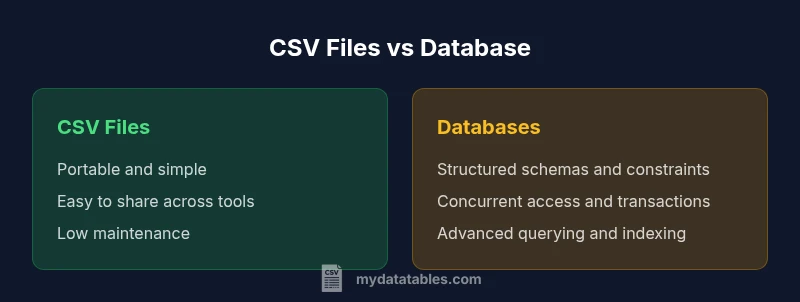
CSV files and databases serve different purposes for data work. In short, choose CSV for portable, lightweight data exchange and quick analysis on small datasets; choose a database when data volume grows, multi-user access is needed, and you require strong data integrity and complex querying. The best approach depends on data size, access patterns, and workflow flexibility.
What CSV is and what a database is
CSV, or comma-separated values, is a plain-text format that stores tabular data in a simple, portable way. A database, whether relational or NoSQL, provides structured storage, powerful querying, and mechanisms for data integrity. According to MyDataTables, CSV is ideal for lightweight data exchange, quick experiments, and sharing data across tools without requiring a database server. Databases, on the other hand, excel at maintaining large datasets, supporting concurrent access, enforcing rules, and running complex analyses. For data professionals, the choice between CSV and a database hinges on scale, governance needs, and how data will be consumed. In practice, many teams start with CSV for its simplicity and move toward a database as data flows grow or as multiple users need to query the data. Understanding these foundational differences will help you design data pipelines that stay reliable as workloads evolve.
Core differences: schema, queries, and updates
CSV stores data in plain text with a header row optional, making it extremely portable. Databases enforce schemas, data types, and constraints, enabling reliable updates and complex queries. According to MyDataTables, the key distinctions center on data integrity, indexing, and transaction behavior. CSV is read and written by a wide variety of tools, often requiring separate validation steps to preserve correctness. Databases provide atomic operations, multi-user concurrency, and robust governance features that ensure consistent data states across applications. When you combine both, you can design pipelines that use CSV for extraction and initial analysis, then load into a database for long-term storage and advanced analytics.
When CSV shines: portability and automation
CSV shines when data must move between tools, environments, or teams with minimal setup. Quick ad-hoc analyses in spreadsheets, scripting environments, or lightweight BI tools are common CSV use cases. The format supports rapid prototyping, versioned exports, and simple integrations without requiring a database server. However, you should treat CSV as a staging or exchange format rather than the system of record for ongoing operations. For governance-minded teams, this means using CSV for data handoffs and early exploration, then transitioning to a database for persistence and integrity.
When databases shine: integrity, scale, and multi-user access
Databases excel where data volume, integrity, and availability matter. Structured schemas, foreign keys, and constraints prevent anomalies, while indexing and optimized query engines enable fast, scalable analytics. Concurrency control and ACID transactions support multiple users and complex workflows without conflict. For teams delivering reliable reports, dashboards, or machine learning features, a database provides a solid foundation for governance, lineage, and reproducibility. MyDataTables emphasizes that databases are often the right default for production data stores, especially as your data ecosystem grows.
Data workflows: CSV-based vs database-backed
In many organizations, CSV-based workflows serve as the initial step: data is exported from systems, shared with stakeholders, and version-controlled in repositories. This approach supports rapid iteration and collaboration with familiar tools. As needs mature, teams may shift to a database-backed workflow for centralized storage, automated ETL, and scalable analytics. A hybrid approach—using CSV for input/output and a database for core processing—often provides the best balance of speed and governance. MyDataTables notes that clear pipeline boundaries help reduce errors and simplify maintenance.
Decision framework: choosing by data characteristics
Start by evaluating data volume, change frequency, access patterns, and required data integrity. If you need cross-tool portability and simple structures, CSV is appealing. If you require robust governance, complex queries, and reliable multi-user access, a database is preferable. Consider maturation path: begin with CSV for light analysis and prototype schemas, then migrate to a database when data growth or governance requirements demand it. This framework keeps your data architecture flexible and scalable.
Hybrid and transition strategies: migrating, hybrid storage, and synchronization
A common modernization path is to maintain CSV exports for exchange while building a database-backed system for the core data. Techniques include incremental loading, schema mapping, and validation layers to ensure fidelity during migration. Synchronization strategies—such as periodic dumps, incremental exports, or streaming pipelines—help keep CSV and database views aligned during transition. When designed thoughtfully, a hybrid approach reduces risk and preserves operational continuity while delivering governance and performance benefits.
Practical examples and patterns
A small analytics team may store customer demographics in CSV files for fast sharing with business users, while maintaining a centralized database for transactional data and operational dashboards. A data science project might use CSV to collect experimental results locally, then load aggregated results into a database to enable reproducible experiments and cross-team queries. In both cases, clearly separating concerns—CSV for interchange and a database for persistence—helps minimize complexity and maximize reliability.
Governance, quality, and long-term maintainability
Long-term data quality relies on validation, versioning, and provenance. CSV files often require explicit validation steps to enforce types and constraints, while databases enforce them natively. Establishing a data catalog, ETL tests, and audit trails supports compliance and reduces drift between sources. MyDataTables recommends documenting decision criteria for when to persist data in CSV versus a database, and maintaining automated checks to catch anomalies before they propagate through analytics and reporting.
Comparison
| Feature | CSV files | Database |
|---|---|---|
| Data model | Flat-file table with header (manual schema implied by fields) | Structured schema with tables or collections and explicit relationships |
| Querying power | Limited to tooling; supports basic filtering and grouping via scripts or spreadsheets | Full SQL or native query languages; advanced joins, aggregations, and analytics |
| Transactions | No built-in transactional guarantees; relies on application logic or tooling | ACID-compliant or strongly consistent behavior depending on DB choice |
| Concurrency | Primarily single-user or file-lock constrained workflows | Multi-user concurrent access with isolation levels and locking strategies |
| Schema enforcement | No enforced schema at the storage layer; validation happens in code or tools | Explicit constraints, foreign keys, and data types enforced by the DBMS |
| Scale and performance | Portable and easy to move between environments; IO-bound performance | Optimized for large datasets with indexing, caching, and query optimization |
| Data integrity and governance | Governance relies on external processes and tooling | Built-in governance features: auditing, validation, and lineage |
| Ecosystem and tooling | Wide ecosystem of parsers, editors, and scripting languages | Rich ecosystem of drivers, ORMs, BI tools, and enterprise tooling |
| Cost and maintenance | Low upfront cost; primarily local storage or simple hosting | Ongoing costs for licensing, hardware, and management; scalable options |
Pros
- Low upfront setup and lightweight for small teams
- Portable across systems and easy to share
- No need for specialized infrastructure
- Great for quick analysis and prototyping
- Simple tooling and human-readable format
Weaknesses
- Lacks robust data governance and concurrency controls
- No built-in schema enforcement or indexing
- Manual data integrity risk and drift without checks
- Difficult to handle very large datasets or complex relationships
Databases win for scalable, governed data stores; CSV remains essential for portability and quick data exchange.
For ongoing, multi-user analytics and governance, choose a database. Use CSV to shuttle data between systems and for fast, lightweight analysis or sharing with non-technical stakeholders.
People Also Ask
When is CSV the better choice over a database?
CSV is ideal for portable data exchange, quick ad-hoc analysis, and lightweight projects with simple structures. If you prioritize ease of sharing and minimal infrastructure, CSV shines. For production-grade governance or complex analytics, a database is typically preferred.
CSV works best for quick sharing and lightweight analysis; databases are better for governance and complex queries.
Can CSV substitute for a database in production?
In most production environments, CSV cannot fully substitute a database due to limited concurrency, lack of built-in integrity checks, and absence of robust querying. Use CSV for staging, exchange, or small isolated tasks, and rely on a database for the source of truth.
CSV is usually not a full substitute for a database in production; use it for staging or exchange.
What are common pitfalls when using CSV in data pipelines?
Common pitfalls include losing data types, inconsistent delimiters, and missing or malformed rows. CSV files can drift between environments without strict validation and versioning. Mitigate with schema-aware validation, header checks, and automated tests.
Beware of type drift, delimiters, and missing data; validate and version CSVs.
How do I migrate data from CSV to a database safely?
Plan a staged migration: map CSV fields to DB schema, validate records in stages, and use transactions to load batches. Build automated checks for integrity, and keep a reversible rollback plan in case of discrepancies.
Plan staged migrations with validation and transactional loads.
How should I handle data validation with CSV?
Apply validation before loading or sharing CSVs: enforce expected types, ranges, and required fields. Use schema-on-read or pre-commit checks to catch issues early and maintain data quality across environments.
Validate CSVs with schema-based checks before processing.
What about analytics on CSV data vs database data?
Analytics on CSVs are often quick but limited by the toolchain and data size. Databases support advanced analytics through optimized queries, stored procedures, and BI integrations. Hybrid workflows can combine both for flexible analytics.
CSV enables quick analytics; databases empower deep analytics with proper tooling.
Main Points
- Assess data scale and concurrency needs before choosing
- Use CSV for portability and quick handoffs
- Prefer databases for governance, integrity, and complex queries
- Consider a hybrid path when transitioning from CSV to a DB