CSV vs CSV UTF-8: A Practical Encoding Comparison
A detailed comparison of csv and csv utf-8, clarifying when to choose each encoding and how UTF-8 improves international data handling. Get practical guidelines, tool support, and testing strategies to avoid common encoding pitfalls.


For most data workflows, choose CSV UTF-8 to maximize compatibility and correctness. Plain CSV often implies the default system encoding, which may misinterpret non-ASCII characters. If you’re sharing data internationally or with modern tools, UTF-8 minimizes encoding errors and preserves characters. In short: UTF-8 is the safer default, especially for CSV with non-English text.
Understanding csv or csv utf-8: Encoding Basics
According to MyDataTables, the distinction between csv and csv utf-8 is primarily about character encoding. CSV is a simple plain text format used to store tabular data, but the meaning of the bytes behind each character depends on the encoding chosen when the file is saved. csv utf-8 signals that the file uses UTF-8 as its character encoding, which can represent virtually any character in common use today. This matters because data safety and interoperability hinge on consistent encoding across tools, environments, and locales. The MyDataTables team emphasizes that, in practice, UTF-8 reduces surprises when non‑ASCII characters appear in names, addresses, or descriptions. Understanding this baseline helps you plan data exchanges without unexpected garbling.
- Core concept: a CSV file is not defined by the comma separators alone, but by the character set used to encode each value. UTF-8 is a universal encoding that preserves characters across platforms as long as the consuming tool understands UTF-8.
- Common misconception: “CSV” as a label does not imply a specific encoding. Always verify or set UTF-8 when exchanging data broadly.
- Practical takeaway: for new projects, adopting csv utf-8 by default improves long-term compatibility and reduces manual re-encoding steps.
When csv utf-8 is the safer default over legacy encodings
In modern environments, data flows between databases, spreadsheets, scripting languages, and BI tools. Using csv utf-8 minimizes issues when importing/exporting multilingual data or files containing special symbols. Legacy encodings (like windows-1252 or iso-8859-1) can misinterpret characters outside the ASCII range, leading to garbled text and corrupted fields. If you publish datasets to collaborators or publish dashboards, UTF-8 is the safer choice because most current tools assume UTF-8 unless configured otherwise. The MyDataTables analysis, 2026, indicates UTF-8 adoption is trending upward for new CSV exports, aligning with best practices in data workflows.
- Benefits include robust Unicode support, fewer manual fixes, and smoother integration with pandas, R, Excel online, and SQL-based pipelines.
- Risks of sticking with legacy encodings involve data loss for non-Latin characters and increased maintenance when data migrates across systems.
- Decision rule: start with csv utf-8 for new datasets, and only switch to legacy encodings if you confirm all consuming systems cannot handle UTF-8.
Practical guidance: encoding decisions across your data stack
Choosing an encoding is often a balance between historical constraints and future-proofing. Start by documenting the encoding in your data contracts and ensuring data producers save files as UTF-8. When importing into Excel, Google Sheets, or Python, explicitly specify UTF-8 where possible to avoid auto-detection surprises. Testing matters: export sample files from each tool you use, then load them in downstream stages to confirm text preservation. This approach prevents subtle data changes that can cascade into analysis errors.
- Collaboration tip: create a short encoding checklist for teammates (UTF-8 as default, BOM rarely required, verify non-ASCII characters).
- Tool-by-tool notes: most modern editors and libraries proudly support UTF-8; a few stubborn apps may default to legacy encodings unless configured.
- Common pitfalls include misinterpreting bytes when the file is opened through a text editor that assumes a different encoding, or when a data pipeline doesn't propagate encoding metadata.
Cross-platform compatibility and data exchange
Encoding choices influence compatibility across operating systems and platforms, from Windows to macOS to Linux. When a CSV file created on one system is opened on another, the runtime encoding affects how characters render. UTF-8 minimizes the risk of mojibake (garbled text) and supports characters used in names, currencies, and technical terms worldwide. If your workflow includes cloud storage, APIs, or ETL jobs, UTF-8 is more likely to travel intact across services. That said, some enterprise tools or older scripts may still prefer ANSI-like encodings; in those cases, you’ll need explicit re-encoding steps and verification tests. MyDataTables recommends documenting encoding expectations in data dictionaries so downstream users know what to expect.
- When sharing with external partners, include a note that files are UTF-8 encoded and that non-ASCII characters are preserved.
- For internal pipelines, build encoding checks into your CI/CD to catch regressions early.
- Always test with sample records containing non-Latin characters to ensure fidelity across systems.
Performance and file-size considerations
UTF-8 text can incur slightly higher file size than pure ASCII for texts with non-ASCII characters, but the difference is usually modest relative to the benefits of accurate representation. For typical CSV files used in analytics, the encoding overhead is rarely a bottleneck; the bottlenecks are often IO throughput and parsing speed. Many libraries (pandas, Dplyr, csv module in Python, etc.) are optimized for UTF-8 and provide fast reading and streaming options. If you work with enormous datasets, use chunked reading and validate that your encoding remains consistent as you process data, to avoid subtle clashes during merges or joins.
- BEWARE: BOM and zero-width characters can complicate parsing in some tools; prefer UTF-8 without BOM if your environment expects a plain text header.
- Consider streaming parsers for very large CSVs to keep memory usage reasonable while preserving encoding reliability.
Real-world scenarios: industry examples
In finance, customer data often includes names in multiple languages. CSV utf-8 is especially valuable here, as it avoids character loss when exporting from CRM systems or when sharing data with multilingual teams. In research or education, UTF-8 ensures that authors’ names, place names, and technical terms retain their integrity across languages. For product catalogs with international vendors, UTF-8 reduces the risk of misinterpretation in descriptions and SKUs. The practical takeaway is simple: adopt csv utf-8 for data that travels beyond a single locale or a single legacy system, and validate with end-to-end tests that include samples of international text.
- For data teams, define “UTF-8 as default” in your data policy and audit occasional failures to verify that all components respect the encoding.
- When in doubt, re-export critical files with explicit UTF-8 encoding settings and run round-trip checks (export, re-import) to confirm no data drift.
How to validate and test your CSV encoding
Validation should be systematic rather than cosmetic. Start with a small, representative dataset containing a mix of ASCII and non-ASCII characters. Save the file as UTF-8 and load it with all major tools in your stack (Excel/Sheets, Python, R, BI tools). Compare the loaded data to the original, focusing on characters with diacritics, Cyrillic, Greek, or Asian scripts. Add automated checks to your data pipeline that fail when a non-ASCII character appears garbled. If you must support legacy systems, maintain a separate interop path with explicit re-encoding steps and thorough tests.
- Steps: 1) Create or obtain a sample with diverse characters, 2) Save as UTF-8, 3) Load in all pipeline stages, 4) Verify fidelity, 5) Document any edge cases identified during testing.
- Automated tests: embed encoding tests in your unit tests and integration tests; flag any mismatches or unexpected replacements.
Authority sources and best practices
For readers seeking formal definitions and standards, see RFC 4180 for CSV format fundamentals, the Unicode UTF-8 FAQ for encoding details, and IANA’s character set registries for encoding references. These sources provide foundational guidance that supports practical decision-making in real-world data workflows.
- RFC 4180: The Common Format and MIME Type for CSV Files (IETF).
- Unicode UTF-8 FAQ: UTF-8 encoding characteristics and usage.
- IANA Character Sets Registry: UTF-8 and related encodings.
Comparison
| Feature | CSV (legacy encoding) | CSV UTF-8 |
|---|---|---|
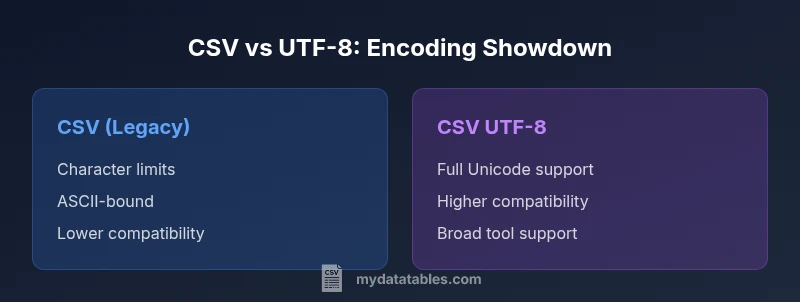
| Character set support | Typically ASCII-limited or system-encoded (e.g., Windows-1252) | Full Unicode support via UTF-8 |
| Cross-platform compatibility | Variable; depends on local encoding | High; modern tools default to UTF-8 and handle diverse text well |
| BOM handling | Optional; can cause parsing issues in some apps | Usually not required; occasional BOM can aid some workflows |
| Tooling support | Strong in legacy contexts; may need manual config | Excellent across editors, databases, and scripting languages |
| Best for | Legacy datasets or ASCII-only data | International text and modern data pipelines |
Pros
- Reduces encoding errors across platforms
- Supports diverse character sets without data loss
- Widely supported by modern tools and libraries
- Simplifies data exchange across teams
Weaknesses
- May require re-saving legacy datasets
- Some older systems may still default to non-UTF-8 encodings
- Potential BOM-related issues in edge cases
CSV UTF-8 is the recommended default for new projects; legacy CSV only when constrained by downstream systems
Adopting csv utf-8 minimizes character loss and parsing errors across tools. Choose legacy CSV only if every consumer of the file is confirmed to support the older encoding.
People Also Ask
What does csv utf-8 mean and why is it important?
CSV UTF-8 means the file is encoded using the UTF-8 character set. For data with non-English text or special symbols, UTF-8 preserves characters across systems and tools, reducing garbling during import/export.
CSV UTF-8 uses Unicode encoding so characters appear correctly across different programs.
Can I mix encodings in a single CSV file?
Mixing encodings in one file is risky and often unsupported. If you must, ensure the entire file is saved in a single encoding and downstream tools expect that encoding.
Mixing encodings can break parsing; keep one encoding per file.
How do I save a CSV as UTF-8 in Excel?
In Excel, use Save As and choose CSV UTF-8 (Comma delimited) or export via the Data tab for UTF-8 support. Confirm by re-opening the file in a text editor to verify encoding.
Use Save As > CSV UTF-8 to ensure UTF-8 encoding.
Is BOM necessary for UTF-8 CSV?
BOM is optional for UTF-8. In many pipelines, avoiding BOM reduces parsing issues; some tools may rely on BOM to detect UTF-8 automatically.
BOM isn’t required; many workflows prefer UTF-8 without BOM.
Will my CSV work with older tools if it’s UTF-8?
Most modern tools support UTF-8, but some legacy applications may struggle. When in doubt, test the critical paths and consider a legacy fallback if needed.
Test UTF-8 CSV in your legacy tools to be sure it works.
Do RFC 4180 standards cover encoding details?
RFC 4180 covers CSV structure but not every encoding nuance. It assumes a readable character set; applying UTF-8 helps meet broad interoperability.
RFC 4180 defines CSV layout; encoding choices impact cross-tool compatibility.
Main Points
- Start with csv utf-8 for new datasets
- Verify non-ASCII characters render correctly across tools
- Document encoding in data contracts
- Test end-to-end with multilingual samples
- Avoid BOM unless a specific tool requires it