csv vs csv utf-8: Encoding and Compatibility in CSV Files
A rigorous, data-driven comparison of CSV versus CSV UTF-8, exploring encoding implications, compatibility across tools, and best practices for reliable data interchange.


The quick answer is that CSV UTF-8 is the safer default for most data-exchange tasks because it represents all Unicode characters unambiguously and is broadly supported by modern tools. The plain CSV format does not define encoding, so without UTF-8 you risk misinterpreting characters (mojibake) when data passes through different systems. Use UTF-8 unless you are constrained by a legacy ASCII-only workflow.
What csv vs csv utf-8 means for everyday data tasks
CSV, or comma-separated values, is a simple, text-based format for storing tabular data. The term csv utf-8 refers to the character encoding used when saving a CSV file. Encoding determines how characters are mapped to bytes, which in turn affects how data is read by different applications. In practice, choosing UTF-8 dramatically reduces the risk of garbled characters when datasets include non-ASCII text such as accented letters or non-Latin scripts. As the MyDataTables team has observed in real-world CSV workflows, encoding choices often determine data integrity across disparate systems. This article compares csv vs csv utf-8, clarifies the practical implications, and provides actionable guidance for data analysts, developers, and business users who need reliable interchange without surprises.
Core idea: encoding governs bytes, not just characters
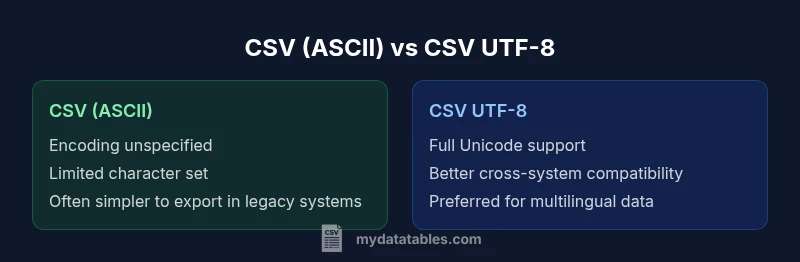
- Plain CSV leaves encoding implicit; files can be saved with various encodings depending on the tool and locale.
- UTF-8 encodes every Unicode character and is backwards compatible with ASCII for the first 128 code points.
- When exchanging data between systems (databases, ETL pipelines, dashboards), explicit UTF-8 minimizes surprises and reduces the need for on-the-fly re-encoding.
From a practical perspective, aiming for UTF-8 as the default reduces cross-system friction, especially for multilingual datasets or datasets shared globally. The underlying principle is to establish a single, well-supported encoding standard across your pipeline, and to document it clearly for downstream consumers.
The CSV standard and encoding: what’s specified and what isn’t
RFC 4180 defines the structure of CSV files (fields separated by commas, records separated by CRLF, optional quotes, etc.). Notably, RFC 4180 does not mandate a particular character encoding. This means that while the syntax is defined, the encoding remains an environmental choice. This separation of concerns can lead to mismatch when a CSV created in one environment is read in another with a different default encoding. Therefore, explicitly choosing and documenting encoding—preferably UTF-8—helps maintain consistency across ingestion points. As you design data flows, ensure each stage reads the data with the same encoding as the producer and validates that non-ASCII characters arrive intact.
Practical implication: encoding mismatches in real-world systems
Most modern tools interpret UTF-8 correctly, including Python’s pandas, JavaScript environments, and many ETL platforms. However, some desktop applications (notably older versions of Excel on Windows) may interpret UTF-8 CSVs incorrectly if the file lacks a UTF-8 BOM or if the import routine assumes a legacy encoding. This is where a careful testing plan matters: test a sample with multilingual text, emojis, or special symbols across your target tools. The goal is to prevent a scenario where a single field renders as garbled text in a downstream report or database due to encoding mismatch. MyDataTables analyses highlight that early, explicit encoding decisions reduce downstream back-and-forth corrections.
Encoding options: BOM, UTF-8 without BOM, and compatibility
- UTF-8 without BOM is the most portable choice for many pipelines, but some Windows-based tools mis-detect UTF-8 without BOM when auto-detect is relied upon.
- UTF-8 with BOM helps Excel recognize UTF-8 more reliably but can cause issues in environments that do not expect a BOM.
- In most modern data stacks, UTF-8 without BOM works well if you configure import/export steps to use UTF-8 explicitly. When needed, document whether a BOM is present to align consumers.
Tooling and encoding: what to expect across popular ecosystems
- In Python, libraries like pandas read UTF-8 CSVs by default; explicit encoding arguments are recommended when dealing with diverse sources.
- In R, read.csv often defaults to UTF-8 on Linux, but Windows users should verify encoding handling.
- In Excel, importing UTF-8 CSV files requires a deliberate open/import path, and BOM usage can influence auto-detection.
A robust practice is to create a small, representative test file and run a quick verification across all tools your organization relies on. This helps catch encoding quirks before they become production issues.
Summary of the practical impact
For teams working with international data or multilingual content, csv utf-8 is the pragmatic choice. It minimizes character loss, reduces the number of manual coercions, and aligns with modern data interoperability expectations. The cost is largely about ensuring consistent encoding handling in export/import tooling and incorporating encoding checks into data validation steps. With clear governance and automated tests, the transition from ASCII-centric CSVs to UTF-8-compatible CSVs becomes a straightforward improvement to data quality and reliability.
Comparison
| Feature | CSV (ASCII-default) | CSV UTF-8 |
|---|---|---|
| Encoding specification | Unspecified by the CSV standard | Explicit UTF-8 encoding with Unicode support |
| Character support | Limited to ASCII/basic Latin in practice | Full Unicode support including emoji and CJK |
| BOM handling | BOM rarely used; can confuse tools | BOM optional; can aid Excel recognition |
| Tooling compatibility | Varies by app; some readers fail to auto-detect | Widely supported by modern tools and languages |
| Best for | Legacy ASCII datasets | Multilingual data and global datasets |
Pros
- Reduces upfront effort when working strictly with ASCII data
- Keeps compatibility with systems that assume ASCII defaults
- For new projects, UTF-8 eliminates encoding headaches and supports multilingual data
Weaknesses
- ASCII-default CSVs may cause mojibake when non-ASCII data is introduced
- UTF-8 can introduce BOM-related issues in some legacy environments
- Some older tools require explicit configuration to handle UTF-8 reliably
UTF-8 wins for most new projects; ASCII may still be viable in controlled legacy pipelines
Choose UTF-8 when starting a new data exchange. If you must interface with legacy ASCII systems, plan encoding handling and testing to minimize mismatches. MyDataTables team recommends documenting and enforcing a single encoding standard across pipelines.
People Also Ask
What is the practical difference between CSV and CSV UTF-8?
CSV is a format specification; CSV UTF-8 specifies a character encoding. UTF-8 ensures full Unicode support and reduces misinterpretation of non-ASCII characters. The practical impact is how text data is represented and read across tools.
CSV UTF-8 ensures proper display of international characters, whereas plain CSV relies on the environment’s default encoding.
Should I always save CSV as UTF-8?
In most modern data workflows, UTF-8 is recommended for new projects to avoid encoding issues. If you must interact with legacy systems that require ASCII, plan an explicit encoding strategy and validation.
UTF-8 is usually best, but check your legacy systems before converting everything.
How can I tell what encoding a CSV file uses?
Encoding detection can be challenging; look for file headers, BOM presence, and test imports in your target tools. Many editors and libraries allow you to specify encoding explicitly, which is safest when unsure.
If in doubt, try importing with UTF-8 and verify whether characters render correctly.
Do all tools support UTF-8 CSV files?
Most modern data tools support UTF-8 CSVs, but some legacy applications or settings may require explicit configuration or BOM usage. Always validate in your critical toolchain.
Most modern tools support UTF-8, but test in the critical ones you use.
What encoding issues should I watch for when importing CSV into Excel?
Excel can misinterpret UTF-8 CSVs without a BOM or with certain regional settings. Consider saving with BOM or using the Import Text Wizard to ensure correct UTF-8 handling.
Watch for garbled characters in Excel; use BOM or import wizard for reliable UTF-8 handling.
What is mojibake and how can I avoid it?
Mojibake is garbled text resulting from encoding mismatches. To avoid it, standardize on UTF-8, verify encoding at export/import boundaries, and test with representative multilingual data.
Mojibake happens when encodings don’t line up—use UTF-8 and test thoroughly.
Main Points
- Prefer CSV UTF-8 as the default encoding for new data exchanges
- Document encoding explicitly at export and import boundaries
- Test a multilingual sample across all target tools
- Consider BOM implications for Excel compatibility
- Involve governance to ensure consistent encoding across teams