CSV UTF-8 vs CSV: Encoding for Reliable Data Exchange
Learn how CSV UTF-8 encoding affects data integrity, interoperability, and analytics. This comparison explains when to use UTF-8 versus standard CSV and offers practical guidance for data analysts and developers.


CSV UTF-8 vs CSV: For most modern data tasks, UTF-8 encoding is the safer default due to broader character support and interoperability. If you only handle plain ASCII data, standard CSV may suffice, but UTF-8 avoids garbled text in non-English datasets. This comparison highlights the key differences, practical implications, and best practices for analysts and developers.
Understanding the Key Distinction: CSV UTF-8 vs CSV
In data workflows, the term CSV often implies a simple, comma-delimited file. However, the encoding behind that file dramatically changes how characters are stored and interpreted. When you encounter csv utf 8 vs csv, you are really choosing between two fundamental approaches to character encoding. In this section, we define what the terms mean, why encoding drives behavior inside editors and databases, and how that choice propagates to downstream analytics. According to MyDataTables, encoding is not just a back-end detail; it shapes data quality, reproducibility, and cross-system compatibility. This quick primer sets the stage for deeper comparisons and practical guidance for data professionals who routinely exchange CSV data across tools and regions.
Encoding Fundamentals and Why It Matters
UTF-8 is a variable-length Unicode encoding capable of representing virtually all characters used in human languages. Standard CSV, in many tools, is read as ASCII or a limited ANSI code page, which can degrade or misinterpret non-ASCII characters. The practical effect is garbled names, corrupted descriptions, and failed joins when datasets contain accents, non-Latin scripts, or symbols. Understanding the basics helps teams design reliable data pipelines. Encoding determines how bytes map to characters, influences file size for multilingual data, and affects how software parsers detect and read the file. In short, csv utf 8 vs csv isn’t just about text aesthetics; it’s about preserving meaning across the analytics stack.
Practical Differences in Data Exchange and Tooling
When you drop a CSV file into Excel, Python, R, or a database, the encoding detection logic varies. UTF-8 is widely recognized and supported for non-English data, making it a safer default choice for data exchange. Some environments misinterpret UTF-8 if a Byte Order Mark (BOM) is present or missing; others require explicit encoding declarations. As a result, teams should standardize on UTF-8 for new files and document how to handle BOMs when moving legacy data. MyDataTables’ experience shows that inconsistent encoding handling is one of the leading sources of data quality issues in real-world projects.
Non-ASCII Data and Character Integrity
The presence of accented characters, Cyrillic, Chinese, or emoji in a CSV can explode into garbled text if encoding is not managed properly. UTF-8 gracefully covers these characters, enabling accurate sorting, labeling, and searchability. In contrast, plain CSV with ASCII assumptions can silently truncate or corrupt characters, creating hidden data quality problems. For organizations operating in multilingual contexts, csv utf 8 vs csv becomes a governance question: which standard best preserves meaning across all user touchpoints? The safe answer is UTF-8 for any data that might include non-English text.
BOM: A Hidden Source of Interoperability Trouble
Byte Order Marks can help or harm depending on the editor and pipeline. Some tools expect BOM, others treat it as data. When standard CSV lacks a BOM by default, some Unicode characters may be misread. UTF-8 with BOM can fix certain Excel parsing quirks but may introduce issues in Unix-based pipelines. Understanding BOM behavior is essential for teams that automate ETL tasks and rely on cross-platform scripts. The csv utf 8 vs csv decision often hinges on how your primary tools handle BOMs and how you surface data to downstream systems.
Best Practices for Consistent Encoding Across Pipelines
A disciplined approach reduces surprises. Start with UTF-8 as the default encoding for new CSV files. Establish a lightweight validation step that checks for UTF-8 compliance and non-ASCII characters, especially in field names and key identifiers. Maintain a centralized encoding policy and document how to convert legacy files safely. When converting, preserve data integrity by testing round-trips from source to destination across several tools (Excel, Python pandas, SQL, and BI platforms). This reduces the risk of subtle data corruption during migration.
Internationalization and Data Governance Implications
Data pipelines increasingly cross borders and languages. Using UTF-8 aligns with internationalization goals and supports accurate representation of multilingual data in analytics dashboards and reports. In governance terms, encoding should be part of data quality rules, inventory catalogs, and data dictionaries. Teams that emphasize encoding discipline enjoy fewer data quality incidents and faster incident response when issues arise. The csv utf 8 vs csv choice is a governance decision with tangible downstream benefits for data trust and collaboration.
Practical Migration Scenarios and Checkpoints
If you inherit a legacy CSV workflow, plan a staged migration to UTF-8. Start by converting non-ASCII files and validating them with known-good tests. Introduce encoding checks in your CI/CD pipelines to catch regressions. For ongoing projects, require UTF-8 for new datasets and add a metadata flag indicating encoding. The result is a smoother handoff between data creators, analysts, and consumers, reducing misinterpretation and rework.
Tooling and Environment Considerations for Encoding Consistency
Different editors, IDEs, and ETL tools have varying default encodings. Ensure your development environment explicitly uses UTF-8 for file I/O operations, and add encoding options as visible defaults in your data workflows. Some popular tools expose encoding settings at the import/export layer; document those defaults in your playbooks. By standardizing on UTF-8 and making encoding choices explicit, teams minimize surprises when collaborating across time zones and systems.
Comparison
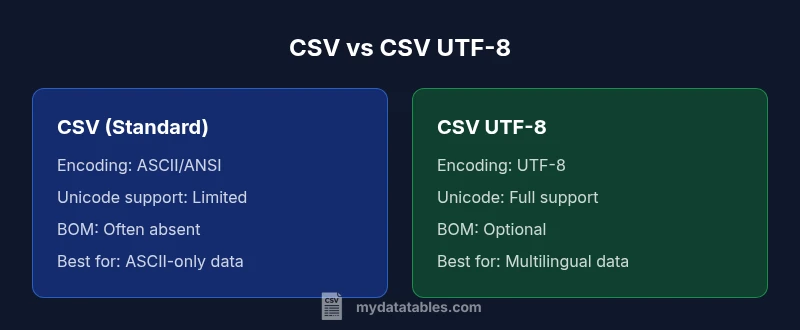
| Feature | CSV (standard) | CSV UTF-8 |
|---|---|---|
| Encoding | ASCII/ANSI compatibility | UTF-8 with full Unicode support |
| Character coverage | Limited to 7-bit/extended ASCII | Full Unicode coverage for international text |
| BOM handling | Typically none or tool-dependent | Optional BOM, can help or hinder some tools |
| Non-ASCII handling | Garbling risk for non-English data | Robust handling of accents, scripts, symbols |
| Tooling interoperability | Varies; some tools assume ASCII | Broadly supported in modern editors and pipelines |
| File size impact | Similar for ASCII data | Slight size increase for multilingual content |
| Best use case | ASCII-centric datasets | Multilingual datasets and global data sharing |
| Excel compatibility | Depends on version and settings | Better cross-version reliability with UTF-8 |
| Migration needs | Minimal when ASCII-only | Requires encoding awareness in pipelines |
| Security considerations | Encoding mistakes can reveal data corruption | UTF-8 reduces misinterpretation risks |
Pros
- Improved international character support reduces garbling
- Better interoperability across tools and platforms
- Safer for mixed-language datasets
- Wide adoption and ongoing support
Weaknesses
- Requires validation of all downstream tools for UTF-8 compatibility
- Some older systems mishandle UTF-8 with BOM
- Slightly larger file sizes for non-ASCII data
- Conversion can introduce errors if not performed carefully
Adopt UTF-8 as the default for new CSV files
UTF-8 offers robust, universal character support and smoother interoperability. Use plain CSV only when you are certain all tools and datasets are ASCII-only; otherwise, UTF-8 minimizes data quality risks across the analytics stack.
People Also Ask
What does CSV UTF-8 mean and how is it different from standard CSV?
CSV UTF-8 refers to a CSV file encoded with the UTF-8 character set, enabling full Unicode support. Standard CSV often relies on ASCII or a legacy code page, which limits character range and can cause garbling for non-English text. The main difference is how characters are stored and interpreted by software.
CSV UTF-8 uses Unicode to represent characters, unlike plain CSV which may only handle ASCII. This matters for any non-English data.
Should I convert existing CSV files to UTF-8?
If your data includes non-English characters, or you share files with international teams, converting to UTF-8 is advisable. Validate the conversion by checking sample records in multiple tools to ensure no characters were corrupted.
Yes, especially for multilingual data; verify with a cross-tool check.
How does BOM affect CSV files in Excel and other tools?
The Byte Order Mark can help some tools recognize UTF-8 but may cause issues in others, particularly when pipes or scripts read the file. Consistency in whether you include BOM is key and should be documented in your encoding policy.
BOM can help some apps but confuse others; decide and document it.
Can non-English characters be represented without UTF-8?
Non-English characters may be representable in specific code pages, but this approach is fragile. It risks data corruption when files pass through different systems or regions. UTF-8 is the safer, more interoperable choice.
You can, with limits, but UTF-8 avoids most cross-system problems.
What tools best support UTF-8 CSV encoding?
Most modern editors, databases, and data analysis libraries support UTF-8. Ensure your workflow explicitly reads and writes UTF-8, and test across the major tools in your stack to prevent surprises.
Most major tools support UTF-8; test across your stack.
How can I detect a file’s encoding and convert to UTF-8?
Use encoding-detection utilities and perform explicit conversion to UTF-8, followed by validation checks. Maintain a changelog and ensure downstream processes re-read the updated files.
Detect the current encoding, convert to UTF-8, and validate across tools.
Main Points
- Prefer UTF-8 for new CSV files to future-proof multilingual data
- Validate encoding consistently across tools and pipelines
- Document encoding decisions in data dictionaries and governance policies
- Be mindful of BOM handling and tool-specific quirks when migrating
- Plan a staged migration for legacy datasets to minimize disruption