CSV vs JSON: A Practical Comparison for Data Teams
An analytics-focused comparison of CSV vs JSON, outlining data models, performance, tooling, and practical use-case guidance for data pipelines.


CSV and JSON are two common data interchange formats with distinct strengths. CSV excels at flat, tabular data and fast parsing in spreadsheets and analytics tools, while JSON supports nested structures, arrays, and richer schemas ideal for APIs and config data. Your choice depends on data complexity, tooling, and workflow; in many data pipelines, teams use both at different stages.
Data Model Fundamentals: CSV vs JSON
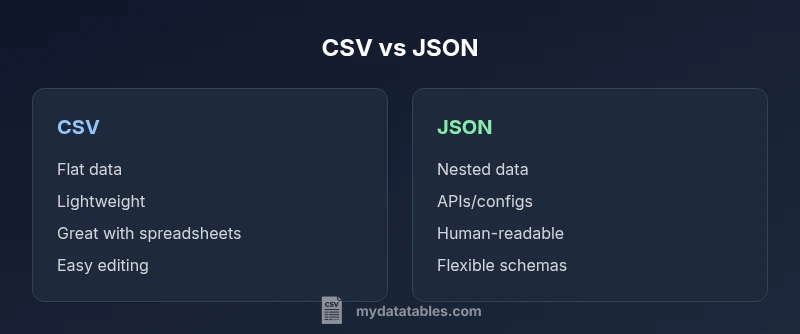
According to MyDataTables, csv vs json presents two fundamentally different ways to represent information. CSV encodes data as rows and columns, with a plain-text approach that favors flat, tabular datasets. JSON, in contrast, uses objects, arrays, and key-value pairs to represent nested structures. This difference drives how you model data, the kinds of queries you can perform, and how easily you can evolve schemas over time. For analysts, this means CSV shines when you work with spreadsheets, BI exports, or CSV-based data feeds, while JSON shines when you deal with hierarchical data such as product catalogs, user profiles, or nested API responses. In practice, teams often start with CSV for quick data dumps and then migrate to JSON as data complexity grows.
Beyond the surface, the practical impact shows up in data normalization, the need for headers, and how easy it is to shoulder changes in schema. CSV requires explicit columns and consistent delimiter usage; JSON allows optional fields and nested objects without reworking the entire data frame. This creates a spectrum: simple, flat data is usually best in CSV; richer, nested data benefits from JSON. Consider your workflow, your downstream tools, and how often your data structure will evolve when deciding which format to favor.
For data professionals using MyDataTables, the choice often aligns with the stage of the data lifecycle: intake and quick exploration may leverage CSV for speed, while API-driven integrations and configuration data lean toward JSON for structure and expressiveness. The key takeaway in this section is recognizing that the data model itself—not just the file size—drives format suitability.
Data Exchange and Schema Discipline: How Structure Shapes Interoperability
Schema discipline matters when moving data between systems. CSV has limited schema support: headers define column names, but there is no native way to express data types or nested relationships. JSON, by contrast, carries explicit structure through objects and arrays, enabling schemas and validation rules in many ecosystems. This difference affects data validation, transformation, and downstream processing. If you require strict, verifiable schemas, JSON with a schema language (or a typed representation in a language like TypeScript or Python) is often more straightforward to enforce. If you need rapid human inspection and straightforward parsing, CSV’s simplicity can be a strength.
In practice, many teams maintain both formats in different parts of the pipeline: CSV to import raw data quickly, JSON to transport structured payloads across services. MyDataTables notes that understanding your data’s structural needs and validating input early can save downstream debugging time, especially when integrating with dashboards, databases, or APIs.
Data Types, Precision, and Quirks: What to Watch For
CSV stores values as plain text, with limited explicit typing. Numbers, dates, and booleans often require downstream parsing rules. Quoting and escaping become essential when values contain the delimiter, newline, or quote characters. JSON explicitly preserves data types: numbers remain numbers, strings remain strings, booleans true/false, and null is supported. This means parsing JSON often yields more faithful representations of the original data, but it also imposes stricter parsing expectations and can reveal inconsistencies in source data. When converting between the formats, you should implement robust type-mapping rules and ensure consistent handling of missing values.
As you scale datasets, CSV files can grow large and slow to parse line-by-line, while JSON structures can become verbose. Consider streaming parsers for CSV and JSON when dealing with very large files to avoid loading everything into memory at once.
Performance and Storage Considerations: Size, Speed, and Accessibility
CSV is typically more compact for flat data and offers fast, line-by-line parsing in many languages. This makes CSV attractive for high-throughput ingestion, batch processing, and quick inspections in spreadsheet software. JSON, while often larger due to structural characters, provides more expressive power that reduces the need for multiple formats when dealing with nested data. The storage footprint and decoding effort differ across environments; some databases store CSV efficiently in columnar formats, while others optimize JSON storage with document-oriented engines. When designing pipelines, it helps to profile the dominant data path to determine which format minimizes processing time and cost.
In analytics workflows, researchers frequently convert source data to CSV for initial exploration, then transform into JSON for API consumption or nested analytics schemas. This dual-path approach can offer both speed and expressiveness where needed.
Ecosystem and Tooling: Libraries, Frameworks, and Community Practices
The tools you rely on will heavily influence format choice. CSV enjoys mature support in spreadsheet tools (Excel, Google Sheets), ETL platforms, and SQL-based environments where tabular data is the norm. JSON is central to web APIs, configuration files, and modern data interchange standards, with extensive libraries across languages for parsing, validating, and transforming nested data. The ability to leverage streaming, chunked processing, and schema validation varies by language and ecosystem; in practice, both formats benefit from a careful selection of libraries that match your processing model.
For teams using MyDataTables, the guidance is to favor CSV for data ingestion into BI workflows and table-based analyses, while opting for JSON when you require nested data structures for APIs or configuration-driven logic. This approach aligns tooling with data structure, reducing friction in downstream steps.
Interoperability: Editing, Validation, and Collaboration in Teams
CSV’s simplicity can be an advantage for collaboration with non-developers who regularly edit datasets in Excel. However, CSV editing can introduce inconsistencies such as missing headers, misaligned rows, or formatting changes during round-tripping. JSON editing is more suited to developers or tools that understand nested data; it supports syntax highlighting and structured diffs, making collaboration easier for complex payloads. When teams coordinate on data contracts, JSON often helps enforce clear expectations about nested fields and arrays, while CSV remains the default for fast data dumps and light-duty sharing.
To minimize human error, implement validation steps early in the data pipeline. For example, ensure headers are consistent across files, verify that required fields exist, and validate types after parsing.
Real-World Workflows: API Data, Data Lakes, and BI Dashboards
In API-driven environments, JSON is the natural payload format, especially for services that exchange configuration and nested objects. BI dashboards and spreadsheets still favor CSV for ingestion and export due to their familiarity and tooling compatibility. A pragmatic approach is to maintain CSV as the primary intake format for tabular datasets, then derive JSON representations for API consumption, configuration pipelines, or nested analytics models. This dual-format strategy aligns with common data engineering patterns, enabling teams to leverage the strengths of both formats while avoiding unnecessary conversion noise.
As you design pipelines, keep in mind that converting back and forth between formats can introduce inconsistencies if you skip validation. Automated tests and checks help ensure that data remains consistent across stages.
Practical Guidelines and Quick Conversion Patterns
When you need to convert from CSV to JSON, consider the following practical steps: parse CSV into an in-memory table, then group related columns into objects where appropriate, and finally serialize to JSON with clearly defined keys. When converting JSON to CSV, flatten nested structures into a tabular row-by-row representation only for fields that map cleanly to columns. In both directions, establish a standard: decide which fields are required, how to handle missing values, and how to express arrays in a CSV-friendly form (e.g., comma-separated values within a single column).
Always test with representative data samples, especially for edge cases like missing values, special characters, or multi-line strings. Maintain a small, well-documented conversion script or a configurable pipeline step so changes are auditable and repeatable.
Decision Framework: When to Choose CSV vs JSON
Before choosing a format, map your primary goals: Is the data primarily flat and intended for spreadsheets or BI tools? Do you need nested representations for APIs or configuration data? If your priority is speed of ingestion and human readability in editor tools, CSV is often the best starting point. If your priority is structural expressiveness, schema validation, and API compatibility, JSON is typically the better fit. In many data environments, teams maintain both formats across different stages of the pipeline, switching as needed to optimize performance and clarity.
MyDataTables suggests documenting the rationale for each format choice in your data contracts, including when and why conversions occur, to minimize ambiguity and ensure consistent practices across teams.
Quick-Reference Do’s and Don’ts
- Do leverage streaming parsers for large files in both formats to avoid memory issues.
- Do validate data types and required fields early in the pipeline.
- Do consider schema evolution and versioning when using JSON.
- Don’t assume CSV is always smaller or faster; JSON can be efficient with compact structures and binary encodings.
- Don’t neglect encoding issues (UTF-8 is standard) or delimiter handling in CSV files.
By following these principles, you can maintain robust data interchange practices that scale with your analytics and development needs.
Comparison
| Feature | CSV | JSON |
|---|---|---|
| Data model | Flat tabular data | Nested, hierarchical structures |
| Best use case | Spreadsheets, quick exports | APIs, configurations, nested payloads |
| Read/write performance | Fast line-by-line parsing; simple IO | Flexible parsing with nested objects; parsing overhead may vary |
| Size on disk | Typically smaller for simple data | Often larger due to structural markers |
| Schema and validation | No native schema; relies on external validation | Structured schemas common; strong validation support |
| Editing and readability | Human-friendly in spreadsheets | Clear for developers; readable with JSON tooling |
| Tooling maturity | Excellent in BI, databases, ETL | Excellent in web APIs, config files, apps |
Pros
- Fast ingestion and easy editing for flat data
- Broad tool support in spreadsheets and BI tools
- Low overhead for simple datasets
- Wide adoption across industries
Weaknesses
- Limited to flat structures; not suitable for nested data
- No inherent schema or data typing in CSV
- Prone to delimiter/quote escaping issues without standards
- Conversions can introduce data quality risks if not validated
CSV is best for flat tabular data, while JSON excels with nested structures.
In practice, choose CSV for speed and simplicity when data is tabular and stable. Opt for JSON when you need hierarchy, arrays, or API-ready payloads. Most pipelines benefit from using both formats at different stages, guiding data through the right format at the right time with proper validation.
People Also Ask
What is the main difference between CSV and JSON?
CSV represents data in a simple table with rows and columns, while JSON encodes structured data with objects and arrays. This fundamental difference drives how you store, parse, and validate data across tools and platforms.
CSV is a flat-table format; JSON allows nested data. The choice depends on data structure and downstream needs.
When should I choose CSV over JSON?
Choose CSV for straightforward, flat datasets that are edited in spreadsheets or loaded into tabular databases. It is ideal for quick inspection, light ETL, and stable schemas.
Go with CSV when your data is flat and you need speed and easy editing.
Can CSV represent nested data?
CSV does not natively support nesting. You can simulate nesting with encoded strings or multiple related files, but this adds complexity and reduces readability.
CSV isn’t meant for nesting; JSON handles nested structures naturally.
What are common pitfalls when converting between CSV and JSON?
Common issues include losing data types, misinterpreting missing values, and flattening nested structures unintentionally. Always define a clear mapping and validate round-trips.
Be careful with types and missing values when converting.
Which tools support both formats?
Most modern data ecosystems provide strong support for both, including libraries in Python, JavaScript, and Java, plus ETL tools and database systems.
Many tools handle both CSV and JSON, but you may need custom adapters for optimal performance.
How do I handle very large CSV files efficiently?
Use streaming parsers, process in chunks, and avoid loading entire files into memory. Consider database ingestion workflows for scalability.
Stream the data so you don’t overwhelm memory.
Main Points
- Prioritize format by data shape: flat vs nested
- Use CSV for high-throughput, tabular workloads
- Use JSON for APIs and nested configs
- Validate and test conversions to maintain data integrity
- Leverage dual-format workflows in modern data pipelines