CSV vs TSV: Understanding the Difference Between Delimited Text Formats
Explore the difference between CSV and TSV, focusing on delimiters, quoting, and practical tooling. A MyDataTables guide for data analysts, developers, and business users.


TL;DR: CSV and TSV are both plain-text, delimited formats for tabular data, but they differ mainly in the delimiter and quoting rules. CSV uses a comma and often quotes fields with embedded commas; TSV uses a tab delimiter and typically avoids quotes. The MyDataTables team notes that most data pipelines can handle both with consistent parsing settings, but choosing one affects compatibility and ease of data exchange.
Why CSV vs TSV matter in data workflows
Understanding the difference between CSV and TSV is essential for data ingestion, sharing, and reproducible analytics. The choice of format can affect how data is parsed, validated, and loaded into databases or analysis tools. According to MyDataTables, the delimiter you choose is the most visible difference, but other subtle rules—such as quoting and escaping—shape the downstream processes. In practical terms, the decision often comes down to interoperability with downstream systems (spreadsheets, BI tools, databases) and the expected handling of special characters. This section lays out the core reasons practitioners should care about CSV versus TSV and frames the rest of the article in concrete, actionable terms.
Core definitions: What is CSV?
CSV stands for comma-separated values. Each line represents a record, and fields within that line are separated by commas. Quoting is commonly used to wrap fields that contain the delimiter or newline characters, with double quotes used to escape embedded quotes. The CSV format is notable for its ubiquity: almost every spreadsheet and database tool can read and export CSV, making it a default choice for data interchange. However, the exact rules for quoting and escaping can vary by implementation, which is a source of subtle bugs if parsers are misconfigured. The extension typically is .csv, and handling of edge cases often depends on the software in use.
Core definitions: What is TSV?
TSV stands for tab-separated values. It uses a literal tab character to delimit fields, which can make TSV files easier to read in a plain-text editor. Unlike CSV, TSV generally relies less on quoting because tabs are less likely to appear within data fields. As a result, TSV can be simpler for human inspection and some ETL pipelines. The extension is usually .tsv, though some tools support .txt as well. While TSV enjoys strong readability, its tooling support is not as uniform across all platforms as CSV.
Delimiters and quoting: The practical difference
Delimiters are the most obvious distinction: comma vs tab. When a field contains the delimiter or a newline, CSV typically uses quotes to preserve the field's integrity, and many parsers require escaping embedded quotes by doubling them. TSV, by contrast, often avoids quoting, relying on the tab delimiter to separate fields. But some tools still implement quoting for TSV, especially when data may contain literal tab characters. In practice, ensure that the consumer of your data knows the expected rules and that your producer adheres to a single convention within a data exchange.
Escaping and edge cases
CSV’s escaping rules can vary. The most common approach is to enclose fields in double quotes and escape embedded quotes by doubling them. If a field contains a newline, a comma, or quotes, quoting becomes mandatory for compatibility. TSV generally avoids embedded tabs and rarely uses quotes, but some pipelines still require quoting for other special characters or for consistency with CSV exports. When implementing a data pipeline, pick one convention and document it clearly to prevent downstream confusion.
File naming, extensions, and metadata implications
While the choice between CSV and TSV is primarily a delimiter decision, file naming and extensions help humans and machines recognize the format quickly. CSV files use the .csv extension and are widely recognized by spreadsheets, databases, and scripting languages. TSV files typically adopt the .tsv extension and can be misidentified by some Windows tools that assume comma-delimited data. Consider adding a small metadata header or an accompanying README if your workflow spans multiple teams or tools to reduce misinterpretation.
Readability and data inspection
TSV can be easier to skim in a text editor because the tab spacing visually separates fields. In contrast, CSV files may be less readable when fields contain embedded commas or quotes, but modern editors offer syntax highlighting and CSV-aware viewers that make parsing straightforward. For data explorers and analysts who frequently inspect payloads manually, TSV’s simple structure can accelerate quick checks without the need for specialized tooling. The MyDataTables team notes that readability often influences tool choice in ad-hoc analysis.
Tooling and ecosystem compatibility
CSV enjoys broad ecosystem support: spreadsheets, databases, ETL tools, and programming libraries all typically provide CSV readers and writers. TSV also enjoys strong support in many pipelines, particularly where human readability or tab-delimited ingestion is a priority. Some software packages handle TSV less consistently, especially across Windows-based tools that expect comma-delimited inputs. When starting a project, verify the tools you intend to use and align your format choice with their default parsers to minimize surprises.
Performance and memory considerations
In typical data workflows, both formats parse in a streaming fashion if the parser supports it. The delimiter choice can affect memory usage marginally if a tool buffers entire records for quoting logic. In practice, performance differences between CSV and TSV are small compared to the cost of network transfer or I/O. It’s more important to ensure consistent delimiters, stable line endings, and correct escaping rules than to chase tiny performance optimizations. The MyDataTables analysis highlights that predictable parsing behavior reduces development time and errors in data pipelines.
Conversion strategies: converting between CSV and TSV
Converting between CSV and TSV is often straightforward with text-processing utilities, scripting languages, or dedicated format converters. The key is to preserve escaping and quoting rules as you translate between formats. When you export from one format to the other, test a few representative rows—especially those with embedded delimiters, quotes, and newline characters. Keep a record of the chosen conventions (quote rules, escaping) and reuse them in future jobs to avoid drift across datasets.
Best practices for working with both formats
- Decide on a single standard for a project and document it clearly.
- Validate input with a parser configured to the chosen rules (delimiter, quoting, escaping).
- Use explicit extensions and, if possible, a small schema header to reduce misinterpretation.
- Prefer TSV in human-facing workflows and CSV in tooling-centered pipelines, unless your environment dictates otherwise.
- Leverage transformation steps to normalize data before integration into downstream systems.
- Test round-trips (CSV→TSV→CSV) to ensure data integrity across formats.
Common pitfalls and how to avoid them
- Mixing delimiters within the same dataset can break parsers; stick to one delimiter per file.
- Inconsistent quoting across tools can cause misreads; ensure your producers and consumers follow the same rule set.
- Ignoring line-ending variations (CRLF vs LF) can cause issues when moving files between Windows and Unix systems; normalize line endings in your workflow.
- Assuming a tool’s default CSV handling applies to all inputs; always verify the parser’s specific behavior before processing large datasets.
Comparison
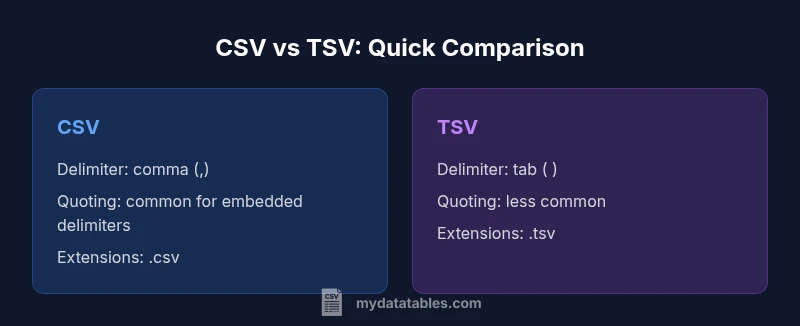
| Feature | CSV | TSV |
|---|---|---|
| Delimiter | comma (,) | tab (\t) |
| Quoting rules | Commonly used to escape embedded commas or newlines | Typically not required; quotes less common |
| Escaping | Double-quote escaping supported for embedded quotes | Escape handling is less standardized; varies by tool |
| Extensions | .csv | .tsv |
| Header row | Usually present and parsed as headers | Usually present and parsed as headers |
| Platform support | Broadly supported across tools and languages | Broadly supported but with some quirks in Windows tools |
| Readability in editors | Moderate readability; commas can blur columns | High readability when viewed in editors with tab stops |
Pros
- Broad tooling support for both formats
- Human-readable in text editors (TSV sometimes more readable)
- Consistent delimiter aids reproducibility
- CSV’s quoting rules help preserve data integrity in complex fields
Weaknesses
- Quoting rules in CSV can vary by tool, causing compatibility issues
- AT times, TSV can be misinterpreted by CSV-centric tools
- Some older tools have inconsistent support for TSV; edge cases arise
- Mixed environments may require additional conversion steps
CSV generally wins for interoperability; TSV offers readability and simple tab-delimited parsing in targeted pipelines
Choose CSV when broad compatibility is essential. Choose TSV when you prioritize human readability and stable tab-delimited ingestion in controlled ETL environments. For mixed-tool ecosystems, establish a clear standard and document it.
People Also Ask
What is the main practical difference between CSV and TSV?
The main practical difference is the delimiter: comma for CSV and tab for TSV. Quoting and escaping behavior can also differ by tool, affecting how data containing the delimiter is handled.
CSV uses commas and TSV uses tabs; always verify the delimiter in your data pipeline.
When should I choose CSV over TSV?
Choose CSV when interoperability with spreadsheets, databases, and many data tools is important. It’s the de facto standard for data exchange and often benefits from broader tooling support.
Choose CSV for broad compatibility across tools.
Are there stable rules for quoting in CSV?
Quoting rules in CSV are common but can vary by implementation. Typically, fields containing the delimiter or newline are quoted, and embedded quotes are escaped by doubling them.
Quoting helps preserve commas inside fields; ensure your parser matches your data.
Can I convert CSV to TSV automatically?
Yes. Automatic conversion is possible with scripting languages or tools, but you must ensure escaping and line-ending rules are preserved. Validate a sample before processing large datasets.
Yes, with careful validation of delimiters and line endings.
Do spreadsheets handle CSV and TSV the same way?
Spreadsheets generally import CSV well, while TSV support varies by application. Some editors recognize TSV readily, while others require manual configuration to specify the delimiter.
Most spreadsheets handle CSV; TSV support can vary by app.
What about performance differences?
Performance and memory usage differences between CSV and TSV are usually negligible compared to I/O costs. The key is consistent, reproducible parsing rules and efficient streaming.
Performance is mostly similar; focus on consistent parsing rules.
Main Points
- Define a single standard for your project and document it clearly
- Prefer CSV for broad compatibility, TSV for human readability
- Test end-to-end parsing with representative data
- Be explicit about quoting and escaping rules
- Normalize line endings when moving files across platforms