CSV vs TSV: Understanding the Difference
Explore the difference csv tsv, focusing on delimiters, quoting, compatibility, and when to choose CSV or TSV. A data-focused comparison for analysts and developers to optimize workflows and conversions in 2026.


When you compare difference csv tsv, the choice usually comes down to delimiter and tooling. CSV uses commas, TSV uses tabs; this simple distinction shapes parsing, quoting, and compatibility across programs. According to MyDataTables, most modern tools favor CSV for broad support, while TSV shines in environments with many commas in data. This quick comparison highlights where each format excels and when to reach for one over the other.
What difference csv tsv means
The terms CSV and TSV describe plain-text data formats that store tabular information. The critical distinction is the delimiter used to separate fields: a comma for CSV and a tab character for TSV. This single choice drives how data is parsed, how embedded delimiters are escaped, and how easily the file can be read by humans. The difference csv tsv is not just about a character; it influences software compatibility, data-cleaning workflows, and even performance in large pipelines. As businesses increasingly rely on data exports and imports, understanding this difference csv tsv helps data analysts and developers choose the right format for their pipelines. MyDataTables notes that the practical impact is felt most in how tools interpret quotes and line breaks, which can cascade into import errors if not handled consistently. In 2026, teams should consider their primary tools and downstream systems when deciding which format to standardize on, especially in shared data environments.
Core Delimiters and Quoting Rules
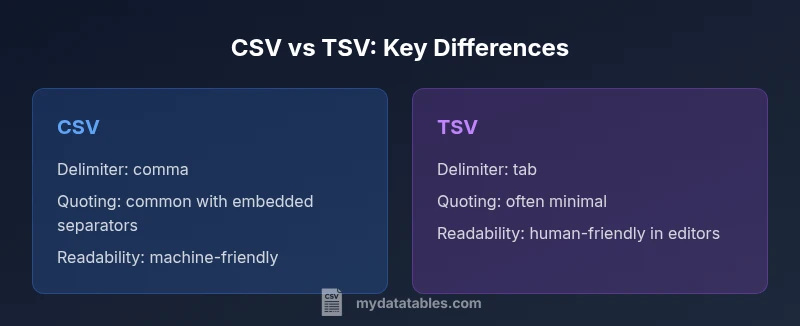
• CSV uses a comma as the default delimiter. Some locales or applications may switch to semicolons due to regional separators, but comma-delimited files are still the most common.
• TSV uses a tab character as the delimiter. Tabs tend to be less ambiguous when fields contain commas or quotes, which can simplify escaping rules in parsing.
• Quoting behavior varies. In CSV, fields containing the separator, newline, or quote characters are often quoted, and embedded quotes are escaped by doubling them. TSV typically involves fewer quoting requirements because tabs are less likely to appear inside data, but it is not strictly standardized across tools.
• Line endings and header handling are generally consistent across both formats, but some tools auto-detect delimiters and may infer the format based on content rather than file extension. Consistency in encoding (e.g., UTF-8) remains critical across both formats.
This section synthesizes practical guidance from the MyDataTables analysis to help teams choose delimiters wisely and document their conventions for maintainers and downstream consumers.
Practical Implications for Data Workflows
Data workflows depend on consistent parsing behavior. The difference csv tsv becomes especially relevant when moving data between systems, such as between a Python ETL job and a spreadsheet tool. When a data file uses commas as separators, any field containing a comma must be quoted; this can complicate downstream parsing if a consumer does not expect quotes. TSV's use of tabs often reduces the need for quoting, which can simplify imports into scripting environments and reduce the risk of misparsed fields. However, not all software handles TSV as robustly as CSV, leading to edge cases in legacy systems. In practice, teams should define a standard format for new projects, document their quoting rules, and verify that all intended tools in the pipeline can read and write the chosen format without data loss. The MyDataTables guidance emphasizes validating with at least two downstream consumers to avoid “format drift” late in a project.
Performance, Size, and Portability Considerations
File size differences between CSV and TSV are typically negligible for small datasets, but can become relevant at scale. The actual size depends on the data and the presence of escaping characters; CSV might incur slightly larger sizes if many fields require quotation, whereas TSV can be more compact when data is free of embedded separators. Parsing speed differences are minor in modern engines, though some pipelines may show tiny gains when using TSV due to simpler tokenization in certain libraries. Portability is another factor: CSV has broader legacy support in databases, BI tools, and web APIs, while TSV is favored in environments where human readability and manual editing are priority and where whitespace-delimited data is common. In real-world projects, testing with representative samples helps quantify any trade-offs you’ll encounter in production.
CSV vs TSV: When to Choose Which
The decision often boils down to tooling and data characteristics. Choose CSV when you need maximum compatibility across databases, ETL tools, and cloud platforms, or when your data includes many commas that are easier to handle with standard quoting rules. Choose TSV when your data naturally contains commas and you want to minimize escaping, or when your workflow involves human inspection or simple text editors. If your team uses Excel widely, CSV remains the default in many workflows, but many editors and BI tools can import TSV with equal ease. MyDataTables recommends defining a policy for new projects and sticking to it to avoid confusion and conversion costs later.
Encoding, Quoting, and Escaping Details
Encoding compatibility matters for both CSV and TSV. UTF-8 is the de facto standard for modern data interchange, reducing corruption when data includes non-ASCII characters. Quoting rules are more strict in CSV: fields with separators or line breaks typically must be quoted, with embedded quotes escaped. TSV generally requires less quoting but can still have edge cases if a tab character appears within a field. Some tools provide a “quoting mode” toggle; if your data contains complex strings, you may prefer CSV with robust quoting, while TSV can be easier to read and edit in plain text editors. Aligning your encoding, delimiter choice, and quoting policy across all producers and consumers minimizes downstream errors and rework.
Tools and Platform Compatibility Across Environments
Both formats enjoy broad tool support, but CSV is more universally supported by databases, analytics platforms, and cloud services. TSV, while equally valid, often has stronger readability in local edits and some programming environments that treat tabs as a natural field separator. In languages like Python, Java, and R, standard libraries provide straightforward readers and writers for both formats, with option flags to define the delimiter and quote behavior. When integrating with Excel or Google Sheets, CSV is typically easier to discover and import, though TSV can be pasted or opened directly in many cases. Always test with your target toolchain to confirm seamless round-trips.
Converting Between CSV and TSV
Converting between formats can be done quickly with both command-line tools and high-level languages. Shell users can run: tr ',' '\t' < input.csv > output.tsv to convert from CSV to TSV, and the reverse for TSV to CSV. In Python, the csv module supports switching delimiters by setting the delimiter argument when reading and writing. For large datasets, streaming processing to avoid loading entire files into memory is advised. If you work in a data team, consider building a small utility that enforces your chosen delimiter and encoding as part of your ETL pipeline.
Case Studies: Common Scenarios in Real Teams
Scenario A: A data team exports from a web app that uses commas for decimal separators in some locales and must export quickly to a CSV for analysts. Scenario B: An internal data catalog stores values with embedded tabs and commas; TSV makes raw inspection easier. In both cases, a documented standard helps. Teams that adopt a single format experience fewer conversion errors, simpler validation checks, and more predictable automation. The key is to align the choice with the downstream ecosystem and to document any deviations clearly.
Final Practical Guidance for 2026
- Decide on a standard delimiter across projects (CSV or TSV) and stick to it.
- Ensure consistent encoding (UTF-8) and include a header row when appropriate.
- Document your escaping rules and how to handle embedded delimiters.
- Test end-to-end with your primary tools to catch any compatibility issues early.
- Consider a lightweight conversion utility for teams that must interoperate with multiple formats.
Comparison
| Feature | CSV | TSV |
|---|---|---|
| Delimiter | Comma (,) | Tab (\t) |
| Typical use cases | Broad compatibility and data exchange | Readable in plain text and easier human inspection |
| Quote escaping | Quoted fields allowed; embedded quotes escaped | Less quoting required; fewer escaping rules |
| Header support | Commonly used with header row | Commonly used with header row |
| Tooling support | Extensive across databases, APIs, and editors | Strong in environments favoring readability and editors |
| Encoding considerations | UTF-8 recommended; broad support | UTF-8 recommended; broad support |
| Best for | General data interchange and automated pipelines | Human-friendly editing and debugging |
Pros
- CSV is the de facto standard for data exchange with broad tooling support
- TSV reduces the need for escaping when data contains commas
- Both formats are plain-text and easy to inspect for quick validation
- UTF-8 encoding is commonly supported to prevent character corruption
Weaknesses
- CSV can require escaping and quoting for embedded separators
- TSV is less universally supported by older tools and some databases
CSV is the safer default for interoperability; TSV is preferable when readability and minimal escaping are priorities
Choose CSV for widest tool compatibility and automation. Opt for TSV when data often includes commas and you value human-readability in raw files; ensure downstream tools can read the chosen format.
People Also Ask
What is the difference csv tsv?
CSV uses commas to separate fields, while TSV uses tabs. This delimiter choice affects how data is parsed and how easily embedded commas or quotes are handled. The difference csv tsv often drives quoting, escaping, and compatibility decisions in data workflows.
CSV uses commas, TSV uses tabs. This delimiter choice influences parsing and compatibility across tools.
Is TSV supported by Excel and Google Sheets?
Both Excel and Google Sheets can work with TSV files, though CSV remains the more common default for these apps. If you receive a TSV, you can typically open it directly or import it with delimiter settings.
Excel and Sheets can handle TSV, but CSV is more universally expected.
When should I choose TSV over CSV?
Choose TSV when data contains many comma characters and you want to minimize escaping, or when readability in plain-text editors is a priority for reviewers and analysts.
Pick TSV if you expect lots of commas in your data and want easier readability without escaping.
How can I convert CSV to TSV quickly?
For quick conversion, use a shell command like: tr ',' '\t' < input.csv > output.tsv. In Python, re-file with csv.reader and csv.writer by setting the delimiter accordingly.
Use tr to swap commas for tabs, or use Python's csv module with the delimiter set accordingly.
Are there encoding concerns with CSV/TSV?
Yes. Use UTF-8 encoding to avoid character corruption and ensure consistent handling across tools and platforms.
UTF-8 encoding is recommended to avoid character issues.
What about delimiters other than comma or tab?
Some systems use semicolons, pipes, or other delimiters depending on locale, tools, and data requirements. Always document the chosen delimiter in your data contracts.
Other delimiters exist, but document them clearly to prevent confusion.
Main Points
- Choose a single delimiter policy for projects
- Prioritize UTF-8 encoding to avoid character issues
- Use quoting rules consistently to prevent parsing errors
- Test end-to-end with your target toolchain