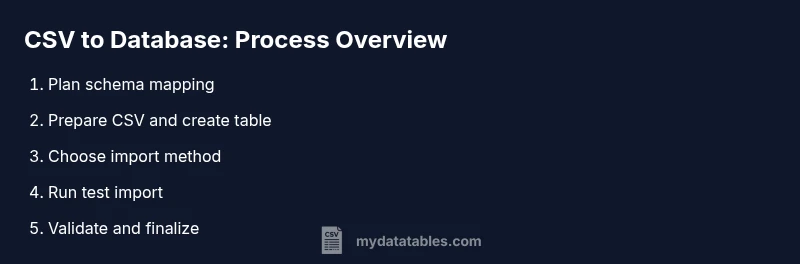
CSV to Database: A Practical Guide for Importing CSV Data
Learn how to move CSV data into a relational database safely and efficiently. This step-by-step guide covers planning, validation, import methods, error handling, and post-load checks to ensure data integrity.


Importing CSV to a database starts with planning the target schema, mapping CSV columns to table fields, and validating data before load. You need a CSV file, a target database, and a mapping plan to execute a safe, repeatable import. This guide outlines a practical, step-by-step workflow you can apply across environments.
What csv to database means and why it matters
CSV to database is the process of loading comma-separated values into a relational database where you can query, join, and analyze the data efficiently. The core idea is to map each CSV column to a corresponding table field, choose the right data types, and enforce constraints that preserve data integrity. This matters because poorly planned imports can introduce duplicates, nulls, or encoding issues that ripple through downstream analytics. According to MyDataTables, many teams underestimate schema design and validation, which leads to brittle pipelines later. A thoughtful approach begins with a clear objective, a defined schema, and a plan to handle edge cases such as missing values and inconsistent delimiters. As you build your csv to database workflow, focus on reproducibility, scalability, and observability so you can repeat the process across datasets and environments. In practice, you’ll benefit from documenting column mappings, validation rules, and the exact import steps so teammates can audit and reproduce the results. This article uses MyDataTables guidance to illustrate practical steps without vendor lock-in, and applies to many database systems such as PostgreSQL, MySQL, SQL Server, and SQLite.
Planning your CSV-to-DB workflow
Before touching data, outline the end state. Define the target database, the schema for each table, and how each CSV column will map to a column in the database. Decide on encoding (UTF-8 is standard), delimiters, and how you will handle missing values. Consider transaction boundaries, error handling policies, and how you will monitor the import. A good plan also covers how you will test on a small subset before a full load, and how you will roll back if something goes wrong. The MyDataTables team recommends starting with a simple subset of fields to prove the mapping works, then gradually expand to the full schema. With a documented plan, you reduce surprises and make automation easier.
Data mapping and schema design considerations
Mapping CSV to database requires translating string values into typed data. Decide on appropriate data types (INTEGER, TEXT, BOOLEAN, DATE, TIMESTAMP) and consider constraints such as NOT NULL, UNIQUE, and foreign key relationships. Normalize the data where possible to avoid redundancy, but be mindful of join performance. Define default values for missing fields and implement data validation rules at import time. Record the expected length and format for each field (for example, dates in YYYY-MM-DD, prices with two decimals). If you are importing into a data warehouse or denormalized reporting schema, plan for surrogate keys and slowly changing dimensions. Finally, document the mapping clearly so future analysts can understand where each CSV column ends up in the database.
Import methods and tooling options
There are several common approaches to loading CSV data into a database. For PostgreSQL and MySQL, bulk import commands (COPY for PostgreSQL, LOAD DATA INFILE for MySQL) are fast and efficient for large files. If you’re using SQL Server, BULK INSERT or bcp can handle big datasets. For smaller datasets, you can use INSERT statements in batches. Each method has trade-offs between speed, error reporting, and transactional safety. Pick a method that matches your environment and data quality requirements, then test on a small sample first. The choice of tooling—command line, GUI, or a scripting language like Python—depends on your comfort level and automation goals. The MyDataTables guidance favors repeatable scripts with clear logging and error handling to simplify maintenance.
Data validation, cleaning, and quality checks
Validation should occur before, during, or after import, depending on your workflow. Validate required fields exist, values conform to the target types, and referential integrity rules are satisfied. Clean the data by trimming whitespace, normalizing case, and standardizing dates and numeric formats. Use a staging area to catch problematic rows and report errors with meaningful messages. Implement constraints in the database to guard against future bad data, and consider adding checks for duplicates or inconsistent foreign keys. Finally, perform spot checks by sampling rows and validating counts against expectations to ensure the import behaved as planned.
Error handling and recovery strategies
No import is perfect on the first run. Design your pipeline to fail gracefully, log errors, and allow partial commits controlled via transactions. If a row fails validation, decide whether to drop it, fix it, or quarantine it for manual review. Maintain a retry policy with backoff for transient issues such as network interruptions or file encoding problems. When you discover a systemic problem, pause the job, inspect the source CSV, adjust the mapping, and re-run from a known good checkpoint. This disciplined approach minimizes data corruption and reduces debugging time.
Post-import validation, indexing, and maintenance
After load, verify row counts, sample data integrity, and constraint satisfaction. Create or update indexes on frequently queried columns to improve performance, then test common queries to confirm performance meets expectations. Establish a refresh cadence for automated imports if your data is ongoing, and document any schema changes for downstream users. Finally, schedule regular reviews of your CSV-to-database pipeline, update mappings as the source files evolve, and maintain logs and audit trails for compliance.
Tools & Materials
- CSV file with headers(Ensure the file uses a consistent delimiter and UTF-8 encoding)
- Target database system(Examples: PostgreSQL, MySQL, SQL Server, SQLite)
- SQL editor or DB admin tool(pgAdmin, MySQL Workbench, SQL Server Management Studio, etc.)
- Data mapping document(Spreadsheet or doc detailing CSV-to-table mappings)
- Scripting environment (optional)(Python, Node.js, or similar for automation)
- Connectivity credentials(Host, port, database, user, password)
- Encoding and delimiter settings(Standardize on UTF-8 and a consistent delimiter)
- Test dataset(A small subset to validate mappings and constraints)
Steps
Estimated time: 1-2 hours
- 1
Define target schema and table structure
Draft the destination schema with tables, columns, and constraints. Align each CSV column to a specific field and decide on data types that minimize conversion errors. Capture this mapping in a reference document.
Tip: Pro tip: Start with a minimal subset of columns to validate the mapping before expanding. - 2
Prepare CSV and create table
Validate the CSV file for header accuracy and encoding. Create the database table(s) with NOT NULL constraints where appropriate and define default values for missing fields.
Tip: Pro tip: Use a staging table to isolate the import and prevent affecting production data. - 3
Choose import method
Select the import method that matches file size and DB tooling (COPY/LOAD DATA/BULK INSERT vs. scripted inserts). Ensure transactional safety where possible.
Tip: Pro tip: For large files, prefer bulk import over row-by-row inserts to minimize time and errors. - 4
Map CSV columns to table columns
Apply the mapping document to ensure each CSV column goes to the correct destination. Convert data types in transit if your tool supports it to reduce post-load work.
Tip: Pro tip: Validate a sample of rows during mapping to catch format mismatches early. - 5
Run a small test import
Load a subset of rows into a staging area to verify the mapping, constraints, and error handling. Review any errors and adjust the mapping or data cleansing rules.
Tip: Pro tip: Enable detailed logging for easier debugging. - 6
Validate results and fix issues
Check row counts, sample records, and referential integrity. Correct any bad data or mapping errors before proceeding.
Tip: Pro tip: Use automated checks to compare source counts with target counts. - 7
Run full import in batches
Import the full dataset in controlled batches to minimize memory usage and facilitate rollback if needed. Monitor progress and resource usage.
Tip: Pro tip: Keep a checkpoint log to resume imports after interruptions. - 8
Post-import validation
Verify totals, run queries to validate key metrics, and confirm indexes are supporting typical workloads.
Tip: Pro tip: Run representative queries to benchmark performance.
People Also Ask
What is the first step to import CSV into a database?
Define the target schema and map CSV columns to the database fields. Establish data types and constraints before loading.
Start by defining the target schema and mapping CSV columns to database fields, then set data types and constraints.
How do I handle data type mismatches during import?
Validate each column against the destination type, cast values as needed, and drop or quarantine rows that cannot be converted.
Validate and cast types as needed, and quarantine any non-convertible rows.
What about encoding and delimiters in CSV?
Ensure UTF-8 encoding, consistent delimiter, and proper escaping to avoid misread values.
Use UTF-8, the correct delimiter, and proper escaping to prevent garbled data.
Should I load in batches or all at once?
Batch loading reduces memory pressure and makes error handling easier. Start with small batches and scale up.
Load in small batches to manage memory and make catching errors easier.
How can I verify import success?
Check row counts, validate a sample of records, and run consistency checks against constraints.
Count rows, sample data, and check constraints to confirm success.
Watch Video
Main Points
- Plan your schema before importing
- Validate data prior to load
- Import in small batches for safety
- Verify integrity after load
- Index critical columns and document mappings