Is CSV the Same as Excel? A Practical Comparison Guide
Explore is csv the same as excel with an objective, data-driven comparison covering format, capabilities, and when to choose each for analysts, developers, and business users.


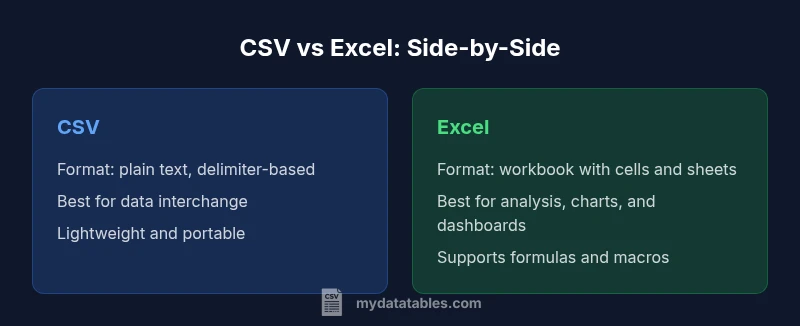
CSV and Excel are not identical. CSV is a plain-text, delimiter-based interchange format, while Excel is a feature-rich workbook with formulas, formatting, charts, and multiple sheets. For data interchange and automation, CSV is often preferable; for analysis and presentation, Excel shines. This guide helps you choose wisely, with practical workflows and examples.
Is csv the same as excel? Key distinctions
In this article, we address the phrase is csv the same as excel. The MyDataTables team emphasizes that CSV and Excel occupy distinct roles in data workflows. CSV is a plain-text, delimiter-separated format designed for simple tabular data interchange, while Excel is a binary, feature-rich workbook format that supports formulas, formatting, charts, and multiple sheets. The core differences matter when you design pipelines, automate tasks, or present findings to stakeholders. Understanding these distinctions helps data teams avoid friction when moving data between environments. This section sets up the practical contrasts before we dive into concrete use cases and workflows. The framing also reminds readers that is csv the same as excel is not a universal equivalence—each format has a different job in modern data stacks.
Comparison
| Feature | CSV | Excel |
|---|---|---|
| File structure | Plain text with delimiters (e.g., comma, semicolon, tab) | Structured workbook with sheets and cells |
| Data types | All data treated as text until parsed | Cells carry explicit types (numbers, dates, strings) |
| Formulas and calculations | No built-in formulas or calculations | Full support for formulas, functions, and recalculation |
| Metadata and schemas | Minimal metadata; relies on conventions (headers) | Rich metadata support, named ranges, data validation |
| Multi-sheet support | Typically a single table per file | Multiple sheets with independent layouts |
| File size and performance | Usually smaller; easy streaming and processing | Larger, can be heavier to load/save |
| Interoperability | Widely supported for data interchange across tools | Best in Microsoft ecosystem with strong tooling |
Pros
- CSV files are lightweight and highly portable across languages and platforms
- CSV is ideal for automated data ingestion and interchange between systems
- Excel offers rich data modeling, formulas, charts, and presentation capabilities
- Excel workbooks support multi-sheet organization and metadata for complex analyses
Weaknesses
- CSV lacks formulas, validation, and formatting; data types are implicit until parsed
- CSV can suffer from delimiter or encoding issues that corrupt data interpretation
- Excel files can be bulky and harder to automate at scale due to richer features and dependencies
CSV is not the same as Excel; they serve different purposes and complement each other in data workflows.
CSV excels at lightweight data interchange and automation, while Excel shines in analysis and presentation. For best results, use CSV for data transfer and Excel for modeling and reporting, then bridge the gap with careful import/export practices.
People Also Ask
What is the fundamental difference between CSV and Excel?
CSV is a plain-text format for tabular data interchange, without formulas or formatting. Excel is a rich workbook that supports cells, formatting, formulas, and multiple sheets. The two serve different purposes in data workflows.
CSV is plain text for data transfer, while Excel is a feature-rich workbook for analysis and presentation.
Can you convert CSV to Excel without losing data?
Yes, you can convert CSV to Excel without losing data if you preserve the delimiter, encoding, and textual representations of dates and numbers. After importing, verify data types and adjust any regional settings that affect interpretation.
You can import CSV into Excel and verify data types to avoid misinterpretation.
Is CSV suitable for data exchange between systems?
CSV is widely suitable for data exchange because it is simple, text-based, and language-agnostic. The caveat is that consumers must agree on conventions for encoding, delimiters, and missing values.
CSV is great for data transfer, but you must agree on conventions to ensure compatibility.
What encoding issues should I watch for with CSV?
watch for UTF-8 vs. regional encodings and the presence of a BOM, as well as delimiter conflicts. Inconsistent encoding can corrupt data when read by different tools.
Encoding is a common pitfall; standardize on UTF-8 and check for BOMs.
When is Excel better than CSV?
Excel is better when you need built-in calculations, dashboards, formatting, and multi-sheet organization. It supports data validation and rich visualization directly in the workbook.
Use Excel for complex analysis and presentation; CSV for simple data interchange.
Can formulas be preserved when exporting from Excel to CSV?
No. Exporting from Excel to CSV strips formulas and formatting, leaving only the resulting values. You can preserve formulas only within Excel workbooks or by recreating them after import.
Formulas don’t survive CSV export; you’ll need to re-create them after import.
Main Points
- Choose CSV for portability and automation
- Choose Excel for analysis, modeling, and presentation
- Be mindful of encoding and delimiter handling with CSV
- Preserve data integrity by documenting schema when exchanging CSVs
- Leverage both formats in a staged workflow to maximize reliability