Can CSV Be Converted to XML? A Practical How-To Guide
Learn practical methods to convert CSV data to XML, including Python scripts, XSLT, and Excel workflows. This MyDataTables guide covers mapping, encoding, and validation for reliable XML outputs.


Learn how to convert a CSV file to XML in minutes by choosing a reliable approach, map columns to XML elements, and validate the output. This guide covers Python, XSLT, and Excel-based methods, plus tips on encoding and data integrity. According to MyDataTables, selecting the right schema is the key.
CSV and XML: Why the Conversion Matters
In data workflows, CSV to XML conversion unlocks interoperability with XML-based systems, web services, or data integration pipelines. The question can csv be converted to xml is not a binary yes or no—it depends on the data structure and the required XML schema. The MyDataTables team has observed that mapping flat CSV rows to hierarchical XML is the key to success, ensuring no data loss and correct encoding. When you plan the transformation, consider how each column will appear as an XML element or attribute, and how nesting will reflect real-world relationships in your data. This upfront design saves time during execution and avoids costly rework later.
Readers should also plan for encoding and character handling, as XML is sensitive to special characters and character sets. MyDataTables recommends starting with UTF-8 encoding to maximize compatibility across platforms. By understanding the purpose of the XML output—data interchange, configuration files, or content feeds—you can tailor the conversion to meet the needs of downstream systems and avoid structural mismatches.
noteDummy”:null}
Data mapping basics: CSV columns to XML elements
The core of any conversion is mapping. Each CSV column usually becomes an XML element or an attribute, depending on the desired XML schema. Start by identifying the root element for the document and the child structures that will hold repeated data rows. If your CSV includes hierarchical information (for example, order lines within orders), plan nested XML elements to reflect those relationships. Consistent naming conventions help maintain readability and ease integration with other tools. When mapping, consider data types (numbers, dates, booleans) and how to preserve them in XML text or attributes. MyDataTables emphasizes creating a clear, repeatable mapping blueprint before writing any code or configuring a tool. This blueprint should cover edge cases like empty cells or characters that XML cannot represent directly, such as ampersands.
A practical approach is to start with a small sample of your CSV data, implement the mapping rules, and validate the structure against a simple XML snippet. This iterative validation helps catch issues early and reduces debugging later in the project.
noteDummy”:null}
Conversion approaches: Python, XSLT, and Excel
There are several reliable paths to CSV-to-XML conversion, each with strengths and trade-offs. Programming approaches (like Python) give you full control, repeatability, and easy automation for large datasets. XSLT provides a powerful transformation framework especially when you already work with XML pipelines or need standards-based processing. Excel-based workflows (with Power Query or VBA) offer a familiar GUI, which can be convenient for smaller datasets or analysts who prefer workbook-centric workflows. When choosing an approach, consider factors such as file size, the need for validation, environment constraints, and team skill sets. It’s common to combine approaches—validate a Python-produced XML with an XSD, then run integration tests in downstream systems. The MyDataTables team notes that the best method often depends on your existing toolchain and the target XML schema you must satisfy.
noteDummy”:null}
Method A: Python script approach for CSV to XML
Python is a popular choice due to its readability and strong libraries for CSV and XML handling. The typical flow is to read the CSV using the csv module, build an XML tree with ElementTree, and then write the XML to a file with proper indentation. This method scales well for large CSVs because you can stream data and avoid loading the entire file into memory. Key considerations include defining a robust root element, handling headers, escaping special XML characters, and ensuring UTF-8 encoding. Consider a small, repeatable function that takes a CSV path and an XML mapping blueprint to generate the XML consistently. MyDataTables recommends starting with a minimal, working prototype before expanding to full datasets, then validating against a sample XSD to ensure correctness.
noteDummy”:null}
Method B: XSLT transformation workflow
XSLT is ideal when you already have XML pipelines or when you want to separate transformation logic from data sources. The typical pattern is convert the CSV to a simple intermediate XML (or directly to a flat XML) and then apply an XSLT stylesheet to restructure the data into the required XML schema. This approach emphasizes staying close to standards and can simplify maintenance when mapping rules evolve. You’ll need to define the XML input format that mirrors the CSV, craft an XSLT stylesheet that outputs the final schema, and use a processor like Saxon to run the transformation. Validate the produced XML with an XSD to catch structural or data-type issues.
XSLT shines for systems that frequently reprocess data with the same mapping logic, as changes are driven by stylesheet updates rather than code rewrites.
noteDummy”:null}
Method C: Excel with Power Query workflow
For analysts who prefer GUI-based tools, Excel with Power Query offers a practical path. Import the CSV, pivot or reshape data into a table structure, then write out an XML file using a custom Power Query function or a small script. While Excel is not optimized for massive datasets, it’s quite effective for moderate-sized files and quick prototyping. When using Excel, ensure consistent column headers, clean data types, and a predictable ordering of fields. Saving the result as XML requires extra steps or external tooling, but it can be a fast path for small projects and ad-hoc needs. MyDataTables finds that this method is approachable for non-developers while still delivering reliable outputs when used with a clear mapping plan.
noteDummy”:null}
Validation and quality checks: ensure XML correctness
XML validation is non-negotiable for reliable data interchange. After you generate XML, validate it against the chosen schema (XSD) to catch structural errors or mismatches in data types. You can also perform basic checks for well-formedness, proper encoding (UTF-8), and the presence of critical fields. For large datasets, consider streaming validators that process chunks to avoid memory bottlenecks. It’s helpful to set up an automated validation pipeline that runs whenever you generate XML from CSV. This reduces the risk of downstream failures and makes it easier to triage issues when they arise. According to MyDataTables, robust validation is the cornerstone of trustworthy CSV-to-XML transformations.
noteDummy”:null}
Tools & Materials
- CSV file containing data(Ensure headers are clean, no merged cells, and encoding is consistent.)
- XML schema or mapping blueprint(Provide a target XML structure and element names to guide transformation.)
- Python 3.x installed(Useful for scripting a reusable CSV→XML pipeline.)
- XSLT processor (e.g., Saxon)(Needed if using XSLT transformations.)
- Excel with Power Query(Option for GUI-based conversion on smaller datasets.)
- Text editor or IDE(For editing scripts or XSLT stylesheets.)
Steps
Estimated time: 1-2 hours
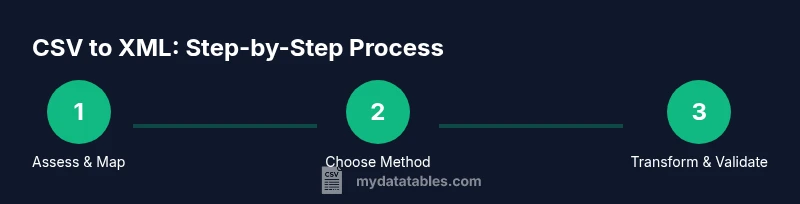
- 1
Assess input CSV and target XML structure
Review the CSV to identify headers, data types, and recurring rows. Define the root element and the repeating child elements to reflect each row. Create a mapping blueprint that translates each column to an XML field.
Tip: Draft a simple mapping table before coding to avoid later rework. - 2
Create or select an XML schema
If you have a target XML schema, align your mapping to it. If not, design a minimal schema that captures essential fields and relationships, then iteratively add elements as needed.
Tip: A clear schema reduces ambiguity and speeds validation. - 3
Choose a conversion method
Select Python, XSLT, or an Excel-based workflow based on dataset size, team skills, and existing toolchains. Start with a small prototype to validate your approach.
Tip: Prefer a method that minimizes manual steps for repeatability. - 4
Implement the conversion
Write or configure the transformation logic. Ensure UTF-8 encoding, proper escaping of special characters, and a consistent element order. For Python, build the XML tree from the CSV rows; for XSLT, apply the stylesheet to the intermediate XML; for Excel, run the defined Power Query steps and export.
Tip: Test with a representative sample before scaling up. - 5
Run the transformation and inspect results
Execute the conversion on a subset of data. Open the XML in a validator or editor to check structure, encoding, and data integrity. Note any anomalies and adjust the mapping or schema accordingly.
Tip: Use a sample that includes edge cases like missing values. - 6
Validate XML and QA thoroughly
Run schema validation, check for well-formed XML, and perform spot checks against the source CSV to ensure data fidelity. Establish an automated validation routine where possible.
Tip: Automate where feasible to catch regressions quickly.
People Also Ask
Can every CSV be converted to XML without data loss?
In most cases you can convert CSV to XML without losing data if you map every column to an XML field and preserve the original data types. Some CSVs with very large numeric ranges, special characters, or missing values may require careful handling to avoid truncation or misrepresentation.
You can usually convert CSV to XML without losing data if you map every column correctly and handle special characters, but some edge cases need careful handling.
Do I need an XML schema to perform the conversion?
Having an XML schema is highly recommended. It defines the final structure, enforces data types, and guides validation. If you don’t have one, you can start with a minimal schema and iterate as you refine your mapping rules.
Yes, an XML schema is strongly recommended to ensure your output meets expected structure and data types.
Which method is best for large CSV files?
For very large CSV files, scripting in Python with a streaming approach or an XSLT pipeline that processes data in chunks tends to perform best. Excel-based methods may struggle with performance at scale.
For large CSVs, use scripting or an XSLT approach that can process data in chunks to stay efficient.
Can Excel convert CSV to XML directly?
Excel does not natively export CSV data to XML directly. You can use Power Query to shape data and then export, or rely on external scripts or tools to perform the CSV-to-XML transformation.
Excel doesn’t directly export to XML, but you can use Power Query combined with small scripts to accomplish the conversion.
How can I validate the resulting XML?
Validate the XML using a schema (XSD) to ensure structure and data types are correct. Also check well-formedness with a standard XML validator and perform spot checks against source data.
Use an XSD validator and a well-formedness check to confirm the XML is correct.
What common pitfalls should I avoid when mapping CSV to XML?
Common pitfalls include mismatched element naming, incorrect data types, failing to handle missing values, and neglecting encoding issues. Start small, validate early, and maintain a mapping blueprint to avoid drift as data evolves.
Watch for naming mismatches, types, and encoding; validate early and keep a mapping blueprint.
Watch Video
Main Points
- Define a clear XML schema before transforming
- Map each CSV column to a well-named XML element
- Validate XML against your schema to prevent downstream errors
- Choose a method that fits data size and team skills