CSV vs CSA: A Practical Difference Guide
Learn the practical distinctions between CSV and CSA, including definitions, delimiters, and real-world use cases, to choose the right format for data portability and interoperability.


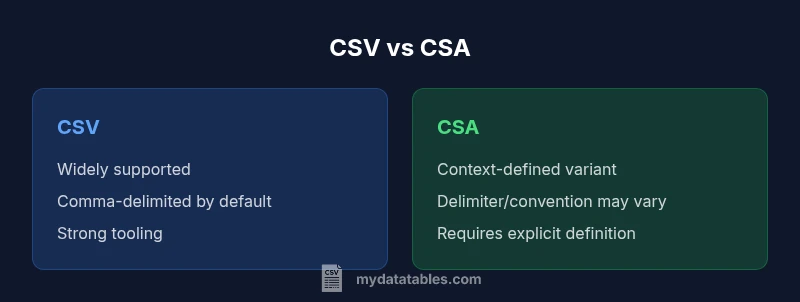
CSV remains the standard for tabular data exchange. CSA is not a formally defined format and usually signals an ambiguous, context-specific variant of CSV with nonstandard conventions. In practice, choose CSV for portability and interoperability, and require a clear CSA definition from collaborators before adopting it in a project.
Understanding the difference between csv and csa in practice
The phrase difference between csv and csa is not just academic; it drives how data is collected, shared, and analyzed. CSV, short for Comma-Separated Values, is a long-standing standard for tabular data in plain text. CSA, by contrast, is not a universally recognized format. In many contexts, CSA serves as a placeholder for a context-specific CSV variant defined by a team, vendor, or workflow. This article treats CSA as an ambiguous class whose exact rules depend on documentation. When you encounter either format, start by clarifying the intended rules: delimiter, quoting, header presence, encoding, and any special treatment for escaped characters. With a clear definition, the difference becomes a practical guide for data portability and integrity.
The historical context of CSV and where CSA can fit
CSV has origins in the early days of data interchange, becoming a de facto standard in spreadsheets, databases, and scripting languages. Its simplicity is a strength, but it also invites variation in how delimiters are handled, whether a header row is required, and which character encoding is used. The formal standard most often cited is RFC 4180, which defines comma delimiters, double quotes for escaping, and a straightforward structure. However, many real-world implementations diverge from the RFC, especially in locales where the decimal separator is a comma, leading to semicolon-delimited variants. In those contexts, some teams refer to what they call CSV as CSA to acknowledge nonstandard choices—though this is not a universally recognized standard. The important takeaway is: when CSA appears, you must verify the exact conventions being used in that project.
CSA in practice: how it appears in different contexts
Because CSA is not universally standardized, its meaning changes across organizations and tools. In some teams, CSA denotes a variant of CSV that uses a nonstandard delimiter (such as a semicolon or tab) and possibly altered quoting rules. In other contexts, CSA might refer to a CSV-like format with specific metadata headers, comments, or embedded data blocks. The lack of a single, formal CSA specification means that interoperability hinges on explicit documentation, agreed-upon parsing rules, and consistent testing across environments. If you encounter CSA, your first job is to locate the exact definition, ideally with a sample file and a minimal validation checklist. Without this, the risk of misinterpretation and data corruption increases dramatically.
Core differences between CSV and CSA: what to look for
The essential differences to verify are delimiter choice, quoting/escaping conventions, header presence, and character encoding. CSV, as a widely used standard, relies on comma delimitation and RFC‑style quoting in many ecosystems, with UTF‑8 as a common default encoding. CSA, by its nature, varies by context. Expect variability in the chosen delimiter, the way quotes are used to escape data, and even whether a header line is required. Understanding these differences helps data teams design robust ingestion pipelines, choose appropriate tooling, and implement validation checks that guard against subtle data shifts that break downstream analyses.
A practical way to anchor your understanding is to construct a small test dataset in both formats and run it through representative tools (databases, ETL pipelines, analytics notebooks). Compare parsed outputs for equivalence, focusing on edge cases like embedded delimiters, line breaks in fields, and non-ASCII characters. This exercise makes the abstract distinction tangible and informs decisions about which format to adopt for a given project.
Practical implications for data analysts: consequences of the CSV vs CSA distinction
For data analysts, the choice between CSV and CSA directly affects data lineage, reproducibility, and collaboration. CSV files tend to be easier to share across departments and systems, with well-documented tooling for parsing, cleaning, and validating data. The absence of a fixed CSA specification places more burden on project teams to document the exact rules, produce clear samples, and implement automated checks that ensure consistent interpretation by all readers. When CSA is needed—such as in a domain-specific workflow—the team should publish a formal CSA specification alongside the data, including details on delimiter choice, quoting behavior, header rules, and encoding. This governance reduces ambiguity and accelerates onboarding for new data stakeholders.
Delimiters, encoding, and escaping: how these impact interoperability
Delimiter choices shape how easily data can be read by generic tools. CSV’s default comma delimiter is widely understood, but many environments tolerate semicolons, tabs, or other characters, especially in locales where a comma is used as a decimal separator. Encoding decisions—most often UTF-8 with or without a BOM—also affect compatibility across systems. Quoting and escaping rules determine how embedded delimiters appear within fields. CSA variants can alter any of these aspects, so explicit specifications help prevent silent data shifts when moving data between tools, languages, or platforms. In practice, you should document the precise delimiter, whether quotes are required, how escaping is performed, and the encoding used for every CSA instance.
Validation and quality checks: ensuring data integrity across formats
Quality checks are essential when working with CSV and CSA. Validate that every row has the same number of fields, that missing values are represented consistently, and that special characters are properly escaped. Build deterministic tests that compare parsed outputs against a known-good reference for a sample set of rows, including edge cases like empty fields, quotes inside fields, and multi-line fields. For CSA, the validation is even more critical because misinterpretation of the variant can produce mismatched schemas, incorrect data types, or misaligned rows. Establish automated pipelines that perform a round-trip test: read CSA, convert to a canonical CSV, and compare the results with the expected baseline. This discipline reduces risk and builds trust in your data products.
Migration strategies: converting CSA to CSV and vice versa
When migrating between CSA and CSV, start with a formal definition of the CSA variant you are dealing with. Identify the delimiter, quoting, header rules, and encoding. In conversion, you typically normalize to a standard CSV with a well-documented delimiter (commonly a comma) and consistent quoting rules. Use a robust parsing library that allows you to specify the exact CSA rules and then emit standard CSV with UTF-8 encoding. Validate the output with a side-by-side comparison to the original CSA-derived data to ensure no data loss or misinterpretation. For ongoing workflows, lock down a single canonical format and clearly communicate any deviations to stakeholders.
Best practices and recommendations for teams handling CSV and CSA
- Document the CSA rules with exact delimiter, quoting, and encoding specifications; attach a sample file.
- Prefer standard CSV for public data exchanges to maximize tooling support and interoperability.
- Implement automated tests that compare parsed output against a reference dataset across platforms and tools.
- Establish governance: who decides when to use CSA, who approves CSA definitions, and how changes are communicated.
- Use validated parsers and serializers that enforce schema integrity and detect anomalies early.
- When possible, provide metadata alongside the file describing the format variant and its scope.
These practices reduce misinterpretation, speed up collaboration, and uphold data quality across teams and tools.
Quick reference: decision checklist for CSV vs CSA usage
- Is the data intended for broad sharing across different systems? If yes, default to standard CSV with a documented schema.
- Does your team rely on domain-specific conventions that require a CSA variant? Require a formal CSA specification.
- Will downstream tooling expect exact delimiters and quoting rules? Define and enforce a fixed CSA specification if CSA is used.
- Are there non-ASCII characters or locale-specific formats? Choose UTF-8 encoding and test cross-platform parsing.
- Can you provide both a CSA definition document and a canonical CSV export for reference? This practice supports transparency and reproducibility.
Comparison
| Feature | CSV | CSA (ambiguous) |
|---|---|---|
| Definition | Widely accepted standard for tabular data in plain text | Context-dependent; varies by organization or tool; not a single standard |
| Delimiters | Default comma (RFC 4180), but other delimiters can appear | Often nonstandard or undefined without documentation |
| Headers | Commonly include a header row; optional in some datasets | Header presence depends on CSA variant; must be specified |
| Quoting | RFC 4180 quoting rules are common; quotes escape embedded delimiters | Quoting rules are variant-specific and not universally standardized |
| Encoding | Typically UTF-8 or ASCII; BOM usage varies | Encoding depends on CSA definition or tool defaults |
| Tooling support | Very broad across databases, editors, and libraries | Support hinges on clearly defined CSA parameters; may require custom parsers |
| Best for | Portable data exchange across multiples systems | Domain-specific workflows where CSA is clearly defined |
Pros
- CSV is universally supported, which reduces compatibility issues
- Standard delimiter and quoting rules improve interoperability
- Broad tooling enables validation, parsing, and transformation
- Clear conventions minimize surprises during ingestion and analysis
Weaknesses
- CSA ambiguity can hinder data sharing across teams
- Lack of universal CSA standard increases the risk of misinterpretation
- Conversion between CSA and CSV requires precise, documented rules
- Reliance on bespoke CSA definitions can slow onboarding and automation
CSV is the safer default; CSA is viable only with explicit, documented definitions
Choose CSV for portability and consistent tooling. If you must use CSA, mandate a precise specification covering delimiters, headers, encoding, and quoting, and validate with sample data.
People Also Ask
What is the difference between CSV and CSA?
CSV is a widely accepted standard for tabular data exchange. CSA is not universally standardized and can refer to context-specific CSV variants; always verify the exact CSA definition in your project.
CSV is standard; CSA is ambiguous and context-dependent.
Is CSA a real, formal file format used in data exchange?
CSA is not recognized as a universal standard. It typically denotes a nonstandard CSV variant defined by a team or tool, so explicit documentation is essential.
CSA is not a universal format; its meaning depends on the project.
How can I convert CSA to CSV safely?
First determine the CSA rules (delimiter, quoting, headers). Then parse using a flexible reader and emit standard CSV with clear documentation and UTF-8 encoding.
Identify CSA rules, parse, and emit standard CSV.
What tooling supports CSA?
Tool support depends on the CSA definition. If defined, generic CSV tooling can be adapted with explicit parameters; otherwise, bespoke parsers may be needed.
Tooling varies with the CSA definition.
When should I avoid CSA?
If portability and interoperability are priorities, prefer standard CSV with a well-documented convention. Use CSA only when there is a clearly agreed-upon spec.
Avoid CSA if you need broad compatibility.
Main Points
- Document CSA rules before use
- Prefer standard CSV for portability
- Validate CMS-like behavior with samples
- Use automated tests for cross-platform consistency