Images to CSV: A Practical How-To Guide
Learn how to transform image data into CSV by extracting metadata and OCR results, merging them into a single dataset, and validating outputs for reliable analytics. Practical steps, tools, and best practices.


This guide shows how to convert images to CSV by extracting metadata (EXIF/IPTC), performing OCR to capture on-image text, and compiling results into a single, structured CSV. You’ll learn practical workflows, essential tools, and common pitfalls. The approach scales from small image sets to large archives, with reproducible steps for analysts, developers, and business users who need searchable image data.
What "images to csv" really means
Images to CSV describes turning the information contained in image files into a tabular format. A single row can represent one image, with columns for filename, path, file size, width, height, color space, and selected metadata fields. In addition, you can include OCR-derived text segments if you want to capture on-screen content. This structured approach enables powerful filtering, sorting, and analytics on image collections. According to MyDataTables, defining a precise field schema early helps maintain consistency across large collections and long-running projects. This mindset keeps downstream processing straightforward and reproducible, especially when collaborating across teams.
Why you would convert images to CSV
Converting images to CSV opens up many data-driven opportunities: cataloging assets for digital libraries, indexing product images for e-commerce, auditing datasets for machine learning, and enabling search across visual archives. CSV is a portable, human- and machine-readable format that integrates with spreadsheets, BI tools, and data pipelines. When you standardize the schema (which fields to include, data types, and encoding), you reduce ambiguity and errors during ingestion and analysis. MyDataTables’ approaches emphasize consistency, repeatability, and clear documentation to maximize reuse of image-derived data.
Metadata extraction: EXIF, IPTC, and more
Most image files carry embedded metadata such as EXIF and IPTC data. EXIF typically stores technical details like camera model, dimensions, focal length, and date/time. IPTC can hold captions, keywords, and creator information. By exporting a subset of these fields to CSV, you gain a compact, query-friendly view of your image assets. Privacy considerations matter: you may want to omit sensitive fields (like exact GPS coordinates) when sharing datasets publicly. Structuring metadata in CSV makes it easy to merge with other data sources and maintain a single source of truth for image-related attributes.
OCR and text extraction: turning images into tabular data
OCR converts visible text within an image into machine-readable data. Tools like Tesseract extract strings from images, which you can store in a CSV column, along with quality metrics (e.g., confidence scores) if available. OCR is especially valuable for document scans, product labels, screenshots, and hand-written notes that aren’t otherwise machine-readable. Keep in mind OCR accuracy varies by image quality, language, and font. It’s wise to design a validation step to confirm OCR results against known references where possible.
End-to-end workflow: a practical pipeline (high level)
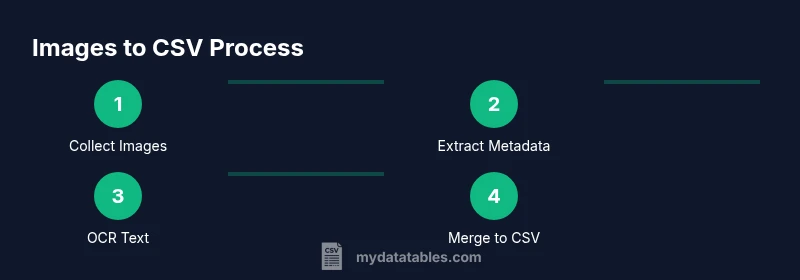
A typical end-to-end workflow for images to CSV follows a logical sequence: collect images, extract metadata, perform OCR if needed, join results into a single CSV, and validate the output. For metadata, use a tool like ExifTool to export selected fields to CSV. For OCR, run a text extractor on each image and save the results to a separate CSV, then merge with the metadata CSV on a common key (usually the file name). Finally, apply data cleaning (trim spaces, normalize dates, handle missing values) and export the final CSV in UTF-8 encoding for broad compatibility.
Tools and libraries that support images to CSV workflows
To implement the workflow, you’ll typically rely on these core tools:
- Python 3.x for scripting and data handling
- ExifTool for metadata extraction
- Tesseract OCR for text extraction
- Pillow (PIL) for image processing
- Pandas for data manipulation and CSV assembly
- Optional: OpenCV for image pre-processing to improve OCR accuracy
Using these tools, you can build a repeatable pipeline that processes thousands of images efficiently and reproducibly.
Data quality: validation and normalization
CSV quality hinges on consistent encoding (prefer UTF-8), uniform column names, and correct data types. Normalize dates to ISO 8601, strip extraneous whitespace, and ensure numeric fields like width/height are integers. Validate that every row has a unique identifier (usually the filename) and that OCR text does not overflow column limits. Consider adding a small set of sample checks to catch common issues early, such as missing metadata fields or inconsistent path separators across operating systems.
Performance considerations for large datasets
When scaling images to CSV, performance becomes a factor. Parallelizing metadata extraction and OCR can dramatically reduce wall-clock time, but be mindful of memory usage and I/O bottlenecks. Process images in batches, write intermediate CSVs incrementally, and then merge them once the batch completes. If you’re handling millions of images, consider a streaming or chunked approach and store intermediate results in a database or parquet format before final export to CSV.
Security and privacy considerations
Images can contain sensitive data, including GPS coordinates, person identifiers, and business-related details. Before exporting to CSV for public sharing or external collaborations, audit the metadata and redact or exclude fields as appropriate. Establish a data governance policy that defines who can access the CSV, how it’s stored, and how updates are tracked over time. Adopting a versioned workflow helps maintain accountability and traceability.
Authority sources and further reading
For image metadata practices and data standards, refer to authoritative resources such as the Library of Congress and NIST guidelines on metadata and data interchange. You can also consult related best practices from university data labs to understand how academic projects structure image-derived data for reproducibility and reuse.
Tools & Materials
- Python 3.x(Used for scripting, data handling, and CSV assembly.)
- ExifTool(Metadata extraction across image formats; cross-platform.)
- Tesseract OCR(OCR engine for extracting text; install language data as needed.)
- Pillow (PIL)(Image processing and basic operations in Python.)
- Pandas(Data manipulation and CSV assembly.)
- OpenCV (optional)(Helpful for image pre-processing to boost OCR accuracy.)
- CSV viewer/editor(Excel, Google Sheets, or other tools for quick validation.)
Steps
Estimated time: 60-90 minutes
- 1
Prepare your environment
Install Python 3.x, ExifTool, and Tesseract. Verify that binaries are accessible from your command line, and create a working directory for the project. This ensures all subsequent steps run smoothly.
Tip: Test basic commands (e.g., exiftool -ver, tesseract --version) to confirm setup. - 2
Collect your image dataset
Gather all image files you want to process into a single folder. Maintain a consistent naming convention to simplify matching metadata with OCR results later.
Tip: Avoid spaces in filenames or standardize to underscores to reduce parsing issues. - 3
Extract metadata to CSV
Run ExifTool to export a subset of fields (filename, width, height, and key EXIF entries) to a CSV file. Review the output for any obvious gaps before continuing.
Tip: Use a stable field list and a consistent order for all batches. - 4
Perform OCR on images
Process each image with Tesseract to extract text, saving the results to a separate CSV with a common key (e.g., filename). Consider language data and image quality to optimize accuracy.
Tip: Pre-process images (grayscale, thresholding) to improve OCR readability when needed. - 5
Merge metadata and OCR results
Join the metadata CSV with the OCR CSV on the filename key to create a unified dataset. Ensure data types align and handle nulls appropriately.
Tip: Use inner or left joins depending on whether every image has OCR text. - 6
Validate and clean the final CSV
Check encoding (UTF-8), remove stray quotes, and normalize dates and numeric fields. Run spot checks on sample rows to verify correctness.
Tip: Create a small validation script that flags non-UTF-8 bytes and inconsistent field counts. - 7
Export and share
Write the final dataset to CSV with a clear, versioned filename. Document the field meanings and any transformations performed for future consumers.
Tip: Provide a README alongside the CSV to aid future users. - 8
Automate for large datasets
If working with thousands or millions of images, automate steps with a batch script or a workflow manager, and consider intermediate formats to ease scaling.
Tip: Batch process and log progress to monitor performance and catch failures early.
People Also Ask
What is the best approach to handle OCR noise in images to CSV?
OCR results can contain inaccuracies due to image quality, fonts, or languages. Improve accuracy with image pre-processing (grayscale, contrast adjustment) and language data packs. Validate OCR outputs with spot checks and consider confidence scores when available.
OCR results can be noisy; use pre-processing and validation to improve accuracy.
Can I automate this workflow for large image datasets?
Yes. Build a scripted pipeline that processes images in batches, exports interim CSVs, and then merges them. Use logging and error handling to recover from failures and maintain audit trails.
Automate in batches with robust logging and error handling.
How do I choose which EXIF fields to include?
Choose fields that support your analysis goals and are consistently present across your dataset. Start with common fields like file name, dimensions, and date, then add domain-specific metadata as needed.
Start with essential fields and expand based on needs.
Do I need to OCR text if images contain no text?
If images contain minimal or no readable text, OCR may add unnecessary data and noise. You can skip OCR for those images or apply a quality filter to detect text presence before OCR attempts.
OCR is optional when there is no meaningful text to extract.
What encoding should I choose for CSV?
UTF-8 is the recommended standard for broad compatibility and to minimize character corruption across platforms.
Use UTF-8 encoding for CSV.
How do I handle duplicate filenames in the dataset?
Ensure filenames are unique within the dataset or create a composite key (filename + path) to maintain row uniqueness in CSV.
Use unique keys to avoid duplicates.
Watch Video
Main Points
- Define a clear field schema before processing images to CSV.
- Combine metadata with OCR results for richer datasets.
- Validate CSV encoding, data types, and field consistency.
- Scale workflows with batch processing and automation.
- Guard privacy by auditing and redacting sensitive metadata.