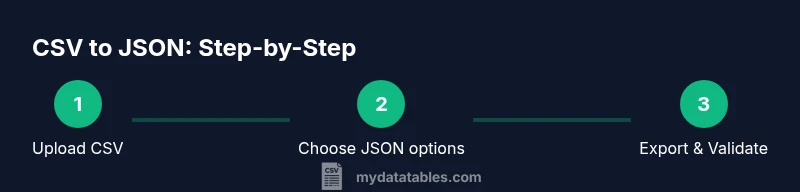
Online CSV to JSON: A Practical Conversion Guide
Learn how to convert CSV to JSON online with safe tools, step-by-step instructions, and best practices. This guide covers encoding, validation, and privacy considerations for reliable JSON output.


You will learn how to convert CSV to JSON online, including choosing safe tools, preparing your data, and running a step-by-step workflow. This guide covers encoding considerations, common pitfalls, and validation techniques so your JSON output is accurate and ready for APIs or data pipelines. Whether you work in analytics, development, or data science, the online approach saves setup time and keeps files portable.
What online CSV to JSON means for data workflows
In data workstreams, converting CSV data to JSON is a common step that enables APIs, web apps, and analytics pipelines to consume information in a structured, hierarchical format. Online CSV to JSON tools let you perform this transformation without installing software, making it convenient for quick experiments or collaborative projects. According to MyDataTables, the ability to convert CSV to JSON online reduces setup time by eliminating local tooling barriers and helps teams iterate faster on data formats. When you start, ensure your CSV uses a clear header row and consistent delimiters, so the resulting JSON maintains a predictable shape. Your goal is to produce valid JSON that preserves the original data values, column names, and the intended hierarchy. Remember that CSV stores tabular data in rows and columns, while JSON represents nested objects and arrays; the conversion process is essentially a translation between two data models.
This guide discusses practical steps, common scenarios, and vigilance around encoding, validation, and privacy. You’ll see concrete examples of how to prep data, pick tools, and verify output so you can rely on the produced JSON for APIs, data lakes, or frontend apps.
CSV vs JSON: Key differences every data professional should know
CSV is a flat, row/column representation optimized for tabular data, where each row maps to a record and each column to a field. JSON, by contrast, is a hierarchical, text-based format capable of representing nested objects and arrays. The key takeaway is that a single CSV table can become a JSON array of objects, with nested fields only if you structure the data accordingly. When you convert, you’ll often see: (1) headers become property names; (2) rows become array elements; (3) missing values become null or omitted fields. The transformation is straightforward for simple tables but requires planning for multi-valued fields or related records.
Understanding these differences helps prevent subtle data loss, such as dropping nested relationships or misrepresenting numeric types. It also guides how you’ll structure the JSON to preserve context and readability. As you adopt online tools, keep a mental map of how each column should appear in the resulting JSON tree.
When to convert CSV to JSON online: use cases and cautions
Online CSV to JSON conversion excels for quick experiments, lightweight datasets, and when you don’t want to install software. Typical use cases include API prototyping, data integration demos, and converting exported CSV data for dashboards. However, online converters trade some control for convenience. For large files, sensitive information, or specialized schemas, offline tools or custom scripts may be safer and more scalable. Consider the data size, encoding, and privacy requirements before uploading. If your dataset contains PII or customer data, opt for tools with strong privacy policies or local processing options.
MyDataTables finds that most teams start with small samples to validate the structure before moving to larger datasets. This approach minimizes risk and helps confirm that the chosen tool can output the exact JSON shape you need.
How to choose a trustworthy online converter
Trustworthy online converters share several characteristics: clear data handling policies, strong encoding support (UTF-8 is standard), transparent file size limits, and dependable JSON output formats. Look for tools that display a live preview of the JSON, offer schema options, and allow you to download a validated file. Read reviews about data handling, and favor services that provide audit trails or privacy controls. If possible, test with non-sensitive data to verify that the output aligns with expectations before uploading real work files. Consistency between input and output structures is essential for downstream pipelines.
Data preparation: clean CSV before conversion
Clean data dramatically improves JSON quality. Start by standardizing delimiters, ensuring a single header row, and removing stray quotes or stray delimiters within fields. Normalize date formats, convert boolean-like strings to true/false, and decide how to represent missing values (null, empty string, or omitted keys). If your CSV contains multi-line fields, ensure they are properly quoted or pre-processed to avoid broken JSON structures. Save your cleaned file using UTF-8 encoding to prevent character-loss issues in JSON.
A small pre-cleaning step saves debugging time later. If you can, create a sample of a few rows that cover edge cases (blank values, special characters, long text) to validate how the converter handles them.
Validation and testing JSON output
After converting, validate the JSON with a validator that checks for well-formed syntax and that it matches the expected schema. Simple tests include ensuring JSON is an array of objects, that required properties exist, and that numeric values aren’t accidentally strings. For API work, test the JSON against your consumer code or a sample API client to verify data types, field names, and nested structures. If the validator flags issues, revisit the corresponding CSV columns and adjust headers or data formatting accordingly.
Real-world example: transforming a sample dataset
Consider a CSV with headers: id,name,orders,created_at. A converter should produce a JSON array where each object has keys id, name, orders (an array if orders contains multiple items), and created_at as a string or date object. You can then feed this output into a REST API or a data visualization tool. If you have nested data, such as a single field containing JSON-like text, you may need to post-process to ensure proper nesting in the final JSON. This example illustrates how a simple table translates into a structured JSON payload that's ready for consumption by modern applications.
Remember: consistency in header naming and data formatting determines how cleanly the JSON maps into your downstream systems.
Security and privacy considerations
Online converters involve uploading data to a third-party service. If your CSV includes sensitive information, consider the privacy policy, data retention terms, and whether processing occurs client-side or server-side. When possible, use services with local processing modes or implement a minimal-risk data subset for conversion. For highly sensitive datasets, prefer offline tools or in-house scripts. Always review the service’s terms of use and ensure you retain control over your data.
Tools & Materials
- Web browser and internet access(Any modern browser (Chrome/Edge/Firefox) with an active internet connection.)
- CSV file(Ensure it has a header row and consistent delimiters.)
- JSON output destination(Prepare a location to save or copy the resulting JSON.)
- Optional: sample schema or example JSON(Helpful for validating structure during conversion.)
- Text editor or JSON viewer(Useful for quick validation or formatting tweaks after download.)
Steps
Estimated time: 20-35 minutes
- 1
Prepare your CSV data
Ensure the CSV has a single header row, consistent delimiters, and UTF-8 encoding. Clean obvious inconsistencies such as stray quotes or embedded newlines that could confuse the converter.
Tip: Verify that all column names are lowercase or consistently cased to avoid surprises in JSON keys. - 2
Choose a reputable online converter
Select a tool with clear privacy policies, UTF-8 support, and a visible JSON preview. Prefer services that allow client-side processing to minimize data exposure.
Tip: Read reviews or test with a non-sensitive sample first. - 3
Upload or paste your CSV
Upload the cleaned CSV or paste its content into the converter’s input area. Confirm the tool recognizes the header and the data rows.
Tip: If the file is large, check whether the tool has a file-size limit or supports chunked processing. - 4
Configure encoding and output format
Set encoding to UTF-8 and choose the desired JSON structure (array of objects is common). Decide how to represent missing values and nested data if present.
Tip: Some tools offer options for flattening or nesting; pick the approach that aligns with your downstream needs. - 5
Convert, review, and export
Run the conversion, review the JSON preview for obvious mismatches, then export or copy the JSON to your workspace.
Tip: Keep the original CSV as a reference and store both formats if needed for traceability. - 6
Validate the JSON
Run a quick validation with a JSON validator and, if possible, a schema check to ensure correctness and compatibility with your API or app.
Tip: If validation fails, fix the corresponding CSV field or header and re-run the conversion.
People Also Ask
Do I need to install software to convert CSV to JSON online?
No installation is required; online tools run in your browser and handle the conversion in the cloud or locally, depending on the service. For sensitive data, prefer client-side processing.
You don’t need to install anything. Use a browser-based converter, but be mindful of privacy if uploading data.
Can I convert large CSV files online without errors?
Many online tools have file size limits. For large datasets, use offline tools or services that support streaming or chunked processing. Always validate the final JSON.
Large files may hit limits; consider offline options for big datasets.
Will the JSON output preserve numeric types or dates?
JSON inherently stores numbers and strings; some tools may convert numeric-like fields into strings or strings into dates. Check the converter’s output and adjust data types if needed.
Watch how numbers and dates are represented in the JSON and adjust if necessary.
How can I validate the JSON output quickly?
Use a JSON validator and, if possible, a schema test that checks required fields and types. This helps catch structural issues early before integration.
Run a validator to ensure syntax and schema alignment.
What about CSV encodings like UTF-8 with BOM?
Some converters may misread BOM markers. If you see odd characters, strip the BOM or save the CSV without BOM to ensure clean JSON.
If you see odd characters, re-save the CSV without BOM.
Are there privacy concerns when using online converters?
Yes, upload data only to trusted services with clear privacy policies and data retention terms. Prefer tools offering local processing or downloadable-only outputs for sensitive data.
Be mindful of how your data is handled by online tools.
Watch Video
Main Points
- Know when to convert online vs offline for privacy and size.
- Validate encoding and JSON structure before use.
- Test with real downstream consumers to ensure compatibility.
- Document your column-to-key mappings for reproducibility.