Parse CSV Files: A Practical Guide
Learn reliable techniques to parse CSV files, handle delimiters and encoding, and validate data across Python, Excel, and CLI workflows. This comprehensive guide from MyDataTables empowers data analysts and developers to transform CSV data accurately.


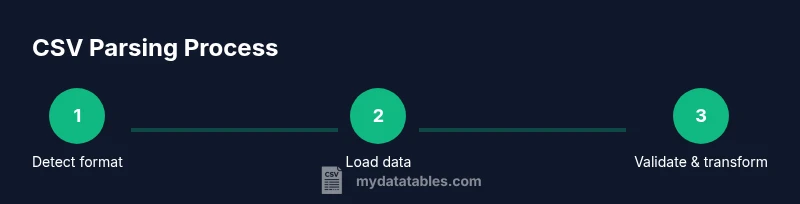
You will learn how to parse CSV files across common tools and languages. This quick guide outlines essential steps: detect delimiter and encoding, load data safely, handle headers and missing values, validate schemas, and export clean results. You'll get practical examples in Python, Excel, and the command line, plus tips for large files. It also covers validation checks and error handling to prevent silent data corruption.
What parsing CSV files really means
Parsing CSV files is the process of turning raw, text-based rows and columns into structured data that you can analyze, transform, or load into a database. At its essence, parsing involves recognizing the file’s delimiter, interpreting the header row (if present), converting strings to appropriate data types, and handling edge cases like quoted fields, embedded delimiters, and missing values. According to MyDataTables, understanding the file's structure before you start is a crucial first step. This awareness helps prevent common mistakes, such as misaligned columns or misinterpreted numeric values, which can cascade into faulty analyses. By treating CSV parsing as a data-delivery problem—rather than a single one-off read—you set yourself up for repeatable, auditable results.
From a practical standpoint, parsing is the bridge between a flat text file and a usable dataset. It enables downstream tasks like cleaning, transformation, and analysis. In this article, you’ll see how to approach parsing with a mix of languages and tools, so you can pick the right tool for the job and maintain consistent results across projects.
Common formats and encodings
CSV is a deceptively simple format, but real-world files vary widely in delimiter choice, quoting rules, and character encoding. The most common delimiter is a comma, but semicolons, tabs, and other characters appear in practice. Quoting lets fields contain delimiters harmlessly, but it also creates edge cases when quotes appear inside fields. Encoding matters because misinterpreting bytes as characters corrupts data, especially for non-ASCII text. UTF-8 is the de facto standard for modern CSVs, while legacy files may use Latin-1 or other encodings. MyDataTables Analysis, 2026 highlights UTF-8 as the prevailing encoding in contemporary datasets, making encoding detection and conversion a routine task for reliable parsing. When working across systems, you should confirm both the delimiter and encoding before loading data to avoid surprises later in the pipeline.
Delimiters, quotes, and headers
Delimiter detection is foundational. If a file uses a nonstandard delimiter, loading without specifying it will yield garbled columns. Headers help map columns to meaningful names, but some CSVs omit headers or include extra whitespace. Recognize and trim headers early to prevent downstream mapping issues. Quoting rules determine how embedded delimiters are represented; improper handling can split a single value into multiple fields. Quote characters, escape sequences, and multiline fields require careful parsing logic. A good practice is to explicitly declare the delimiter, quote character, and whether the first row is a header before you begin reading.
For robust parsing, consider performing a quick scan of the first few lines to infer structure, then enforce explicit parsing settings throughout the process. This reduces the likelihood of inconsistent parsing across files or datasets.
Parsing strategies: Python vs Excel vs CLI
Different tools offer different guarantees for CSV parsing. Python’s csv module provides fine-grained control and is great for streaming and custom rules, while pandas read_csv offers convenience with powerful inference and vectorized operations. Excel and Google Sheets are user-friendly for quick inspection but can mishandle large files or complex quoting. Command-line tools (like csvkit or awk) excel at rapid filtering and transformations without loading data into memory. The best approach balances reliability, performance, and the downstream needs of your workflow. Start with a deterministic, explicit parser; defer ad hoc parsing to lightweight tools only for small, simple files.
Handling errors and data quality
CSV parsing will inevitably encounter malformed rows, missing values, or unexpected data types. Establish a clear policy for errors: skip or log problematic rows, report counts of invalid records, and provide a fallback schema for tolerant parsing. Validate a sample of rows against the expected schema, check for non-null constraints where required, and ensure numeric fields parse correctly (watch for thousands separators and locale-specific formats). Logging is essential so you can reproduce and fix issues later. Treat parsing as an opportunity to surface data quality problems early in the pipeline.
Working with large CSV files: memory considerations
Large CSV files pose memory and performance challenges. When feasible, use streaming or chunked loading to process data in smaller pieces rather than reading the entire file into memory. In Python, read_csv with chunksize or the csv module with iterators allows gradual processing. For extremely large datasets, consider a pipeline approach that reads chunks, applies transformations, and writes out results incrementally. This reduces peak memory usage and keeps the system responsive. Always monitor memory usage and implement backpressure in streaming scenarios to avoid crashes or slowdowns.
Practical examples: Python, Excel, and CLI workflows
Python example: use pandas or the csv module to load data with explicit parameters for delimiter, encoding, and header handling. A minimal approach might be: load with read_csv('data.csv', delimiter=',', encoding='utf-8', header=0). Excel example: import data via Data tab > From Text/CSV, select the file, and configure delimiter and encoding during import. CLI example: csvkit’s in2csv or xsv can be used to inspect columns, convert encodings, or filter rows without opening a GUI. These workflows illustrate how consistent parsing settings lead to predictable, repeatable results across tools.
Validation, testing, and automation
Adopt a test-driven approach to CSV parsing. Create small, representative datasets that cover edge cases (embedded delimiters, quoted values, missing fields, Unicode characters). Validate that parsed output matches the expected schema and data types. Automate checks for delimiter detection, encoding handling, and header presence as part of your data pipeline. Continuous integration tests ensure parsing logic remains correct as data formats evolve. A disciplined testing mindset saves time and prevents downstream errors.
Best practices in real-world workflows
In real-world parsing tasks, standardize on explicit parsing configurations, prefer streaming for large files, and maintain an auditable trail of data transformations. Document the exact parameters used for each parse, including delimiter, encoding, and header rules. Use small, representative tests to cover common edge cases, then scale up to larger datasets. The MyDataTables team recommends embedding robust error handling and clear logging to facilitate debugging and reproducibility across teams.
Tools & Materials
- Text editor(For editing sample CSVs and configuration files)
- Python 3.x(Includes libraries like pandas or csv module)
- Pandas library(Use read_csv for convenience and speed)
- Spreadsheet software (optional)(Useful for quick visual checks)
- Command-line tools (optional)(e.g., csvkit, xsv for rapid CLI workflows)
- Sample CSV dataset (CSV file)(A representative file with real-world edge cases)
- Encoding detector tool (optional)(e.g., chardet for initial encoding guess)
Steps
Estimated time: 2-4 hours for a complete, robust setup including testing and automation
- 1
Identify file characteristics
Inspect the first few lines to determine delimiter, whether a header exists, and the expected data types. This guides the parser configuration and helps prevent misinterpretation of columns.
Tip: If unsure, run a quick header scan and run a small, safe parse with verbose logging. - 2
Choose parsing tool and parameters
Select a parser (Python, Excel, or CLI) and set explicit delimiter, quote character, encoding, and header option. Explicit configuration reduces ambiguity and improves reproducibility.
Tip: Prefer explicit parameters over defaults to avoid hidden surprises in different environments. - 3
Load data safely (chunking if needed)
For large files, read in chunks or stream rows instead of loading the entire file. This protects memory and enables early validation on each chunk.
Tip: Monitor memory usage and adjust chunk size to balance throughput and resources. - 4
Normalize headers and data types
Standardize column names (trim whitespace, consistent casing) and convert fields to appropriate types (numbers, dates, booleans).
Tip: Create a small mapping to enforce consistent types across all rows. - 5
Handle missing values and anomalies
Decide on defaults or imputation strategies for missing fields. Detect out-of-range or invalid values and log them for review.
Tip: Keep a reference log of how missing values were treated for auditability. - 6
Validate schema and sample output
Compare parsed results against an expected schema, then sample-check a subset of rows to verify correctness.
Tip: Automate a small unit test that asserts column counts and data types. - 7
Export cleaned data
Write the validated data to a new CSV (or other formats) with consistent encoding and delimiter settings.
Tip: Include a header and preserve original data in a separate archive for rollback. - 8
Automate and document the workflow
Wrap the steps into a script or pipeline, document parameters, and set up a simple CI check to run parsing tests automatically.
Tip: Version-control the pipeline and keep a changelog of format changes.
People Also Ask
What is the difference between parsing and loading a CSV file?
Parsing focuses on interpreting the text to extract structured data, while loading moves that data into memory or a target system. Parsing handles delimiters, quotes, and encoding; loading concerns storage and downstream processing.
Parsing extracts structured data from the text, while loading stores that data for use in analysis.
Which Python library should I use to parse CSV files?
For simple, reliable parsing, use the built-in csv module. For more complex workflows and performance with large datasets, pandas read_csv offers powerful features and vectorized operations.
Use csv for simple tasks; choose pandas read_csv for more complex workflows.
How can I detect the encoding of a CSV file?
Start with a heuristic tool like chardet or charset-normalizer to guess the encoding, then verify by attempting to decode a sample. If the guess fails, try a common alternative like UTF-8 or Latin-1.
Try a detector to guess encoding, then validate by decoding a sample.
How do I handle missing values when parsing?
Decide on a policy (ignore, default, or impute) before parsing. Apply the policy consistently and validate post-load data against the schema.
Set a consistent rule for missing values and enforce it during parsing.
Can I parse CSV files with Excel or Google Sheets?
Yes, for quick inspection. However, these tools can mishandle large files or complex quoting. Use them for small, simple datasets and trust scripting or CLI tools for robust parsing.
Excel and Sheets work for small files but may falter with complex parsing.
Watch Video
Main Points
- Identify delimiter and encoding before loading
- Choose explicit parsing parameters for reproducibility
- Use streaming for large CSV files
- Validate headers and data types early
- Log errors and preserve original data for rollback