CSV Like Formats: A Practical Comparison for Data Teams
An analytical, practical guide comparing csv like formats (CSV, TSV, PSV) for data analysts and developers, detailing delimiters, encoding, quoting, and tooling to improve data quality and interoperability.


For most data teams, a standard comma-delimited CSV provides broad compatibility, but csv like formats vary in delimiter, quoting, and encoding rules. If your data includes commas or quotes, consider TSV or PSV variants to reduce escaping complexity. In practice, start with UTF-8 encoding, document the delimiter and quoting rules, and validate a sample file across downstream tools to minimize parsing errors.
What csv like means in data tooling
In data tooling, csv like refers to a family of plain-text formats that use a delimiter to separate fields. The core idea is simple: one record per line, fields separated by a chosen character, and optional quoting to preserve embedded delimiters. The most familiar member is comma-separated values (CSV), but many teams encounter tab-delimited, pipe-delimited, or other custom variants. For data analysts and developers, csv like formats offer portability, readability, and easy ingestion by spreadsheets, databases, and scripting languages. According to MyDataTables, the defining trade-off is between human readability and machine interpretability, which shifts as soon as you introduce unusual delimiters, embedded quotes, or non-UTF-8 encodings. When you encounter csv like data in the wild, the best practice is to document the delimiter, quoting rules, and encoding at the data source, then enforce consistent parsing rules downstream.
Teams should also consider how downstream tools express nulls, decimal separators, and line breaks, because those choices ripple through the pipeline from ETL to analytics. This article compares the main csv like formats, explains the practical implications of delimiter choices, and provides guidance for selecting the right variant for a given project. By understanding the common patterns and pitfalls, you can reduce data cleaning time and improve reproducibility. The topic is especially relevant when sharing CSV-like data across departments that use different BI tools, scripting languages, or cloud storage solutions.
Core CSV-like formats and their characteristics
CSV-like formats cover a spectrum from the classic comma-delimited CSV to alternatives that use different delimiters. The core advantage is human readability and ease of editing in spreadsheets. The trade-off often lies in tool compatibility and escaping rules. In practice, CSV is the most interoperable across software ecosystems, but TSV (tab-delimited) and PSV (pipe-delimited) can simplify parsing when fields themselves contain commas or quotes. MyDataTables observations show that many data pipelines rely on consistent delimiter documentation, explicit encoding choices (usually UTF-8), and uniform header handling. When choosing a format, map your data characteristics (delimiter collisions, embedded delimiters, and the need for fast parsing) to a version that minimizes downstream surprises while preserving portability.
Delimiters and quoting: how to interpret csv-like data
Delimiter choice affects parsing logic more than most surface features. Common CSV practice uses a comma and supports quoted fields to allow embedded delimiters. Quoting rules vary; RFC-like conventions often require double quotes around fields containing the delimiter or quotes themselves, with internal quotes escaped by doubling. csv like data can break when tools disagree on escaping, line breaks inside quotes, or missing quotes for fields with special characters. A practical rule is to prefer consistent quoting across all records and to run a small validation set that includes edge cases (embedded commas, quotes, and newlines). When problems arise, switching to a simpler delimiter or enforcing strict quoting reduces ambiguity and parsing errors.
Encoding, headers, and data types
Encoding governs how bytes map to characters, and UTF-8 is the de facto standard for csv like data in modern tooling. BOM presence or absence can affect some parsers, so decide on a single convention and document it. Headers are not mandatory, but their presence dramatically improves readability and downstream mapping. Data types are implicit in csv like files; without schema, numbers can be misinterpreted due to locale-based decimal separators or thousands separators. To minimize ambiguity, commit to a single encoding (preferably UTF-8), include a header row, and use consistent numeric and date formats. MyDataTables’s guidance emphasizes early standardization of these attributes to avoid late-stage data cleaning pain.
Practical differences: CSV, TSV, PSV, and more
Different csv like formats shine in different contexts. CSV excels in broad compatibility with popular tools and cloud platforms. TSV reduces the need for escaping since tabs are less likely to appear in data, though some pipelines still require quoting. PSV (pipe-delimited) sits between CSV and TSV, often helping when data contains commas and tabs. Some teams also use custom delimiters for internal datasets or to align with legacy systems. The trade-off is tooling support: not all libraries treat non-standard delimiters equally, so you should test ingestion across languages (Python, R, JavaScript) and databases. The key is to document the chosen variant and validate the end-to-end flow.
Validation and data quality considerations
Data quality hinges on predictability: a reproducible parse, a known encoding, and stable headers. Validate a sample of records with common edge cases (empty fields, quoted delimiters, and trailing delimiters) to catch parsing anomalies early. Establish schema expectations (column count, types, allowed ranges) and verify against a representative subset. For csv like data, automated checks for delimiter consistency, line terminators, and encoding correctness can prevent subtle downstream bugs. Regular audits, versioned samples, and clear source documentation align teams and reduce time spent chasing inconsistent inputs. MyDataTables stresses that validation is not a one-off task but a continuous discipline across data pipelines.
Strategies for converting between csv-like formats
Converting between formats requires careful handling of delimiters, quotes, and encodings. The most robust approach is to read using a tolerant CSV parser with explicit delimiter definitions, then write using a strict writer that enforces the target format’s rules. When converting to TSV or PSV, ensure embedded delimiters are escaped or re-quoted, and verify that the target encoding remains intact. Batch conversions with reproducible scripts, and maintain a changelog for format decisions. This discipline reduces drift and ensures that downstream analytics see consistent, well-formed data through every stage of the pipeline.
Tooling and libraries: Python, R, JavaScript, and SQL
Modern data stacks rely on language-native libraries that handle csv like formats elegantly. In Python, the csv module and pandas read_csv offer flexible parsing with delimiter and quote parameters. R’s read.csv and data.table::fread support a variety of separators and encodings. JavaScript environments use standard parsers in Node.js ecosystems, which handle streaming large csv like files efficiently. In SQL contexts, loading tools and COPY commands frequently specify delimiter and encoding options. Across these ecosystems, a common rule is to test with representative samples, ensure consistent escaping, and document configuration for reproducibility. MyDataTables highlights that robust tooling accelerates data workflows while reducing manual cleanup.
Real-world scenarios: when to choose which csv-like format
Internal analytics dashboards often favor CSV due to compatibility with BI tools. External data releases may prefer TSV to minimize parsing nuances for downstream users. Log data pipelines might use PSV or a custom delimiter to avoid clashes with the field contents. When data includes embedded commas or quotes, TSV or PSV can simplify extraction, whereas plain CSV remains ideal for spreadsheets and most cloud services. By aligning the format choice to the data’s content and downstream consumers, teams can optimize both data quality and workflow efficiency.
Performance considerations with large csv like files
Large csv like files demand streaming rather than loading entire files into memory. Use iterators, chunked reads, and incremental parsing to maintain responsiveness in data processing pipelines. Delimiter choice can impact parsing speed: simpler delimiters with straightforward escaping parsers are faster. When feasible, pre-validate and sanitize data in a staging area, then batch-load into analytics environments. For teams using cloud storage and serverless processing, partitioned files and parallelized ingestion reduce latency. MyDataTables recommends profiling a representative workload to identify bottlenecks and tailor parsing strategies accordingly.
Security and data privacy considerations for csv-like data
Csv like data can carry sensitive information, and its plain-text nature makes it easy to leak if access controls are weak. Always apply the principle of least privilege to data sources, and consider masking or redacting PII in shared files. Validate file origins to prevent injection-like risks in automated pipelines, and avoid embedding executable content in text fields. When exporting data for external use, review compliance requirements and implement data governance checks. Overall, treat csv like files as living artifacts that require careful access control, auditing, and secure handling throughout their lifecycle.
Comparison
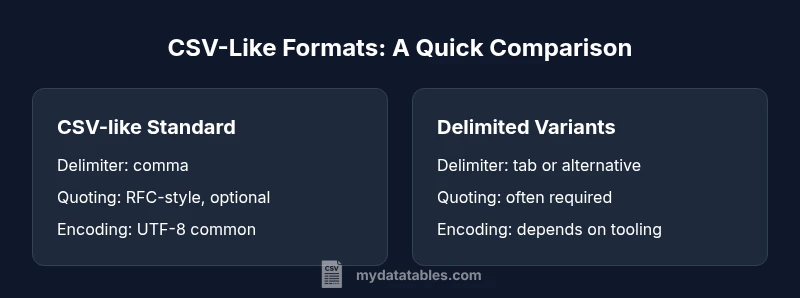
| Feature | CSV-like Standard (Comma-delimited) | Delimited Variants (TSV/PSV) | ||
|---|---|---|---|---|
| Delimiter | comma (,) | tab (\t) or alternative (e.g., |) | ||
| Quoting | RFC 4180-style quotes (optional) | Quoting often used for embedded delimiters | ||
| Headers | usually present | usually present | ||
| Escaping | double quotes to escape embedded quotes | escaping varies by tool; some require doubling quotes | ||
| Encoding | UTF-8 by default | tool-dependent but commonly UTF-8 | ||
| Best Use Case | Interoperability across many tools | Cleaner parsing when data contains the delimiter | ||
| Common Extensions | .csv | .csv | .tsv | .psv |
Pros
- High interoperability across tools and platforms
- Simple, human-readable format for quick inspection
- Wide ecosystem support and documentation
- Easy integration with spreadsheets and databases
Weaknesses
- Delimiter collisions require escaping or quoting
- Inconsistent handling of encodings or line breaks across tools
- Lack of a formal schema can lead to data quality issues
- Quoting rules vary, causing parsing differences in edge cases
CSV-like formats offer broad compatibility, but choose a variant based on delimiter clashes and downstream tooling.
CSV-like formats maximize interoperability with standard tooling. TSV/PSV reduce escaping complexity when data contains commas/tabs, but may face uneven support across ecosystems. Align delimiter and encoding choices with downstream consumers for best results.
People Also Ask
What does csv like mean in practical terms?
Csv like refers to a family of delimited-text formats that use a delimiter to separate fields. The concept emphasizes consistent delimiters, quoting rules, and encoding to enable reliable parsing across tools. Understanding csv like formats helps data teams choose a variant that fits their workflows.
Csv like means a family of text formats using a delimiter to separate fields, with consistent quoting and encoding rules for reliable parsing.
CSV vs TSV: when should I pick one?
Choose CSV when broad tool compatibility matters, such as spreadsheet software and databases. TSV can simplify parsing when data contains many commas, since tabs are less likely to appear in content. Consider downstream tooling and data quality needs when deciding.
Pick CSV for compatibility; TSV when commas are frequent in your data and you want cleaner parsing.
How do I ensure encoding consistency across csv-like files?
Standardize on UTF-8, document BOM usage if any, and validate encoding during ingestion. Mismatches often cause misread characters or parsing errors. Include encoding in source data documentation to prevent surprises downstream.
Keep UTF-8 as the standard and verify encoding during data ingestion.
Can I automatically convert between csv-like formats?
Yes, with careful handling of delimiters, quotes, and encoding. Use a robust parser to read the source, then write to the target format with explicit delimiter settings and escaping rules. Validate a sample after conversion to ensure data integrity.
Automatic conversion is possible if you manage delimiters and encoding carefully and test the result.
What are common pitfalls in csv-like data?
Pitfalls include inconsistent quoting, delimiter collisions, mixed line endings, and data fields containing the delimiter. These issues often surface only after data has flowed to downstream systems, making upfront validation essential.
Watch for quoting mistakes, delimiter conflicts, and line-ending inconsistencies.
How should I handle large csv-like files efficiently?
Use streaming parsers and chunked processing to avoid loading entire files into memory. Parallelize ingestion where supported, and partition input data to improve throughput. Monitoring resource usage helps prevent bottlenecks in analytics pipelines.
Process large files in chunks and stream data to avoid memory issues.
Main Points
- Choose your delimiter based on data content and downstream tools
- Document encoding, header presence, and quoting rules
- Test end-to-end ingestion with edge-case samples
- Prefer streaming and chunking for large files
- Apply data governance to csv-like outputs