Parquet File vs CSV: A Practical Comparison for Data Workflows
Compare Parquet and CSV formats across storage, speed, and tooling. Learn when Parquet shines for large datasets, and when CSV is enough for simple data sharing and interoperability.


Parquet and CSV serve different data needs. For analytics on large datasets, Parquet’s columnar storage, compression, and schema support typically deliver faster queries and lower storage costs. For simple data exchange or small datasets, CSV offers broad compatibility and human readability. In most data pipelines, start with CSV for intake and move to Parquet for processing and long-term storage as data volume grows.
Overview: Parquet vs CSV—Core Differences
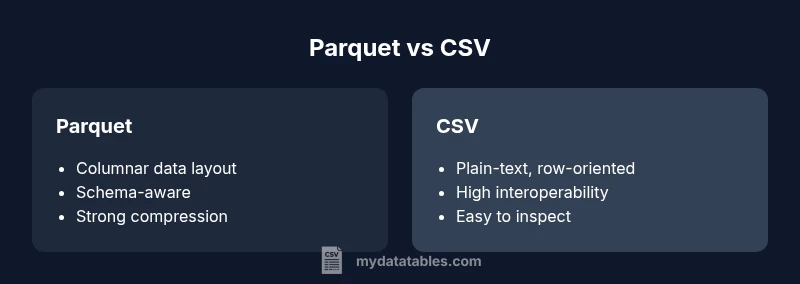
In modern data workflows, the choice between Parquet and CSV often boils down to scale, performance, and governance. Parquet is a columnar, self-describing format designed for analytical workloads, while CSV is a plain-text, row-oriented format that shines in simplicity and interoperability. When you’re deciding between these formats, consider not only immediate needs but also how data will be consumed downstream by BI tools, data warehouses, and machine learning pipelines. According to MyDataTables, the trend in data engineering favors formats that minimize storage and maximize query speed for large datasets, while preserving ease of data sharing for quick analyses.
wordCount":150},"## Data Layout and On-Disk Format
The physical layout of Parquet versus CSV drives performance and storage. Parquet stores data column by column, enabling efficient scans for specific fields and effective compression schemes. This columnar layout supports advanced features like predicate pushdown and vectorized processing, which accelerates analytic queries on large tables. CSV, by contrast, stores rows one after another with a simple delimiter-separated structure. While CSV is easy to read and write with almost any programming language, its row-oriented layout means full-table scans and repetitive parsing become costly as data grows. For data lakes and lakehouse architectures, Parquet aligns well with modern query engines, while CSV remains a convenient interchange format for smaller datasets or initial data capture.
wordCount":168},"## Schema, Types, and Data Integrity
Parquet embeds a schema and strong type information in its metadata. This enables format-aware reads, validation of values, and schema evolution over time without rewriting data. The presence of a schema helps downstream systems enforce data quality constraints, catch type mismatches early, and support complex data types like nested records. CSV typically lacks a built-in schema, relying on external contracts or manual validation. That makes CSV flexible but more prone to drift if columns are added, removed, or reordered without coordination. If governance and reproducibility matter, Parquet provides a clearer, self-describing data model.
wordCount":168},"## Performance: Read/Write and Compression
Analytical workloads benefit from Parquet’s performance characteristics. Its columnar storage reduces I/O by reading only the needed columns, and compatible engines can apply compression and encoding on a per-column basis. Predicate pushdown and column pruning commonly reduce query times for large datasets. CSV requires reading and parsing every row, which can be slower for large-scale analytics and increases CPU usage. In exchange, CSV’s simplicity means rapid writing in streaming or batch pipelines and straightforward integration with a broad ecosystem. The trade-off is clear: Parquet favors speed and storage efficiency at scale; CSV favors simplicity and compatibility.
wordCount":172},"## Compression and Encoding Options
Parquet includes sophisticated encoding and compression strategies tightly coupled to the data types of each column. This often yields substantial storage savings without sacrificing performance. The metadata in Parquet aids efficient reading, enabling engines to skip entire blocks that don’t contain relevant data. CSV compression is typically achieved through separate compression layers (eg, gzip, zip) after the fact and depends on the raw text size. While gzip can dramatically reduce CSV size, decompressing and parsing still incurs per-row overhead. For bulk data processing, Parquet’s integrated compression usually outperforms ad hoc CSV compression in both storage and speed.
wordCount":158},"## Tooling and Ecosystem Support
Parquet has strong support in the big data ecosystem: Spark, Hive, Presto, Drill, and many cloud data services natively read and write Parquet. Arrow-based tooling improves cross-language efficiency, making Parquet a natural choice for data warehouses and analytics pipelines. CSV enjoys universal compatibility; nearly all languages can read and write CSV, making it ideal for data exchange and lightweight pipelines. When starting a project, consider your primary execution engine and how you’ll access the data downstream. If you rely on Spark or a modern lakehouse, Parquet is typically the better choice; if you need portability and simplicity, CSV remains compelling.
wordCount":158},"## Interoperability Across Platforms and Languages
CSV’s human-readable format makes it an easy handoff across teams and tools, including spreadsheets and ad-hoc scripts. Parquet’s binary format is optimized for performance but can introduce friction when sharing with environments that lack comprehensive Parquet support. Most data platforms provide adapters or connectors, but the level of maturity and performance can vary by language. For a multi-language stack, Parquet can reduce data conversion overhead, while CSV minimizes the risk of format mismatches during ingestion. Plan for your team’s development ecosystem to maximize long-term efficiency.
wordCount":168},"## Use Case Scenarios and Best Fit Outcomes
For data ingestion and quick sharing between analysts, CSV is often the simplest path, particularly for small datasets or when collaboration with non-technical stakeholders is needed. When data volumes grow or you perform complex analytics, Parquet shines: it supports efficient columnar reads, advanced compression, and robust schema management. Business intelligence, data warehousing, and machine learning pipelines benefit from Parquet’s performance and governance. A pragmatic approach is to start with CSV for intake, then convert to Parquet for processing, storage, and analytics as data maturity increases.
wordCount":170},"## Migration and Conversion Between Formats
Converting from CSV to Parquet is a common step in data pipelines. Use a schema-aware conversion to preserve data types and avoid loss of precision. Tools and libraries, such as those in the PyArrow ecosystem, provide efficient batch conversion and can handle large files with streaming options. When moving from Parquet to CSV for sharing or legacy tooling, consider exporting a subset of columns and ensuring that nested structures are flattened or serialized in a compatible way. Documentation and versioning help maintain consistency across transformations.
wordCount":178},"## Best Practices for Using Parquet and CSV in Pipelines
- Define a clear data contract: specify schema for Parquet and column order for CSV exports.
- Prefer Parquet for analytics and storage in data lakes and warehouses.
- Keep a CSV export path for data interchange with legacy systems.
- Use compression and encoding routinely with Parquet to maximize savings.
- Validate data after format conversions to catch schema drift early.
wordCount":135},"## Pitfalls, Trade-offs, and How to Avoid Them
Relying on CSV for large-scale analytics leads to high I/O and processing costs. Parquet’s learning curve and the need for schema governance can slow initial adoption. To avoid friction, implement automated tests for schema compatibility, maintain clear versioning, and document data flows. Consider a hybrid approach: publish Parquet in the data lake for analytics, while distributing CSV for quick, ad-hoc sharing.
wordCount":150},"## Decision Framework: A Practical Step-by-Step Guide
- Assess data size and query patterns. 2) Identify downstream tools and language support. 3) Evaluate governance requirements and schema evolution needs. 4) Pilot a Parquet-based workflow for analytics and a CSV-based path for lightweight sharing. 5) Iterate and monitor performance and storage metrics to refine the format choice over time.
wordCount":123}],"comparisonTable":{"items":["Parquet","CSV"],"rows":[{"feature":"Data layout","values":["Columnar, optimized for analytics","Row-based, text-based"]},{"feature":"Schema support","values":["Self-describing and evolvable","Schema-less (external contracts)"]},{"feature":"Compression/Encoding","values":["Integrated per-column encoding and compression","External compression on text data"]},{"feature":"Read/write performance (large datasets)","values":["Faster for analytics with pruning/pushdown","Slower for large analytics due to parsing"]},{"feature":"Tooling/ecosystem","values":["Rich big-data and analytics tooling","Broad language support, best for interchange"]}]},
prosCons":{"pros":["Significant storage efficiency for large datasets","Faster analytical queries through columnar access","Strong schema and data governance","Better integration with modern data processing engines"],"cons":["Steeper learning curve and tooling setup","Requires schema management and coordination","Not always ideal for simple data interchange"]},
verdictBox":{"verdict":"Parquet is the better choice for analytics and large datasets; CSV remains best for simple sharing and portability.","confidence":"high","summary":"Choose Parquet when you need fast analytics on big data and strong schema governance. Use CSV for lightweight data exchange and compatibility with a wide range of tools. The MyDataTables team recommends adopting Parquet for analytics-first workflows and retaining CSV for interoperability.
Comparison
| Feature | Parquet | CSV |
|---|---|---|
| Data layout | Columnar, optimized for analytics | Row-based, text-based |
| Schema support | Self-describing and evolvable | Schema-less (external contracts) |
Pros
- Significant storage efficiency for large datasets
- Faster analytical queries through columnar access
- Strong schema and data governance
- Better integration with modern data processing engines
Weaknesses
- Steeper learning curve and tooling setup
- Requires schema management and coordination
- Not always ideal for simple data interchange
Parquet is the better choice for analytics and large datasets; CSV remains best for simple sharing and portability.
Choose Parquet when you need fast analytics on big data and strong schema governance. Use CSV for lightweight data exchange and compatibility with a wide range of tools. The MyDataTables team recommends adopting Parquet for analytics-first workflows and retaining CSV for interoperability.
People Also Ask
What are the main differences between Parquet and CSV?
Parquet is a columnar, schema-aware format optimized for analytics and storage efficiency. CSV is a plain-text, row-oriented format that excels at simple data exchange and broad compatibility. The choice depends on data size, processing needs, and downstream tooling.
Parquet is best for analytics and storage efficiency, while CSV is great for simple data sharing.
When should I choose Parquet over CSV?
Choose Parquet when you work with large datasets and analytical queries. Parquet’s compression and columnar layout speed up reads and reduce storage. CSV works well for quick data exchange and small-scale workflows.
Pick Parquet for big data analytics; use CSV for simple sharing.
Is Parquet compatible with all data tools?
Most modern data platforms support Parquet, but some legacy tools may offer limited or no native Parquet support. CSV enjoys near-universal compatibility, but you may need adapters or converters for some systems.
CSV is widely supported; Parquet support is strong but varies by tool.
Can I convert CSV to Parquet easily?
Yes. Converting CSV to Parquet typically involves applying a schema and using libraries that support Parquet, such as Apache Arrow. For large files, streaming or chunked processing helps avoid memory issues.
Converting is straightforward with the right libraries; plan for schema alignment.
Are there downsides to using Parquet?
Parquet adds schema management overhead and requires appropriate tooling. For shared files with non-technical users or rapid ad-hoc editing, CSV remains easier.
Parquet has more setup cost and governance needs.
Main Points
- Evaluate data size and query patterns before choosing
- Use Parquet for analytics, CSV for interchange
- Plan for schema governance and tooling in Parquet
- Maintain CSV exports for legacy compatibility
- Benchmark end-to-end performance for your workloads