Export CSV: A Practical How-To Guide
Master CSV exports with practical steps for Excel, Sheets, SQL, and Python. Learn encoding, delimiters, and validation to ensure clean, portable exportcsv outputs.


Export CSV means saving your table as a comma-delimited text file. In practice, choose CSV as the export option, select UTF-8 encoding, use a comma delimiter, and ensure consistent quoting. See the full guide for step-by-step instructions to produce reliable exportcsv outputs.
What exportcsv means for data workflows
exportcsv is the process of saving tabular data as a comma-separated values file, a universally readable format. It underpins data movement across tools, from spreadsheets to databases and analytics pipelines. According to MyDataTables, mastering CSV exports improves portability and reduces data-lock-in. This article walks you through practical, tool-agnostic steps to produce clean, reliable exportcsv outputs that work across environments and platforms. The term exportcsv highlights the action of exporting data to a CSV file, with attention to consistent encoding, delimiters, and line endings. A careful export avoids common pitfalls like misaligned columns, broken quotes, or lost headers. You’ll learn how to configure exports from Excel, Google Sheets, SQL databases, or Python scripts, and how to validate results before sharing with colleagues or downstream systems.
Common sources and export options
CSV exports originate from many ecosystems. In Excel or Google Sheets, you choose Save As or Download as CSV; in SQL, you run a query and export the result; in Python, you leverage the csv module or pandas to write to CSV; and in APIs, you serialize records to CSV before storage or transit. Across these sources, you will commonly set encoding (UTF-8 most often), delimiter (comma), quoting rules, and line endings (CRLF for Windows, LF for Unix). The key is to define the export target and the expected consumer. The MyDataTables team has found that failing to lock these options early leads to downstream surprises. Align on what downstream systems expect: delimiter, encoding, and newline conventions, then export accordingly to minimize rework when integrating with BI tools or data warehouses.
CSV format decisions: encoding, delimiter, and quoting
The CSV format is simple but nuanced. Encoding determines how characters are stored; UTF-8 is the default choice for interoperability. Delimiter choices matter when data contains commas; in that case, you might switch to a semicolon, but be sure downstream systems can handle it. Quoting rules prevent misinterpretation of embedded separators; typical rules are to quote fields that contain quotes, newlines, or delimiters. When exporting, choose a consistent strategy and test with real data that includes edge cases like empty fields, nulls, long text, and embedded newlines. These decisions affect compatibility across spreadsheets, databases, and programming languages, and they are essential for exportcsv reliability.
Practical export workflows by tool
- Excel: File > Save As > CSV (Comma Delimited). Confirm that only the active sheet is exported, and re-check the file to ensure column headers are intact. If you have non-ASCII characters, verify the UTF-8 encoding after saving.
- Google Sheets: File > Download > Comma-separated values (.csv). Remember that Sheets stores data in UTF-8 and will escape characters appropriately.
- SQL: Use a SELECT query and a CSV export option or a command-line tool (e.g., COPY ... TO 'file.csv' WITH CSV).
- Python: Use pandas to_csv('file.csv', encoding='utf-8', index=False). These workflows produce consistent exportcsv outputs when you validate post-export.
Validation and quality checks after export
After exporting, validate the file. Open the CSV in a plain text editor to confirm delimiter usage, check the header row, and scan a few data rows for correctness. Run a quick import into a sandbox environment to verify column types and data boundaries. If you automate exports, add a checksum or hash (e.g., MD5) for change detection. For large files, stream exports and avoid loading entire datasets into memory. The goal is to catch encoding or delimiter problems before data reaches downstream consumers.
Troubleshooting common export issues
- Mismatched delimiters: If downstream tools expect a comma but your export uses a semicolon, adjust the delimiter in the exporter and re-run.
- Encoding problems: If special characters appear garbled, ensure UTF-8 encoding and disable any BOM if needed by the consumer.
- Truncated columns: When exporting large results, ensure no limit or truncation settings at the source or in the destination.
- Empty lines or extra line endings: Normalize line endings to LF or CRLF to match your target environment.
- Quoted fields: If quotes end up misinterpreted, enforce strict quoting rules and test with embedded commas.
Privacy and security considerations when exporting data
Exporting data can expose sensitive information. Implement data minimization: export only the necessary columns, and redact or pseudonymize personal data when appropriate. If you share exports, use secure transfer methods, and consider encryption at rest and in transit. Audit who has export permissions and set expiration on shared links. Remember that CSV is plain text and lacks built-in access controls; treat exports as an interface boundary and protect them accordingly.
Example scenarios and code snippets
Here are quick examples to illustrate exportcsv in practice.
- Example 1: Export a pandas DataFrame to CSV: df.to_csv('out.csv', index=False, encoding='utf-8')
- Example 2: Excel export: ensure the file is saved as CSV with UTF-8 and then validate with a sample import into a database.
- Example 3: Large dataset: stream by chunks (read in, write out, flush) to avoid memory exhaustion.
- Example 4: API: convert JSON to CSV using a mapping, then export to a file or pipe to a consumer. See the full guide for deeper code samples and edge cases.
AUTHORITY SOURCES
- RFC 4180: Common Format and "CSV" Comma-Separated Values. https://www.ietf.org/rfc/rfc4180.txt
- Python Docs: The csv module provides classes to read and write tabular data in CSV format. https://docs.python.org/3/library/csv.html
- Microsoft Support: Import or export text files (CSV) with Excel. https://support.microsoft.com/en-us/office/import-or-export-text-files-7b0167a8-89c8-4f63-9a4b-1a523bd1d5a0
Tools & Materials
- Spreadsheet software (Excel, Google Sheets)(Needed to export to CSV from everyday data sources.)
- Database client or query tool(Run queries and export results to CSV.)
- Text editor(For quick checks and small edits.)
- Python (optional)(Use pandas or csv module for programmatic exports.)
- Command-line tools (optional)(For automation or large exports (e.g., csvkit, awk).)
Steps
Estimated time: 30-60 minutes
- 1
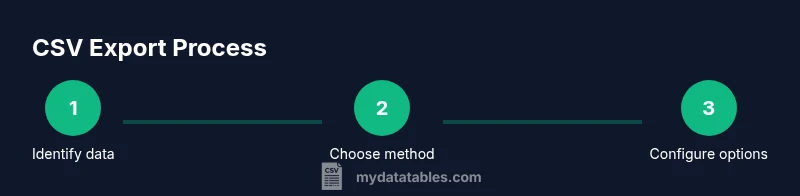
Identify data to export
Define which table, query, or dataset will be exported and confirm the target consumer (BI tool, data warehouse, or API). Decide whether to export headers, which columns to include, and any data masking needs.
Tip: Document the export scope before starting to avoid exporting extra columns. - 2
Choose the export method
Decide whether to use a GUI export (Excel/Sheets), a SQL export, or a scripting approach (Python, CLI). The method should align with your workflow and the size of the data.
Tip: For repeatable workflows, favor automation over manual exports. - 3
Configure CSV options
Set encoding to UTF-8, choose the delimiter (comma), set quoting rules, and select line endings appropriate for the target system. This step prevents downstream misinterpretation of data.
Tip: Test with a sample containing commas, quotes, and newlines. - 4
Execute the export
Run the export operation and save the file with a descriptive name and the .csv extension. Keep a copy of the export parameters if possible.
Tip: Include metadata in the filename or as a sidecar file for traceability. - 5
Validate the exported file
Open the CSV in a text editor, check the header row, and import a sample into a test environment to verify data types and integrity.
Tip: Check a few rows with non-ASCII characters to confirm UTF-8 handling. - 6
Handle edge cases for large exports
If the dataset is large, stream the export in chunks or process in batches to avoid memory pressure. Consider compression if appropriate.
Tip: Prefer chunked writing in scripts to maintain responsiveness. - 7
Automate export processes
Create a repeatable workflow with scheduled tasks or a simple script so exports happen consistently without manual steps.
Tip: Version-control your export scripts and document change history.
People Also Ask
What is exportcsv and when should I use it?
exportcsv is the process of saving tabular data as a CSV file. Use it when you need a portable, human- and machine-readable format to move data between tools, platforms, or systems. It’s ideal for sharing data with analysts, loading into BI tools, or feeding data pipelines.
exportcsv is saving your table as a CSV file, useful for moving data between tools and platforms.
Which encoding should I choose when exporting to CSV?
UTF-8 is the most interoperable choice for CSV exports because it supports a wide range of characters. Some legacy systems may require ASCII or UTF-16; always confirm downstream expectations.
Go with UTF-8 in most cases, unless your downstream system specifies otherwise.
How can I export from Excel to CSV without data loss?
In Excel, use File > Save As and choose CSV (Comma Delimited). Ensure you export only the active worksheet if needed and recheck non-ASCII characters after saving to confirm UTF-8 handling.
Export from Excel using Save As, check encoding, and verify non-ASCII characters.
Can I use a different delimiter than a comma in CSV?
Yes. Some consumers expect semicolons or tabs. If you use another delimiter, ensure downstream systems expect and can parse it correctly, and document the delimiter choice in your export metadata.
You can, but make sure downstream tools support it.
How do I export CSV from Python reliably?
Use pandas or the csv module to write CSV files with explicit encoding. Example: df.to_csv('out.csv', index=False, encoding='utf-8') for a straightforward export.
Use Python to write CSV with explicit encoding, keeping headers intact.
Is CSV safe for very large datasets?
CSV can handle large datasets, but memory usage matters. For huge files, stream processing or chunked writes, and consider compression or chunked reading/writing to avoid memory limits.
Yes, but consider streaming and chunking for big data.
Watch Video
Main Points
- Export CSV reliably by defining encoding, delimiter, and quoting before exporting
- Validate exports in downstream tools to catch format and type issues
- Use automated workflows to reduce human error and improve repeatability
- Protect sensitive data by minimizing exposure in CSV exports
- MyDataTables recommends documenting export parameters for auditability