How to Get a CSV File From a Bank
Practical steps to obtain a bank CSV file: portal export, API options, encoding checks, and data validation. A reusable workflow for analysts and developers from MyDataTables.


You can get a CSV file from your bank by exporting transactions from the bank’s online portal or via an API if available. This quick guide covers the fastest reliable method, plus security checks and basic validation. According to MyDataTables, start by confirming CSV export support and gathering secure access credentials before proceeding.
What 'how to get csv file from bank' means for you
For many teams, the phrase 'how to get csv file from bank' describes a repeatable process to obtain structured transaction data from a financial institution in CSV format. The CSV file is a plain-text table with rows and columns that can be loaded into spreadsheets, BI tools, or data pipelines. In practice, banks offer multiple pathways: direct portal export, API access, or scheduled file drops via secure channels. Understanding these options helps you choose the fastest, most auditable method. As MyDataTables notes, starting with official bank-supported methods ensures traceability and reduces risk. After exporting, you’ll validate headers, delimiter consistency, and encoding so downstream analytics stay accurate.
Prerequisites and security considerations
Before attempting any download, confirm you have the right permissions and secure access to your bank data. Use a device with up-to-date security patches and a trusted network. Enable two-factor authentication (2FA) and keep backup codes secure. Plan for data handling according to your organization’s policy, especially if the CSV includes sensitive personal or financial information. If you’re in a regulated environment, document the data lineage and export timestamp to support audits.
Bank portal export: fast, manual method
Many banks let you export transactions directly from your online banking portal. Log in, navigate to the transactions or statements section, and locate the export option. Choose CSV as the format, select the date range, and initiate the export. Save the file with a clear, time-stamped name (e.g., bank-transactions-2026-02.csv). If you encounter a delimiter mismatch or missing headers, use the portal’s help resources or contact support.
API access and alternatives
If your bank offers an API, you can pull CSV data programmatically, which is ideal for automation. Obtain API credentials, review the rate limits, and fetch the data using a safe, authenticated request. Some institutions provide built-in CSV endpoints; others require you to retrieve JSON that you convert to CSV. For larger datasets, check pagination, data freshness, and the fields included in the export.
Encoding, headers, and CSV quirks
CSV files can vary in encoding (UTF-8 is common, but some banks use UTF-16 or Windows-1252). Always verify the file's encoding, especially before loading into a data pipeline. Check that header names match your data model and that there are no hidden characters or BOM markers. If you see unusual characters or formatting, re-export or convert the file to UTF-8 using a safe tool.
Data validation after download
After you obtain the CSV, validate its structure and contents. Confirm the expected column order and data types (dates, amounts, IDs). Run a quick sanity check: row counts, sums, and key cross-field validations. Maintain a simple changelog to track changes in export formats over time, which helps with reproducibility and audits.
Automation considerations and pitfalls
Automation can streamline CSV retrieval, but it introduces risk if the bank changes endpoints or file formats. When scripting downloads, handle authentication securely, store credentials outside the script, and implement error handling for network failures. Use versioned file names and a consistent schema. Periodically verify automation against manual exports to catch drift.
Security and privacy best practices
Limit data exposure by restricting access to downloaded CSVs, encrypt files at rest, and purge temporary copies after processing. Use secure storage and access controls, especially for payroll or sensitive financial data. Ensure compliance with data protection policies and bank terms of use.
Real-world example workflow
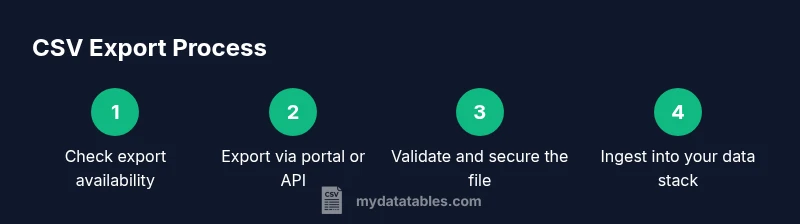
In a data team workflow, you typically start with confirming export availability, then perform a portal export for the desired date range (e.g., last 90 days). Next, validate headers and encoding, load the data into a staging area, and run basic validations (counts, sums). If your bank supports API access, set up a nightly retrieval to ensure freshness, and document every export with a timestamp and reference ID for auditability.
Final notes on reliability and auditability
To maximize reliability, always keep a concise data dictionary describing the CSV schema and any transformations. Preserve a small set of sample exports for validation and use checksums to verify file integrity. Regularly review access controls and retention policies to stay compliant with regulatory requirements.
Tools & Materials
- Bank portal login credentials(Username, password, and any 2FA device/app)
- Device with internet access(PC, laptop, or mobile with up-to-date OS)
- CSV viewer/editor(Excel, Google Sheets, or a text editor)
- Authorized API access credentials(API key or OAuth token as provided by bank)
- Secure storage for downloaded files(Encrypted storage; consider automatic purge after processing)
- Bank-approved data handling policy(Follow regulatory requirements)
Steps
Estimated time: 60-90 minutes
- 1
Verify export availability
Check whether your bank supports CSV export for transactions. Review the bank’s docs or contact support if the portal doesn’t show an export option. Knowing this upfront helps decide whether portal export or API retrieval is the best path.
Tip: If CSV export isn’t available, ask about secure file delivery or API access as an alternative. - 2
Log in securely
Open the bank site on a trusted device. Use your normal credentials and complete any second-factor authentication. Do not save passwords in browsers on shared machines.
Tip: Enable 2FA for all accounts that grant export access to protect against credential leakage. - 3
Navigate to data export section
Find the area labeled transactions, statements, or exports. If you’re unsure, use the site’s search help or the support center. The exact path varies by institution.
Tip: Use the site’s help or FAQ to confirm you’re in the correct module for exports. - 4
Configure export settings
Select the date range, fields, and CSV format. If available, choose UTF-8 encoding and a common delimiter (comma). Review field names to ensure they map to your data model.
Tip: Limit the date range to essential data to keep the file size manageable and processing faster. - 5
Choose CSV format and encoding
Confirm CSV as the output format and pick encoding that matches downstream systems (UTF-8 is typically safest). Note any bank-specific quirks such as header prefixes or unused columns.
Tip: If you see BOM markers or unusual headers, plan to normalize the file during ingestion. - 6
Download and save the file
Export and download the CSV to a secure, designated folder with a clear timestamped name. Avoid ambiguous names like data.csv. Keep a backup if required by your process.
Tip: Use a versioned naming convention (e.g., bank-transactions-YYYYMMDD.csv) to support reproducibility. - 7
Validate CSV structure
Open the file in a viewer and verify header names, column order, and data types. Check a few rows for obvious issues such as misformatted dates or amounts. Ensure the delimiter matches the expected schema.
Tip: Run a quick assertion script to confirm the header set matches your data model. - 8
Run post-download validation
Perform basic checks: row counts, total sums for numeric fields, and cross-field consistency (e.g., dates align with the range). Document any discrepancies for review.
Tip: Keep a changelog of export formats to help future debugging if a bank changes its export layout. - 9
Consider automation options
If API access exists, set up automated retrieval with secure storage and error handling. If sticking to portal export, schedule periodic manual exports and integrate them into your pipeline with versioned files.
Tip: Always test automated paths against a known-good manual export to catch drift. - 10
Secure disposal and governance
Ensure temporary files are purged after processing and that retained exports comply with your retention policy. Review access controls and encrypt sensitive data at rest.
Tip: Keep only the minimum viable data in working directories and enforce least-privilege access.
People Also Ask
Do all banks support CSV exports?
Not all banks offer direct CSV exports. Some require API access or provide data via secure file delivery. Always check the bank’s documentation or contact support to confirm availability.
Most banks offer a CSV export option for transactions, but availability varies. Check the bank’s docs or contact support.
What if the CSV uses a non-UTF-8 encoding?
If encoding isn’t UTF-8, convert the file using a safe tool or re-export in UTF-8 when possible. Confirm downstream systems can ingest the chosen encoding.
If the encoding isn’t UTF-8, convert it safely or re-export in UTF-8 for reliability.
How can I validate the data after download?
Check header names, column order, and data types. Run row counts and basic aggregations to verify consistency with expectations and prior exports.
Validate headers, order, and types, and run quick checks like counts and sums to ensure accuracy.
Can I automate CSV retrieval from banks?
Yes. Use the bank API if available, or schedule portal exports and integrate them into your pipeline with proper security and error handling.
Automation is possible through API access or scheduled exports with solid error handling.
What security steps should I take after download?
Store CSVs securely with encryption, restrict access, and purge temporary files. Follow your organization’s data retention and privacy policies.
Secure, restrict access, and purge temporary copies to protect sensitive data.
Watch Video
Main Points
- Identify the bank’s supported export method early.
- Validate encoding and headers before ingestion.
- Document export metadata for audits and reproducibility.
- Automate carefully with strong security practices.